Flickhaven IPTV UK
IPTV Not Working? UK Troubleshooting for Every Common Problem
When IPTV is not working, start with a 60-second triage rather than a settings change: confirm the subscription is still in date, test the internet on the streaming device itself, try the same login in a second app, then try a phone on mobile data. Those four checks tell you whether you are fixing an app, a network or an account. On a Firestick the usual culprit is memory or Wi-Fi, so close background apps and clear the player cache first.
When IPTV is not working, almost every fault is one of six things, and you can tell which in under a minute without changing a single setting. This is the hub for IPTV troubleshooting in the UK — start with the triage below to find out whether you are fixing an app, a network or an account, then follow the row in the symptom table that matches what you are actually seeing. Each row links to the full fix. If you are still setting up, the installation guide, EPG explained and speed requirements will save you a round trip. If the triage points at the service rather than your setup, message support with the result, and if the service has gone quiet altogether read what to do when an IPTV provider disappears.
The 60-Second IPTV Triage
Troubleshooting fails when people change five settings at once and never learn which one mattered. Run these five checks in order first. Each one eliminates a whole category of cause, so by the end you are looking at one problem rather than twenty possibilities.
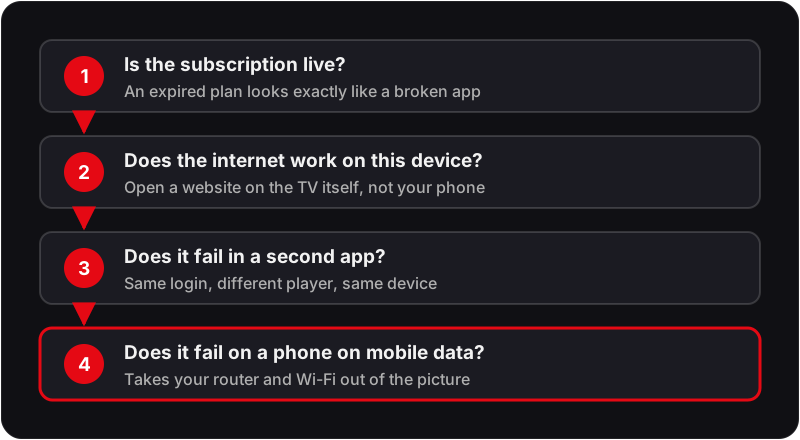
Is the subscription live?
Before changing any setting, confirm the account has not lapsed. An expired plan produces symptoms that look exactly like a broken app: empty channel lists, authorisation errors and streams that stop mid-programme. This is the single most common cause of a service that worked yesterday and does not today.
Does the internet work on this exact device?
Open a browser or another streaming app on the same device, not on your phone. A TV can hold a Wi-Fi association while having no usable throughput. If a web page will not load there, the fault is the network and no amount of player configuration will help.
Does it fail in a second app?
Enter the same credentials in a different player on the same device. If the second app works, the first app is the fault and needs a cache clear or reinstall. If both fail, move on — the problem is the device, the network or the account, not the software.
Does it fail on a second device?
Try a phone on mobile data, with Wi-Fi switched off. Mobile data takes your home broadband, router and Wi-Fi entirely out of the equation in one move. Works on 4G but not at home, and you have isolated the fault to your network or your ISP.
Only then change a setting.
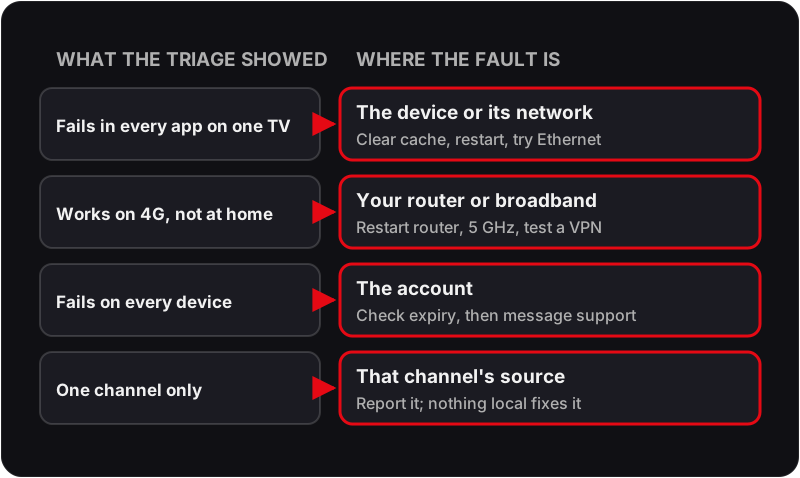
By this point you know whether you are fixing an app, a network or an account. Every fix below is grouped by that answer, so you can go straight to the right one instead of working through a list of twenty things that might help.
Find Your Symptom
Match what you are seeing on screen to a row. The middle column tells you what is actually causing it, which is usually not what the symptom suggests — a black screen, for instance, is almost never a connection problem.
| What you see | Usual cause | Full fix |
|---|---|---|
| Picture freezes or stutters every few seconds | Bandwidth, Wi-Fi band or evening contention | IPTV buffering fix → |
| Channel opens but the screen stays black | Codec or hardware decoding mismatch in the player | IPTV black screen fix → |
| Channel list is empty or never populates | Wrong credentials, lapsed plan or a stale cache | Channels not loading → |
| TV guide is blank or shows the wrong programmes | EPG source not selected, or the wrong time zone | EPG not working → |
| Lips are out of step with the sound | Audio track delay or a passthrough setting on the TV | Audio out of sync → |
| Subtitles will not display or are the wrong language | Track not embedded, or disabled at player level | Subtitles not working → |
| Everything stopped on one day and the login is now refused | The prepaid plan reached its expiry date | Check your expiry date → |
| You have lost the server URL, username or password | The message was deleted, or the app or device was reset | Recover lost login details → |
| “Failed to authorise” or “invalid credentials” | Typo, expiry, or the connection limit already in use | Failed to authorise → |
| Everything breaks the moment the VPN connects | DNS leak, wrong protocol or a blocked server region | IPTV not working with VPN → |
| EPG works in other apps but not IPTV Smarters Pro | Smarters caches its own EPG separately from the playlist | Fix Smarters EPG → |
| Streams fine on mobile data, fails on home broadband | ISP-level throttling or port interference | Best VPN for IPTV UK → |
What the Error Messages Actually Mean
IPTV player apps report faults in wording that rarely describes the real cause. These are the messages UK subscribers see most often, translated:
Authorisation failed / Invalid credentials
The username, password or server URL is not being accepted. Re-enter all three by pasting rather than typing, and check for a trailing space at the end of the URL.
Maximum connections reached
The plan's simultaneous-stream limit is already in use, often by a device left running in another room. Close the stream elsewhere, or add connections to the plan.
Playlist could not be loaded
The app reached the server but received nothing usable. Usually a stale cache: clear the app's data and log in again rather than editing the playlist.
No EPG data available
The guide source has not been selected or has not finished downloading. Large UK guides can take several minutes on first load; how often they refresh depends on the player's EPG update setting.
Stream unavailable on one channel only
A single upstream source is down. Nothing on the device fixes this; report the channel name to support so it can be switched server-side.
App keeps closing to the home screen
The device has run out of memory. Clear the app cache, close background apps, and on older Firestick hardware reduce the buffer size in player settings.
If you are fixing the same fault every week
The problem may be the service, not your setup
A well-configured device on a decent connection should not need weekly troubleshooting. If you have worked through the triage repeatedly and keep landing on the same server-side symptoms, test another provider before you replace hardware. Flickhaven runs a free 24-hour trial with no card required, which is enough to tell the two apart.
Device-Specific Troubleshooting
Each platform fails in its own characteristic way. Once the triage has told you the device is at fault, this is where to look:
📺 Amazon Firestick & Fire TV
The most common Firestick fault is memory pressure rather than the IPTV service. Hold Home, open App Switcher and fully swipe away every background app, then Settings → Applications → Manage Installed Applications → your player → Clear Cache. Second-generation Fire TV Sticks in particular struggle with 55,000-entry lists; keep favourites trimmed and set the buffer low.
Full Amazon Firestick & Fire TV setup guide →📺 Samsung smart TV (Tizen)
Samsung caches playlists aggressively and will keep serving a broken one after the account is fixed. Settings → Support → Device Care → Manage Storage, delete the app's data, then log in again. Use the 5GHz band where the TV can reach it, or an Ethernet cable — TVs often sit further from the router than a phone does.
Full Samsung smart TV (Tizen) setup guide →📺 LG smart TV (webOS)
If a session degrades after a long evening rather than failing outright, fully close the player and relaunch it, and switch the TV off at the wall for a minute to clear its memory. A player that keeps stalling at the same point is worth reinstalling from the LG Content Store.
Full LG smart TV (webOS) setup guide →📺 Android TV & Google TV
Clear the Play Store cache before the player's own, because a half-applied Play Store update is a frequent cause of an app that opens and immediately closes. For 4K streams use Ethernet — most Android TV boxes accept a USB-C or USB-A adapter even when they have no built-in port.
Full Android TV & Google TV setup guide →📺 iPhone, iPad & Apple TV
iOS suspends background network activity aggressively, which shows up as a stream that dies whenever you switch apps. Enable Background App Refresh for the player, and check Settings → Wi-Fi → your network → HTTP Proxy is set to Off. On Apple TV, use the Ethernet port if your model has one.
Full iPhone, iPad & Apple TV setup guide →📺 MAG & Enigma2 boxes
Set-top boxes fail differently: they rarely have an app-level cache problem and almost always have a portal problem. Re-enter the portal URL in the system settings rather than the player, reboot from the menu rather than pulling the power, and confirm the box's MAC address is the one registered on the account.
Full MAG & Enigma2 boxes setup guide →IPTV Not Working on Firestick
The Fire TV Stick is the most common IPTV device in the UK, and it fails in a predictable way: the service is fine, but the stick runs short of memory or Wi-Fi. Work through these in order:
- Hold Home, open the App Switcher and close every app except the player.
- Settings → Applications → Manage Installed Applications → your player → Force Stop, then Clear Cache.
- Move the stick to the 5GHz band, or plug in Amazon's Ethernet adapter for 4K.
- Try the same login in a second player. If that one works, reinstall the first.
- Restart the stick from Settings → My Fire TV → Restart, not just by sleeping it.
If nothing changes, run the triage above from step one — a Firestick fault that survives all five is usually the account or the line, not the stick. The Firestick IPTV guide covers the full setup.
Why Is IPTV Not Working Today?
A service that worked yesterday and fails today has usually hit one of three things: the prepaid plan reached its expiry date, the home broadband or router changed overnight (an update, a reset, a new channel), or the player app updated itself and lost its cache. Check the expiry first — it takes ten seconds and explains the largest share of “not working today” messages.
If the plan is live, the internet works on the TV and every channel fails on every device, the fault is upstream. Message support on WhatsApp with the time it started and the device you tried; support runs 24/7.
The Three UK-Specific Causes Worth Knowing
Evening contention, roughly 8pm to 10pm
UK broadband is sold on a contended basis, so the throughput you get at 9pm is not the throughput you get at 2pm. A stream that is perfect all day and unwatchable during the football is a contention symptom, not a server one. Ethernet and the 5GHz band recover most of the difference; see the speed guide for the headroom figures.
ISP-level interference
Some UK providers handle sustained streaming traffic differently from ordinary browsing. The test is simple: if a stream works on mobile data and fails on your home line, with everything else identical, the line is the variable. A VPN confirms it in a minute — if the stream recovers with the VPN on, you have your answer.
Router Wi-Fi defaults
Most UK ISP-supplied routers ship with band steering on and both bands sharing one network name, which lets a TV in the next room quietly sit on 2.4GHz all evening. Splitting the bands into two named networks and joining the streaming device explicitly to the 5GHz one removes a whole class of intermittent buffering that looks like a service fault.
IPTV Troubleshooting — Frequently Asked Questions
Why is my IPTV not working today?+
If it worked yesterday and nothing on your side changed, check three things in order: whether the plan has reached its expiry date, whether your broadband is up on the TV itself, and whether every channel is affected or only some. A lapsed plan or a home network fault explains most "not working today" cases. If the plan is live, the internet works and every channel still fails on every device, message support on WhatsApp — that pattern points at the service rather than your setup.
Why is IPTV not working on my Firestick?+
On a Firestick the usual causes are memory and Wi-Fi rather than the service. Close background apps from the App Switcher, clear the player's cache under Settings → Applications → Manage Installed Applications, and move the stick to 5GHz Wi-Fi or Amazon's Ethernet adapter. If the same login works in a second player on the same stick, the first player is at fault and a reinstall usually fixes it.
Xtream IPTV not working — what should I check?+
With an Xtream Codes login, nearly every failure is in the three details. Paste the server URL with http:// and the port and nothing after it, then the username and password with no trailing spaces. If the app still refuses them, check the plan is in date and that no other device is already using your connection.
How do I troubleshoot IPTV problems?+
Work from the outside in. First confirm the subscription is active, then test the connection on the same device by opening a website or running a speed test, then force close and reopen the player app, then clear its cache, then re-enter the server URL, username and password exactly as issued. That sequence resolves the large majority of IPTV faults without touching any advanced setting.
Why is my IPTV buffering only in the evening?+
Evening-only buffering is almost always local congestion rather than a server fault. Between roughly 8pm and 10pm UK broadband contention peaks, and household Wi-Fi is competing with every other device in the property. Move the streaming device to the 5GHz band or a wired Ethernet cable and the symptom usually disappears. If it persists on Ethernet, test the same stream over mobile data to rule out ISP throttling.
What does it mean when IPTV says the connection has expired?+
An expired or unauthorised message means the credentials the app is sending are not being accepted. There are three causes: the subscription has genuinely lapsed, the credentials contain a typo or a trailing space, or the device is already using the maximum number of simultaneous connections your plan allows. Check the connection count first if the same login works on another device.
Should I use a VPN to fix IPTV problems?+
Only as a diagnostic, not as a default. If a stream fails on home broadband but works over mobile data, that points to ISP-level interference and a VPN may restore it. If the stream fails everywhere, a VPN adds a second thing to debug and usually makes buffering worse, because it adds an encryption and routing hop between you and the server.
How do I know whether the problem is my device or the IPTV service?+
Test the same credentials in a second app on the same device, then the same app on a second device. If it fails in both apps on one device, the device or its network is at fault. If it fails on every device, the account or the server is at fault. If it fails only on one app, reinstall that app. This two-by-two test isolates the cause in about three minutes.
Why do only some IPTV channels fail while others work fine?+
When most channels play and a handful stall, the fault is upstream on those specific channel sources rather than on your connection or app. Nothing on the device will fix it. Note which channels are affected and report them to support, because per-channel source problems are usually resolved server-side within hours.
Does restarting the router actually help IPTV?+
Often, yes. A router that has been up for weeks accumulates stale NAT table entries and can drift onto a congested Wi-Fi channel. Powering it down for a full 60 seconds, not just rebooting it, clears both and forces a fresh channel scan on the 5GHz band. It is worth doing before any deeper troubleshooting because it costs two minutes.
How long should IPTV channels take to load?+
A channel list typically populates within 15 to 60 seconds of a successful login, and a large list of 55,000 or more entries can take up to two minutes on first load. Individual channels should start playing in two to five seconds. If nothing has appeared after three minutes the credentials are almost certainly wrong or the subscription has lapsed.
Every IPTV Fix Guide
Still Stuck?
Send us what the triage told you — which device, which app, and what changed between working and not — and support can usually pinpoint it in one exchange.
For the wider context, start with our complete UK IPTV guide, best IPTV apps UK and start a free trial.