Flickhaven IPTV UK
IPTV Parental Control Password: Default PIN, Reset and Parental Lock
The default IPTV parental control password is usually 0000, including the IPTV Smarters Pro parental control password, with 1234 on some builds; TiviMate has no default and asks you to create a PIN. The PIN code lives in the app on that device, so there is no recovery email: a forgotten one is reset by clearing the app's data, or deleting the app on iPhone. For a real parental lock, change the default and hide adult categories.
The default IPTV parental control password is usually 0000, with 1234 on some builds, and no default at all on TiviMate, which asks you to create one the first time you turn the feature on. Below are the commonly reported defaults for the players UK subscribers use, what to do when you have forgotten yours, and why hiding a category works considerably better than locking it. Related: kids' channels on IPTV and symptom-led IPTV troubleshooting.
The Short Answer
- ▸ Try 0000 first. It is the default most often reported for IPTV Smarters Pro, XCIPTV and many rebranded players.
- ▸ Then try 1234. Some IBO Player and rebranded builds ship with this instead.
- ▸ TiviMate has no default — the PIN was set by whoever enabled it.
- ▸ If neither works, clear the app's data to reset every setting, then log in again.
- ▸ Change it straight away. A default PIN is not a control.
Default Parental Control PIN for IPTV, by App
| Player | Commonly reported default | Notes |
|---|---|---|
| IPTV Smarters Pro | 0000 | Change it in the app's parental control settings straight after first login. |
| Smarters Player Lite | 0000 | Same approach as Smarters Pro, though the option may sit in a different menu. |
| XCIPTV | 0000 | Some rebranded builds use 1234. Try both before resetting. |
| IBO Player / IBO Pro | 0000 or 1234 | Varies by build. Set your own immediately after first login. |
| TiviMate | None — you set it | Asks for a new PIN the first time you turn parental control on. |
| Perfect Player, Televizo, GSE Smart IPTV | Check the app | No reliable published default. Try 0000, then reset if it fails. |
One caveat worth stating: the PIN belongs to the app, not to your subscription. Reinstalling the player resets it to the factory default, and installing a different player gives you a fresh unprotected copy of the same channel list. That is the central limitation of app-level parental control, and the reason the layered approach below matters.
IPTV Smarters Pro Parental Control Password
The IPTV Smarters Pro parental control password is 0000 unless someone in the house has changed it. Open the app's settings, choose the parental control option and enter 0000; from there you can set a new four-digit IPTV PIN code and choose which categories it protects. Menu names shift between versions, so look for the word "parental" rather than following an exact path.
If 0000 is rejected, the PIN has been changed on that device. Smarters has no recovery option, so the reset is the one in the device table below: clear the app's data, then log in again with your IPTV login details.
How to Set an IPTV Parental Lock — Four Layers
Each layer covers a gap the one before it leaves open, and together they are far harder to work around than any single one.
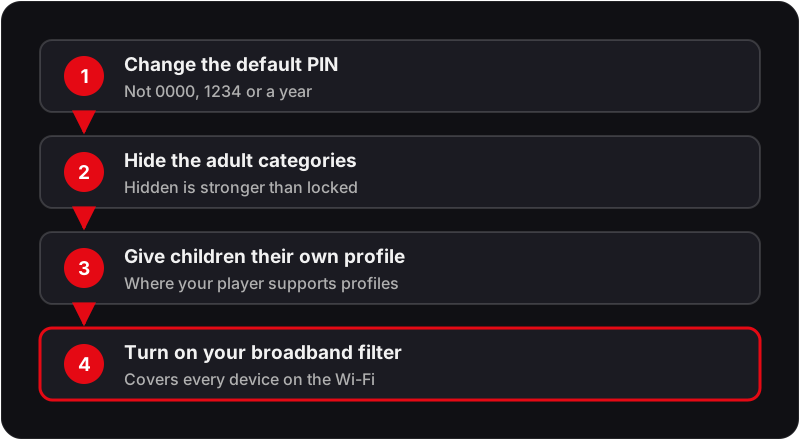
Layer 1: Set a PIN that is not 0000
A default PIN protects nothing — it is the first thing anyone tries, and it is printed in every guide including this one. Change it before you do anything else.
- 1Open your player's settings and find the parental control option.
- 2Enter the current PIN (0000 on most apps, or the one you were asked to create).
- 3Choose Change Password and enter a new four-digit code twice.
- 4Avoid 1234, 0000, and the year — pick something not derivable from the household.
Layer 2: Hide the adult category rather than locking it
A locked group still appears in the guide, which invites attempts. A hidden group is simply absent from the channel list, and that is a far stronger control on a shared TV.
- 1Open your player's parental, playlist or channel-group settings.
- 2Find the adult or other unwanted categories in the group list.
- 3Hide or untick them, rather than only locking them, where the app offers it.
- 4Reload the playlist afterwards so the guide rebuilds without the hidden group.
Layer 3: Give children their own profile
Some players support multiple profiles against the same subscription. A child profile carries its own filtered channel list, so the control travels with the profile rather than depending on someone remembering to lock the app.
- 1Create a second profile using the same server URL, username and password.
- 2In that profile, hide every category you do not want available.
- 3If the app can lock profile switching, protect it with your PIN.
- 4Where the app allows it, make the child profile the default.
Layer 4: Add network-level filtering
App-level controls stop at the app. Filtering applied at the router covers every device on the home network — including a tablet with a different player installed, or a guest's phone.
- 1Sign in to your broadband provider's account area and look for the parental controls or family filter section.
- 2Enable the filter and set the strictness level, plus any time-of-day schedule you want.
- 3Give the change a little time to reach devices that are already connected.
- 4Test it by opening a blocked category on a device that is not the one you configured it from.
Resetting a Forgotten PIN, by Device
No IPTV player has a “forgot PIN” email flow, because the PIN never leaves the device. Clearing the app's stored data is the reset — it wipes the PIN along with every other local setting, so have your server URL, username and password to hand before you start.
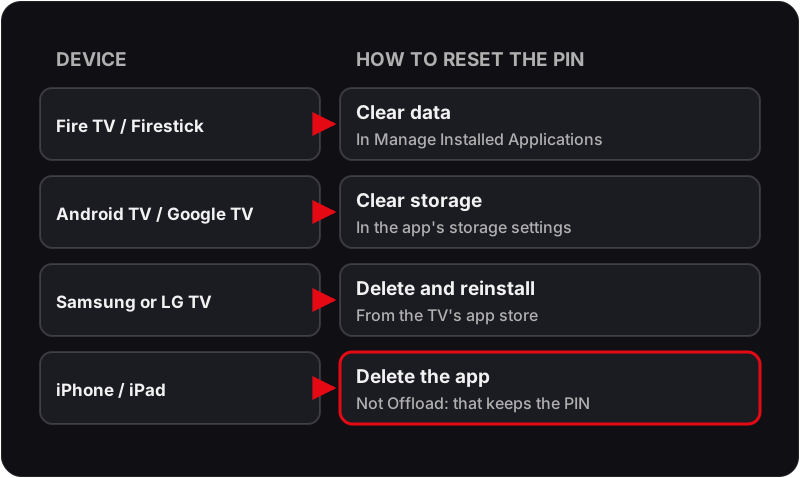
📺 Amazon Firestick / Fire TV
Settings → Applications → Manage Installed Applications → your player → Clear Data. Reopen and log in again.
📺 Android TV / Google TV / Android box
Settings → Apps → See all apps → your player → Storage & cache → Clear storage.
📺 Samsung smart TV (Tizen)
No per-app data control. Uninstall the app from the Apps screen and reinstall it from the store.
📺 LG smart TV (webOS)
Hold the app icon on the home row → Delete → reinstall from the LG Content Store.
📺 iPhone / iPad / Apple TV
Delete the app (not Offload App, which keeps the app's data and the PIN with it), then reinstall from the App Store.
📺 MAG / Enigma2 box
The PIN sits in the box's own system settings rather than a player app. If you cannot change it there, the box's own reset option clears it.
Family-safe from the start
Ask about filtering before you activate
If you would rather not have adult categories in your playlist at all, message Flickhaven support on WhatsApp before you activate and ask what filtering options are available for your line.
UK Network-Level Filtering
Every large UK broadband provider offers free filtering applied at the network rather than the device. It is the layer most households skip and the one with the widest coverage, because it applies to any device that joins the Wi-Fi — including one with a freshly installed player and no PIN set.
IPTV Parental Controls — Frequently Asked Questions
What is the default IPTV parental control password?+
0000 is the default most often reported for IPTV players, including IPTV Smarters Pro and XCIPTV, with 1234 on some builds. TiviMate asks you to create a PIN the first time you turn parental control on, so it has no default to guess. Defaults can change between versions, so if 0000 and 1234 both fail, the PIN has been changed and only a reset will clear it.
What is the IPTV Smarters Pro parental control password?+
The IPTV Smarters Pro parental control password is 0000 unless someone has changed it. Open the app's settings, choose the parental control option, enter 0000, then set a new four-digit code. Menu names vary between versions, so look for the word parental rather than an exact path.
What is an IPTV PIN code for?+
An IPTV PIN code is the four-digit number a player asks for before it opens a locked category or its parental settings. It is set inside the app, not by your IPTV provider, so each app on each device has its own PIN.
I forgot my IPTV parental control password — how do I reset it?+
There is no recovery prompt in the common IPTV players, because the PIN is stored locally on the device. The reset is to clear the app's data, which returns every setting including the PIN to its default, then log in again with your server URL, username and password. On Fire TV that is Settings, Applications, Manage Installed Applications, your player, Clear data. On iPhone or iPad, delete the app rather than offloading it, because offloading keeps the data.
Can I hide adult channels from the IPTV channel list entirely?+
Often, yes, and it is more effective than a PIN. Many players let you hide whole channel categories rather than lock them, so the group never appears in the guide at all. Look in the player's parental, playlist or channel-group settings. A hidden group cannot be stumbled into.
Does IPTV parental control work on a smart TV?+
It works wherever the player app supports it, so on Samsung and LG it depends on which app you use. Where the app has no PIN option, use the television's own parental or PIN settings in its system menu, which apply whatever app is open.
Is a player PIN enough to keep children off adult IPTV content?+
It is one layer, not the whole answer. A PIN protects a category inside one app on one device. Pair it with hidden categories so nothing is visible to begin with, a separate user profile for children where the app supports one, and router-level filtering that applies to every device on the network regardless of which app is opened.
How do I set up router-level filtering for IPTV in the UK?+
The large UK broadband providers offer free network-wide filtering that you switch on in your online account rather than on the device — the feature is branded differently by each provider but works the same way. It applies to every device on the home Wi-Fi, including ones with no parental controls of their own, and it cannot be bypassed by reinstalling an app.
Why does my IPTV parental PIN keep resetting itself?+
Because the PIN lives in the app's local data, anything that clears that data resets it: an app update that fails partway, a cache or data clear performed while troubleshooting, or a device factory reset. If it keeps happening without any of those, check the device has free storage and that the app is up to date, then set the PIN again.
Related Guides
For the wider context, start with our complete UK IPTV guide, best IPTV apps UK and start a free trial.