Flickhaven IPTV UK
IPTV on Roku: Apps, Mirroring and What Works (UK)
Getting IPTV on Roku takes a workaround, because IPTV Smarters Pro and similar Xtream Codes players are not in the Roku Channel Store, and Roku ended private channels in 2022. You have three routes: mirror an Android phone running IPTV Smarters Pro, load your M3U link into an M3U player from the Channel Store, or plug a streaming stick into a spare HDMI port. Mirroring suits occasional viewing; a stick suits watching most nights.
Setting up IPTV on a Roku in the UK takes one extra step compared with a Firestick or Android box. Roku runs the same Channel Store certification policy in the UK as everywhere else it sells, and third-party Xtream Codes players such as IPTV Smarters Pro are not listed there. That is why every UK Roku setup uses one of the routes below instead of a normal store install.
For alternatives to a Roku, see every IPTV-compatible device we have a guide for.
If you have not bought a streamer yet, Chromecast with Google TV runs IPTV players natively, and our installation guide for all devices shows how the setup compares on each platform. If your TV is a Samsung, compare the IPTV apps for Samsung Smart TVs. Some Hisense TVs run Roku as their built-in system; the IPTV options for a Hisense Roku TV also cover the VIDAA and Google TV models.
Three Ways to Get IPTV on a Roku
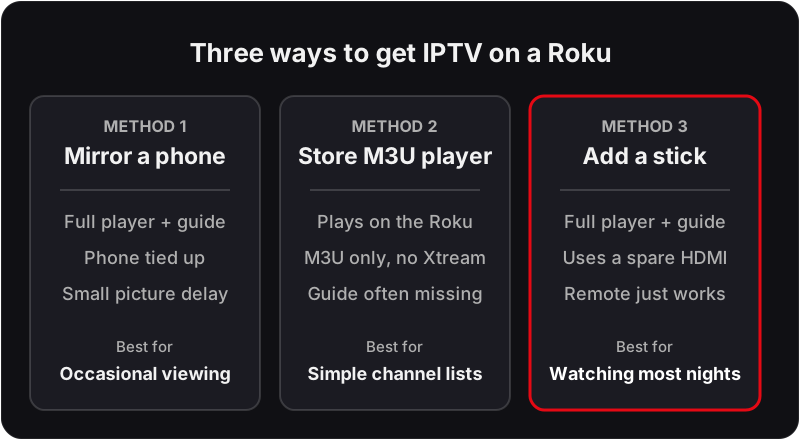
Important: Roku has stricter app restrictions than Firestick or Android TV. The quickest method is screen mirroring from an Android device. For the best IPTV experience, we recommend adding a Firestick — see our Firestick setup guide.
IPTV on a Roku TV or Roku Stick: Before You Start
Each method goes more smoothly with three things checked first:
- Same network. The Roku and the phone must be on the same Wi-Fi network. A guest network or a phone on mobile data will not see the Roku in the cast list.
- Roku software up to date. Go to Settings → System → System update → Check now.
- Your Flickhaven credentials to hand. You receive them within minutes over WhatsApp: a server URL, username and password for the Xtream Codes API login, or an M3U URL if your player asks for one. Enter them exactly, including the port in the server URL.
Roku TVs with the platform built in and Roku sticks or boxes run the same system, so every step below applies to both.
Method 1: Screen Mirror from Android (Quickest)
💡 Screen mirroring adds a small amount of processing delay between your phone and the TV — usually under a second, but noticeable if you're watching live football and comparing the picture to a neighbour's terrestrial feed. Method 3 below plays natively on the TV, with no mirroring delay.
Method 2: A Roku IPTV App from the Channel Store
The Roku Channel Store does list some M3U playlist players. They load an M3U link rather than an Xtream Codes login, play on the Roku itself, and leave your phone free. The trade-off is quality: many have no TV guide, no films and series section, and only basic channel switching. Check recent reviews and whether the player shows a guide before you pay for one.
You may see guides offering a "private channel code" for IPTV on Roku. Roku ended non-certified private channels in 2022; codes now add only developer beta channels, which serve a handful of test users and expire after 120 days.
Method 3: Add a Streaming Stick to a Spare HDMI Port
If you watch IPTV most evenings, the most reliable fix leaves the Roku in place and adds a stick that runs a full IPTV player. Plug a Firestick or a Google TV streamer into a spare HDMI port, install a player such as IPTV Smarters Pro or TiviMate, and switch inputs when you want live TV. The stick plays the stream itself with its own remote and a full guide, and your phone stays free.
Setup takes a few minutes: see the IPTV Firestick setup or the Google TV guide. On a Roku TV, the stick appears as an HDMI input tile on the home screen.
UK Broadband & Router Notes
UK ISPs handle home network traffic slightly differently, and a few known quirks are worth checking if a method above misbehaves:
- Virgin Media — the Hub (3, 4 or 5) ships with a fairly strict default NAT/firewall profile. It rarely blocks IPTV outright, but if screen mirroring keeps dropping the connection, try Advanced Settings → Firewall, or switch the Hub to Modem Mode if you're running your own router behind it.
- BT — the Smart Hub 2 prioritises traffic dynamically, and UK peak viewing hours (roughly 6–10pm) are when contention on BT's network is highest. A wired Ethernet connection to your Roku or stick, where possible, avoids most of it.
- TalkTalk and EE — both routers generally have shorter Wi-Fi range than the Virgin/BT hubs, so a Roku sat far from the router is more likely to see buffering on any method.
- Content filters — BT, Virgin Media, TalkTalk and EE have all shipped default-on family/content filters since 2013. They're aimed at adult content but occasionally over-block streaming or proxy domains — worth checking your router's parental control settings if a channel won't load.
Watching Live UK Sport on Roku
If you're setting this up mainly for Premier League football, remember fixture times shift with the clocks: GMT over winter, BST from late March. Roku's screen mirroring path doesn't carry its own EPG — that comes entirely from whichever app (IPTV Smarters Pro) you're mirroring — so it's worth double-checking kick-off times there after a clock change. UK viewers used to BBC iPlayer and ITVX's multi-day catch-up windows should also check what catch-up/timeshift range your channels actually offer, since it isn't the same guarantee IPTV players make as the broadcasters' own apps.
Troubleshooting IPTV on Roku
The Roku does not appear in the phone's cast list
Likely cause: Screen mirroring is disabled on the Roku, or the two devices are on different networks.
Check: Settings → System → Screen mirroring on the Roku, and the Wi-Fi name on the phone.
Fix: Set screen mirroring to Prompt or Always allow, join both devices to the same network, then restart the phone's cast search.
Mirroring connects, then drops after a few minutes
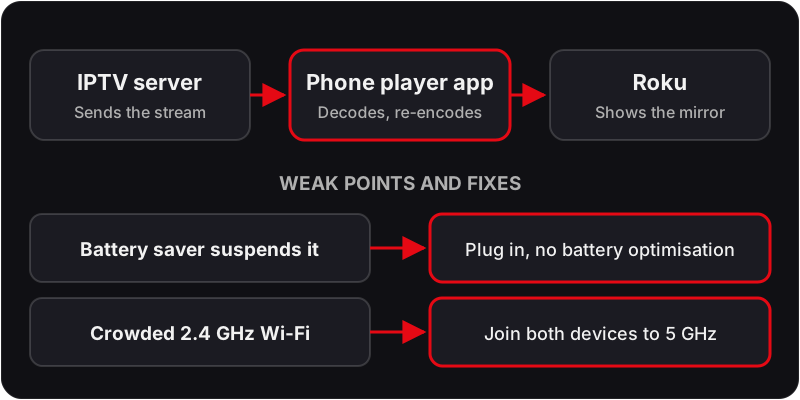
Likely cause: The phone's battery saver is suspending the connection, or the Wi-Fi signal to one device is weak.
Check: Does it drop at the same point every time, or only when the phone screen is left alone?
Fix: Plug the phone in, disable battery optimisation for the player app, and move the router or the Roku closer together.
An M3U player from the store loads no channels
Likely cause: The link was typed with an error, or the player wants a different playlist format.
Check: Open the M3U link in a phone browser: it should download a text file that starts with #EXTM3U.
Fix: Re-enter the link exactly as sent, ideally from a phone app if the player offers one. If it still fails, try another player or move to Method 3.
Streams stutter in the evening but are fine in the afternoon
Likely cause: Peak-time contention on your broadband, made worse because the phone is decoding and re-encoding the stream.
Check: Play the same channel on the phone alone without mirroring. If it is smooth, the mirror link is the bottleneck.
Fix: Lower the stream quality in the player, move to the 5 GHz band, or use Method 3 so the stream plays natively on the TV.
If the stutter persists on a stick or wired connection too, the problem is upstream of the Roku. Our guide to fixing IPTV buffering covers the router-side checks in order.
Which Method Suits You?
Screen mirroring suits occasional viewing: a one-off match, a film, or testing the service before you decide on hardware. It needs an Android phone in the room and the phone is tied up while you watch. A Channel Store M3U player suits a short, simple channel list where a guide does not matter. A streaming stick suits daily use, because it plays the stream itself, the phone is free and the remote works normally.
If Roku is the only streamer you own and you watch IPTV most evenings, the honest advice is a Firestick or Android box, where a dedicated player with a full EPG installs in minutes. Try the free 24-hour trial by mirroring to the Roku first so you know what you are deciding between.
During the trial, test the things that matter to you rather than flicking through channels: play one live channel for a full half hour at peak time, open a 4K Ultra HD stream, change channel ten times and time how long each takes to start, and use catch-up on something you missed.
Roku IPTV FAQ
Is IPTV Smarters on Roku?▼
No. IPTV Smarters Pro is not in the Roku Channel Store, so there is no IPTV Smarters Roku app to install. Run Smarters on an Android phone and mirror it to the Roku (Method 1), or plug a streaming stick that does run Smarters into a spare HDMI port (Method 3).
What is the best IPTV app for Roku?▼
On the Roku itself, the choice is limited to M3U playlist players in the Channel Store, and they vary a lot; read recent reviews and check for a TV guide before paying for one. For the full experience, the best route is not a Roku app at all: mirror a phone running IPTV Smarters Pro, or add a streaming stick.
Can I add a private IPTV channel to my Roku with a code?▼
Not any more. Roku ended non-certified private channels in 2022. The add-with-code route on my.roku.com now only adds developer beta channels, which are limited to a small number of test users and expire after 120 days, so no provider can offer one to subscribers.
Can I mirror from an iPhone instead of Android?▼
Only on Roku models that support AirPlay. Check Settings → Apple AirPlay and HomeKit on your Roku; if that menu exists, turn AirPlay on and use Screen Mirroring from the iPhone's Control Centre. Older and HD-only models do not have it, so an Android phone or a streaming stick is the route there.
Will a full 90-minute match mirror without dropping?▼
Usually, if the phone stays plugged in and the Wi-Fi signal to both devices is strong. The weak points are the phone's battery saver and a crowded 2.4 GHz band, which the troubleshooting section above covers. For regular live sport, a streaming stick is the steadier option.
Do I get an EPG on Roku?▼
With mirroring, you see whatever guide the player app on your phone shows, so the EPG and catch-up come from the app, not the Roku. With an M3U player from the Channel Store, the guide depends on the player; many show a channel list only.
Not Sure Which Route Fits Your Roku?
Message us on WhatsApp with your Roku model — support runs 24/7 — and we'll send your login, your M3U link and the steps for the route that suits you.
For the full picture, see these guides: complete IPTV explainer, UK IPTV explained, complete best IPTV UK guide and IPTV free trial UK.