Flickhaven IPTV UK
IPTV for Samsung Smart TV UK 2026 — Best Tizen Apps: SS IPTV, Smart IPTV & Smarters Pro
Samsung Smart TVs run Tizen rather than Android, so IPTV is installed from the Samsung app store instead of sideloaded. SS IPTV and Smart IPTV are the two established options: install one, note the device key it displays, then upload your M3U playlist URL through the provider portal shown on screen. EPG data is configured separately in the app settings. Samsung models from roughly 2016 onward support both apps.
SS IPTV
Free — RecommendedAvailable free in Samsung App Store. No sideloading. Xtream Codes + M3U.
Smart IPTV Samsung
Best EPG LayoutTV-guide layout. €5.49 one-time. Setup via siptv.app using your TV MAC address.
IPTV Smarters Pro
Most FeaturesLive TV + VOD + Series. Free. Requires Samsung developer mode.
Samsung IPTV lets you stream 55,000+ live channels, sports, and on-demand content directly on your Samsung Smart TV — no Firestick, no satellite dish, no set-top box. The best IPTV app for Samsung TV is SS IPTV, available free in the Samsung App Store. Smart IPTV Samsung is the best choice if you want a traditional TV guide layout. Both support IPTV Samsung Xtream Codes and M3U credentials, the login formats Flickhaven's UK IPTV service sends, and work on every Tizen model from 2016 to 2026 — QLED, Neo QLED, The Frame, Crystal UHD, and Samsung OLED. New to IPTV? See how IPTV works.
What You Need
- ✓Samsung Smart TV (2016 or newer running Tizen OS)
- ✓Home broadband — 10 Mbps+ for HD, 25 Mbps+ for 4K
- ✓Flickhaven credentials (Server URL, Username, Password)
- ✓USB drive (for developer mode / sideload method only)
Which Samsung Smart TV Models Support IPTV?
IPTV apps work on all Samsung Smart TVs running Tizen OS — that's every model from 2016 onwards. Here's the full compatibility breakdown:
| Samsung Series | Years | SS IPTV | Smart IPTV | Method |
|---|---|---|---|---|
| QLED / Neo QLED | 2017–2026 | ✓ | ✓ | App Store |
| The Frame / Serif | 2017–2026 | ✓ | ✓ | App Store |
| Crystal UHD | 2019–2026 | ✓ | ✓ | App Store |
| Samsung OLED (S95) | 2022–2026 | ✓ | ✓ | App Store |
| 4K UHD (MU/NU/RU) | 2017–2020 | ✓ | ✓ | App Store |
| Full HD Smart TV | 2016–2019 | ✓ | ✓ | App Store |
| Older Smart TVs | 2015 & earlier | ✗ | ✗ | Use Firestick via HDMI |
Not sure of your TV year? Press Menu → Settings → Support → About This TV — the model number contains the year (e.g., QN65Q80C = 2023).
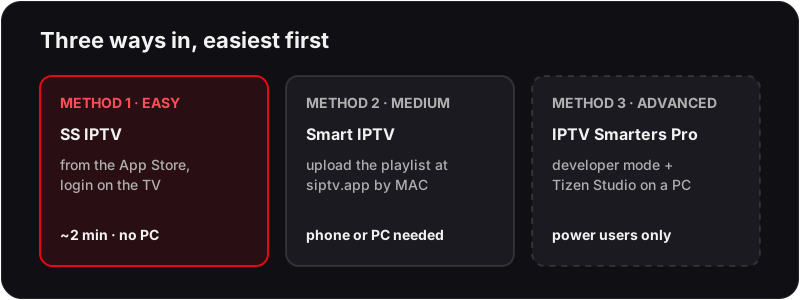
Method 1: SS IPTV from the Samsung App Store (Easiest — Recommended)
Need an IPTV subscription for your Samsung TV?
Flickhaven gives you 55,000+ channels in 4K UHD — set up on your Samsung in under 5 minutes.
Method 2: Smart IPTV Samsung — Best TV Guide Layout
Smart IPTV Samsung — Full Guide (SIPTV)
Smart IPTV Samsung (also called SIPTV) is one of the most searched IPTV apps for Samsung TVs in the UK. Unlike SS IPTV which connects directly via Xtream Codes, Smart IPTV Samsung uses a unique MAC-address activation system — you upload your M3U playlist via a browser at siptv.app using your TV's MAC address, and the playlist loads on your TV automatically. Our Smart IPTV (SIPTV) setup guide covers the app on every TV brand it supports.
What is Smart IPTV Samsung (SIPTV)?
It presents your channels in a traditional TV guide grid — similar to Freeview. The playlist is linked to your Samsung TV's unique MAC address. A one-time payment of €5.49 removes the 7-day trial limitation.
Best for
TV guide grid layout fans
Cost
Free (7-day trial) / €5.49 one-time
Format
M3U + XMLTV EPG
Available on
Samsung + LG App Store
Method 3: Developer Mode (IPTV Smarters Pro — Advanced)
💡 Most people should use Method 1 (SS IPTV) — it takes 2 minutes and requires no PC.
Samsung Tizen IPTV Apps — Which Ones You Can Actually Download
Short answer: four IPTV players install straight from the Samsung store on a Tizen TV — SS IPTV, Smart IPTV (SIPTV), Flix IPTV and Set IPTV. IPTV Smarters Pro needs developer mode, and TiviMate does not run on Tizen at all.
Samsung TVs run Tizen, not Android, so the only apps that install are the ones Samsung lists in its own store. That rules out several names people search for (our Hot IPTV on Samsung Smart TV guide covers one of the most common). Here is what is and is not available on a Tizen TV in 2026 (Hisense TVs are a different case, because VIDAA has its own small app store, so the Hisense TV IPTV setup by system lists which players say they support it):
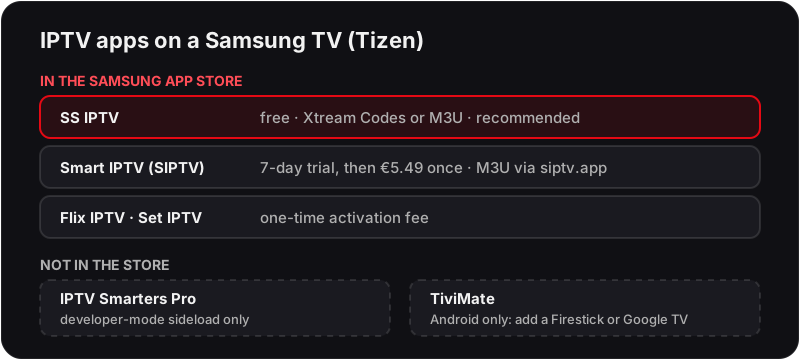
| App | In the Samsung App Store? | Cost | Login type |
|---|---|---|---|
| SS IPTV | Yes | Free | Xtream Codes or M3U |
| Smart IPTV (SIPTV) | Yes | 7-day trial, then €5.49 one-time | M3U via siptv.app |
| Flix IPTV | Yes | One-time activation fee | M3U or Xtream Codes |
| Set IPTV | Yes | One-time activation fee | M3U via web upload |
| IPTV Smarters Pro | No — developer-mode sideload only | Free | Xtream Codes |
| TiviMate | No — Android only | — | Needs a Firestick or Google TV dongle |
Store listings are searched by exact name — type "SS IPTV" with the space. If an app is missing, check the TV's region and clock (Settings → General → System Manager) before assuming it has been withdrawn.
Best Samsung IPTV Apps — Compared (2026)
All three Samsung IPTV applications work on any Samsung Smart TV (2016+) and support Flickhaven Xtream Codes and M3U credentials:
★★★★★
Free
- ✓Available directly in Samsung App Store
- ✓No developer mode or USB required
- ✓Supports Xtream Codes & M3U playlists
- ✓Full EPG TV guide support
★★★★☆
Free + one-time €5.49
- ✓Best TV guide (EPG) layout on Samsung
- ✓Clean, intuitive interface for UK viewers
- ✓Stable playback on 4K channels
- ✓MAC address activation via browser
★★★★☆
Free
- ✓Live TV, VOD and series in one app
- ✓Full multi-screen UI with parental controls
- ✓Requires developer mode sideload
- ✓Best option for power users
- ✓Supports catchup and recording
Samsung Smart TV IPTV — Troubleshooting
❓ SS IPTV not in Samsung App Store
Search the full name 'SS IPTV' (not 'SSIPTV') and check your TV's region settings. Smart IPTV, also in the App Store, is the alternative.
❓ Channels not loading after entering credentials
Double-check your Server URL, Username and Password — copy-paste from your activation message. Ensure no extra spaces. Your Flickhaven credentials include a full URL starting with http:// or https://.
❓ IPTV buffering on Samsung TV
Switch to 5GHz Wi-Fi: Settings → General → Network → Network Settings → Wireless. If your router doesn't support 5GHz, use a wired Ethernet connection via the LAN port on your Samsung TV.
❓ Buffering on 4K channels specifically
4K UHD streams require 25 Mbps+. Check your speed at fast.com on the same TV. Enable 4K output in Samsung Settings → Picture → Expert Settings. Also ensure the HDMI cable between your TV and any source device is HDMI 2.0 or higher.
❓ Black screen when playing channels
This is usually a codec issue. In SS IPTV, go to Settings → Player → change Hardware Decoder to Software. If the channel plays, switch back — some channels need hardware, some need software decoding.
❓ EPG (TV guide) not loading
In SS IPTV, go to Settings → Playlist → your Flickhaven playlist → EPG → Update EPG. Allow 3–5 minutes for the guide to populate. Make sure your Flickhaven Server URL is entered correctly as this is also the EPG source.
❓ App crashes or freezes on Samsung TV
Low device memory causes crashes on older Samsung models. Press and hold the Home button on the remote, open the running apps bar, and close all background apps. Then relaunch your IPTV app. Restarting the TV (not standby — full power off) also clears memory.
Channel list still blank on your Samsung? Work through our IPTV channels not loading fixes.
Is IPTV Legal on Samsung Smart TV in the UK?
Installing an IPTV app on a Samsung Smart TV is lawful in itself; legality depends on the subscription service you use with the app — not the app itself. Flickhaven is a prepaid IPTV subscription, and its Terms and Refund Policy are published on this site. See our what makes an IPTV service legal guide.
Samsung IPTV — Frequently Asked Questions
What is the best IPTV app for Samsung Smart TV?+
SS IPTV — free in the Samsung App Store with no sideloading. Smart IPTV has the best TV guide layout; IPTV Smarters Pro has the most features but requires developer mode.
Can you get IPTV on a Samsung Smart TV?+
Yes, on Samsung Smart TVs from 2016 onwards (Tizen OS). Install SS IPTV from the Samsung App Store and enter your Flickhaven Xtream Codes credentials — no Firestick or external box needed.
How to install IPTV on a Samsung TV?+
Install SS IPTV from the Samsung App Store, then Settings → Playlist → Add Playlist → Xtream Codes → enter your Flickhaven Server URL, Username and Password → Save (Method 1 above).
Does IPTV work on all Samsung Smart TV models?+
It works on every Samsung Smart TV from 2016 onwards running Tizen OS. For 2015 or older Samsung TVs, plug a Firestick or Android TV box into the HDMI port.
What internet speed do I need for IPTV on Samsung TV?+
10 Mbps for HD (1080p) streaming and 25 Mbps for 4K UHD. Samsung Smart TVs perform best on a 5GHz Wi-Fi band or wired Ethernet. Most UK fibre broadband packages easily exceed these requirements.
Is IPTV legal on Samsung Smart TV in the UK?+
The apps are legitimate software in the Samsung App Store; legality depends on the IPTV subscription service you use, not the app.
Why is my IPTV not working on my Samsung Smart TV?+
The most common causes are wrong credentials, an expired subscription, or a slow Wi-Fi connection. Try clearing the app cache (Settings → Support → Device Care → Manage Storage), re-entering your credentials, and switching to 5GHz Wi-Fi or Ethernet.
How do I get my Samsung TV remote to work with IPTV apps?+
SS IPTV and Smart IPTV are fully compatible with the standard Samsung Smart Remote and the One Remote Control. Use the directional pad to navigate channels, OK to select, and Return to go back. The Play/Pause button works for VOD content.
Which IPTV apps are in the Samsung App Store on Tizen in 2026?+
SS IPTV, Smart IPTV (SIPTV), Flix IPTV and Set IPTV — costs are in the table above. IPTV Smarters Pro needs developer mode, and TiviMate is Android-only, so it needs a Firestick or Google TV dongle.
Is IPTV Smarters Pro available for Samsung Tizen TVs?+
No. Either sideload the Tizen build in developer mode (Method 3 above), or run Smarters on a Firestick, Onn or Google TV device over HDMI. For most people SS IPTV is quicker and does the same job.
Does TiviMate work on a Samsung Smart TV?+
Not directly. TiviMate is an Android TV app and Samsung TVs run Tizen, so it cannot be installed or sideloaded. Connect a Firestick 4K, an Onn 4K Plus or a Google TV Streamer over HDMI and install it there.
How do I download an IPTV app from the Samsung App Store?+
Press Home → Apps → search → type SS IPTV or Smart IPTV → Install → Open. No USB or developer mode is involved. If search returns nothing, check the TV's clock and region under Settings → General → System Manager.
Related Guides
Need Help with Your Samsung TV?
Our team will walk you through setup on your specific Samsung model via WhatsApp — for free.
More on the basics: complete UK IPTV guide, our provider comparison, IPTV free trial UK and setup guides for other devices.