Flickhaven IPTV UK
Fire Stick IPTV UK 2026 — Best Apps for Firestick with IPTV
Installing IPTV on an Amazon Firestick takes about five minutes. Enable Apps from Unknown Sources in Developer Options, install the Downloader app, then sideload TiviMate or IPTV Smarters Pro. Open the player, choose the Xtream Codes option and enter the server URL, username and password issued with your subscription. The channel list, EPG and on-demand library load automatically. Every Fire Stick model from the second generation onward supports this, including the 4K and 4K Max.
Setting up a Firestick with IPTV takes under 5 minutes — and the Amazon Firestick is the most popular streaming device in the UK for exactly this reason. This guide covers three apps: TiviMate (best overall), IPTV Smarters Pro (free), and Perfect Media Player (great UI alternative). Each of them plays our IPTV service for the UK once your login is added.
Before you start, make sure you have your Flickhaven credentials ready — your Server URL, Username, and Password are sent via WhatsApp after purchase. Don't have a subscription yet? Start your free 24-hour trial. Not sure what IPTV is? Read our the full IPTV explainer first.
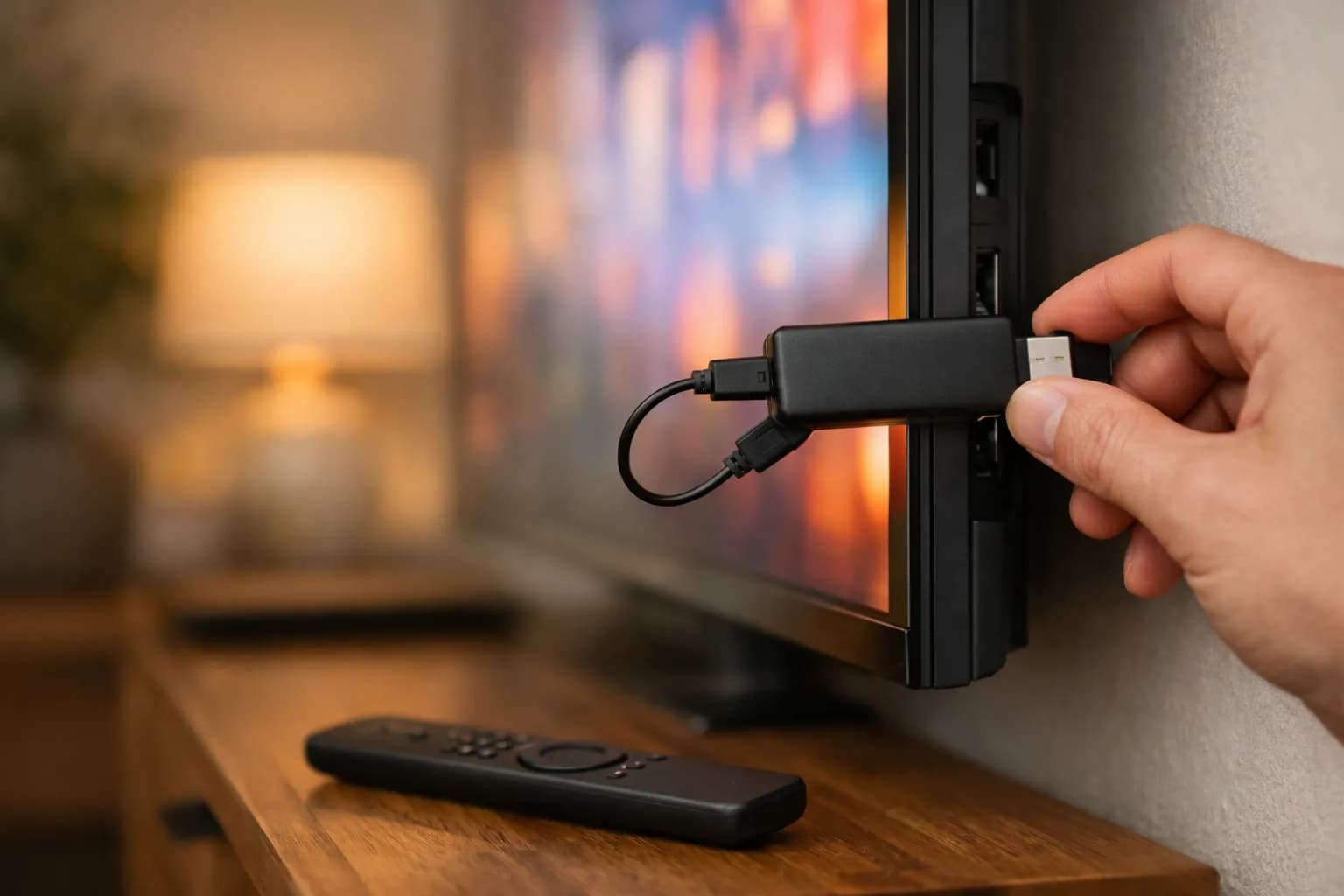
Which Amazon Fire Stick Models Support IPTV?
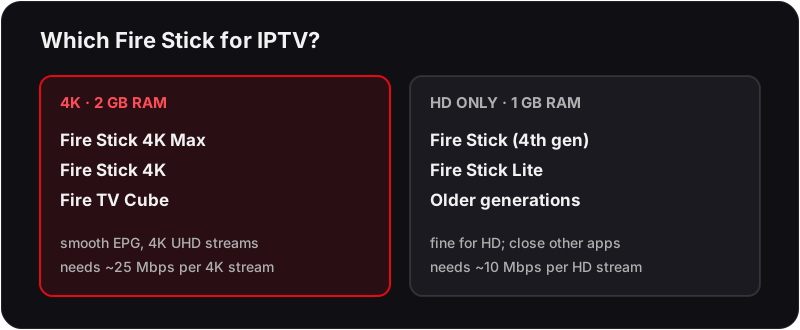
All Amazon Fire Stick and Fire TV models support IPTV via sideloaded apps. Here's how each model compares for IPTV use:
| Fire Stick Model | Resolution | 4K IPTV | TiviMate | Verdict |
|---|---|---|---|---|
| Fire Stick 4K Max (2nd gen) | 4K Ultra HD | ✓ | ✓ | Best — fastest, HDR10+ |
| Fire Stick 4K (2nd gen) | 4K Ultra HD | ✓ | ✓ | Excellent for 4K IPTV |
| Fire TV Cube (3rd gen) | 4K Ultra HD | ✓ | ✓ | Hands-free, most powerful |
| Fire Stick (4th gen) | 1080p Full HD | ✗ | ✓ | Great for HD IPTV |
| Fire Stick Lite | 1080p Full HD | ✗ | ✓ | Works well, no 4K |
| Fire Stick (older gens) | 1080p Full HD | ✗ | ✓ | Still supported — HD only |
Not sure which model you have? Settings → My Fire TV → About — your model name is shown at the top. Panasonic TVs with Fire TV built in take the same steps as the stick; IPTV on a Panasonic Fire TV shows which models run it.
How Much Power Does Firestick IPTV Need?
Two specs decide how smooth IPTV feels on a Fire Stick: RAM and your internet bandwidth. Neither is printed on the box, so here's what actually matters:
RAM — why the 4K models feel faster
The Fire Stick 4K, 4K Max, and Fire TV Cube ship with 2 GB of RAM; the Lite and HD models make do with 1 GB. That difference matters more for IPTV than for ordinary streaming apps, because an IPTV player holds a 55,000+ channel playlist and a multi-day EPG in memory at the same time.
On a 2 GB model the TV guide scrolls smoothly and channel zapping is near-instant. A 1 GB Fire Stick still works fine — just close background apps before big match nights, let the EPG finish its first load, and avoid hopping between several heavy apps mid-stream.
Bandwidth — HD vs 4K
- ✓HD streams: 10 Mbps+ per stream is comfortable; below that you'll notice buffering at peak evening hours.
- ✓4K streams: 25 Mbps+ per stream — and only the 4K, 4K Max, and Fire TV Cube models can output 4K at all.
- ✓Connection tip: use the 5 GHz Wi-Fi band, or an Ethernet adapter for the most stable 4K sport. The 4K Max's Wi-Fi 6/6E is the best wireless option of any Fire Stick model.
What You Need
- ✓ Amazon Firestick (any generation) or Fire TV Cube
- ✓ Active Wi-Fi or Ethernet connection (10 Mbps+ recommended)
- ✓ Flickhaven IPTV credentials (Server URL, Username, Password)
- ✓ 5 minutes of your time
Firestick IPTV setup in five steps
- Developer OptionsAllow apps from unknown sources
- Downloader appInstall it on the Fire Stick
- TiviMate or IPTV Smarters ProSideload the player
- Xtream Codes loginServer URL, username, password
- Channels and EPGLoad automatically
Method 1: How to Download IPTV on Firestick with TiviMate
RecommendedTiviMate is widely considered the best IPTV player for Firestick. It has a beautiful UK TV guide (EPG), smooth 4K playback, multi-screen support, and catch-up TV — everything a UK viewer needs.
Step 1: Enable Developer Options
- 1Press the Home button on your Firestick remote.
- 2Go to Settings (gear icon at the top).
- 3Select My Fire TV.
- 4Scroll down and tap Developer Options.
- 5Turn on Apps from Unknown Sources.
- 6Turn on ADB Debugging (optional, but recommended).
Step 2: Install the Downloader App
- 1Press the Home button and go to the Search bar (magnifying glass icon).
- 2Type 'Downloader' and select the app by AFTVnews.
- 3Click Download / Get and wait for it to install.
- 4Open Downloader and allow storage permissions when prompted.
Step 3: Download and Install TiviMate
- 1Open Downloader and enter the TiviMate APK URL in the address bar.
- 2Tap Go and wait for the download to complete.
- 3When prompted, tap Install.
- 4After installation, tap Open to launch TiviMate.
Step 4: Add Your Flickhaven Playlist
- 1In TiviMate, tap Add Playlist on the welcome screen.
- 2Select Xtream Codes API.
- 3Enter your Flickhaven Server URL in the URL field.
- 4Enter your Username and Password (from your WhatsApp activation message).
- 5Tap Add — TiviMate will load your full channel list, EPG, and VOD library.
- 6Use the TV Guide tab to browse UK channels including BBC, ITV, live sports, and Premier League.
💡 TiviMate Tip: Go to Settings → Player and select ExoPlayer for the smoothest 4K playback on Firestick.
Method 2: IPTV Smarters Pro on Firestick (Free)
IPTV Smarters Pro is a free IPTV player that works great on Firestick. It's slightly simpler than TiviMate and a good option if you're setting up IPTV for the first time.
- 1Enable Developer Options (same as Method 1, Steps 1–6 above).
- 2Install the Downloader app from the Amazon App Store.
- 3Open Downloader and enter the IPTV Smarters Pro APK URL.
- 4Install the APK when the download completes.
- 5Open IPTV Smarters Pro and tap Add User.
- 6Select Login with Xtream Codes API.
- 7Enter your Flickhaven Server URL, Username, and Password.
- 8Tap Login — all 55,000+ channels and VOD titles will load automatically.
TiviMate vs IPTV Smarters Pro — Which Should You Install?
Both players work with the same Flickhaven credentials on any Fire Stick model. Here's the honest difference:
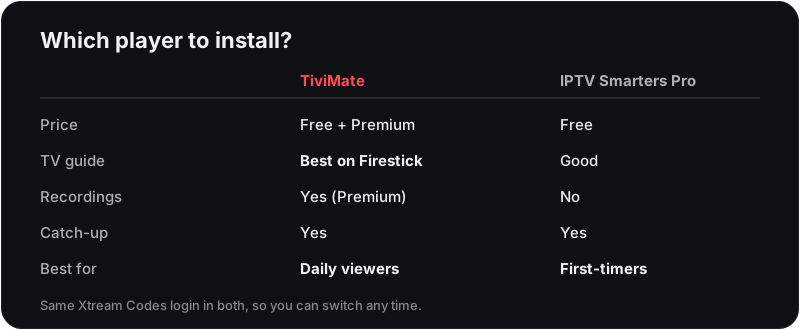
| Feature | TiviMate | IPTV Smarters Pro |
|---|---|---|
| Price | Free (Premium £4/yr) | Free |
| EPG TV guide | Best on Firestick | Good |
| Recordings | Yes (Premium) | No |
| Multi-screen view | Yes (Premium) | No |
| Catch-up TV | Yes | Yes |
| Setup difficulty | 5 minutes, more options to tune | Simplest for beginners |
| Best for | Daily sports & TV viewers | First-time IPTV users |
Short version: start with IPTV Smarters Pro if you want the fastest possible setup, and move to TiviMate once you want the better TV guide and recordings. For a deeper look, read the full TiviMate review, the IPTV Smarters Pro setup guide, or the complete Firestick & Android player comparison. Prefer Perfect Media Player? Follow the Perfect Player Firestick guide. Whichever app you choose, it logs in with the same Xtream Codes credentials — the Xtream Codes Firestick setup guide explains how that login works.
Firestick IPTV Troubleshooting
❓ App won't install
Make sure Apps from Unknown Sources is enabled in Developer Options.
❓ Wrong credentials error
Double-check your Server URL, Username, and Password. Copy-paste from your WhatsApp message to avoid typos.
❓ Channels not loading
Check your internet connection speed. You need 10 Mbps+ for HD and 25 Mbps+ for 4K.
❓ IPTV buffering on Firestick
Clear the app cache, close background apps, or connect via Ethernet. See our full buffering fix guide. See our full buffering fix guide.
❓ Black screen but audio plays
Switch the video decoder: in TiviMate go to Settings → Player and change between ExoPlayer hardware and software decoding, then restart the app. Follow the full black screen fix guide.
❓ EPG / TV guide not showing
In TiviMate, go to Settings → EPG and tap Refresh EPG. Allow 2–5 minutes to load.
Best IPTV Apps for Fire Stick UK
Both apps below work with any Fire Stick IPTV service using Xtream Codes credentials:
★★★★★
Free (Premium £4/yr)
- ✓Best EPG TV guide on Firestick
- ✓Smooth 4K UHD playback
- ✓Multi-screen & catch-up support
- ✓Favourite channels & recordings
★★★★☆
Free
- ✓No cost — fully free
- ✓Simple setup for beginners
- ✓Live TV, VOD & series all-in-one
- ✓Available via Downloader APK
★★★★☆
Free
- ✓Clean, modern interface on Firestick
- ✓Supports Xtream Codes & M3U
- ✓Fast channel switching
- ✓Popular alternative to TiviMate
Fire Stick IPTV — Frequently Asked Questions
What is the best IPTV app for Fire Stick in the UK?+
TiviMate is the best IPTV app for Fire Stick — it has the smoothest 4K playback, the best EPG TV guide, multi-screen support, and catch-up TV. IPTV Smarters Pro is a free alternative that's great for beginners.
How do I get IPTV on my Firestick?+
Yes. Enable Apps from Unknown Sources in Developer Options, then download TiviMate or IPTV Smarters Pro via the Downloader app. Enter your Flickhaven credentials and all 55,000+ channels load instantly. Takes under 5 minutes.
Does fire stick IPTV work on all models?+
Yes — IPTV works on all Fire Stick models: Lite, 3rd/4th gen, 4K, 4K Max, and Fire TV Cube. The Fire Stick 4K and 4K Max give the best experience with 4K UHD and HDR support for compatible channels.
How much does IPTV for Firestick cost in the UK?+
Flickhaven IPTV plans start at £15.00/month. The app itself (TiviMate or IPTV Smarters Pro) is free or £4/year for TiviMate Premium. There are no long-term contracts and you can try free for 24 hours.
How do I use a Firestick with IPTV?+
To use a Firestick with IPTV: enable Apps from Unknown Sources in Developer Options, install the Downloader app, then download TiviMate, IPTV Smarters Pro, or Perfect Media Player. Enter your Flickhaven Server URL, Username and Password — channels load automatically in under 5 minutes.
Is fire stick IPTV legal in the UK?+
The Fire Stick and the player app are lawful; in the UK the legal question turns on the subscription service behind them. Flickhaven publishes its terms, privacy policy and refund policy so you can read them before you pay. Always choose a provider with transparent policies.
Need Help Setting Up?
Our UK support team is available on WhatsApp, 24/7. We'll walk you through setup on your Firestick in minutes — for free.
For the full picture, see these guides: full IPTV explainer for British viewers, best IPTV providers UK, free IPTV trial, IPTV audio out of sync, every device we cover and Downloader codes explained.