Flickhaven IPTV UK
Best IPTV Apps for LG Smart TV UK 2026 — SS IPTV, Flix IPTV & Smarters Pro
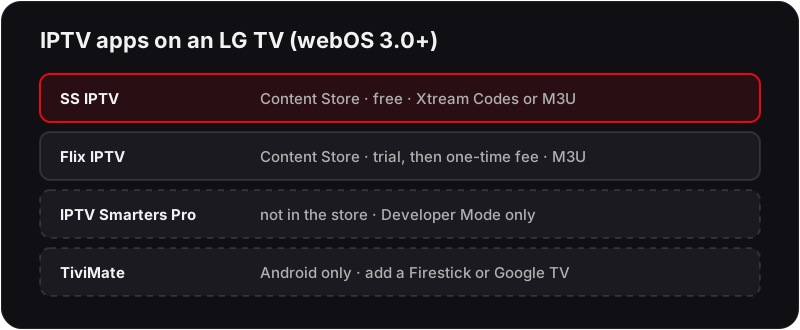
LG Smart TVs run webOS, so IPTV comes from LG Content Store rather than a sideload. SS IPTV and Flix IPTV are the two reliable choices: install one, note the pairing code it shows, then upload your M3U playlist through the provider portal on screen. EPG is set separately in the app options. Most LG models from 2016 onward run both apps, and the whole process usually takes under ten minutes.
LG IPTV lets you stream 55,000+ live channels, sports, and on-demand content directly on your LG Smart TV — no satellite dish, no set-top box, no Firestick required. LG Smart TVs run webOS and support IPTV natively through the LG Content Store. The best LG IPTV app is SS IPTV — install it free from the LG Content Store in under 2 minutes on any LG TV from 2016 onwards. Flix IPTV is the best M3U alternative. Both support LG TV IPTV via Xtream Codes and M3U credentials and work across every LG OLED, QNED, NanoCell, and UHD model from 2016 to 2026. The EPG runs on GMT/BST, so Premier League kick-off times and the on-screen guide match your TV's clock without any manual offset — the same catch-up expectations you'd bring from BBC iPlayer or ITVX carry straight over. New to IPTV? See our complete IPTV guide for a full explanation of how the technology works.
What You Need
- ✓LG Smart TV (webOS 3.0 or newer — 2016 onwards)
- ✓Home broadband — 10 Mbps+ for HD, 25 Mbps+ for 4K
- ✓Flickhaven credentials (Server URL, Username, Password)
Which LG Smart TV Models Support IPTV?
IPTV apps work on all LG Smart TVs running webOS 3.0 or newer — that covers every model from 2016 onwards. Here's the full compatibility breakdown:
| LG Series | Years | SS IPTV | Flix IPTV | Method |
|---|---|---|---|---|
| LG OLED (C / G / Z Series) | 2016–2026 | ✓ | ✓ | Content Store |
| LG QNED / NanoCell | 2019–2026 | ✓ | ✓ | Content Store |
| LG UHD 4K Smart TV | 2016–2026 | ✓ | ✓ | Content Store |
| LG Full HD Smart TV | 2016–2022 | ✓ | ✓ | Content Store |
| LG OLED Evo (B / A Series) | 2020–2026 | ✓ | ✓ | Content Store |
| Older LG Smart TVs | 2015 & earlier | ✗ | ✗ | Use Firestick via HDMI |
Not sure of your TV year? Press Settings → Support → TV Information — the model number contains the year (e.g., OLED65C3 = 2023). Panasonic is a different case: its sets run Fire TV, TiVo or My Home Screen, and the Panasonic TV IPTV guide sorts out the route for each.
Method 1: SS IPTV from LG Content Store (Easiest — Recommended)
💡 SS IPTV is available directly in the LG Content Store — no sideloading, no USB drive, no developer mode required.
Need an IPTV subscription for your LG TV?
Flickhaven gives you 55,000+ channels in 4K UHD — set up on your LG in under 5 minutes.
Method 2: Flix IPTV — Best for M3U Playlists
💡 Flix IPTV is ideal if you prefer M3U playlist format. Both SS IPTV and Flix IPTV also support Xtream Codes.
LG Content Store: UK Region & Developer Mode Sideload
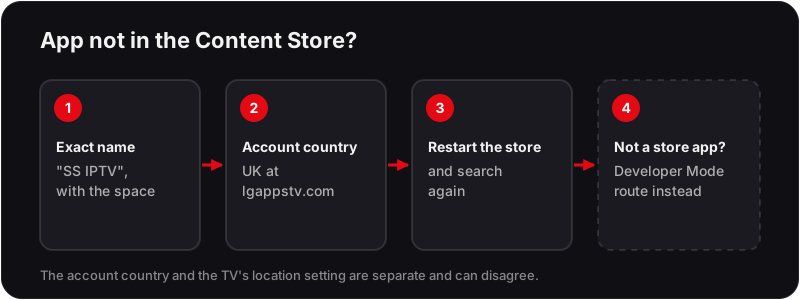
The LG Content Store shows a different app catalogue depending on the country registered to your LG account — not just the TV's on-screen system region. This trips up two groups of UK viewers in particular: sets bought as parallel imports from outside the UK, and TVs that had their account set up while travelling.
- ▸If SS IPTV or Flix IPTV don't appear when you search, confirm your account country at lgappstv.com is set to United Kingdom — this is separate from Settings → General → System → Location on the TV itself, and the two can disagree.
- ▸Apps that aren't distributed through the Content Store at all — IPTV Smarters Pro on LG is the main example — go through LG's official Developer Mode route instead, and the steps differ by webOS generation. Our IPTV Smarters on LG Smart TV guide walks through that install end to end.
- ▸Older sets (webOS 3.x–4.x, roughly 2016–2019): install the "Developer Mode" app from the Content Store, switch Developer Mode ON, then pair with LG's webOS TV SDK over your home network from a PC to install the app file.
- ▸Newer sets (webOS22/23/24, 2022 onwards): the same Developer Mode app requires signing in with a free LG Developer Account, and Developer Mode needs re-confirming roughly every 50 hours of TV runtime — if a sideloaded app suddenly stops launching a few weeks after install, this expiry is usually why, not a broken app.
None of this applies to SS IPTV or Flix IPTV — both install directly from the Content Store with no Developer Mode step, which is why Method 1 above is the one most UK viewers should start with.
UK Broadband Router Quirks on Smart TVs
A Smart TV connects over Wi-Fi far more often than a PC does, which makes it more exposed to router-side issues that don't show up on wired devices:
- ▸BT Whole Home Wi-Fi (mesh disks): a TV connected through a disk rather than the main Smart Hub can suffer double-NAT style buffering. Confirm the disks are in the standard mesh setup (not manually bridged) via the BT Smart Hub app, and place the nearest disk with a clear line of sight to the TV.
- ▸Virgin Media Hub 5 band steering: Advanced Wi-Fi Settings can push a 4K-capable TV onto the weaker 2.4GHz band during busy periods instead of 5GHz. Manually selecting the "-5G" SSID from the TV's Wi-Fi list keeps it on the faster band.
- ▸TalkTalk HomeSafe: its content-filtering can misclassify streaming traffic on a smart TV's app store connections the same way it does on PCs — disable HomeSafe for the TV's device profile if channels fail to load at all rather than just buffering.
- ▸EE Smart Hub: check the Device Manager in the EE Smart Hub app for a per-device bandwidth cap — TVs added after the initial router setup sometimes inherit a lower default cap than the 25 Mbps+ needed for 4K.
Where the TV has a LAN port, a wired Ethernet connection avoids all four of the above and is the most reliable fix for persistent buffering.
Best LG IPTV Apps — Compared (2026)
All three LG IPTV apps work on any LG Smart TV (webOS 3.0+) and support Flickhaven credentials:
★★★★★
Free
- ✓Available directly in LG Content Store
- ✓No sideloading or developer mode
- ✓Supports Xtream Codes & M3U playlists
- ✓Full EPG TV guide support
- ✓Works on all webOS models from 2016
★★★★☆
Trial, then one-time fee
- ✓Clean, modern interface for UK viewers
- ✓Best M3U playlist support on LG
- ✓EPG TV guide included
- ✓Available in LG Content Store
- ✓Smooth 4K playback
★★★★☆
Free (sideload)
- ✓Live TV, VOD and series in one app
- ✓Parental controls and multi-profile support
- ✓Requires developer mode installation
- ✓Best for power users wanting full feature set
- ✓Supports Xtream Codes API
LG Smart TV IPTV — Troubleshooting
❓ SS IPTV or Flix IPTV not in LG Content Store
Change your LG account region to United Kingdom. On your phone or PC, log into your LG account at lgappstv.com and update the country. Restart the Content Store app on your TV and search again.
❓ Channels not loading after entering credentials
Double-check your Server URL, Username, and Password — copy-paste from your WhatsApp activation message to avoid typos. Ensure there are no trailing spaces and your URL starts with http:// or https://.
❓ IPTV buffering on LG TV
Switch to 5GHz Wi-Fi: Settings → Network → Wi-Fi Connection → select your 5GHz network (usually shows as your router name + '5G'). For the most stable connection, use a wired Ethernet cable — LG TVs have a LAN port on the back.
❓ Buffering on 4K channels specifically
4K UHD streams require 25 Mbps+. Run a speed test on your TV at Settings → Support → Quick Help → Check the Internet Connection. If your speed is fine, check that the LG TV's HDMI output is set to HDMI 2.0: Settings → Picture → HDMI Ultra HD Deep Colour.
❓ EPG (TV guide) not loading
In SS IPTV, go to Settings → your playlist → EPG → Update EPG. Allow 3–5 minutes for the guide to populate fully. If the EPG is blank, confirm your Flickhaven Server URL is entered correctly as this doubles as the EPG source.
❓ Black screen when playing channels
This is usually a codec issue. In SS IPTV, go to Settings → Player and switch between Hardware and Software decoder modes. Also check that your LG TV firmware is up to date: Settings → Support → Software Update.
❓ App freezes or crashes on LG TV
LG TVs can freeze when memory is low. Press the Home button and close all background apps from the multi-task bar. Fully restart your TV (not standby — hold the power button on the TV for 5 seconds) to clear memory before relaunching the IPTV app.
Is IPTV Legal on LG Smart TV in the UK?
Installing an IPTV app on an LG Smart TV is lawful in itself. SS IPTV and Flix IPTV are legitimate software applications available in the official LG Content Store. The legality of IPTV in the UK depends on the subscription service you use with the app — not the app itself. Flickhaven is a prepaid IPTV subscription, and its Terms and Refund Policy are published on this site. For full detail, see our IPTV and UK law guide.
LG IPTV — Frequently Asked Questions
What is the best IPTV app for LG Smart TV?+
SS IPTV is the best IPTV app for LG Smart TV — available directly in the LG Content Store with no sideloading required. Flix IPTV is the best alternative for M3U playlists. IPTV Smarters Pro has the most features but needs developer mode.
Can you get IPTV on an LG Smart TV?+
Yes. LG Smart TVs from 2016 onwards (webOS 3.0+) support IPTV natively. Install SS IPTV from the LG Content Store, enter your Flickhaven Xtream Codes credentials, and all 55,000+ channels load instantly — no Firestick or external box needed.
How do I install IPTV on my LG Smart TV?+
Press Home → LG Content Store → search 'SS IPTV' → install → open → Settings → Remote Playlist → Add Playlist → Xtream Codes → enter your Flickhaven Server URL, Username and Password → Save. Your channels load automatically in under 60 seconds.
Does IPTV work on all LG Smart TV models?+
IPTV works on LG Smart TVs from 2016 onwards running webOS 3.0 or newer — including all LG OLED, QNED, NanoCell, UHD, and Full HD Smart TV series. For 2015 or older LG TVs, plug a Firestick or Android TV box into the HDMI port.
What is SS IPTV on LG TV?+
SS IPTV is the most popular IPTV app for LG TVs — free in the LG Content Store on all webOS models from 2016. It supports Xtream Codes and M3U playlists, has a full EPG TV guide, and requires no sideloading. It's the easiest way to watch IPTV on any LG Smart TV.
What internet speed do I need for IPTV on LG TV?+
10 Mbps for HD (1080p) and 25 Mbps for 4K UHD streaming on your LG TV. Use 5GHz Wi-Fi or wired Ethernet for the best stability. Most UK fibre broadband plans comfortably exceed these speeds.
Is IPTV legal on LG Smart TV in the UK?+
Yes — SS IPTV and Flix IPTV are legitimate apps in the LG Content Store. Legality depends on the IPTV subscription service you use, not the app. Flickhaven is a prepaid IPTV subscription; its Terms and Refund Policy are published on this site, and the free 24-hour trial lets you test it first.
Why is my IPTV not working on my LG Smart TV?+
The most common causes are incorrect credentials, an expired subscription, or slow Wi-Fi. Try clearing the SS IPTV app cache (Settings → General → App Manager → SS IPTV → Clear Cache), re-entering your credentials, and switching to 5GHz Wi-Fi or Ethernet.
Related Guides
Need Help with Your LG TV?
Our team will walk you through setup on your specific LG model via WhatsApp — for free.
Worth reading next: IPTV UK guide, UK IPTV providers compared, our no-card free trial and the full device setup hub.