Flickhaven IPTV UK
MAG Box IPTV: Portal Setup for Every Infomir Model (UK)
A MAG box gets IPTV through a Stalker portal URL rather than an app. Find the MAC address under Settings, System Information, and send it on WhatsApp; your plan is linked to that MAC and you receive a portal URL. Enter it as Portal 1 under System Settings, Servers, Stalker Portal, then reboot. The channel list and guide load on the home screen. MAG IPTV works on every Infomir model; only 4K models such as the MAG420 or MAG520 play 4K channels.
MAG boxes (made by Infomir) are dedicated IPTV devices that use a Stalker Portal system — you enter your Flickhaven portal URL once in the settings and all 55,000+ channels load automatically after a reboot. This guide covers the Infomir MAG models you are likely to meet in the UK, from the classic MAG254 to the 4K-capable MAG520. Setup takes under 5 minutes and requires no apps, no sideloading, and no technical knowledge. For a full explanation of how IPTV works, see our what IPTV actually is.
For other hardware, see our IPTV device guide.
Using a Formuler rather than an Infomir box? See Formuler Z setup with MYTVOnline. For app-based devices such as Firestick and Smart TVs, use the step-by-step installation guide instead.
What You Need
- ✓Any Infomir MAG box (any model)
- ✓Flickhaven portal URL — sent via WhatsApp after purchase
- ✓Home broadband — 10 Mbps+ for HD, 25 Mbps+ for 4K
- ✓Ethernet cable, or Wi-Fi (built in only on "w" models such as the MAG322w1; otherwise a USB Wi-Fi adapter)
Why MAG Boxes Use a Portal URL Instead of M3U
Unlike a Firestick or Kodi setup, which typically takes an M3U playlist link or an Xtream Codes login, a MAG box runs Infomir's own Stalker middleware — the box itself talks to the portal server directly, using its MAC address as the identifier. That's why activation is tied to a MAC address rather than a username and password. It's a different authentication model, not a lesser one: once the portal URL and MAC address are linked on our side, the box doesn't need any app installs or further logins.
Compatible MAG Box Models — UK
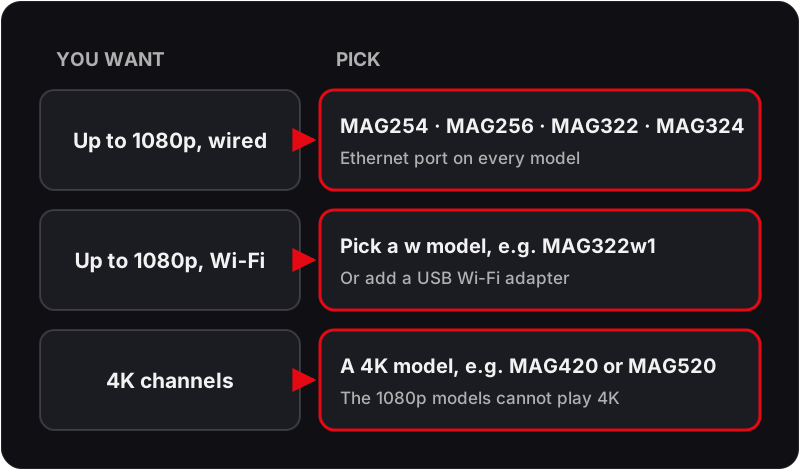
All Infomir MAG boxes support IPTV via the Stalker Portal system. The main choice is picture quality and how the box connects:
| MAG Model | Max Quality | Built-in Wi-Fi | Notes |
|---|---|---|---|
| MAG520 | 4K UHD | Check model | Newer 4K model |
| MAG420 | 4K UHD | Check model | 4K + Stalker Portal |
| MAG324 / MAG325 | Full HD | MAG324w2 only | Reliable workhorse |
| MAG322 / MAG323 | Full HD | MAG322w1 only | Dual-core, common UK model |
| MAG256 / MAG257 | Full HD | w2 versions only | Stable, widely supported |
| MAG254 / MAG255 | Full HD | MAG254w1/w2 only | Classic — USB Wi-Fi adapter otherwise |
| MAG250 | Full HD | No | Older — Ethernet |
Not sure which model you have? Settings → System Information → Model — the full model number is shown on screen.
MAG Box UK Imports & Genuine Hardware
Almost all MAG boxes reach the UK through third-party importers and resellers rather than a UK Infomir storefront, and that has a couple of practical knock-on effects worth knowing before you buy or set one up:
- Genuine vs clone hardware — genuine Infomir hardware shows "Infomir" and the model number (MAG254, MAG322, etc.) on the rear panel and in Settings → System Information. A small number of cheaper "MAG-style" Android boxes sold by UK resellers borrow the Stalker Portal branding without running genuine Infomir middleware, and won't reliably accept a standard portal URL — worth checking the model against the table above before buying secondhand.
- Pre-configured units — reseller units, especially secondhand ones, sometimes arrive with a previous owner's portal URL already saved as Portal 1. If your box boots straight to another provider's channel list, go to Settings → System Settings → Servers → Stalker Portal and overwrite Portal 1 with your Flickhaven URL rather than assuming a factory reset is needed.
- UK power supply — UK mains is 230V/50Hz on a 3-pin plug, and MAG boxes run from a 12V DC power adapter, and imported units sometimes ship with a non-UK plug. Check the box includes a UK-compatible power supply, or a plug adapter, before assuming a dead unit is faulty out of the box.
MAG Box IPTV Setup — Step by Step
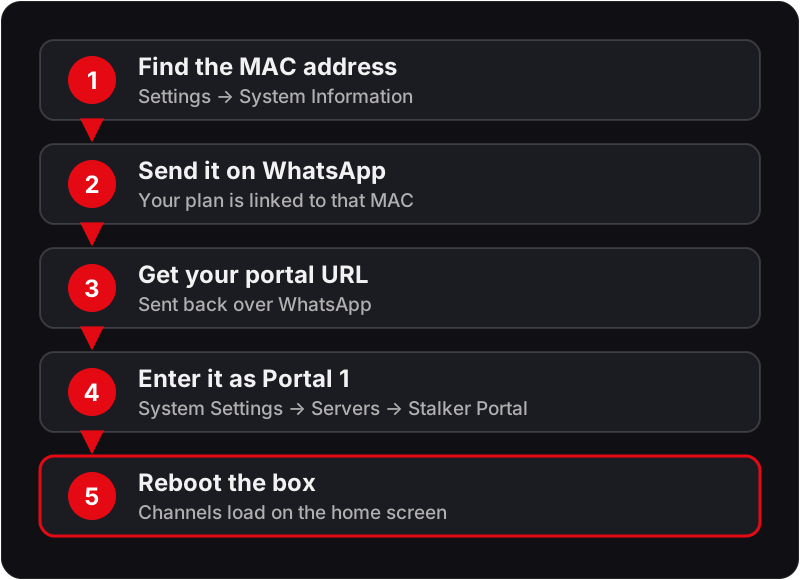
💡 Your Portal URL is different from Xtream Codes credentials. When purchasing, request the MAG portal URL specifically via WhatsApp and include your MAG box MAC address.
Need an IPTV subscription for your MAG box?
Flickhaven provides a portal URL for all MAG models — activate in under 5 minutes via WhatsApp.
UK Broadband Notes for MAG Box
MAG boxes lean on a wired Ethernet connection more than most streaming devices, so Wi-Fi router quirks matter less than on a Firestick or Apple TV — but a couple of UK-specific points are still worth knowing:
- Content filters — BT, Virgin Media, TalkTalk and EE have all run default-on family content filters since 2013. A portal URL can occasionally get caught by an over-eager filter the same way a streaming site would — if the portal genuinely won't load despite being entered correctly, check your router's parental control settings before assuming the URL is wrong.
- Virgin Media — the Hub defaults to a fairly strict NAT/firewall profile. It's rarely an issue for a plain HTTP/HTTPS portal connection, but if you're also running a VPN or third-party firewall on your network, whitelist your MAG box's local IP address.
MAG Box IPTV — Troubleshooting
❓ Portal URL not loading after reboot
Ensure you copied the full URL exactly as provided — no missing characters, no spaces before or after. Your Flickhaven portal URL starts with http:// or https://. Copy-paste directly from your WhatsApp activation message.
❓ MAC address required for activation
Find your MAG box MAC address at Settings → System Information → MAC address (or Network Info on newer models). Send this to Flickhaven via WhatsApp before purchasing — your subscription is tied to the MAC address.
❓ Channels not loading after entering URL
Try a soft reboot first: Settings → System Settings → Reboot. If channels still don't load, confirm your internet connection is active and your subscription is still active. Check your broadband speed at fast.com on another device.
❓ MAG box buffering
MAG boxes perform best on a wired Ethernet connection. Plug an Ethernet cable directly from your router into the MAG box LAN port for the most stable stream. If you must use Wi-Fi (a w model or a USB adapter), position the MAG box close to your router.
❓ EPG / TV guide not showing
MAG boxes pull the EPG from the Stalker Portal automatically. If the guide is blank, go to Settings → General → EPG Update Time and set it to 06:00 (overnight). Allow 24 hours for the guide to fully populate after first setup. If the guide looks correct but times are an hour out, check Settings → General → Time Zone is set to GMT/London rather than a fixed UTC offset — MAG boxes don't always follow the UK's clock change to BST automatically.
❓ Factory reset required
If channels have stopped loading after a portal change or service switch: Settings → System Settings → Factory Reset. Re-enter your portal name and URL after the reset and reboot. Note: a factory reset clears all settings including saved portal URLs.
❓ Box shows someone else's channels straight out of the box
This is common on secondhand or reseller units — a previous portal URL is often still saved as Portal 1. Go to Settings → System Settings → Servers → Stalker Portal and overwrite it with your Flickhaven URL; a factory reset isn't usually necessary.
No channels after rebooting? Read how to fix an empty IPTV channel list.
MAG Box IPTV — Frequently Asked Questions
How do I set up IPTV on a MAG box?+
Press Settings on your MAG remote → System Settings → Servers → Stalker Portal → Portal 1 URL → enter your Flickhaven portal URL → OK → reboot. Your full channel list loads automatically after restart. The portal URL is sent via WhatsApp after purchase.
What is a MAG box portal URL?+
A portal URL is a web address entered into the MAG box settings that connects the device to an IPTV service. MAG boxes (Infomir) use the Stalker Portal system — you enter the URL once and all channels load automatically. Flickhaven provides your unique portal URL via WhatsApp after activation.
What IPTV works with MAG boxes in the UK?+
Any IPTV service that provides a Stalker Portal URL works with MAG boxes. Flickhaven provides a portal URL for all Infomir models including MAG250, MAG254, MAG322, MAG349, MAG351, MAG420, and MAG520.
Is the MAG 254 still a good IPTV box, and how does it compare with the MAG322?+
For HD viewing on a wired connection, yes. Both play up to 1080p and have an Ethernet port and USB ports. The MAG322 has a faster dual-core processor, so menus and channel changes feel quicker. Built-in Wi-Fi is only on the w versions (MAG254w1/w2, MAG322w1); the base models take a USB Wi-Fi adapter. For 4K channels you need a 4K model such as the MAG420 or MAG520.
What is the best IPTV for a MAG box?+
One that activates by MAC address with a Stalker portal URL, supports your exact MAG model, and lets you test before paying. Check that the provider names your model, that the portal loads the guide as well as channels, and that support can re-link the MAC address if you change box.
Do I need a special MAG box IPTV subscription?+
No. A MAG box IPTV subscription is the same plan as on any other device; the difference is delivery. Instead of an Xtream Codes login, your plan is linked to the box's MAC address and you receive a portal URL. Send the MAC address on WhatsApp when you order.
Is a MAG box better than a Firestick for IPTV?+
MAG boxes are dedicated IPTV devices — simpler to configure via portal URL, with no sideloading required. Firesticks offer more app flexibility alongside IPTV. For pure IPTV use on a wired connection, a MAG box is a simple, stable choice. Flickhaven works with both.
How do I find my MAG box MAC address?+
On your MAG box remote, press Settings → System Information → Network Info. Your MAC address is shown as a 12-character code in the format XX:XX:XX:XX:XX:XX. You'll need this when activating a Flickhaven portal subscription.
How do I know if my MAG box is genuine Infomir hardware?+
Check the rear panel and Settings → System Information — genuine units show 'Infomir' alongside the model number (MAG254, MAG322, etc.). Some cheaper 'MAG-style' Android boxes sold by UK resellers borrow the Stalker Portal branding without running genuine Infomir middleware and won't reliably accept a standard portal URL.
Why does my secondhand MAG box show another provider's channels?+
Reseller and secondhand units often arrive with a previous owner's portal URL still saved as Portal 1. Go to Settings → System Settings → Servers → Stalker Portal and overwrite it with your Flickhaven portal URL — a factory reset usually isn't necessary.
Related Guides
Need Your MAG Portal URL?
Message us on WhatsApp with your MAG box MAC address — support runs 24/7 — and we'll activate your Flickhaven subscription. Plans start at £15.00 a month.
For the background, see these guides: UK IPTV guide, eight UK services side by side and start a free trial.