Flickhaven IPTV UK
IPTV vs Virgin Media UK — Which Is Better?
Virgin Media bundles television with broadband on a contract, typically twelve to eighteen months, with a set-top box and a curated channel lineup. IPTV is contract-free, costs substantially less per month, and carries more channels including international feeds — but supplies no broadband and no hardware. If you need the broadband anyway, the comparison is not like for like. This page separates the television cost from the bundle and compares them directly.
Verdict: Virgin Media bundles broadband and TV under one bill — IPTV unbundles just the TV part, at a fraction of what that part costs on its own.
Weighing Virgin Media against IPTV? Virgin sells TV over its own cable network with a rented box; IPTV streams the TV part over whatever broadband you have, Virgin Media's included. The bundle can look efficient right up until you isolate what the TV portion alone actually costs, and what you have to sign up to in order to get it: an 18-month contract, a rented box, and an engineer visit if your address needs one. A prepaid Flickhaven IPTV plan asks for none of the three. New to IPTV? Our what IPTV is and how it works explains what IPTV is and how it works before you compare.
IPTV vs cable TV: where the two actually differ
| Feature | Virgin Media | Flickhaven IPTV |
|---|---|---|
| Installation & availability | Engineer visit or self-install kit — and only where Virgin's own cable network reaches your address | ✓ None — credentials arrive by WhatsApp, works on hardware you already own |
| Contract | 18-month minimum | ✓ No contract |
| Monthly Cost | £50–£100+/month | ✓ From £15.00/month |
| Device Support | Virgin TV box only | ✓ Any device |
| Channels | 200–300 channels | ✓ 55,000+ channels |
| Sports Coverage | Premium sports via add-on | ✓ All sports included |
| 4K Content | Limited (V6 box) | ✓ Full 4K UHD |
| VOD Library | Virgin Movies (paid) | ✓ 180,000+ VOD free |
| Recordings if you cancel | Stored on the rented V6 box — gone once it's returned | ✓ Nothing to lose — there's no box to hand back |
| Broadband Bundled | Yes (often required) | Use any broadband |
| Cancelling | Exit fees apply mid-contract | ✓ No fees, ever |
What £90 a month actually buys you
Break the Virgin Media bundle into its parts and the TV portion is doing most of the damage — not the broadband:
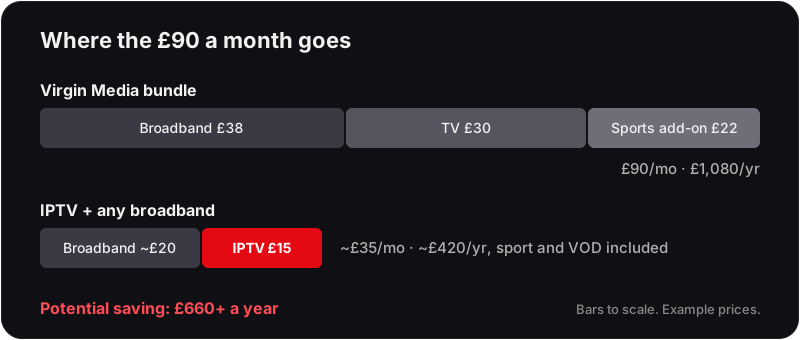
Virgin Media (TV + Broadband)
- Broadband (M500)£38/mo
- TV (Big Bundle)£30/mo
- Premium sports add-on£22/mo
- Total£90/mo
- Per year£1,080/yr
Flickhaven + Any Broadband
- Budget broadband (100 Mbps)~£20/mo
- Flickhaven IPTV£15.00/mo
- Sports, VOD, 4KIncluded
- Total~£35/mo
- Per year~£420/yr
Potential saving: £660+/year by switching from Virgin Media to Flickhaven + budget broadband.
Three things the price page doesn't mention
Your recordings live on the box, not with you
Anything recorded on a Virgin TV V6 box is stored on that box. Cancel, downgrade, or move house outside the cable footprint and the box goes back — recordings included. IPTV has nothing to hand back, because there is no box in the first place.
"Available at your address" is doing a lot of work
Virgin Media runs its own cable network rather than using the phone line most other UK broadband providers rely on. If that cable hasn't already been laid to your street, the TV and broadband bundle isn't an option regardless of price — worth checking availability before comparing anything else. IPTV only needs an internet connection you already have.
The price you sign up for isn't the price you keep paying
Virgin Media, like most major UK broadband and TV providers, applies an annual mid-contract price rise on top of the figure you agreed to — check the exact clause in your own contract, since the amount is not fixed and changes year to year. Leaving early to avoid it means paying the exit fee instead. Satellite TV contracts work the same way — our guide to cancelling satellite TV in the UK walks through notice and charges.
Who should choose which
The table settles the feature-by-feature question. The household question is different: which one fits how you actually watch — a Virgin bundle or an IPTV service built for UK viewers.
Stay with Virgin Media if
- ▸You need Virgin's cable broadband anyway and the TV add-on on your bill is small once you isolate it.
- ▸You rely on recordings stored on the box and want them to keep working during a broadband outage.
- ▸Nobody in the house wants to open an app, pick a playlist or type a password, and the TV must behave like a set-top box.
- ▸Your broadband is slow or unstable and you cannot change supplier, so a stream would struggle regardless of provider.
Switch to IPTV if
- ▸TV is the expensive part of your bill, and you would happily keep cheaper broadband from anyone.
- ▸You watch sport from several broadcasters and are paying for more than one add-on to cover it.
- ▸You rent, move often, or live somewhere the cable network does not reach.
- ▸You want to pay month to month with no contract and no auto-renewal, and stop whenever you like.
- ▸You already own a Firestick, Smart TV or Android box and want to watch on any device, including phones and tablets away from home.
Not sure which column you fall into? Run the free 24-hour trial alongside your existing Virgin service. Nothing on the Virgin side changes until you decide.
What to test during the free 24-hour trial
A trial only answers the question if you test the things that would make you regret switching. Twenty-four hours is enough for all of these:
- ▸The channels you actually watch, at the time you watch them. Evening peak is when broadband is busiest, so test a live match or a 9pm drama, not a daytime channel at lunchtime.
- ▸The device you will really use. If the living-room TV runs a built-in app, test on that app, not on your phone.
- ▸The guide and catch-up. Open the EPG, confirm the times match the clock, and play one catch-up programme from a channel you follow.
- ▸A 4K stream. Play one 4K channel on your TV to check the picture and that your connection holds it. Our guide to how much broadband speed IPTV really needs explains what to look for.
- ▸Wi-Fi versus wired. If the TV is on Wi-Fi and the stream stutters, try an Ethernet cable before you blame the service.
- ▸Support. Send one real question on WhatsApp during the trial. How quickly and how clearly it is answered tells you what the service will be like when something goes wrong.
How to switch without a gap
Do the steps in this order and you never spend an evening without television:
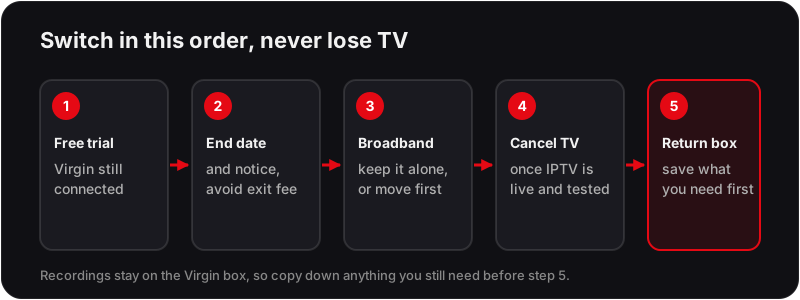
- 1Take the free 24-hour trial and run the checklist above while Virgin Media is still connected.
- 2Find your contract end date and notice period in your Virgin Media account. Leaving before the end date usually means an exit fee, so the saving is largest when you time the switch to the end of the term.
- 3Decide what happens to broadband. If you keep Virgin broadband, ask for the broadband-only price. If you move supplier, order the new line first and let the switch complete before cancelling TV.
- 4Give notice on the TV part only once the IPTV plan is live on the devices you tested. Plans are prepaid with no contract, so start with one month if you want a low-risk overlap.
- 5Return the Virgin equipment when asked, after copying down anything you still need from the box, because recordings do not travel.
IPTV vs Virgin Media Questions
Can you use IPTV with Virgin Media?+
Yes. IPTV streams over any UK broadband line, Virgin Media's cable broadband included, so you can keep Virgin for broadband only and use IPTV for TV. If a stream stutters in the evening, test on a wired Ethernet connection before blaming either side.
Can I keep Virgin Media broadband and drop the TV?+
Usually, yes. Virgin Media sells broadband on its own, so the question is whether your current bundle discount makes the TV part look cheaper than it is. Ask for the broadband-only price at your contract end date and compare that figure plus an IPTV plan against the bundle. If you are mid-contract, removing the TV part may count as a change to the agreement, so check the terms before you ask.
Do I need a Virgin box, or any box, to use IPTV?+
No. IPTV runs as an app on hardware you already own: a Firestick, an Android TV box, a Samsung or LG Smart TV, an Apple TV, a phone, tablet or PC. There is nothing to rent, nothing to install at the wall and nothing to return.
What happens to my recordings if I leave Virgin Media?+
Recordings made on a rented V6 box stay on that box, and the box goes back when the contract ends. IPTV does not record to a box at all. Catch-up on supported channels is streamed from the server, so there is no library to lose when you change plan.
Is the picture quality comparable?+
4K Ultra HD streams are included on Flickhaven for channels that broadcast in 4K, and HD on the rest. The practical difference is that IPTV quality depends on your broadband rather than on a cable feed, so a stable connection matters more. The free 24-hour trial is the way to check this on your own line.
Try Before You Cancel Virgin Media
Start your free 24-hour trial before making any changes to your Virgin Media contract.
Related reading: Flickhaven's guide to IPTV in Britain, which IPTV providers are worth paying for and free IPTV trial.