Flickhaven IPTV UK
Kodi IPTV: How to Install IPTV on Kodi (UK)
Kodi IPTV runs through one official addon: PVR IPTV Simple Client, installed from the built-in Kodi Add-on Repository. Paste your M3U playlist URL into its General settings and your XMLTV EPG URL into its EPG settings, set both locations to Remote path, then restart Kodi. Your channels appear under TV in the main menu, and the guide fills a few minutes later. The addon carries live TV only; films and series need an Xtream Codes app.
Note: Kodi setup is more complex than TiviMate or IPTV Smarters. If you're new to IPTV, we recommend TiviMate on Firestick instead. This guide is for existing Kodi users.
Kodi is one option among many; see the supported devices for IPTV.
Kodi behaves the same on every platform it runs on. If you have not installed a player on the machine itself yet, start with IPTV on a Windows PC or pick your hardware in the IPTV installation guide, then come back here for the Kodi add-on.
The Kodi IPTV Addon vs Kodi Builds — What's the Difference?
"Fully loaded" Kodi builds — pre-configured skins bundled with dozens of add-ons, popular on YouTube and forum threads — are a different thing entirely from what this guide sets up. Many of those builds quietly bundle unofficial add-ons that stream copyrighted films and TV with no licensing behind them at all, which is both a legal risk for whoever is running Kodi and the usual source of the buffering, crashes and malware complaints those builds are known for.
PVR IPTV Simple Client is a different route. It's an official, open-source add-on distributed through the built-in Kodi Add-on Repository — the same repository Kodi itself ships with — and all it does is turn your own M3U playlist and EPG URL into a normal Kodi PVR (live TV) source, the same way a TV tuner card would. It doesn't bundle any add-ons or content of its own and needs nothing from outside the official repository. If you've been pointed at a "build" rather than this add-on, it's worth knowing the two aren't the same thing before you install anything.
Kodi IPTV Setup with PVR IPTV Simple Client
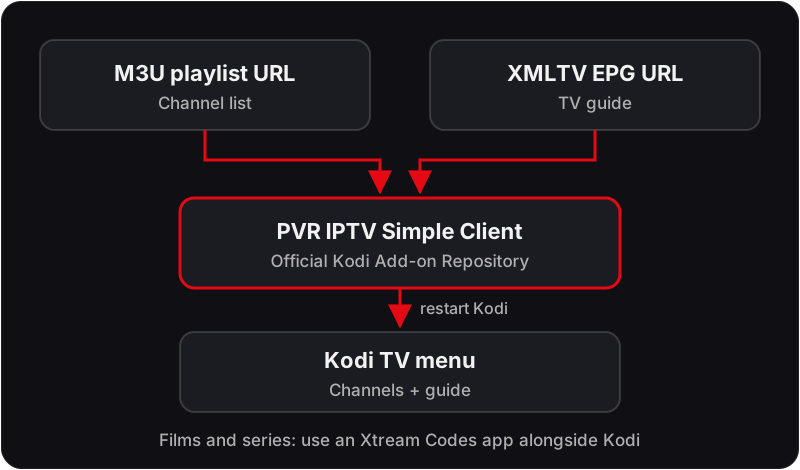
💡 Request both your M3U URL and EPG URL from Flickhaven support before starting Kodi setup. The steps above are the same from Kodi 19 (Matrix) through Kodi 21 (Omega) and later — menu wording differs slightly by version, but the Add-ons → Install from Repository → PVR Clients path is unchanged.
Where Each Setting Lives in PVR IPTV Simple Client
The add-on configuration screen has a handful of tabs, and only four fields matter for a subscription. Everything else can stay at its default.
General → Location
Set this to Remote path (Internet address). The Local path option is for a playlist file you have saved on the device, which is not how a subscription works.
General → M3U playlist URL
Paste the full Flickhaven M3U URL here, including everything after get.php. Leave the cache option on so Kodi keeps a copy and starts faster next time.
EPG Settings → Location and XMLTV URL
Again choose Remote path, then paste the EPG URL. Kodi downloads the guide separately from the playlist, so an empty guide with working channels means this field, not the one above.
EPG Settings → EPG time shift
Keep it at 0 for the UK. Use this only if every programme is consistently out by the same number of hours and the device time zone is already correct.
What a correct result looks like: after the restart, the TV entry in the main menu opens to a channel list with group names down the side, and the Guide view fills with programme titles a few minutes later. If you only see a spinner, the import is still running — give it time before changing anything.
Kodi IPTV EPG: UK Time Zone & Clock Changes
Once your channels are loaded, open the PVR IPTV Simple Client configuration → EPG Settings and confirm the EPG time shift is set to 0 for the UK. Kodi doesn't always follow the UK's clock change to British Summer Time (late March to late October) automatically on every device, so if listed programme times look an hour out after a clock change, check that your device's system time zone is set to Europe/London rather than a fixed GMT/UTC offset.
UK Broadband Notes for Kodi
- Virgin Media — the Hub (3, 4 or 5) ships with a fairly strict default NAT/firewall profile. It's rarely an issue for a standard M3U/EPG PVR connection, but if channels time out on load, check Advanced Settings → Firewall or Modem Mode if you're running your own router behind it.
- BT — the Smart Hub 2 prioritises traffic dynamically, and UK peak hours (roughly 6–10pm) see the most contention on BT's network. A wired Ethernet connection into whichever box runs Kodi avoids most of the buffering that turns up right at that time. Our guide to other causes of IPTV buffering covers the rest.
- TalkTalk and EE — both routers tend to have shorter Wi-Fi range than the Virgin/BT hubs, worth bearing in mind if your Kodi device sits far from the router.
- Content filters — BT, Virgin Media, TalkTalk and EE have all run default-on family content filters since 2013. If PVR IPTV Simple Client can't reach your M3U or EPG URL at all (not just buffering), it's worth checking your router's parental controls before assuming the URL itself is wrong.
Troubleshooting Kodi IPTV
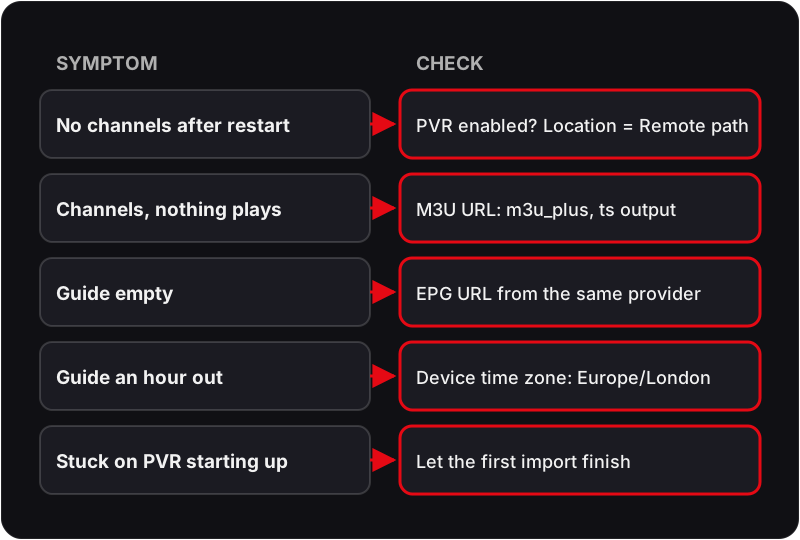
No channels after the restart
Likely cause: The add-on is installed but PVR is still disabled, or the playlist location is set to Local path.
Check: Settings → PVR & Live TV → General: is Enabled ticked? Then open the add-on configuration and look at the Location field.
Fix: Enable PVR, switch Location to Remote path, re-enter the URL and restart Kodi once more. The TV menu entry only appears once a PVR client is enabled.
Channels listed but nothing plays
Likely cause: The playlist URL is incomplete, or the stream type in the URL does not match what Kodi expects.
Check: Open the M3U URL in a browser on your phone — it should download a text file that starts with #EXTM3U.
Fix: Use the m3u_plus link with the ts output type from Flickhaven. Paste it rather than typing it, then clear the add-on cache so Kodi fetches the new file.
Guide is empty or only fills for some channels
Likely cause: The EPG has not finished downloading, or the playlist and guide use different channel IDs.
Check: Give Kodi a few minutes after restart, then open Settings → PVR & Live TV → Guide and run Clear data.
Fix: If it stays empty, re-enter the EPG URL supplied with your M3U link rather than one from another source, so the channel IDs match.
Kodi sits on "PVR manager is starting up" for a long time
Likely cause: A 55,000+ channel playlist takes time to parse, especially on a low-powered box.
Check: Wait for the progress indicator to finish before judging. On a slow device the first load is the slow one.
Fix: Let the first import complete, keep the cache options on, and ask Flickhaven for a playlist trimmed to the groups you watch if the device still struggles.
If the guide is the only thing misbehaving, our IPTV EPG not working fix covers the playlist-and-guide mismatch in more depth than the Kodi-specific notes above.
Is Kodi the Right Player for You?
Kodi suits anyone who already runs it as a media centre and wants live TV in the same interface, with the same remote and the same skin. It also suits a PC or Raspberry Pi under the TV where no dedicated IPTV app is available. It is the wrong choice if all you want is to watch TV with the least setup — a dedicated player gets you there in a fraction of the time and handles VOD and catch-up better.
What to test during the free 24-hour trial
- ✓Run the full playlist import on the device you will actually use and time how long the first load takes.
- ✓Open the TV menu and play a UK channel in HD, then try one of the 4K Ultra HD streams included on the plan.
- ✓Wait for the guide to fill, then confirm the programme names match what is on screen.
The trial gives you the same kind of M3U and EPG links as a paid plan, on one connection, so what you see in those 24 hours is what you get. Plans are prepaid with no contract and no auto-renewal; the 1-month plan at £15.00 is the sensible next step if Kodi behaves on your hardware.
Frequently Asked Questions
Does Kodi work with Xtream Codes, or only M3U?
PVR IPTV Simple Client takes an M3U playlist URL and an XMLTV guide URL. Flickhaven supplies both with every plan, so ask for the M3U link on WhatsApp if you were sent Xtream Codes details. The Xtream Codes login is for apps such as IPTV Smarters and TiviMate.
Can I watch Flickhaven movies and series in Kodi?
The PVR client is a live-TV source. It lists channels and the guide, not an on-demand library. If you want the 180,000+ movies and series, use an Xtream Codes app alongside Kodi on the same device — the same subscription covers both.
Will I need to redo this when I renew?
Usually not. Flickhaven plans are prepaid with no auto-renewal, and the add-on keeps its settings between sessions. If your renewal keeps the same login, channels come back as soon as the plan is live again; if you are sent new details, paste the new M3U and EPG URLs into the same two fields.
Get Your M3U & EPG URLs
Message us on WhatsApp — support runs 24/7 — and we'll send you both URLs with your subscription.
For the full picture, see these guides: complete IPTV guide, UK IPTV guide, complete best IPTV UK guide and IPTV free trial UK.