Flickhaven IPTV UK
TiviMate on Onn 4K Pro & 4K Plus — The Complete IPTV Guide (2026)
Onn IPTV setup is a one-tap job: the Onn 4K Plus and Onn 4K Pro run Google TV, so TiviMate installs straight from the Play Store with no sideloading or developer mode. Add a playlist, choose Xtream Codes, enter your server URL, username and password, and set the guide to load seven days. The Pro adds built-in Ethernet and twice the storage. Onn is a Walmart brand, so UK buyers usually import one or use a Google TV Streamer instead.
The Onn 4K Plus and TiviMate make a capable, low-cost IPTV setup: a Google TV streaming device that installs TiviMate directly from the Play Store (no sideloading, no developer mode) and a polished IPTV player that makes 55,000+ live channels feel like a proper TV guide. Pair it with a subscription that supplies the 7-day guide TiviMate is built around — Flickhaven's UK IPTV service does on every plan.
Own the Onn 4K Pro instead? Every install step here applies to it identically — same Google TV OS, same one-tap Play Store install. The Onn 4K Pro sectioncovers what's different on the Pro and why its built-in Ethernet port matters for IPTV.
Need an IPTV subscription for TiviMate on your Onn 4K Plus?
Flickhaven: 55,000+ channels · 4K UHD · Live Sports · Full EPG · Anti-Freeze CDN
16GB
Onn 4K Plus Storage
Play Store
TiviMate Install
55,000+
Live Channels (Flickhaven)
< 5 min
Setup Time
What Is the Onn 4K Plus? Full Hardware Overview
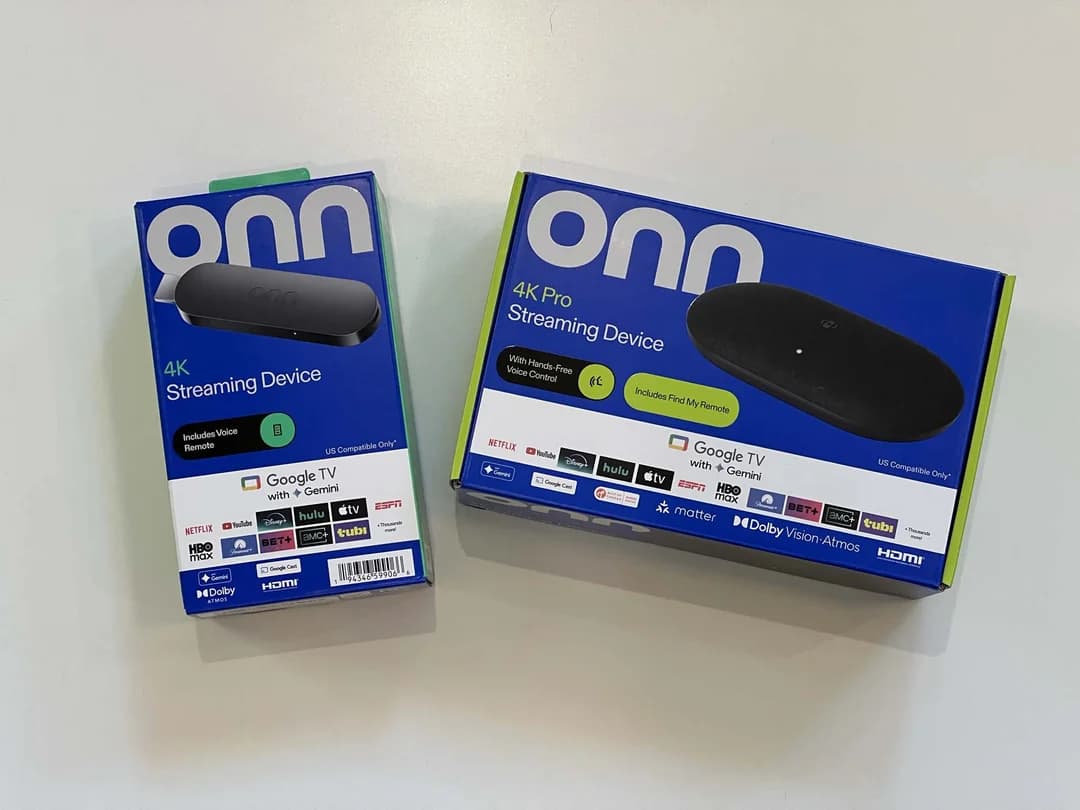
The Onn 4K Plus is Walmart's own-brand Google TV streaming device, sold under the onn. label in the US. It is a fully capable IPTV device — primarily because it runs Google TV (built on Android TV), giving it native access to the Google Play Store and every Android TV app including TiviMate.
The Onn 4K Plus sits above the standard Onn 4K in the range. Walmart's onn 4K Plus listing (checked 12 October 2026) gives it 16GB of storage, double the 8GB on the standard onn 4K, plus 2GB RAM and Dolby Vision and Dolby Atmos. The table below shows only what that listing states; check the box for anything else.
Operating System
Google TV (Android TV)
Resolution
4K UHD
HDR
Dolby Vision
Audio
Dolby Atmos
Storage / RAM
16GB / 2GB
Remote
Voice control
TiviMate
Available on Google Play Store
Sold in
US only (Walmart)
Walmart's 4K Plus listing mentions no Ethernet port. If you watch a lot of 4K content and want a wired connection, the Onn 4K Pro has one built in.
What is Google TV?
Google TV is a layer on top of Android TV, so every Android TV app runs on it — TiviMate, IPTV Smarters Pro, OTT Navigator, Kodi and VLC included. That is why the Onn 4K Plus is easier for IPTV than a Firestick: no sideloading, no developer mode, no APK hunting.
What Is TiviMate? The Best IPTV Player for Google TV
TiviMate is the most widely used IPTV player for Android TV and Google TV. It connects to any IPTV service using Xtream Codes credentials or an M3U playlist URL, downloads your full channel list and EPG, and presents them in a TV-optimised interface with a 7-day guide, catch-up, favourites, groups, parental controls and hardware-decoded 4K playback.
For a deep-dive on every feature, see our dedicated TiviMate review. If you want to compare it with IPTV Smarters Pro, OTT Navigator and Kodi on this device, our guide to the best IPTV apps UK ranks all four.
TiviMate on the Onn 4K Pro — What's Different?
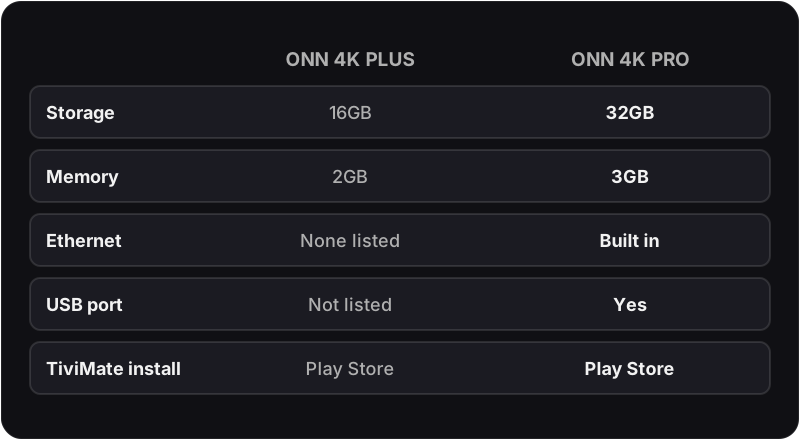
Searching for TiviMate on the Onn 4K Pro? Everything in this guide applies to the Pro exactly as written. It runs the same Google TV operating system as the 4K Plus, so TiviMate installs the same way — open the Google Play Store, search "TiviMate IPTV Player", tap Install. What the Pro changes is the hardware around TiviMate. Walmart's own onn 4K Pro listing (checked 12 October 2026) gives these specs, and two of them matter for IPTV:
Built-in Ethernet port
The 4K Pro has a built-in Ethernet port; the 4K Plus listing has none. A wired connection is the single most effective buffering fix for 4K IPTV — it removes Wi-Fi congestion entirely. On the Pro you just plug in a cable, then pick Ethernet under Settings → Network & Internet.
32GB storage, 3GB RAM and a USB port
Walmart lists 32GB of storage on the Pro, double the 16GB on the 4K Plus, plus 3GB RAM (2GB on the Plus) and a USB port for media and storage. TiviMate, a VPN app and a second player fit without uninstalling anything, and channel switching has more memory to work with.
TiviMate settings, EPG setup and Xtream Codes login are identical on both devices. If you are choosing between the two: the 4K Plus covers everything TiviMate needs, the 4K Pro is worth the extra cost if a wired Ethernet connection or more storage matters to you. Onn devices are sold by Walmart in the US; we found no UK retailer listing. Flickhaven has no affiliation with Walmart, onn or TiviMate.
Onn 4K Plus vs Firestick 4K for IPTV
The Amazon Firestick 4K is the default IPTV recommendation in most forum posts, but for TiviMate the Onn 4K Plus is the easier device. TiviMate is not in the Amazon App Store, so a Firestick needs developer mode and a sideloaded APK; the Onn installs it in one tap from Google Play and accepts any Android TV VPN or IPTV app without restriction. Choose the Firestick only if you prefer Alexa and the Amazon ecosystem.
For the Firestick route, read our IPTV Firestick setup guide and compare it against this guide.
How to Install TiviMate on Onn 4K Plus (Step-by-Step)
.webp&w=1920&q=75&dpl=dpl_42T38tP8oofjgCvVQ1KmArGr7XmZ)
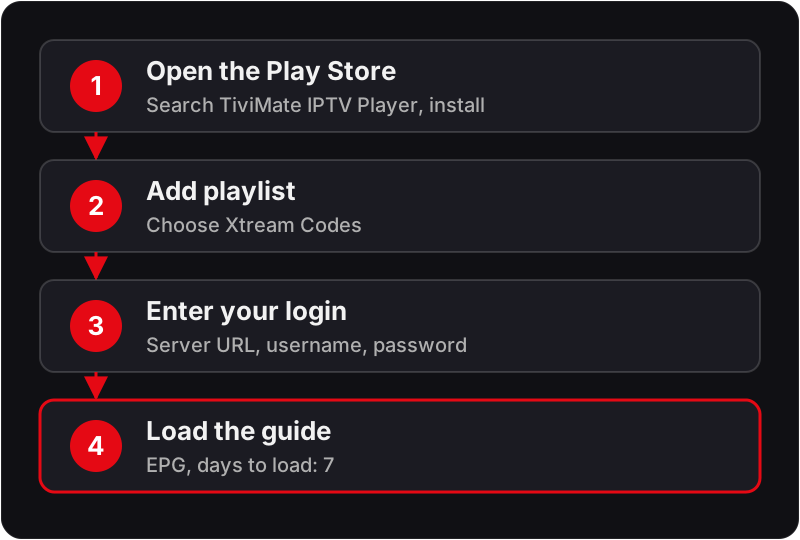
There is no developer mode to enable and no APK to sideload — TiviMate installs directly from the Google Play Store.
Set Up Your Onn 4K Plus
Plug the Onn 4K Plus into an HDMI port and connect USB-C power. Follow the on-screen Google TV setup — join Wi-Fi and sign in with your Google account.
Open Google Play Store
On the Google TV home screen, scroll to the Apps section and open the Google Play Store, or use the search icon at the top to search directly for TiviMate.
Search for TiviMate IPTV Player
In the Play Store search bar, type 'TiviMate IPTV Player'. Select the app by developer Artem Golitsyn and tap Install — it is free.
Open TiviMate and Add a Playlist
Tap Open. On the welcome screen, tap Add Playlist. You will see three options: Xtream Codes API, M3U URL, and Local File. Select Xtream Codes API — the format used by Flickhaven and most IPTV providers.
Enter Your IPTV Credentials
Enter your Server URL in the first field (the exact URL is in your welcome message), then your Username and Password. Flickhaven sends these on WhatsApp when you subscribe. Tap Add.
Wait for Channels to Load
TiviMate authenticates against the server and downloads your channel list, VOD library, series and EPG data. Allow a minute or two on a typical broadband connection — a progress bar shows the status.
Navigate Your Channel List
Your channels appear organised by group — UK channels, Sports, Movies, Entertainment, International and more. Select Live TV to start watching.
Add TiviMate to Your Home Screen
Long-press the TiviMate icon in the Apps section and select 'Move to top' or 'Add to home screen' for one-press access from the Google TV home screen.
Need IPTV credentials for TiviMate?
Flickhaven provides Xtream Codes credentials instantly via WhatsApp after subscribing. Free 24-hour trial — no credit card.
How to Set Up the EPG (TV Guide) in TiviMate on Onn 4K Plus
If your IPTV provider uses Xtream Codes (like Flickhaven), the EPG is embedded in your credentials and populates automatically — no separate EPG URL is needed. If the guide is empty after setup, follow these steps.
Open TiviMate Settings
From the TiviMate home screen, press the Menu button on your remote (or long-press OK), select Settings, then EPG.
Check EPG Sources
Under EPG → EPG Sources, your Flickhaven playlist should be listed with a green checkmark. If not, tap Add EPG Source and enter your Xtream Codes server URL.
Force an EPG Update
Tap Update EPG Now. TiviMate downloads programme data for every channel in your list; a counter shows the number of programmes loaded.
Set Days to Load
Set Days to Load to 7 for a full week's guide, and the EPG Update Interval to Every 12 Hours so the guide stays current without manual refreshing.
Browse the Guide
Return to Live TV and press the down arrow to open the guide. Left/right scrolls through time, up/down moves between channels, and OK on a programme watches it or sets a reminder.
Flickhaven includes EPG and 7-day catch-up on every plan — EPG data loads automatically with your Xtream Codes credentials.
TiviMate Buffering on Onn 4K Plus — Causes & Fixes
On the Onn 4K Plus, buffering has four root causes — and each has a targeted fix.
Slow or congested Wi-Fi (2.4GHz)
Most common cause
The Onn 4K Plus can default to the slower 2.4GHz band if both bands share one network name. Fix: Settings → Network → Wi-Fi → connect to your 5GHz network by name. If buffering persists, a wired connection removes Wi-Fi buffering entirely; the Onn 4K Pro has a built-in Ethernet port.
Small TiviMate buffer size
Common on 4K streams
TiviMate's default buffer is small for 4K HDR streams. Fix: TiviMate → Settings → Player → Buffer Size → increase to 10 seconds (15 for very large 4K streams). This pre-loads more of the stream and smooths over brief network hiccups.
Hardware decoding off or incorrect
Affects 4K specifically
If hardware decoding is disabled, the CPU decodes video in software and cannot keep up with 4K. Fix: TiviMate → Settings → Player → set Hardware Decoding to Auto, which hands decoding to the hardware decoder.
IPTV provider server overload
Occurs during peak events
During cup finals, Grand Prix weekends and fight nights, underpowered IPTV servers overload. Fix: check whether your provider has backup streams (labelled 'backup' or 'B2'). If not, this is a provider problem — switch to a service with load balancing such as Flickhaven's Anti-Freeze 8.1, which has a 99.9% uptime target.
For a complete IPTV buffering fix guide, see our article: IPTV not loading channels — full fix.
Choosing an IPTV Service for TiviMate on Onn 4K Plus
TiviMate is the player — it does not include any channels. You need a separate IPTV subscription that provides Xtream Codes credentials. Look for 4K UHD streams, UK-peered servers, a full UK EPG and a free trial so you can test on your own broadband before paying.
Flickhaven — IPTV for TiviMate on Onn 4K Plus
- ✓Xtream Codes credentials — native TiviMate integration
- ✓55,000+ live channels including all UK and international content
- ✓4K Ultra HD streams included on live sport, Premier League and Formula 1
- ✓Anti-Freeze technology — 99.9% uptime target, including peak match days
- ✓EPG and 7-day catch-up included — no separate EPG URL needed
- ✓180,000+ VOD titles — movies, box sets, documentaries
- ✓Free 24-hour trial — no credit card required
- ✓Plans from £15.00/month or £55.00 for 14 months (12 + 2 free)
TiviMate Settings to Change on Day One
Out of the box, TiviMate's defaults are conservative. These five changes improve the Onn 4K Plus experience from day one.
.webp&w=3840&q=75&dpl=dpl_42T38tP8oofjgCvVQ1KmArGr7XmZ)
Player → Hardware Decoding → Auto
Offloads 4K decoding to the hardware decoder. Removes stuttering on high-bitrate 4K streams.
Player → Buffer Size → 10 seconds
Smooths out brief network hiccups. Critical for stable 4K viewing.
EPG → Days to Load → 7
Loads a full week's programme guide. Essential for scheduling sport and catch-up.
EPG → Update Interval → Every 12 Hours
Keeps the guide current automatically without manual refreshing.
General → Start with Favourites → On
Opens TiviMate directly to your favourite channels, skipping the full list.
Going deeper on any topic? Read the TiviMate Full Review — Is It Worth It?, Best IPTV Apps for UK Viewers 2026, IPTV on Android TV — Complete Guide, IPTV on Firestick 4K — Setup Guide, IPTV Not Loading Channels — Fix Guide, EPG Not Working on IPTV — Fix Guide, Best IPTV Providers UK 2026, IPTV Free Trial UK — 24 Hours No Card, Xtream Codes IPTV — Full Explanation, our VPN guide for UK IPTV viewers, IPTV on Samsung Smart TV — Setup Guide and IPTV on LG TV — Setup Guide.
TiviMate Onn 4K Plus — Frequently Asked Questions
Does TiviMate work on the Onn 4K Plus?+
Onn 4K Plus or Onn 4K Pro — which is better for TiviMate IPTV?+
Can I use a VPN with TiviMate on Onn 4K Plus?+
Is there a UK alternative to the Onn 4K Pro or 4K Plus?+
Ready to Stream on Your Onn 4K Plus?
TiviMate is installed in one tap — now you need the IPTV subscription behind it. Flickhaven gives you 55,000+ live channels, 4K UHD, full EPG, and a 24-hour free trial with no credit card required.
No credit card required · Instant activation · Cancel any time
For the full IPTV picture: what IPTV actually is · IPTV UK guide · best IPTV UK 2026 · free IPTV trial.