Flickhaven IPTV UK
IPTV Keeps Buffering in the UK? 10 Fixes That Work
IPTV buffering almost always traces to one of four causes: not enough speed reaching the device, Wi-Fi instead of a cable, congestion at peak evening hours, or a player cache that needs clearing. Test your speed on the streaming device itself — about 10 Mbps for HD, 15 Mbps for Full HD and 25 Mbps for 4K — then move it to Ethernet or 5GHz Wi-Fi, restart the router and clear the app cache. If it only buffers in the evening, test with a VPN on a UK server.
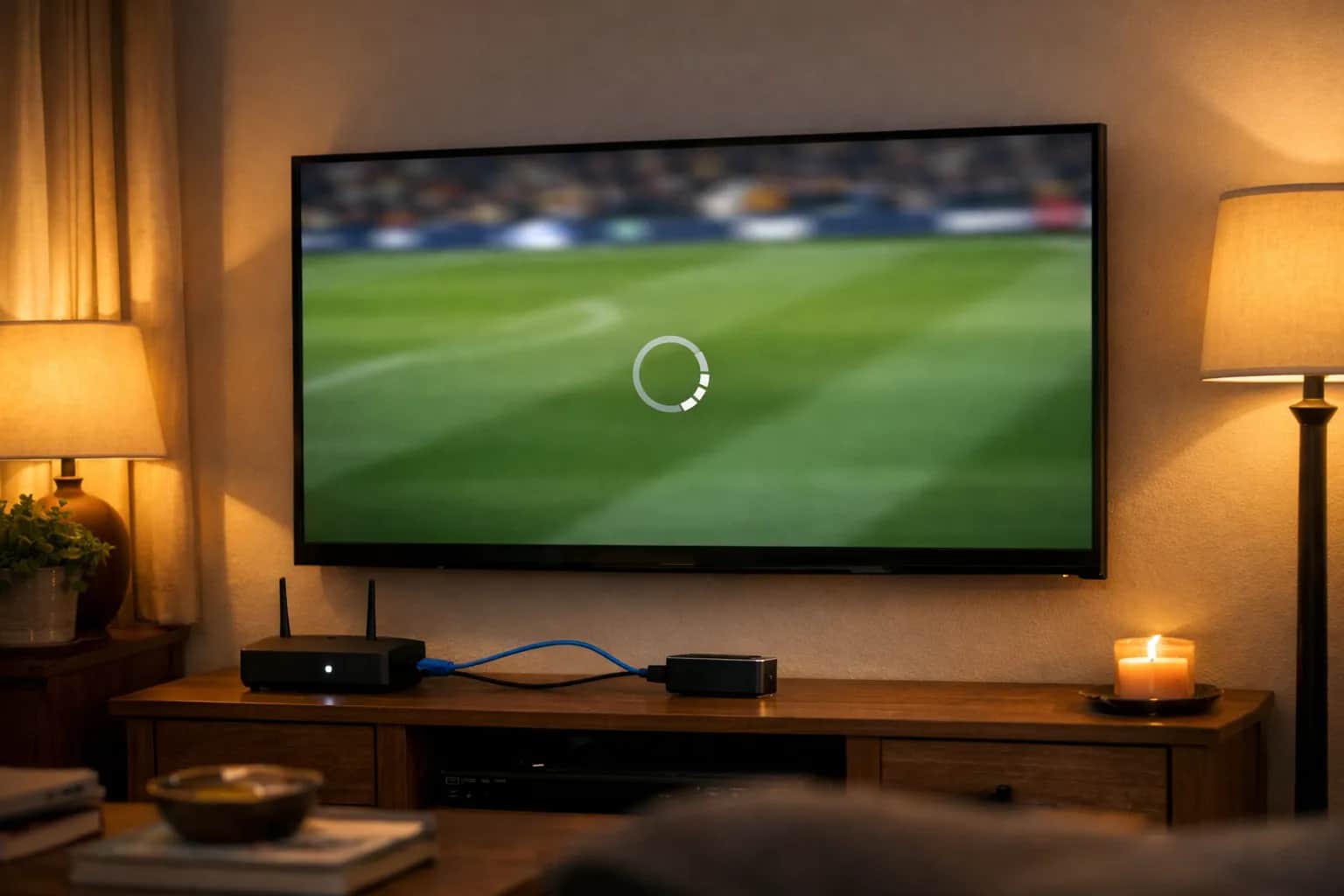
IPTV buffering in the UK is almost always caused by one of four things: a connection too slow for the stream (plan on 10 Mbps for HD, 15 Mbps for Full HD and 25 Mbps for 4K), a device on Wi-Fi instead of Ethernet, a server or ISP route overloaded at peak time, or a player app whose cache needs clearing. Test your speed, wire the device, then clear the app cache — in that order. If buffering only appears between 8pm and 10pm, evening congestion on your broadband is the more likely cause than your device.
Work through the list below from top to bottom. Most users solve their buffering with fixes 1–3. If channels will not start at all, see why IPTV channels won't load instead. For background on how IPTV streaming technology works, see these guides: beginner's guide to the technology, fixing audio that drifts out of sync and subtitles that will not show.
Where buffering starts, and the fix at each point
- Provider serverOverloaded at peak time
- Your broadband line10 Mbps for HD, 25 Mbps for 4K
- Router and Wi-FiWire the device with Ethernet
- Device and player appClear the app cache
Quick Diagnosis
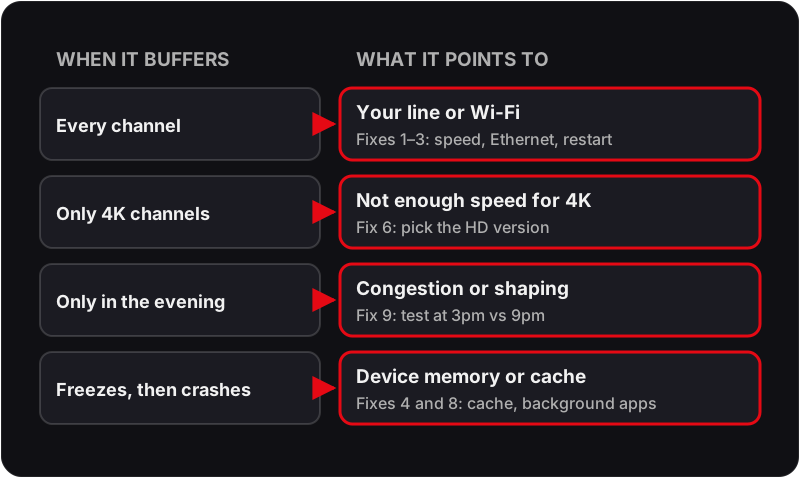
- ▸ Buffering on all channels → internet speed or router issue
- ▸ Buffering only on 4K channels → connection speed too low for 4K
- ▸ Buffering only in evenings → evening congestion or traffic shaping
- ▸ Buffering only on one channel → server issue, contact support
- ▸ Freezing then crashing → clear app cache or reinstall
Why Does IPTV Buffer So Much?
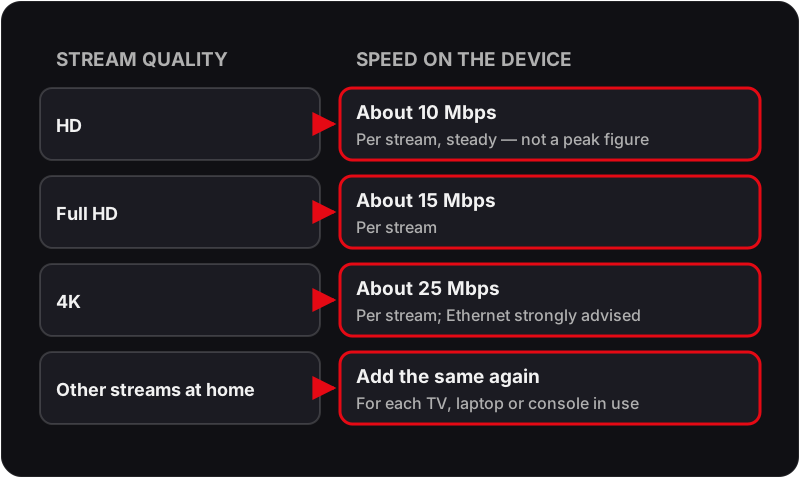
Because live IPTV has no room to catch up. A film on a streaming service can download minutes ahead; a live channel can only buffer a few seconds, so any dip in speed on the way to your TV shows up as a pause. The two tables below cover the speed each stream needs and what the timing of your buffering tells you.
Fix 1: Check Your Internet Speed
IPTV requires a stable connection. Plan on about 10 Mbps for HD, 15 Mbps for Full HD and 25 Mbps for 4K, per stream. Run a speed test at fast.com or speedtest.net on the streaming device itself.
- 1Open a browser on the streaming device and go to fast.com.
- 2Run the test and note your download speed.
- 3For HD: about 10 Mbps. Full HD: about 15 Mbps. 4K: about 25 Mbps.
- 4If speeds are low, restart your router and test again.
- 5Contact your ISP if speeds are consistently below expectations.
Fix 2: Connect via Ethernet Instead of Wi-Fi
Wi-Fi is the single most common cause of IPTV buffering. A wired Ethernet connection is always more stable and faster — especially for live sports and 4K streams.
- 1Get an Ethernet cable (and Amazon's Ethernet adapter for a Firestick).
- 2Connect your streaming device directly to your router.
- 3Restart the IPTV app and test the stream quality.
- 4If Ethernet is not possible, move your router closer to your streaming device.
Fix 3: Restart Your Router and Streaming Device
A simple restart clears memory and resets network connections — fixes many intermittent buffering issues instantly.
- 1Unplug your router from the power socket and wait 60 seconds.
- 2Restart your Firestick, Smart TV, or Android box.
- 3Plug the router back in and wait for it to fully reconnect.
- 4Open your IPTV app and test the stream.
Fix 4: Clear the IPTV App Cache
A bloated app cache slows down loading and causes freezing. Clear it regularly for smoother playback.
- 1On Firestick: Settings → Applications → Manage Installed Applications → select your IPTV app → Clear Cache.
- 2On Android: Settings → Apps → IPTV app → Storage → Clear Cache.
- 3On Smart TV: Settings → Apps → select IPTV app → Clear Cache.
- 4Restart the app after clearing the cache.
Fix 5: Switch Your DNS Server
Your ISP's default DNS can be slow to answer, which shows up as channels that take a long time to start. Switching to Google DNS (8.8.8.8) or Cloudflare (1.1.1.1) can speed that up. It does not get round traffic shaping — for that, see fix 9.
- 1On your router: log in to your router admin panel (usually 192.168.1.1).
- 2Find DNS settings and change Primary DNS to: 8.8.8.8
- 3Set Secondary DNS to: 8.8.4.4 (Google) or 1.1.1.1 (Cloudflare).
- 4Save and restart the router.
- 5Alternatively, change DNS in your device's Wi-Fi settings directly.
Fix 6: Change the Stream Quality in Your IPTV App
If your connection cannot sustain 4K or Full HD, watch a lower-quality version of the channel. In most IPTV playlists each quality is its own entry — the same channel listed as 4K, FHD, HD or SD — rather than a setting inside the player.
- 1Open the channel group in your IPTV app (TiviMate, IPTV Smarters, etc.).
- 2Look for the same channel listed more than once with a quality label.
- 3Pick the HD or SD entry instead of 4K or FHD.
- 4Add that version to Favourites so you go straight to it next time.
- 5Test if buffering stops at the lower quality.
Fix 7: Use a Different IPTV Player
Players handle the same stream differently. If you're using IPTV Smarters and buffering persists, try the same login in TiviMate (or the other way round) — if the second player is smooth, the first one is the problem.
- 1On Firestick or Android: install TiviMate from the Play Store or via sideload.
- 2Log in with your Flickhaven Xtream Codes credentials.
- 3Test the same channels that were buffering.
- 4Alternatively, try MX Player or VLC as external player options within your current app.
Fix 8: Close Background Apps
Other apps running in the background consume RAM and bandwidth, causing IPTV to buffer. Force-close all background apps before streaming.
- 1On Firestick: hold the Home button → App Switcher → swipe up to close all apps.
- 2On Android: tap the square/recent apps button and swipe away all open apps.
- 3On Smart TV: press and hold the Home button and close background apps.
- 4Open your IPTV app fresh and test streams.
Fix 9: Check if Your ISP is Throttling IPTV
Some broadband providers manage heavy streaming traffic at peak times (evenings and weekends). A VPN hides the type of traffic, so if shaping is the cause, a VPN on a UK server can smooth it out.
- 1Run a speed test at normal times and at peak times (7–10pm).
- 2If speed drops significantly during peak hours, throttling is likely.
- 3Install a VPN app on your Firestick, Android, or router.
- 4Connect to a UK server via the VPN.
- 5Test your IPTV streams with the VPN active — buffering should reduce.
💡 Choose a VPN with a Fire TV app and UK servers, and always connect to a UK location — a distant server adds delay that looks like buffering.
Fix 10: Contact Your IPTV Provider
If you've tried all the above and buffering persists, the issue may be a server-side problem. Contact your provider — a good IPTV service will diagnose and fix it quickly.
- 1Message your provider on WhatsApp with details of the buffering (device, app, channels affected, time of day).
- 2Ask if there are server issues or if your account needs to be moved to a different server.
- 3Flickhaven support runs 24/7 on WhatsApp — a specific channel name and time is the quickest thing to check.
IPTV Keeps Buffering — Frequently Asked Questions
Why does my IPTV buffer so much?+
Persistent IPTV buffering almost always comes down to one of four things: not enough bandwidth reaching the device (Wi-Fi, not the headline broadband speed), an ISP shaping video traffic at peak time, a player buffer or cache that is too small or corrupted, or an overloaded server at the provider's end. Fixes 1–4 on this page deal with the first three; if buffering follows you across devices and connections, it is the provider.
How do I fix IPTV buffering in the UK?+
In order: run a speed test on the streaming device itself (about 10 Mbps for HD, 15 Mbps for Full HD, 25 Mbps for 4K); move the device to Ethernet or 5GHz Wi-Fi; restart the router and the device; clear the IPTV app's cache; and if it only happens between 7pm and 10pm, test with a VPN to rule out ISP throttling. Most UK cases are solved by the first two steps.
Why is my IPTV slow to load channels?+
Slow channel changes are a different problem from mid-stream buffering. They usually mean the app is parsing a very large playlist on a low-memory device, or the player buffer is set high so each new stream has to fill it before playing. Trim the playlist to the groups you watch and, if your player has a buffer setting, keep it moderate rather than at maximum — channel changes then start in a second or two.
Why does my IPTV only buffer in the evening?+
Evening-only buffering points at congestion outside your home: either your ISP is shaping streaming traffic at peak time, or the provider's servers are busy. Test at 3pm and again at 9pm on the same channel; if the afternoon is clean and the evening stutters, try a VPN on a UK server (which defeats ISP shaping but not a busy provider). If the VPN makes no difference, the bottleneck is the service.
Does a VPN stop IPTV buffering?+
Only when the cause is your ISP slowing down streaming traffic. A VPN hides what you are streaming so the shaping does not apply, which can turn a stuttering peak-time stream into a smooth one. It cannot add bandwidth you do not have, and a distant VPN server will make things worse — always pick a UK location. If streams buffer with and without the VPN, look at Wi-Fi and the provider instead.
Does IPTV keep buffering because of my Firestick?+
Often, yes — older Fire TV Sticks have little memory for big playlists and 4K streams, and Wi-Fi is less steady than a cable. Clear the app cache, close background apps, plug in Amazon's Ethernet adapter, and use a lighter player on older sticks. A current Fire TV Stick 4K Max or an Android box with Ethernet removes most device-side buffering.
Why is my IPTV freezing?+
A picture that freezes for a second and carries on is buffering — the stream ran out of data. A picture that freezes and stays frozen, or takes the app down with it, is usually the device: low memory, a bloated cache or an app that needs reinstalling. Work through fixes 1–3 for the first kind and fixes 4 and 8 for the second.
Still Buffering After All Fixes?
The problem may be your current IPTV provider — not your connection. Flickhaven uses Anti-Freeze technology and runs to a 99.9% uptime target. Try it free for 24 hours.
More on the basics: IPTV UK guide, our provider comparison, free IPTV trial, the speed your line actually needs and every other IPTV fault.