Flickhaven IPTV UK
IPTV on Apple TV: Setup, Best Apps and Fixes (UK)
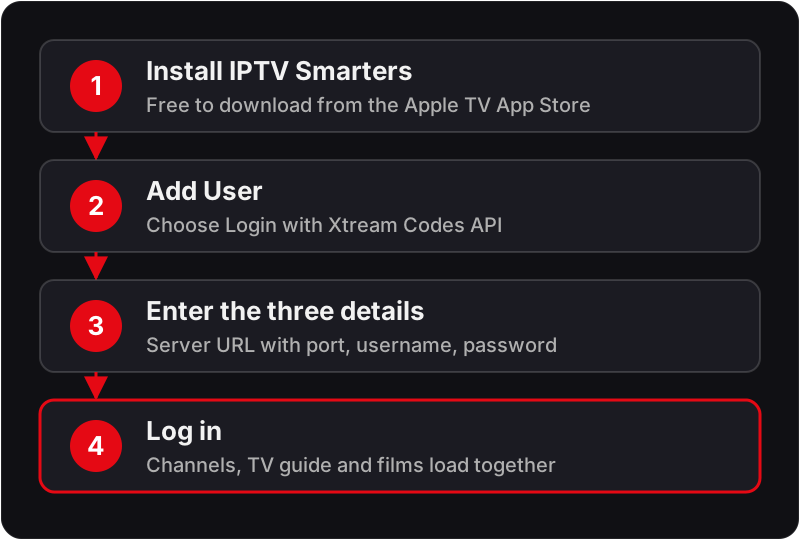
Getting IPTV on Apple TV takes one Apple TV IPTV app from the App Store, with no jailbreak. Install IPTV Smarters Pro, choose Login with Xtream Codes API, and enter the server URL with its port, your username and your password exactly as sent. The channels, guide and films then load together. Any Apple TV 4K or Apple TV HD works; the 2012 Apple TV 3rd gen has no App Store and cannot run an IPTV app.
You can install IPTV on Apple TV in under 5 minutes using IPTV Smarters Pro — available free on the official Apple TV App Store. No jailbreak, no sideloading, and no external device required. This guide covers every method to get IPTV on Apple TV 4K and Apple TV HD, plus troubleshooting for the most common issues. New to IPTV? See our IPTV explained for UK viewers for a full overview.
Setting up a different screen? Our IPTV device compatibility guide covers the rest.
Setting up other screens with the same login? Our step-by-step IPTV installation guide covers every other device, from Firestick and Smart TVs to phones and PCs.
What You Need
- ✓Apple TV 4K (any generation) or Apple TV HD
- ✓Flickhaven IPTV credentials — Server URL, Username, Password
- ✓Home broadband — 10 Mbps+ for HD, 25 Mbps+ for 4K UHD
- ✓iPhone or iPad nearby (makes entering credentials easier)
Which Apple TV Models Support IPTV?
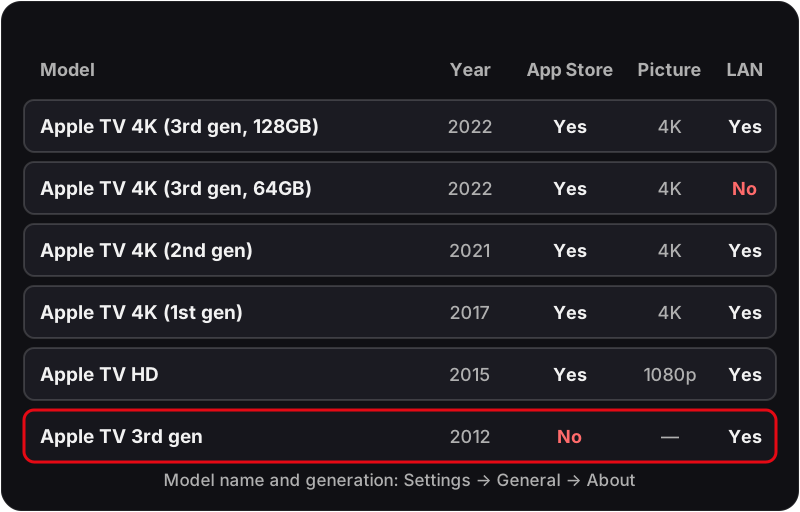
| Model | Year | App Store IPTV | 4K Streaming |
|---|---|---|---|
| Apple TV 4K (3rd gen) | 2022 | ✓ | ✓ (up to 4K HDR) |
| Apple TV 4K (2nd gen) | 2021 | ✓ | ✓ (up to 4K HDR) |
| Apple TV 4K (1st gen) | 2017 | ✓ | ✓ (up to 4K HDR) |
| Apple TV HD (4th gen) | 2015 | ✓ | 1080p only |
| Apple TV 3rd gen | 2012 | ✗ | No App Store support |
Not sure of your model? Go to Settings → General → About on your Apple TV — the model name and generation are listed.
Why Your Apple TV App Store Might Show Different Apps
Apple ties App Store listings to the region on your Apple ID, not to your physical location or your Apple TV's IP address. If your Apple ID was created while living abroad, or you're in a Family Sharing group organised by someone with a non-UK Apple ID, your Apple TV's App Store can quietly serve the wrong region's catalogue — occasionally hiding IPTV Smarters Pro or showing a different version of it. To confirm you're on the UK store, check Settings → Users and Accounts → your Apple ID, and make sure the account's country is set to United Kingdom. Switching region on an existing Apple ID also pauses active subscriptions and requires a valid UK payment method, so it's worth checking this before assuming an app "isn't available here."
Method 1: IPTV Smarters on Apple TV (Recommended — Free)
💡 Use your iPhone as a keyboard for Apple TV — when a text field opens, tap the keyboard notification that appears on your iPhone (signed in to the same Apple ID or on the same Wi-Fi) and type your credentials there.
Need an IPTV subscription for Apple TV?
Flickhaven gives you 55,000+ channels, with 4K UHD where broadcast — set up on your Apple TV in under 5 minutes.
Method 2: GSE Smart IPTV (Best TV Guide Layout)
💡 GSE Smart IPTV has the best EPG TV guide layout — ideal for watching scheduled UK programmes.
Method 3: AirPlay from iPhone or iPad
💡 AirPlay works instantly and requires no setup on Apple TV — but for the best picture quality and reliability, use the native App Store method above.
UK Broadband Notes for Apple TV
Apple TV leans on Bonjour/mDNS (multicast) for device discovery, AirPlay and parts of the App Store's local network features — and that's the traffic most likely to trip over a UK router's default settings:
- Virgin Media — the Hub (3, 4 or 5) can run a fairly strict default NAT/firewall profile. It's rarely a problem for the App Store method above, but if AirPlay (Method 3) can't find your Apple TV, check Advanced Settings → Firewall, or try Modem Mode if you're running your own router behind it.
- BT — the mesh Wi-Fi discs and Smart Hub 2 sometimes ship with client (AP) isolation switched on for guest networks. Harmless for browsing, but it blocks the local discovery AirPlay needs — make sure your Apple TV and iPhone are on the same, non-guest Wi-Fi network.
- Peak hours — UK viewing hours (roughly 6–10pm) see the highest contention across most UK ISPs. For 4K UHD streaming specifically, a wired Ethernet connection avoids most of it — every Apple TV 4K and Apple TV HD has an Ethernet port except the 64GB Wi-Fi-only Apple TV 4K (3rd gen).
- Content filters — BT, Virgin Media, TalkTalk and EE have all shipped default-on family content filters since 2013. Worth checking if an App Store search for IPTV Smarters Pro comes back empty on a home network with parental controls switched on.
Watching UK Sport on Apple TV
If Premier League football is the main draw, remember kick-off times in your EPG follow UK clock changes — GMT in winter, BST from late March — so double-check fixture times after the clocks change if the guide looks an hour out. UK viewers used to BBC iPlayer and ITVX's multi-day catch-up windows should also check what catch-up/timeshift range each channel actually offers, rather than assuming it behaves exactly like the broadcaster apps.
The Best IPTV App for Apple TV: Three Players Compared
There is no single best IPTV player for Apple TV for everyone: IPTV Smarters Pro is the easiest all-rounder, GSE Smart IPTV has the better guide grid, and a lightweight M3U player suits a short channel list. Check current prices on the App Store before you buy.
★★★★★
Free
- ✓Free on Apple TV App Store
- ✓Live TV, VOD and series in one app
- ✓Xtream Codes & M3U support
- ✓Works on all Apple TV 4K and HD models
- ✓Multi-screen UI with parental controls
★★★★☆
Free + in-app
- ✓Best EPG TV guide layout on Apple TV
- ✓Clean interface for UK scheduled TV
- ✓Full Xtream Codes & M3U support
- ✓Works on all current Apple TV models
- ✓Stable 4K playback
★★★☆☆
Check App Store
- ✓Lightweight and fast
- ✓Simple M3U playlist loader
- ✓Good for basic channel lists
- ✓Less feature-rich than Smarters
- ✓No Xtream Codes login — M3U only
Apple TV IPTV — Troubleshooting
❓ IPTV Smarters Pro not found on Apple TV App Store
The App Store follows your Apple ID's country, not the Apple TV's language settings: check Settings → Users and Accounts → your Apple ID and confirm it is United Kingdom. If the app still doesn't appear, try GSE Smart IPTV as an alternative — it is also available in the UK App Store.
❓ Channels not loading after entering credentials
Copy-paste your Server URL, Username, and Password from your Flickhaven activation message. Check for spaces at the start or end. The Server URL should start with http:// or https:// and include the port number (e.g. :8080).
❓ IPTV buffering on Apple TV
Switch your Apple TV to 5GHz Wi-Fi: Settings → Network → Wi-Fi → select your 5GHz network. For 4K UHD channels, plug an Ethernet cable into the Apple TV's LAN port (every model except the 64GB Apple TV 4K 3rd gen has one).
❓ Black screen on some channels
Go into IPTV Smarters Pro → Settings and switch to the other player option if the app offers one. Some channels need a different decoder, and switching fixes most black screen issues on Apple TV.
❓ App crashes or freezes
Force-quit the app (double-press the TV button to open the app switcher, then swipe the app up) and relaunch. If the issue persists, delete and reinstall IPTV Smarters Pro. Also restart your Apple TV (Settings → System → Restart) to clear memory.
❓ EPG (TV guide) not showing
In IPTV Smarters Pro, go to Settings → EPG Settings → Update EPG. Allow 3–5 minutes. Ensure your Flickhaven credentials are entered via Xtream Codes (not M3U) as the EPG data is embedded in the Xtream Codes feed.
❓ App Store shows no results for 'IPTV Smarters Pro' in the UK
This is almost always an Apple ID region mismatch rather than the app being pulled from the store. Check Settings → Users and Accounts → your Apple ID → Country/Region. If it isn't set to United Kingdom, switching it requires clearing any pending purchases and adding a UK payment method — or sign in with a different Apple ID that's already on the UK store.
Channels still missing? See why IPTV channels fail to load.
Apple TV IPTV — Frequently Asked Questions
Can you install IPTV on Apple TV?+
Yes. Install IPTV Smarters Pro or GSE Smart IPTV, both free to download from the Apple TV App Store — no jailbreak required. Enter your Flickhaven Xtream Codes credentials and the channel list, guide and VOD load in the app.
What is the best IPTV app for Apple TV?+
For most people, IPTV Smarters Pro is the best IPTV app for Apple TV — free on the App Store, supports Xtream Codes and M3U, includes live TV, VOD, and series. GSE Smart IPTV is the best alternative for a traditional TV guide layout.
How do I install IPTV on Apple TV 4K?+
Open App Store on Apple TV 4K → search IPTV Smarters Player (listed as Smarters Player Lite on some storefronts) → install free → open → Add User → Login with Xtream Codes API → enter your Flickhaven Server URL, Username, Password → Login. Done in under 5 minutes.
Does IPTV work on Apple TV without jailbreak?+
Yes. IPTV Smarters Pro and GSE Smart IPTV are on the official App Store — no jailbreak, sideloading, or developer account needed. Just install, enter your credentials, and stream.
Which Apple TV models support IPTV?+
Apple TV 4K (1st, 2nd, 3rd gen) and Apple TV HD all support IPTV via the App Store. The older Apple TV 3rd gen (2012) does not support App Store apps and cannot run IPTV.
What is the best IPTV player for Apple TV if I want a TV guide grid?+
GSE Smart IPTV. IPTV Smarters Pro is the easier all-rounder, but GSE lays its EPG out as a traditional channel-by-time grid, which suits scheduled UK viewing. Both take the same Xtream Codes login, so you can install both and keep whichever you prefer.
Why is my IPTV not working on Apple TV?+
Check your credentials — copy-paste from your Flickhaven activation message. Check your internet speed (needs 10 Mbps+ for HD). Delete and reinstall the app. Contact Flickhaven on WhatsApp for instant help.
Why can't I find IPTV Smarters Pro on my UK Apple TV App Store?+
It's almost always an Apple ID region setting, not an availability issue — Apple serves App Store listings based on your Apple ID's registered country, not your Apple TV's location. Check Settings → Users and Accounts → your Apple ID and confirm the country is United Kingdom. GSE Smart IPTV is a good fallback if you'd rather not change region settings.
Does my UK broadband provider affect IPTV on Apple TV?+
It can. Virgin Media's Hub and BT's mesh Wi-Fi discs sometimes run firewall or AP-isolation settings that interfere with Bonjour/AirPlay discovery, and UK peak hours (6–10pm) bring the most network contention on most ISPs. A wired Ethernet connection to your Apple TV avoids most of these issues, especially for 4K streaming.
Related Guides
Need Help Setting Up on Apple TV?
Our team will walk you through setup on your specific Apple TV model via WhatsApp — for free, 24/7.
Related reading: what IPTV costs in the UK, which IPTV providers are worth paying for and IPTV free trial UK.