IPTV UK Payment Methods
— Card, Google Pay, Apple Pay & More
Flickhaven accepts Visa, Mastercard, Google Pay and Apple Pay payments processed by third-party providers, so card details are never handled directly. Payment is a single charge for the term selected, with nothing stored for automatic renewal. This page sets out which methods are available, how the payment flow works, when credentials are issued relative to payment clearing, and what to do if a payment succeeds but activation has not arrived within the expected window.
Pay for IPTV the same way you pay for anything else online. Flickhaven accepts Visa, Mastercard, Apple Pay and Google Pay — with a free trial before any payment at all.
Card · Google Pay · Apple Pay
Standard, protected payments
No Crypto, No Gift Cards
Reversible methods only
Trial Before Payment
24 hours free, no card needed
Every Payment Method Flickhaven Accepts
All methods buy the identical prepaid Flickhaven subscription plansat the identical prices — from £15.00 for 1 month to £55.00 for 12 months + 2 free.
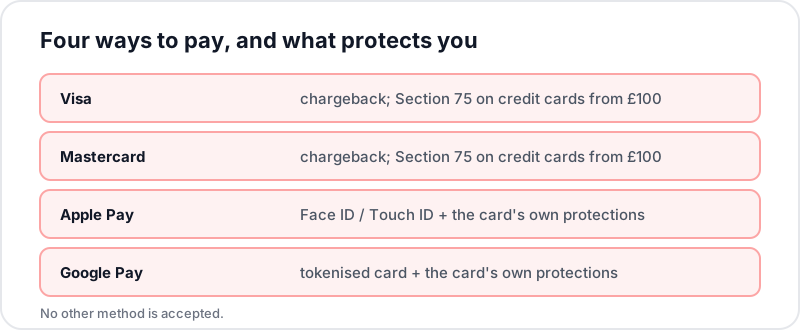
Credit / Debit Card
Visa · MastercardThe most common choice. Processed securely with full encryption — card details never sit with the provider.
Protection: Chargeback rights; Section 75 protection on credit card purchases of £100 or more
Apple Pay
Face ID / Touch IDFastest checkout on iPhone, iPad, and Mac — one tap and the transaction is done.
Protection: Device-level authentication; underlying card protections still apply
Google Pay
One-tap checkoutThe Android equivalent — your real card number is never shared.
Protection: Tokenised card details; underlying card protections still apply
Why Payment Methods Are the #1 Provider Test
Before you compare channel counts or picture quality, look at how a provider asks to be paid. It is the single fastest signal of legitimacy: a provider that accepts cards and Google Pay is accepting reversible payments — it only gets to keep your money if it actually delivers the service. A provider that will only take cryptocurrency or gift cards has structured its payments so you can never get your money back.
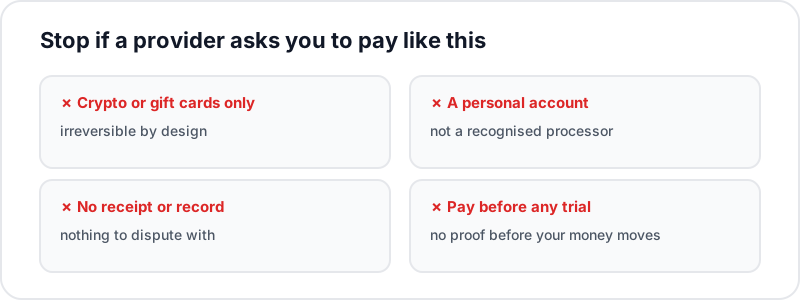
✗Crypto or gift cards are the ONLY payment option▼
Irreversible, untraceable payment is what a provider chooses when it expects disputes. No chargebacks, no recourse if the service vanishes next month.
✗Payment link sent from a random personal account▼
Legitimate providers process payments through recognised processors. A payment request from an unrelated personal Google Pay or bank account is a warning sign.
✗No receipt, no order confirmation, no record▼
You should always have a written record of what you paid, when, and for which plan — in the chat, by email, or both.
✗Demands full payment before any trial▼
A provider confident in its service lets you test it first. Payment-before-proof combined with no-refund policies leaves you with zero leverage.
How to Pay for IPTV, Step by Step
Take the free trial first
Message via WhatsApp and get 24-hour trial credentials with no card required. Verify sports channels, 4K quality, and EPG on your own devices before any money moves — the 15-minute IPTV test guide linked below lists exactly what to check.
Choose your plan in the chat
1 month at £15.00, 3 months at £25.00, 6 months at £35.00, or 12 months + 2 free at £55.00 (£3.93/month effective). Every plan is a one-off payment: prepaid, with no contract and no auto-renewal.
Pay with the method you prefer
Visa, Mastercard, Apple Pay or Google Pay — a secure payment link is sent in the conversation and a confirmation follows once it completes.
Credentials arrive in minutes
Your subscription login is sent in the same chat right after payment confirms — activation is instant, with no hardware and no waiting.
Full activation walkthrough: Instant Activation IPTV UK. Before the trial, read the 15-minute IPTV test guide so you know what to check while it runs.
The Best Way to Pay for IPTV: Which Method to Choose
All four methods buy the same plans at the same prices, so the choice comes down to the device in your hand and how much of a paper trail you want.
You are on an iPhone, iPad or Mac
Apple Pay
The payment link opens in Safari and completes with Face ID or Touch ID. Your card keeps its own chargeback rights underneath.
You are on an Android phone or tablet
Google Pay
Same idea: the card saved in Google Wallet pays through a token, so the real card number is never typed anywhere.
You are paying from a laptop or want a paper trail
Visa or Mastercard
A card payment leaves a line on your statement with the amount and date, which is what you need if you ever have to raise a dispute.
One honest note on Section 75: it only applies to credit card purchases of £100 or more. Of the plans on sale, only these reach it: 12 Months + 2 FREE for 3 devices (£123.75), 12 Months + 2 FREE for 4 devices (£154.00). For every other plan the protection that applies is the ordinary chargeback route on a debit or credit card.
If a Payment Does Not Go Through
✗The payment link will not open or shows an error▼
Links are single-use and tied to the plan you asked for. Ask for a fresh one in the same chat rather than retrying an old one, and open it in your normal browser rather than inside the WhatsApp preview.
✗My card was declined▼
Most declines are your bank's online-purchase check, not the payment itself. Look for an approval prompt in your banking app, approve it, then retry the same link. If it declines twice, switch to Apple Pay or Google Pay on the same card.
✗The payment went through but I have no credentials▼
Check the same WhatsApp chat first, since login details are sent there, then message support. Support is staffed 24/7, so a payment is picked up at any hour.
✗I chose the wrong plan▼
Say so in the chat straight away, before you start watching. The 7-day money-back guarantee in the refund policy covers a service problem that cannot be fixed, not a wrong plan, so tell support at once.
Frequently Asked Questions
QWhat payment methods does Flickhaven accept?▼
Four methods: Visa, Mastercard, Google Pay and Apple Pay. Flickhaven does not take bank transfer, PayPal, cryptocurrency or gift cards. Every method buys the same plans at the same prices, and all card and wallet payments go through a secure payment link rather than a card number typed into a chat.
QCan I pay for IPTV with Google Pay in the UK?▼
Yes. Many subscribers prefer Google Pay because it keeps card details out of the merchant flow entirely, and the card saved in Google Wallet keeps its own chargeback rights.
QIs it safe to pay for IPTV with a credit card?▼
With a legitimate provider, yes — a credit card is one of the safest options because Section 75 and chargeback rights protect card payments. The warning sign is a provider that refuses cards and demands crypto or gift cards only.
QWhy do some IPTV providers only accept crypto?▼
Crypto-only payment means transactions that cannot be reversed. For you that means no chargeback rights and no recourse if the service disappears. Treat crypto-only or gift-card-only payment as a major red flag.
QDo I have to pay before trying the service?▼
No. Flickhaven offers a free 24-hour trial via WhatsApp with no credit card required. Test the full service first and only pay once you have verified it works on your devices.
QCan I pay monthly for IPTV?▼
Yes, by buying the 1-month plan each month. Nothing renews automatically, so each month is a separate one-off payment that you choose to make; skip a month and nothing is charged.
QDoes Flickhaven store my card details?▼
There is nothing to store. Payment is taken through the secure link for the plan you chose, and because every plan is prepaid with no auto-renewal, no recurring mandate is set up against your card. When the plan ends you choose whether to pay again, by any of the four methods, and nothing is taken without that choice.
QCan I pay by bank transfer, PayPal, cryptocurrency or a gift card?▼
No. Flickhaven takes Visa, Mastercard, Google Pay and Apple Pay only. If anyone claiming to be Flickhaven asks for a bank transfer, crypto, a gift card or PayPal, stop and message support through the number on this site.
Related Guides
Try Free First — Then Pay However You Prefer
Free 24-hour trial with no card required. When you are ready, pay by Visa, Mastercard, Apple Pay or Google Pay — from £15.00 with no contract.