Instant Activation IPTV UK
— Watching Within Minutes
Activation is not automated instantly in the way an app-store purchase is — credentials are issued by a person, usually within minutes of payment, and support works 24/7. You receive a server URL, username and password on WhatsApp, enter them into a player app, and the channel list loads immediately. The realistic expectation is minutes rather than seconds. This page explains the process end to end.
No engineer visit, no dish, no box in the post. Message us on WhatsApp, get your login in minutes, and you have instant access to the full 55,000+ channel lineup on the device you already own.
Setup in Minutes
Credentials sent via WhatsApp
No Hardware Needed
Works on your existing devices
Free Trial First
24 hours, no card required
IPTV Activation: From First Message to Live TV in 4 Steps
The entire process happens in one WhatsApp conversation, which is also the first place to look if you ever lose your IPTV login details. Most new subscribers are watching within 15 minutes of their first message.
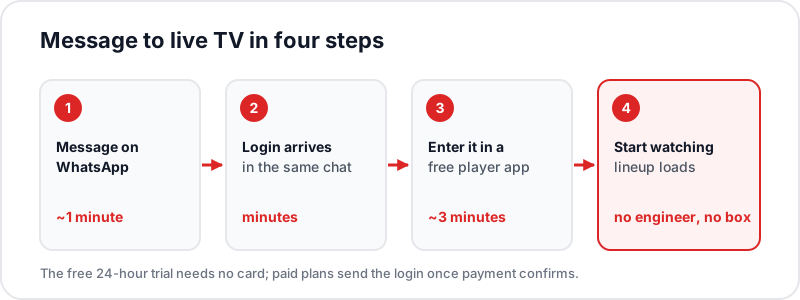
Message us on WhatsApp
~1 minuteOne tap on the button below opens the chat. Say you want the free trial or name the plan you want — a human replies, not a bot.
Receive your login credentials
MinutesTrial credentials are free with no card. For paid plans, pay by Visa, Mastercard, Apple Pay or Google Pay and credentials follow in the same chat.
Enter them in a free player app
~3 minutesIPTV Smarters, TiviMate, IBO Player — whichever suits your device. Enter the username, password, and server URL from the chat.
Start watching
InstantThe full lineup loads immediately: live sports in 4K, fight nights, 55,000+ channels, and the complete VOD library.
Activation Time vs Traditional TV Services
| Service | Wait Before Watching | Why the Wait |
|---|---|---|
| Satellite TV installation | 7–14 days | Engineer appointment, dish installation, hardware delivery |
| Cable TV installation | 5–14 days | Engineer visit and line activation required |
| Broadband TV box services | 2–5 days | Set-top box shipped by post |
| Flickhaven IPTV | Minutes | Credentials sent over WhatsApp — no hardware, no visits |
IPTV activation is instant because there is nothing physical to deliver or install — the service streams over the broadband you already have, to devices you already own. If a big match kicks off tonight, you can be set up before the teams walk out.
Works Immediately on the Devices You Own
Need setup help? Step-by-step guides: Fire Stick · Samsung TV · LG TV · IPTV Smarters Pro— or ask on WhatsApp and support walks you through it live.
Have These Ready Before You Message
Quick activation only stays quick if nothing on your side holds it up. Five minutes of preparation means the credentials go straight into a working app.
- A player app already installed on the device you will watch on. IPTV Smarters Pro, TiviMate and IBO Player all accept the same login.
- The device on your home Wi-Fi, not a guest network or mobile data, and ideally wired if it is a box next to the router.
- Your choice of plan, or simply ask for the free 24-hour trial first and decide later.
- A payment method to hand for paid plans: Visa, Mastercard, Google Pay and Apple Pay are accepted.
- Any VPN switched off for the first login, so the player reaches the server directly. You can turn it back on once channels load.
How to Activate IPTV: Entering the Credentials Correctly
The message you receive contains three things: a server URL, a username and a password. In most player apps you add them under a login type called Xtream Codes API, and the app then builds the channel list, VOD library and EPG by itself. Our guide to how Xtream Codes logins work explains what the app does with them behind the scenes.
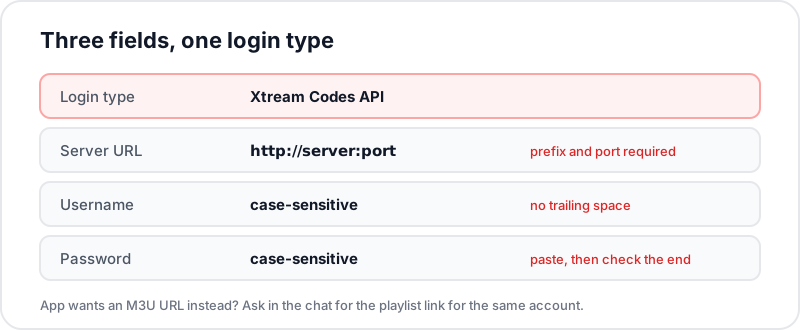
- Type the server URL in full, including the http:// prefix and the port number after the colon. Leaving either out is the most common reason a first login fails.
- Usernames and passwords are case-sensitive. Copy and paste where the device allows it, then delete any space that comes along at the end.
- If your app asks for an M3U URL instead, say so in the chat and support sends the matching playlist link for the same account.
- Give the app a moment after login. Building a 55,000+ channel list takes longer than opening one stream.
If Something Does Not Load
Credentials have not arrived
Likely cause: The payment has not completed yet, or the message went to a different chat.
Check: Look at whether the payment shows as sent or received, and that you messaged the same WhatsApp number.
Fix: Message support again in the same chat; if the payment did not go through, ask for a fresh payment link.
"Failed to authorise" or "invalid login"
Likely cause: A typo, a trailing space, or the wrong login type selected.
Check: Retype the three fields slowly and confirm the login type is Xtream Codes API.
Fix: Correct the field and try again. If it still fails, send a screenshot of the error in the chat.
The channel list loads but streams do not play
Likely cause: A VPN or an ISP content filter is in the way, or the stream is already open on another device.
Check: Turn the VPN off, close the player on any other device, and try one UK channel.
Fix: If it plays, re-enable the VPN afterwards and test again. If it does not, check your router's parental control settings for a filter.
The guide is empty
Likely cause: The EPG downloads after the channel list and takes a few minutes on first login.
Check: Open the app's EPG or settings page and look for an update option.
Fix: Run the EPG update manually once, then leave the app open while it fills.
Instant IPTV Subscription Plans — All Activated Instantly
1 Month
£15.00
£15.00/mo
6 Months
£35.00
£5.83/mo
12 Months + 2 FREE
£55.00
£3.93/mo
Every Flickhaven subscription plan is prepaid with no contract and no auto-renewal, and includes the full lineup: live sports, fight nights, 55,000+ channels, 180,000+ VOD, 4K UHD.
Who Quick Activation Suits, and What to Test First
Same-day activation matters most in three situations: a match or premiere is on tonight and you have no way to watch it; you have just moved and the old TV service is not yet connected; or you are cancelling a satellite or cable package and want the replacement running before the notice period ends.
Use the free 24-hour trial deliberately rather than flicking around. Play the channels you actually watch, at the time you actually watch them, and keep one live stream running for half an hour at peak evening time. If it stalls, try our steps to stop IPTV buffering. Open a 4K Ultra HD stream on your main television. Check the EPG and 7-day catch-up for a programme you missed yesterday.
Frequently Asked Questions
QHow fast is IPTV activation with Flickhaven?▼
Activation happens over WhatsApp and typically takes minutes. Message us, choose a plan or the free trial, and receive login credentials directly in the chat. No engineer visit, no hardware delivery, no waiting period.
QWhat do I need before activating IPTV?▼
A broadband connection and a device you already own: Fire Stick, Samsung or LG smart TV, Android box, iPhone, Android phone, or a computer. A free IPTV player app takes a couple of minutes to set up.
QIs the free trial also instant?▼
Yes. Trial credentials are sent in minutes via WhatsApp, no credit card required. You can be testing live sports and 4K streams within a quarter of an hour.
QDo I need new hardware or an engineer visit?▼
No. IPTV streams over your existing broadband. No dish, no cable installation, no set-top box shipped, no engineer appointment.
QIs IPTV delivery instant after payment?▼
Your credentials arrive in the same WhatsApp conversation, usually within minutes of payment confirmation. Enter them in your player app and the full lineup is live immediately.
QIs activation just as quick late at night?▼
Credentials are issued by a person, and WhatsApp support runs 24/7, so expect minutes at any hour, including late at night.
QWhich payment method confirms fastest?▼
Flickhaven takes Visa, Mastercard, Google Pay and Apple Pay. All four are card or wallet payments that confirm as soon as they go through, so none of them holds up your credentials.
QThe login says it failed to authorise. Is my activation broken?▼
Almost always it is a typing error rather than an account problem. Check the server URL includes the http:// prefix and the port, that there is no space copied at the end of the username or password, and that you chose the Xtream Codes login type rather than M3U. If it still fails, paste a screenshot of the error into the WhatsApp chat.
Related Guides
Be Watching in the Next 15 Minutes
Message us now, get your free 24-hour trial credentials in minutes, and see the full 4K lineup on your own TV before paying a penny.