How to Record IPTV:
IPTV Recorders and DVR Setups
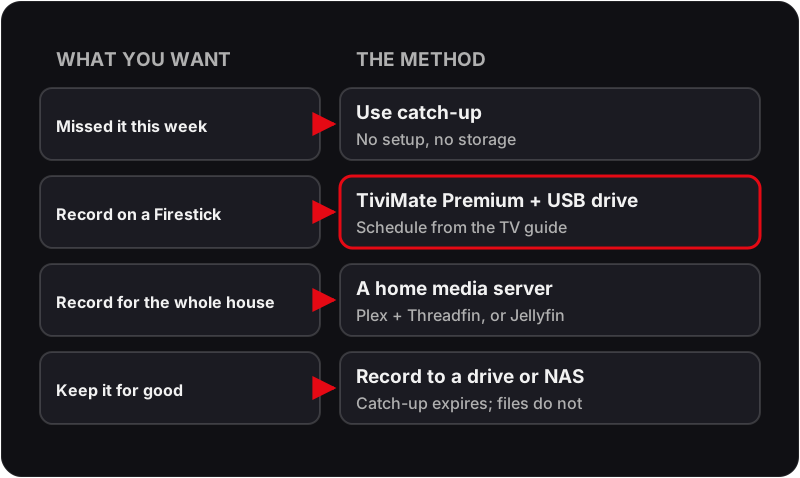
To record IPTV you need a player with recording, not new hardware. TiviMate Premium is the simplest IPTV recorder: on a Firestick or Android box it records to a USB drive and schedules from the TV guide. For whole-home recording, Plex with a tuner bridge such as Threadfin, or Jellyfin, records on an always-on server. If you only missed something this week, 7-day catch-up plays it back with no recording at all.
Yes — you can record IPTV channels. From simple TiviMate recordings on a USB drive to a full whole-home Plex DVR server, here are your options in 2026. If a recording fails to play back, our guide to common IPTV problems covers playback faults.
💬 Ask About Catch-Up TV Options
IPTV With Recording: Which Method Fits?
An IPTV record feature lives in the player or a home server, not in the subscription, so the right IPTV recorder depends on what you want to keep and where you watch.
4 Ways to Record IPTV in 2026
TiviMate Premium DVR
Easiest — RecommendedTiviMate Premium includes built-in DVR recording. Connect a USB drive to your Firestick, configure the recording path in TiviMate settings, then schedule recordings directly from the EPG guide — same as a traditional satellite set-top box.
Steps
- 1.Buy TiviMate Premium through the TiviMate Companion app on an Android phone, then sign in to it in TiviMate.
- 2.Connect a USB drive: a Firestick needs a USB OTG adapter; an Android TV box usually has a USB port.
- 3.In TiviMate's settings, set the recording folder to the USB drive.
- 4.Open the TV guide, select a programme and choose to record it, or record the whole series.
- 5.TiviMate saves the recording to the drive during the broadcast.
- 6.Play recordings back from TiviMate's recordings section at any time.
Pros
- ✓No extra hardware beyond a USB drive
- ✓Scheduled recording from the TV guide
- ✓Series recording support
- ✓Plays back within TiviMate
Cons
- ✗Requires TiviMate Premium (paid)
- ✗USB drive needed (not included)
- ✗Android TV / Firestick only
- ✗Recording quality tied to stream quality
Provider Catch-Up TV
No Setup RequiredMany quality IPTV providers — including Flickhaven — offer built-in catch-up TV on supported channels. This gives you 7 days of content to rewatch without any recording setup. Not a true DVR but solves "I missed it" for most use cases.
Steps
- 1.In a player that supports catch-up, such as IPTV Smarters or TiviMate, find the channel in the TV guide.
- 2.Navigate backwards in the EPG to a past time slot.
- 3.Press OK/Select on a past programme to play it back directly.
- 4.Catch-up TV is available for 24–168 hours depending on the channel and provider.
Pros
- ✓Zero setup
- ✓No extra hardware or software
- ✓Works in any player that supports catch-up
- ✓Covered by your existing subscription
Cons
- ✗Limited to supported channels
- ✗Content disappears after 7 days
- ✗Cannot save recordings locally
Plex DVR (Home Server)
Most PowerfulPlex Media Server with Plex DVR is a powerful whole-home IPTV recording option. It records multiple channels at once, organises recordings by show, and streams them to any device in the house or remotely. Plex expects a TV tuner rather than an M3U link, so IPTV needs a free bridge in between.
Steps
- 1.Install Plex Media Server on a Windows PC, Mac, or Raspberry Pi that stays switched on all the time.
- 2.Subscribe to Plex Pass, which Plex requires for DVR recording.
- 3.Install a tuner bridge such as Threadfin and give it your Flickhaven M3U URL; it presents the playlist to Plex as a tuner.
- 4.In Plex settings, open Live TV & DVR, add the device the bridge provides, and give Plex your XMLTV guide URL so it can schedule by programme name.
- 5.Use the Plex guide to browse channels and schedule recordings — similar to a satellite set-top box.
- 6.Recordings are stored on your server and stream to any Plex app on TV, phone, or PC.
Pros
- ✓Record multiple channels simultaneously
- ✓Series recording with metadata
- ✓Access recordings remotely
- ✓Works on every device via Plex app
- ✓Commercial skip feature (Plex Pass)
Cons
- ✗Requires always-on PC or server
- ✗Needs a tuner bridge for IPTV
- ✗Plex Pass subscription needed
- ✗Higher upfront cost
Jellyfin (Free Server)
Free & Open SourceJellyfin is the free, open-source alternative to Plex. It accepts an M3U playlist and an XMLTV guide directly in its Live TV settings and records from them, so no tuner bridge is needed. TVHeadend is an optional back end for people who want finer control.
Steps
- 1.Install Jellyfin Media Server on an always-on Windows, macOS or Linux machine, or a NAS.
- 2.In the Live TV settings, add an M3U tuner and paste your Flickhaven M3U URL.
- 3.Add your XMLTV guide URL as the guide data provider.
- 4.Schedule recordings in the Jellyfin web interface or the Jellyfin app on any device.
- 5.Recordings are saved to the folder you choose and stream via Jellyfin to any device.
- 6.Optional: run TVHeadend as the back end if you want more control over streams.
Pros
- ✓Completely free and open-source
- ✓No ongoing subscription costs
- ✓Takes an M3U link directly
- ✓Active community and updates
Cons
- ✗More hands-on setup than Plex
- ✗Complex multi-step setup
- ✗No official support (community only)
- ✗Not suitable for beginners
How to Record IPTV on Firestick
The Firestick has no recording of its own, so the player does the work. TiviMate Premium is the usual choice, and the only extra hardware is a USB drive on an OTG adapter.
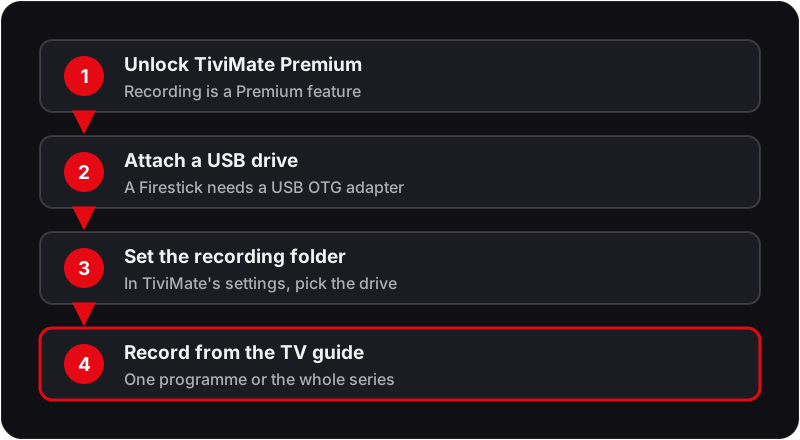
Use a drive formatted the way the Firestick can read, keep the stick awake during scheduled slots, and record a short test clip before trusting it with a series.
How to Record on IPTV Smarters Pro
Some Android versions of IPTV Smarters Pro show a record option in the live player, which saves what you are watching to the device's own storage. It does not schedule recordings from the guide, and versions differ, so check the on-screen controls while a channel is playing. If yours has no record option, use catch-up for anything from the last week, or switch to TiviMate Premium for scheduled and series recordings. If the app is not set up yet, start with setting up Smarters Pro step by step.
Which DVR Method Should You Choose?
When a Recording Fails: Symptom, Cause, Fix
Most failed recordings come down to the same handful of causes, whichever app you use. Match the symptom, run the check, then apply the fix.
Recording file is empty or only a few seconds long
Likely cause: The stream dropped at the start, or the app could not write to the drive.
Check: Play the same channel live at the time the recording was due; then open the recording path in the app settings.
Fix: Re-select the recording folder on the USB drive and record a short test clip to confirm the app can write to it.
Recording stops partway through
Likely cause: The device went to sleep, lost Wi-Fi, or the stream hit the connection limit on your plan.
Check: Check whether anyone else was watching on the same login while it recorded.
Fix: Keep the device awake during scheduled recordings, use an Ethernet cable where you can, and stay within your plan's connection count.
Scheduled recording never started
Likely cause: The EPG times are offset from the real broadcast, or the device was off at the scheduled time.
Check: Compare the EPG start time with what is actually on screen for that channel.
Fix: Correct the EPG time offset in the app, add start padding, and leave the device on for the slot.
A guide that lists the wrong times breaks every scheduled recording at once; if the EPG is the problem, start with our fix for an IPTV EPG that is not working, and for what catch-up covers before you record anything, see how IPTV catch-up TV works in the UK.
FAQ
QCan you record IPTV channels?▼
Yes. TiviMate Premium records to a USB drive attached to your Firestick or Android box. Plex DVR (with a tuner bridge such as Threadfin) and Jellyfin support server-based recording for whole-home setups. Many providers also include 7-day catch-up TV which covers most "I missed it" scenarios without any recording setup.
QWhat is the best IPTV DVR app?▼
For Firestick and Android TV, TiviMate Premium is the simplest IPTV recorder: it records to a USB drive, schedules from the TV guide and plays back within the app. For a whole-home DVR, a server running Plex (with a tuner bridge such as Threadfin) or Jellyfin records several channels and serves them to every device.
QHow do I record IPTV on a Firestick?▼
Unlock TiviMate Premium, connect a USB drive through a USB OTG adapter, set the drive as the recording folder in TiviMate's settings, then pick a programme in the TV guide and choose to record it or the whole series. Recording uses a connection on your plan while it runs.
QHow do I record on IPTV Smarters Pro?▼
Some Android versions of IPTV Smarters Pro show a record option in the live player that saves to the device's own storage. It is basic: it records what you are watching rather than scheduling from the guide. If your version has no record option, use catch-up for anything from the last week, or TiviMate Premium for scheduled recordings.
QDoes TiviMate have a recording feature?▼
Yes. TiviMate Premium includes DVR recording. Connect a USB drive to your Firestick or Android TV box, set it as the recording folder in TiviMate's settings, then schedule recordings from the TV guide.
QDo I need a separate device to record IPTV?▼
No for simple recordings — TiviMate uses a USB drive on your existing Firestick. For advanced whole-home DVR (multiple simultaneous recordings, remote access), a Raspberry Pi or NAS running Plex or Jellyfin is recommended.
QDoes recording count as a second connection?▼
Usually, yes. A recording is a stream being pulled from the provider, so recording one channel while watching another typically uses two connections at once. If one stops when the other starts, your plan has fewer simultaneous connections than you are using. Check the connection count on your plan before scheduling overlapping recordings.
QHow much storage does an IPTV recording need?▼
It depends on the bitrate of the stream and the length of the programme, not on the app. A recording is saved at the quality it was received, so an HD stream fills a drive far faster than an SD one, and a 4K stream faster still. Check the free space on the drive before setting a series recording, and clear old recordings regularly.
QWhy is my recording shorter than the programme?▼
Scheduled recordings follow the EPG times, and broadcasts routinely start a little early or overrun. Most DVR apps let you add padding before the start and after the end of a recording; set a few minutes on each side for live sport and anything that follows it. If the EPG itself is wrong, fixing that comes first.
Want Catch-Up TV Without the DVR Setup?
Flickhaven includes 7-day catch-up TV on supported channels — no recording setup needed. Start a free trial to test it.
💬 Get Free Trial with Catch-Up TV