Flickhaven IPTV UK
IPTV VPN: Do You Need One, and the Best VPN for IPTV in the UK
An IPTV VPN is not required, and on a healthy connection it makes streaming slightly worse by adding a hop. It helps when buffering appears only at peak evening times and the same channel plays cleanly on a phone hotspot, which points to your broadband line. If you do need one, the best VPN for IPTV has UK servers, a Fire TV app, a WireGuard-based protocol, split tunnelling and no speed cap. Test it with and without the VPN before you pay.
An IPTV VPN is not required to use Flickhaven, but it can help with two things:
- 1.Peak-time traffic management — some broadband providers manage traffic at busy times, and their published traffic-management policies say what they do. Because a VPN encrypts the stream, the provider cannot single it out.
- 2.Privacy — A VPN encrypts your internet traffic so your ISP cannot see what you are streaming.
If your IPTV buffers in the evenings but works fine in the morning, the cause is either traffic management or ordinary evening congestion, and the two-minute test below tells you which. See our full guide: Why does my IPTV keep buffering?. If a VPN does not change anything, the problem is elsewhere — our IPTV troubleshooting guide works through every other cause.
Do I Need a VPN for IPTV in the UK?
A VPN fixes one specific problem well and makes several others worse. Decide which side you are on before you pay for anything.
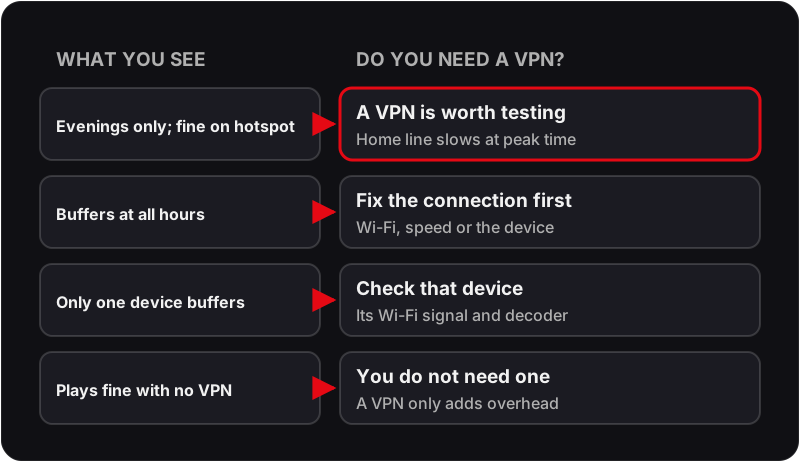
A VPN is likely to help if
- ✓Buffering starts in the evening and clears late at night, on every channel, on every device in the house.
- ✓The same channel plays cleanly when the device is tethered to your phone's 4G or 5G instead of the home broadband.
- ✓Your broadband provider publishes a traffic-management policy that mentions video or streaming at peak times.
- ✓You want your provider to see only encrypted traffic rather than what you are streaming.
A VPN will not help, and may hurt, if
- ✗Buffering happens at all hours. That is a connection, Wi-Fi or device problem, and a VPN adds overhead on top of it.
- ✗Only one device buffers while others on the same network are fine. Look at that device's Wi-Fi signal and decoder first.
- ✗Your streaming device is old or low-powered. Encrypting every packet costs CPU, and a Firestick that is already working hard will stutter.
- ✗You would connect to a server outside the UK. Every extra hop adds delay, and live streams tolerate very little of it.
The two-minute test before you pay
Pick a channel that buffers in the evening. At the time it usually fails, switch your streaming device to your phone's mobile hotspot and play the same channel. If it plays cleanly on the hotspot and stutters on the home line, the problem sits with the home broadband and a VPN is worth trying. If it stutters on both, no VPN will fix it, and the cause is the device, the app or the stream.
What the Best VPN for IPTV Needs
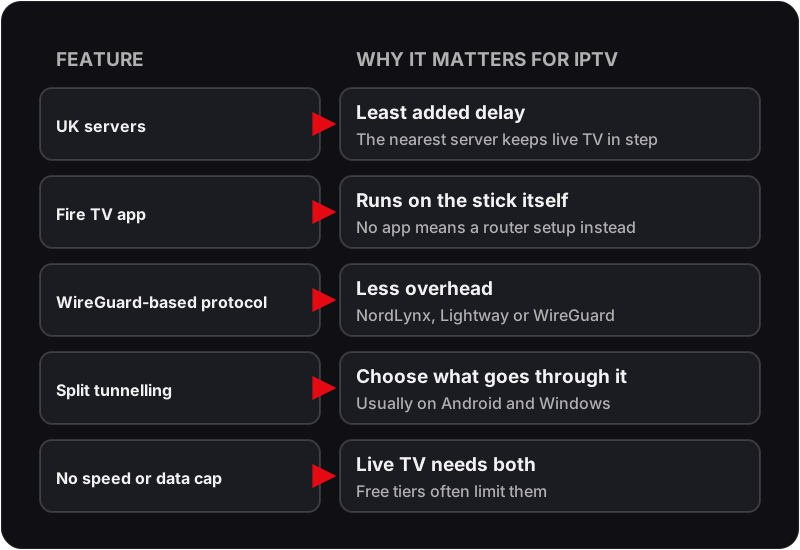
The best VPN for IPTV is the one that adds the least delay on your own connection, so features matter more than brand. Check these five before you pay; a free VPN for IPTV usually fails the last one.
Five VPNs Worth Shortlisting for IPTV
These five all publish the features above for Fire TV and Android. We have not run a lab speed test of them, and speed on your own line is what counts, so use the trial test plan further down. Prices, device limits and refund terms change: check them on each provider's own site.
NordVPN
NordLynx protocolWhat it offers
- ✓Fire TV app
- ✓NordLynx, its WireGuard-based protocol
- ✓Split tunnelling in its Android and Windows apps
- ✓Advertises a 30-day money-back guarantee
Check before you buy: Current price and how many devices your plan covers.
ExpressVPN
Lightway protocolWhat it offers
- ✓Fire TV app
- ✓Lightway, its own fast protocol
- ✓Split tunnelling in its Android and Windows apps
- ✓Advertises a 30-day money-back guarantee
Check before you buy: Current price and how many devices your plan covers.
Surfshark
Unlimited devices (advertised)What it offers
- ✓Fire TV app
- ✓WireGuard protocol
- ✓Split tunnelling, which it calls Bypasser, on Android and Windows
- ✓Advertises a 30-day money-back guarantee
Check before you buy: Current price and UK server choice.
Private Internet Access (PIA)
Open-source appsWhat it offers
- ✓Fire TV app
- ✓WireGuard protocol
- ✓Split tunnelling in its Android and Windows apps
- ✓Publishes its app source code
Check before you buy: Current price and refund terms.
IPVanish
Router setup guidesWhat it offers
- ✓Fire TV app
- ✓WireGuard protocol
- ✓Router setup guides for TVs that cannot run a VPN app
- ✓Advertises a money-back guarantee
Check before you buy: Which plans its refund policy covers.
How to Set Up IPTV UK With a VPN on Firestick
- 1Subscribe to your chosen VPN; each of the five above has a Fire TV app.
- 2On your Firestick, open the Amazon App Store and search for your VPN by name.
- 3Install and open the VPN app. Log in with your VPN account credentials.
- 4Connect to a UK server (this keeps latency low for UK IPTV streams).
- 5Once connected, open your IPTV app (TiviMate or IPTV Smarters Pro).
- 6Stream as normal — the VPN encrypts your traffic, so your broadband provider sees encrypted data rather than a video stream.
Need help setting up IPTV on your Firestick? See our full guide: How to Install IPTV on Firestick UK.
What to test during the free 24-hour trial
The trial is the cheapest place to find out whether you need a VPN, because you can test with and without one on the same evening. Run these in order and write the results down:
- 1Play one busy channel at peak time with no VPN. Note whether it buffers, how often, and on which device.
- 2Connect the VPN to a UK server and play the same channel at the same time. If nothing changes, the VPN is not the lever.
- 3Try a second UK server. Server load varies, and one slow server can make a good VPN look useless.
- 4If the VPN app lets you choose a protocol, compare the modern option with the older one. The newer protocols are usually faster on a streaming device.
- 5Switch on split tunnelling so only the IPTV app goes through the VPN. If the stream is steadier with the rest of the house outside the tunnel, keep it that way.
- 6Turn the kill switch off while testing. It blocks all traffic the moment the VPN drops, which looks exactly like a dead stream and sends you chasing the wrong fault.
- 7Finish with the same channel on Ethernet if your device has a port. If wired fixes it without the VPN, you have a Wi-Fi problem, not a throttling one.
If the stream was working and stopped the moment you turned the VPN on, that is a different fault with its own fixes: see why IPTV stops working with a VPN switched on, and how to fix it.
Devices that cannot run a VPN app
Samsung and LG Smart TVs, and most set-top boxes, have no VPN app to install. You have two practical routes:
- ▸Put the VPN on the router. Every device in the house then goes through it, including the TV. The trade-off is that the router does the encryption for everyone, and a typical home router has far less processing power than a phone, so total speed can drop noticeably. A second router used only for the TV avoids slowing the rest of the house.
- ▸Add a streaming stick. A Firestick or Android box plugged into the TV runs both the VPN app and the IPTV app, and is usually the simpler and cheaper option for one television.
VPN for IPTV Questions
What is an IPTV VPN?+
An IPTV VPN is an ordinary VPN used while you stream: it encrypts the traffic between your device and a VPN server, so your broadband provider sees encrypted data rather than a video stream. It does not speed up a slow connection; at best it removes a slowdown your provider applies at peak time.
Do I need a VPN for IPTV in the UK?+
Usually not. If IPTV plays smoothly at all hours, a VPN only adds overhead. It is worth testing when buffering appears in the evening and the same channel plays cleanly on a phone hotspot at the same time.
Does Flickhaven require a VPN?+
No. The service works without one on any device. A VPN is a tool for a specific problem, usually evening throttling by your broadband provider, and if you do not have that problem there is nothing for it to fix.
Will a VPN slow my stream down?+
A little, always: encryption adds overhead and the traffic takes a longer route. On a fast VPN connected to a UK server the difference is small. On a slow VPN, or one connected to a distant server, the slowdown can be larger than the throttling you were trying to avoid, which is why the same-channel test matters.
Can I use a free VPN for IPTV?+
Free tiers commonly limit bandwidth, monthly data or server choice, and a live stream needs all three. They are fine for checking whether a VPN helps at all, but a free tier that caps speed will make buffering worse, not better. Treat a free VPN as a test, not a solution.
Which server should I connect to?+
A UK server. The aim is to hide the traffic type from your broadband provider, not to appear elsewhere, and the nearest server adds the least delay. Try a second UK server if the first is busy; VPN servers in the same city can perform very differently at peak time.
Start Streaming on a Steadier Connection
Flickhaven uses Anti-Freeze technology and premium UK servers to minimise buffering — even without a VPN. Try it free for 24 hours.
For the background, see these guides: Flickhaven's guide to IPTV in Britain, eight UK services side by side and our no-card free trial.