Flickhaven IPTV UK
IPTV Smarters Pro Downloader Code? How Firestick Codes Work
An IPTV Smarters downloader code is a short number that redirects to a download URL, so you do not have to type a long address on a remote. It is a shortcut, not an app store, and carries no vetting: a code is only as trustworthy as its destination. Check the Amazon Appstore first. If the player is not there, install Downloader, allow it under Developer Options, Install Unknown Apps, and enter the developer's own address.
A Downloader code is a short number that redirects to a download URL — nothing more. It exists so you do not have to type a long web address on a TV remote. It is not an app store, it carries no vetting, and a code is exactly as trustworthy as the address behind it. This guide covers the part that actually matters: how to install Downloader, the Fire OS permission that silently blocks every install until you find it, and how to get a legitimate IPTV player onto a Firestick without picking up something you did not ask for. If your player is in the Amazon Appstore, you can skip all of it — see the Firestick IPTV guide and best IPTV apps UK.
Using something other than a Fire Stick? See all supported IPTV devices.
Before You Hunt for a Code — Do You Need One?
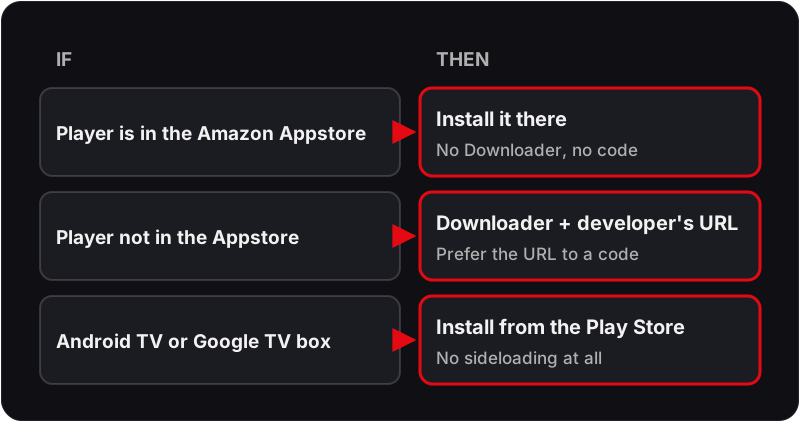
- ▸ IPTV Smarters Pro is often missing from the UK Amazon Appstore. Search for it on the Fire TV home screen first — if it is listed, install it there with no Downloader, no code and no permission change.
- ▸ TiviMate is not in the Amazon Appstore, which is the usual reason Firestick owners need Downloader at all.
- ▸ On Android TV or Google TV — an Onn box, a Shield, a Chromecast with Google TV — TiviMate is in the Play Store. Sideloading is a Fire TV problem, not an Android TV one.
- ▸ Prefer a URL to a code where the developer publishes one. You can read a URL. You cannot read a number.
Installing an IPTV Player via Downloader — Step by Step
Step 1: Install the Downloader app
Downloader itself is a legitimate Amazon Appstore app by AFTVnews. You do not sideload it — it installs like any other Fire TV app, and it is the tool everything else runs through.
- 1From the Fire TV home screen, open Find → Search.
- 2Type Downloader and select the orange icon by AFTVnews.
- 3Choose Get or Download and wait for it to install.
- 4Open it once and accept the storage permission prompt.
Step 2: Grant Downloader permission to install
This is the step almost everyone misses, and it produces the blocked-install message that sends people looking for a different code. Fire OS grants install rights per app, not globally.
- 1Go to Settings → My Fire TV → Developer Options.
- 2If Developer Options is not visible, go to Settings → My Fire TV → About and press Select on the device name seven times.
- 3Open Install Unknown Apps, find Downloader in the list and switch it on.
- 4On older Fire OS builds, enable the single Apps from Unknown Sources toggle instead.
Step 3: Enter the code or, better, the URL
A code is a redirect to a URL. If you already have the developer's download address, type that instead — it removes an intermediary and you can see exactly where the file is coming from.
- 1Open Downloader and highlight the URL field on the Home tab.
- 2Type the numeric shortcode, or paste the full https:// address of the developer's download page.
- 3Press Go and wait for the package to download.
- 4Read the app name and publisher on the install screen before confirming — it should match what you expected.
Step 4: Install, delete the file, sign in
Fire TV sticks with 8 GB of storage fill quickly, and IPTV players need free space for their channel cache and EPG database. Deleting the installer immediately is not housekeeping, it is a performance decision.
- 1Choose Install, then Done when it completes, then Delete to remove the package.
- 2Confirm the second Delete prompt.
- 3Open the player and choose the Xtream Codes API login option.
- 4Enter your server URL, username and password exactly as issued, then let the channel list load.
Once the player is installed
You still need credentials to put in it
A player app is an empty shell — it does nothing until you enter a server URL, username and password. Flickhaven issues all three on activation and the free 24-hour trial issues them without a card, so you can confirm the install worked before you pay for anything.
How to Judge IPTV Downloader Codes Before You Use Them
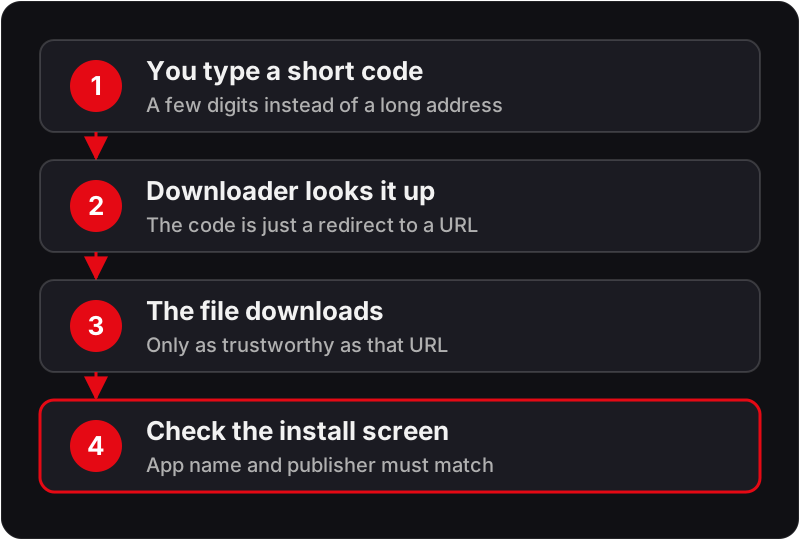
Codes get passed around in comment sections and short videos, stripped of any context about where they lead. Four rules cover most of the risk:
Downloader Errors and What They Mean
“For your security, your device is not allowed to install unknown apps”
The per-app permission has not been granted. Settings → My Fire TV → Developer Options → Install Unknown Apps → switch Downloader on.
“There is a problem parsing the package”
The downloaded file is corrupt or built for a different processor. Delete it, check the connection, and download again from the developer's own address.
“App not installed”
Usually a signature clash with an existing copy. Uninstall the previous version of the same app completely, then install again.
Download stops at 0% or times out
The address is dead or unreachable from the UK. Confirm the URL in a browser on a phone first — if it fails there too, the code is stale.
Install fails with no message on an 8 GB stick
Storage. Fire TV needs headroom to unpack a package. Uninstall unused apps, clear caches, delete old installer files, then retry.
Downloader itself will not open a URL field
The app lost its storage permission after an update. Settings → Applications → Manage Installed Applications → Downloader → Permissions → enable Storage.
Which Player to Install on a Firestick
Once Downloader is working, the choice of player matters more than the install method. Short version for UK subscribers:
TiviMate
The best experience on Fire TV by a clear margin — proper EPG handling, channel groups, recording on the paid tier. Needs sideloading because it is not in the Amazon Appstore.
Read the full guide →IPTV Smarters Pro
Check the Amazon Appstore first; it is often missing from the UK store, in which case install it via Downloader from the developer's own address. Less refined than TiviMate but quick to set up, and it handles Xtream Codes logins cleanly.
Read the full guide →IBO Player / IBO Pro
Mainly a smart TV player, but runs on Fire TV. Worth knowing if you want the same interface on a Samsung or LG set as on the stick.
Read the full guide →Smarters Player Lite
A lighter build for older or storage-constrained sticks. Fewer features, noticeably less memory pressure on a 2nd-gen Fire TV Stick.
Read the full guide →Firestick Downloader — Frequently Asked Questions
What is a Downloader code on Firestick?+
A Downloader code is a short number that stands in for a full web address. Rather than typing a long URL on a remote control, you type a few digits into the Downloader app and it resolves them to the real link and starts the download. The codes are a convenience shortcut hosted by the Downloader developer — they are not an app store, and the number itself carries no guarantee about what it points at.
How do I install Downloader on a Firestick?+
Downloader is a normal Amazon Appstore app, so no sideloading is required to get it. From the Fire TV home screen open Find, then Search, type Downloader, select the orange icon by AFTVnews and choose Get or Download. Installation takes under a minute. Everything else on this page assumes Downloader is already installed.
Why does my Firestick say the app is blocked from installing?+
Fire OS blocks installs from any app that has not been individually granted permission. Go to Settings, My Fire TV, Developer Options, then Install Unknown Apps, find Downloader in the list and switch it on. On older Fire OS builds the setting is a single Apps from Unknown Sources toggle in the same menu. Enable it, then start the install again.
Do I need Downloader to use IPTV on a Firestick?+
Only for players the Amazon Appstore does not carry. TiviMate is the common example, and IPTV Smarters Pro is often missing from the UK Appstore too, so search the Appstore first: if your player is listed, install it there and skip this entirely. If not, the IPTV Downloader route below is the standard way in.
Is there a Downloader code for IPTV Smarters Pro?+
Codes for IPTV Smarters Pro circulate widely, but we do not publish one, because a code is only a redirect and you cannot see where it leads. Check the Amazon Appstore first. If IPTV Smarters Pro is not listed, type the address of the developer's official download page into Downloader instead of a third-party code, then check the publisher name on the install screen.
Are Downloader codes safe to use?+
The mechanism is safe; the destination is what matters. A code is just a redirect, so it is exactly as trustworthy as whatever it points to. Only use codes published by the app developer you are installing, or type the developer's own URL directly instead. Codes circulated on forums and video comments are worth treating with the same suspicion as any unsolicited download link.
Where should I get TiviMate for a Firestick?+
From the developer's official download page, entered as a URL in Downloader rather than via a third-party code. TiviMate is not in the Amazon Appstore, which is why sideloading is needed on Fire TV hardware at all. On Android TV and Google TV boxes it is in the Play Store and needs no sideloading.
Why does the download fail or show a parse error?+
A parse error means the file is not a valid app package for this device — usually the wrong architecture, or a partially downloaded file. Delete it and download again on a stable connection. If the install fails for storage reasons instead, a Firestick with 8 GB has very little free space; uninstall unused apps and clear caches before retrying.
Should I delete the installer file after installing?+
Yes. Downloader offers to delete the package once installation finishes, and you should accept — on an 8 GB Firestick, leftover installer files are a meaningful chunk of the free space that IPTV apps need for cache and EPG data. It has no effect on the installed app.
Related Guides
For the wider context, start with our IPTV installation guide, complete UK IPTV guide and start a free trial.