Flickhaven IPTV UK
Top 5 IPTV Players for Firestick & Android Box 2026 — Ranked
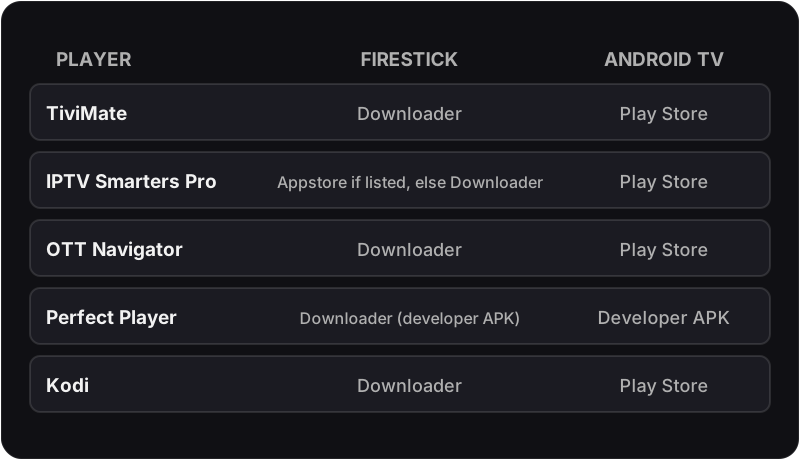
The best IPTV player for Firestick in 2026 is TiviMate, sideloaded via Downloader, because it leads on the TV guide, recording and stability. On an Android TV box it installs straight from the Play Store. IPTV Smarters Pro is the best free IPTV player and also runs on Android phones and iPhone. OTT Navigator suits power users, Perfect Player suits old 1GB boxes, and Kodi suits anyone running a full media centre.
🥇 Best Overall
TiviMate
Firestick 4K / Android TV
🥈 Best Free
IPTV Smarters Pro
Every device including iOS
🥉 Best for Old Boxes
Perfect Player
1GB RAM devices
How We Compared These IPTV Players
Every IPTV player in this guide accepts the same Flickhaven IPTV subscription, so the comparison is about the app, not the content: how it installs on a Firestick and on an Android TV box, and how it handles a full UK channel list.
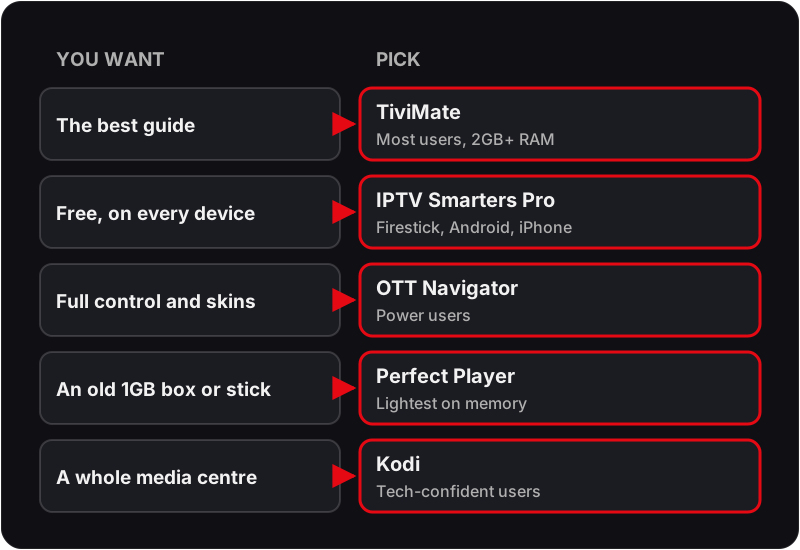
Each app is scored on eight criteria: EPG quality, 4K playback performance, ease of initial setup, interface design, catch-up TV support, memory usage, value for money, and stability during busy live events such as Premier League match days — the hardest real-world load for any IPTV player.
The guide focuses exclusively on Firestick and Android-based devices. If you need an IPTV player for iPhone, iPad, or Apple TV — see our iOS IPTV guide, or our best IPTV apps UK guide which covers all platforms.
Quick Comparison — All 5 IPTV Players
| Feature | TiviMate | Smarters | OTT Nav | Perfect | Kodi |
|---|---|---|---|---|---|
| Score | 9.5/10 | 9.0/10 | 8.7/10 | 8.2/10 | 7.8/10 |
| Price | Free / Premium | Free | Free | Free | Free |
| EPG Quality | ★★★★★ | ★★★★☆ | ★★★★★ | ★★★★☆ | ★★★★☆ |
| 4K Playback | ★★★★★ | ★★★★☆ | ★★★★☆ | ★★★★☆ | ★★★★☆ |
| Ease of Setup | Medium | Easiest | Hard | Medium | Hardest |
| Recording | Yes (Premium) | No | No | No | No (Simple Client) |
| iOS Support | No | Yes | No | No | No |
| Windows Support | No | Yes | No | No | Yes |
| RAM Usage | Medium | Medium | Medium | Very Low | Medium-High |
| Best For | Most users | Multi-device | Power users | Old hardware | Media centre |
| In Amazon Appstore | No | Sometimes* | No | No | No |
* IPTV Smarters Pro is often missing from the UK Amazon Appstore; check before sideloading. TiviMate is not in the Amazon Appstore on any Firestick.
The Best IPTV Player for Android
On an Android TV box or Google TV, the best IPTV player for Android is TiviMate, installed straight from the Play Store with no sideloading. On an Android phone or tablet, use IPTV Smarters Pro, because TiviMate is built for TV screens. OTT Navigator is the IPTV player Android power users choose for skins and layout control, and Perfect Player keeps an old 1GB box usable. See the Android IPTV box setup guide for the install steps.
#1 — TiviMate IPTV Player
Best Overall9.5
/10
Price
Free · paid Premium tier
Install
Play Store on Android TV; sideload via Downloader on Firestick
Platforms
Firestick, Android TV, Android Box +2
EPG / TV Guide
Video / 4K Quality
Ease of Setup
UI / Design
Catch-Up TV
Memory Usage
Value for Money
Stability
Pros
- ✓Best EPG TV guide in the IPTV app market — 7-day grid, UK time-accurate
- ✓Smooth 4K UHD playback with hardware decoding
- ✓USB recording (Premium) — record Premier League matches
- ✓4-channel panel view — watch multiple streams simultaneously
- ✓Regularly updated — new features added in 2026 version
Cons
- ✗Android and Fire OS only — no iOS or Windows support
- ✗Requires sideloading on Firestick (one-time 2-minute process)
Verdict
TiviMate is the clear number-one IPTV player for Firestick and Android TV boxes in 2026. If you have a Firestick 4K, Firestick 4K Max, or an Android TV box with 2GB+ RAM — install TiviMate first.
Setup Guide — TiviMate IPTV Player with Flickhaven
+
- 1Enable Apps from Unknown Sources: Firestick Settings → My Fire TV → Developer Options → Apps from Unknown Sources → On
- 2Install the Downloader app from the Amazon App Store
- 3Open Downloader → enter the TiviMate APK URL → download and install
- 4Open TiviMate → Add Playlist → Xtream Codes API
- 5Enter your Flickhaven Server URL, Username, and Password → tap Add
- 6Wait 30–60 seconds for channels and EPG to load
- 7Optional: if 4K stutters, try the other decoder under Settings → Player
- 8Optional: upgrade to Premium through the TiviMate Companion app for recording and panel mode
On Android TV boxes via Google Play: TiviMate is available directly in the Play Store — no sideloading needed.
#2 — IPTV Smarters Pro
Best Free · Most Versatile9
/10
Price
Free
Install
Google Play / App Store / official site; Firestick: Appstore if listed, else Downloader
Platforms
Firestick, Android TV, Android Box +4
EPG / TV Guide
Video / 4K Quality
Ease of Setup
UI / Design
Catch-Up TV
Memory Usage
Value for Money
Cross-Platform
Pros
- ✓Completely free — no subscription, no in-app purchases
- ✓Works on every platform: Firestick, Android, iPhone, iPad, Windows
- ✓Simplest setup of any IPTV player — Xtream Codes in under 2 minutes
- ✓Live TV, VOD, and Series sections built in
- ✓Check the Amazon Appstore first — when it is listed, no sideloading is needed
Cons
- ✗UI is less polished than TiviMate — less TV-native feel
- ✗No USB recording feature
- ✗Occasional crashes on older Firestick models under sustained use
- ✗Often missing from the UK Amazon Appstore, so usually sideloaded on Firestick
Verdict
IPTV Smarters Pro is the best free IPTV player and the most versatile option in the market. Where it is listed in the Amazon Appstore it needs no sideloading at all; where it is not, the Downloader route takes a few extra minutes.
Setup Guide — IPTV Smarters Pro with Flickhaven
+
- 1Open the Amazon Appstore on your Firestick and search for 'IPTV Smarters Pro'
- 2If it is listed, install it; if not, install it via Downloader from the developer's own address, then open the app
- 3Tap 'Add User' on the main screen
- 4Select 'Xtream Codes API' from the options
- 5Enter a profile name, then your Flickhaven Server URL, Username, and Password
- 6Tap 'Add User' — channels and EPG load automatically
- 7Navigate to Live TV → Sports to find UK sports channels
- 8Tap Update Playlist & EPG to ensure your guide data is current
If your EPG shows wrong times: go to Settings → Time Offset → set +0 (GMT, winter) or +1 (BST, summer). See our full EPG fix guide.
#4 — Perfect Player IPTV
Best for Older Devices8.2
/10
Price
Free
Install
Developer's APK — via Downloader on Firestick; it has been missing from Google Play
Platforms
Firestick, Android TV, Android Box +1
EPG / TV Guide
Video / 4K Quality
Ease of Setup
UI / Design
Catch-Up TV
Memory Usage
Value for Money
Stability
Pros
- ✓Lowest RAM usage of any IPTV player — ideal for older Firestick (2nd gen) and budget Android boxes
- ✓Completely free — no paid tier, no ads
- ✓Loads an M3U playlist URL (ask your provider for it)
- ✓XMLTV EPG support for full TV guide
- ✓Highly stable — rarely crashes even under sustained viewing
Cons
- ✗UI is dated compared to TiviMate and OTT Navigator
- ✗No recording feature
- ✗No catch-up TV support on most setups
- ✗M3U only — no Xtream Codes login screen
Verdict
Perfect Player IPTV is the right choice for one specific scenario: older Firestick models (1st or 2nd generation) or budget Android boxes with 1GB RAM where TiviMate and IPTV Smarters Pro struggle due to memory limitations.
Setup Guide — Perfect Player IPTV with Flickhaven
+
- 1Enable sideloading on Firestick: Settings → My Fire TV → Developer Options → Apps from Unknown Sources → On
- 2Install Downloader from the Amazon App Store
- 3Open Downloader → enter the Perfect Player APK URL → download and install
- 4Open Perfect Player → tap Settings (gear icon) → Playlist
- 5Tap the + icon → enter a name for your playlist
- 6Enter your Flickhaven M3U URL in the playlist URL field
- 7For EPG: tap Settings → XMLTV → enter your EPG URL (contact Flickhaven support for your URL)
- 8Exit settings → channels will begin loading from your M3U playlist
Perfect Player takes an M3U URL rather than an Xtream Codes login, so ask your provider for the M3U link and the XMLTV EPG URL.
#5 — Kodi with PVR IPTV Simple Client
Best for Tech Users7.8
/10
Price
Free
Install
Sideload via Downloader on Firestick / Google Play / direct download
Platforms
Firestick, Android TV, Android Box +4
EPG / TV Guide
Video / 4K Quality
Ease of Setup
UI / Design
Catch-Up TV
Memory Usage
Ecosystem / Add-ons
Stability
Pros
- ✓Open-source and completely free forever
- ✓Works on virtually every device including PC, Mac, Linux, Raspberry Pi
- ✓Full PVR TV-guide interface once the IPTV client is configured
- ✓Enormous add-on ecosystem — media management, subtitles, streaming services
- ✓Supports M3U playlists for IPTV via PVR IPTV Simple Client add-on
Cons
- ✗IPTV setup requires multiple steps: install Kodi, install add-on, configure M3U — not beginner-friendly
- ✗Interface is not optimised specifically for IPTV channel browsing
- ✗No native Xtream Codes login support (M3U URL only for IPTV)
- ✗Add-on quality varies — some are abandoned, requiring manual updates
Verdict
Kodi is for experienced users who want a full media centre — not just an IPTV player. If you just want the best IPTV experience on your Firestick with minimal fuss, TiviMate does the job faster, more cleanly, and with far less configuration.
Setup Guide — Kodi with PVR IPTV Simple Client with Flickhaven
+
- 1Sideload Kodi on Firestick using Downloader: install Downloader → open it → enter the Kodi APK URL → install
- 2Open Kodi → navigate to Add-ons → Install from repository → Kodi Add-on repository
- 3Find PVR clients → PVR IPTV Simple Client → Install
- 4After installing: go to Add-ons → PVR IPTV Simple Client → Configure
- 5In the General tab, enter your M3U URL (your Flickhaven M3U URL)
- 6In the EPG Settings tab, enter your EPG/XMLTV URL
- 7Click OK and restart Kodi
- 8Navigate to TV → Channels — your channel list should now appear
Ask Flickhaven support for your M3U URL (different from Xtream Codes login) — Kodi's PVR Simple Client requires the full M3U URL format.
The App is Only Half the Story
You Also Need a Quality IPTV Subscription
The best IPTV player app in the world will buffer if the underlying service has poor servers. Flickhaven runs on Anti-Freeze CDN infrastructure — 55,000+ channels, 4K UHD, a 99.9% uptime target. Try free for 24 hours.
Works with TiviMate, IPTV Smarters, OTT Navigator, Perfect Player & Kodi
Frequently Asked Questions
What is the best IPTV player for Firestick in 2026?+
TiviMate — best UK EPG, smooth 4K, catch-up and USB recording (Premium). It is sideloaded on Firestick via Downloader. IPTV Smarters Pro is the best free alternative.
What IPTV player works on Firestick without sideloading?+
Check the Amazon Appstore for IPTV Smarters Pro first; it is often missing from the UK store, in which case it is sideloaded like the rest. TiviMate is not in the Amazon Appstore on any Firestick model, so it always needs a one-time sideload via Downloader.
Which IPTV player uses the least memory on Firestick?+
Perfect Player IPTV — the lightest of the five, suited to Firestick 2nd generation (1GB RAM) and budget Android boxes. On 2GB+ RAM devices, TiviMate is the better choice.
What is the best IPTV player for Android?+
On an Android TV box or Google TV, TiviMate from the Play Store. On an Android phone or tablet, IPTV Smarters Pro, since TiviMate is built for TV screens. OTT Navigator is the pick if you want deep customisation, and Perfect Player suits old 1GB boxes.
How do I fix EPG not loading in IPTV Smarters Pro?+
Tap your playlist profile → Update Playlist & EPG. Wait 2–3 minutes for the guide data to download. If times are 1 hour wrong, go to Settings → Time Offset → set +0 (GMT, winter) or +1 (BST, summer). See our full guide: How to Fix EPG on IPTV Smarters Pro.
Related guides: TiviMate Full Review, IPTV Smarters Pro Review, Best IPTV Apps UK 2026, IPTV on Firestick Setup, IPTV on Android TV, Fix EPG on IPTV Smarters, IPTV Buffering Fix, Kodi IPTV Setup UK and IPTV Free Trial UK.
For the full picture, see these guides: best IPTV apps UK guide (all platforms), Firestick IPTV setup and IPTV free trial.