Xtream IPTV on Firestick:
Best Player Apps and Setup
To use Xtream IPTV on a Firestick, install a player that accepts Xtream Codes, then enter three credentials. Enable Apps from Unknown Sources, install Downloader, and add TiviMate, IBO Player Pro (code 481220) or XCIPTV, or IPTV Smarters Pro from the Appstore where it is listed. Choose the Xtream Codes login and enter the server URL, username and password exactly as sent. Channels, films, series and the guide load from that login.
Once you have your Xtream Codes credentials (server URL, username, password), setting up any IPTV app takes under 5 minutes. Here's how to get each Xtream IPTV player onto a Firestick and the exact login steps for the 4 most popular apps.
Your 3 Xtream Codes credentials:
Server URL
http://host:port
Username
your_username
Password
your_password
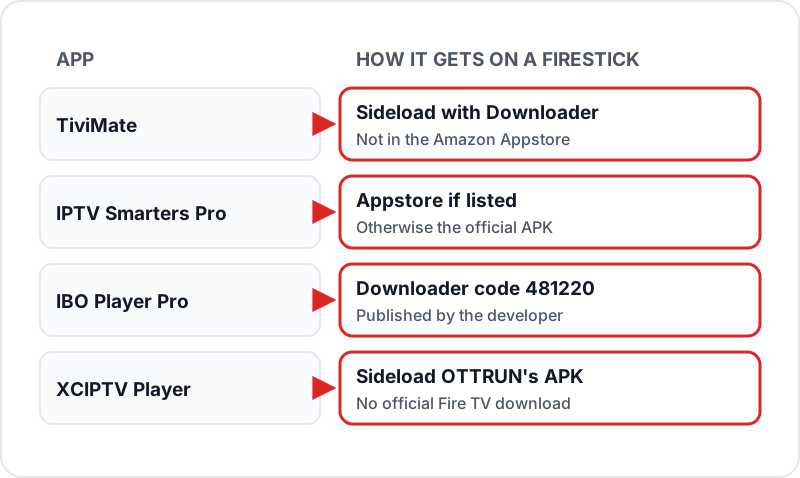
How to Download an Xtream IPTV App on Firestick
Only some Xtream IPTV players are in the Amazon Appstore, so most go on with the free Downloader app. Turn on Apps from Unknown Sources (Settings → My Fire TV → Developer Options), install Downloader by AFTVnews from the Appstore, then use the route for your app below. Stick to each developer's own APK or code — re-hosted and “mod” copies can be outdated or modified.
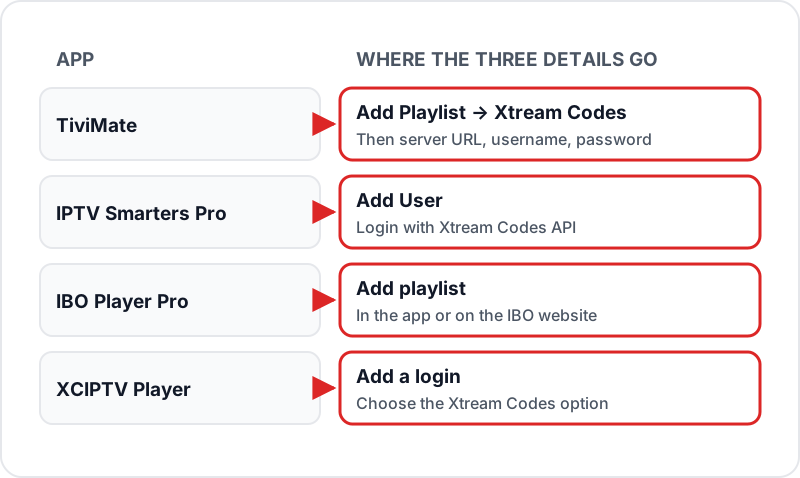
Best Xtream IPTV Player Apps for Firestick — Setup Steps
IPTV Smarters Pro
- 1.Launch IPTV Smarters Pro on your Firestick or Android TV.
- 2.Tap "Add User" on the home screen.
- 3.Select "Login with Xtream Codes API".
- 4.Enter your Flickhaven Server URL, Username, and Password exactly as sent on WhatsApp.
- 5.Tap "Add User". Your channels, VOD, and EPG load automatically.
TiviMate
- 1.Launch TiviMate on your Firestick or Android TV.
- 2.Press "Add Playlist" on the welcome screen.
- 3.Select "Xtream Codes" as the playlist type.
- 4.Enter your Server URL, Username, and Password exactly as provided.
- 5.Tap "Next" — TiviMate loads your channels. Set your playlist name and tap "Add".
- 6.TiviMate processes your playlist and EPG in the background (1–2 minutes).
IBO Player Pro
- 1.Install IBO Player Pro with Downloader and the developer code 481220.
- 2.Open the app — the 7-day free trial starts on first launch.
- 3.Add a playlist and choose the Xtream Codes option (you can also add it on the IBO website).
- 4.Enter your Server URL, Username, and Password.
- 5.Save — your channels, films, series and guide load from the login.
XCIPTV Player
- 1.Launch XCIPTV on your Firestick or Android TV.
- 2.Add a new login from the welcome screen.
- 3.Select the Xtream Codes option as the login type.
- 4.Enter your Server URL, Username, and Password.
- 5.Connect. Your full playlist loads within 30–60 seconds.
Reading Your Credentials Correctly
Almost every failed first login is a copying error, not a server problem. The server URL has three parts — the scheme (http://), the host name and the port — and the app needs all three with nothing added. The username and password are separate values and are case-sensitive. Before you retype anything, check for these five mistakes.
Typing https:// instead of http://
Most Xtream Codes servers answer on plain http with a port number. Use the scheme exactly as it was sent to you.
Leaving a trailing slash or a space
http://server.com:8080/ and http://server.com:8080 are not the same to the app. Delete anything after the port number and check for a space copied in at the end.
Confusing O and 0, l and 1
Usernames and passwords are often random strings. Copy from the WhatsApp message rather than reading it off a screen and typing.
Pasting the M3U URL into the server field
An M3U link contains get.php and your username inside it. The Xtream Codes server field wants only the part up to and including the port.
Copying the label as well as the value
If your message reads "Username: abc123", the username is abc123 — not the whole line.
Xtream Codes or M3U — Which Should You Use?
Both logins point at the same Flickhaven account and the same 55,000+ channels. The difference is what the app receives. With Xtream Codes, the app talks to the server directly and gets the live channels, the 180,000+ movies and series and the EPG as separate sections, so VOD browsing and catch-up work without extra setup. With an M3U link, the app downloads one playlist file and you add the EPG URL yourself.
Use Xtream Codes in any app that offers it — IPTV Smarters, TiviMate, IBO Player Pro and XCIPTV all do. Use the M3U link for players that only accept playlists, such as VLC (or Perfect Player, if it is already installed — it is no longer in any store). Our guide to how Xtream Codes IPTV works in the UK goes deeper on the format, and what an M3U playlist contains shows the file line by line. Both logins are included with every plan. The same Xtream Codes fields work on a TV with Fire TV built in, such as a Panasonic Fire TV set up for IPTV.
Troubleshooting Xtream Codes Setup
✗Login fails / "Authentication failed"▼
Double-check credentials. Server URL must include http:// and the port number. Username and password are case-sensitive. Try copying from your WhatsApp message.
✗Channels load but some don't play▼
Specific stream servers may be temporarily down. Try the SD quality version of the channel. If many channels are affected, contact Flickhaven support.
✗"Could not connect to server"▼
Check your internet connection. Verify the server URL is correct — no trailing slash, correct port number. Try a different Wi-Fi network or mobile hotspot to rule out ISP issues.
✗EPG guide is empty▼
In your IPTV app settings, find EPG settings and press "Force Update" or "Reload EPG". EPG loading takes 2–5 minutes on first load. Ensure timezone is set to GMT/BST.
✗Playlist takes very long to load▼
A full 55,000+ channel playlist takes 30–90 seconds on first load. Subsequent loads are faster from cache. A stable connection matters more than raw speed here; for watching, plan on about 10 Mbps for HD, 15 Mbps for Full HD and 25 Mbps for 4K.
What to Test During the Free 24-Hour Trial
The login from the no-card Flickhaven free trial is a normal Xtream Codes login on the same servers as a paid plan, so what you see in those 24 hours is what you get afterwards. Use the time to test the things that depend on your home, not on the service.
- ✓Log in on the device you will actually use, not just the one closest to the router.
- ✓Open a UK channel in HD, then a 4K channel, and note whether either stutters.
- ✓Check the Live TV, Movies and Series tabs all populate, not just Live TV.
- ✓Wait a few minutes after login, then confirm the EPG shows programme names on the channels you watch most.
- ✓Try the login at the time of day you usually watch — the evening peak is the real test of your broadband.
If a channel fails, note the name and the time and send both on WhatsApp — support runs 24/7, and a specific example is far quicker to check than "some channels don't work". Plans are prepaid with no contract and no auto-renewal, so the 1-month plan at £15.00 is a low-risk next step once the trial passes.
Sources
- Ibo Player Pro — developer site with the Downloader code (iboproapp.com)
- XCIPTV PLAYER by OTTRUN — Google Play listing
Checked on .
FAQ
QWhat is Xtream Codes API?▼
Xtream Codes is the most widely used IPTV authentication format. Your provider gives you three values: a server URL, username, and password. Enter these in any compatible IPTV app to automatically load your full channel list, VOD library, and EPG guide.
QWhat is the best Xtream IPTV player for Firestick?▼
TiviMate is the most popular Xtream IPTV player on Firestick for its guide layout; IPTV Smarters Pro is the easiest for beginners. IBO Player Pro (7-day trial, then a paid activation) and XCIPTV Player (free with ads, with DVR) also take Xtream Codes. GSE Smart IPTV is an iPhone and Apple TV app, so it is not an option on a Firestick.
QHow do I download an Xtream IPTV app on Firestick?▼
Turn on Apps from Unknown Sources under Settings → My Fire TV → Developer Options, install Downloader from the Amazon Appstore, then fetch the app: TiviMate as an APK, IBO Player Pro with its developer code 481220, XCIPTV as the OTTRUN-signed APK, and IPTV Smarters Pro from the Appstore if it is listed there, otherwise its official APK.
QWhat does the Xtream Codes server URL look like?▼
It starts with http://, then the server's host name, then a colon and a port number such as 8080. Enter it exactly as provided, with no trailing slash.
QCan I use the same Xtream Codes login on two devices?▼
Yes, up to the number of connections your plan includes — a second device simply uses the same server URL, username and password. Whether two streams can play at the same time depends on the plan, so check the connection count on the pricing page before buying a second Firestick for another room.
QDo I need to re-enter my credentials after an app update?▼
Normally no. Apps keep the profile you added through updates. If you uninstall and reinstall the app, or reset the Firestick, the profile is wiped and you add the same three values again. Keep the WhatsApp message with your login so it is one copy-and-paste away.
QWhat happens to my login when the plan ends?▼
Flickhaven plans are prepaid with no auto-renewal, so the login stops working when the term ends and the app shows an authentication error. Renewing reactivates the same credentials — you do not need to set the app up again.
QDoes Xtream Codes work on Smart TVs and phones as well?▼
Yes. The same three values work in any Xtream Codes app — for example IBO Player Pro on Samsung and LG TVs, TiviMate on Android TV boxes, IPTV Smarters on phones, and GSE Smart IPTV on iPhone and Apple TV. The login screen is in a different place in each app, but it always asks for server URL, username and password.
Need Your Xtream Codes Credentials?
Get a free 24-hour Flickhaven trial — your server URL, username, and password sent via WhatsApp.
💬 Get Free Trial Credentials