Flickhaven IPTV UK
TiviMate IPTV Player Review UK 2026
The TiviMate IPTV player is the strongest IPTV player on Firestick and Android TV, and the reason is the TV guide: it is faster and more reliable than any free rival. The free tier covers one playlist with the full guide, films and series. Premium adds recording, several playlists and a four-channel panel for a low yearly or one-off fee. TiviMate IPTV installs from the Play Store on Android TV and via Downloader on Firestick.
TiviMate
9.3/10
Verdict: TiviMate is the best IPTV app for Firestick and Android TV boxes in the UK. Its EPG is well formatted for BBC, ITV and live sports schedules, and 4K playback is among the smoothest of any IPTV app. On a budget Google TV dongle it installs from the Play Store in one tap — our TiviMate on the Onn 4K Plus setup walks through it.
Recommended for: Firestick users, Android TV, anyone who watches live UK sports
TiviMate has become the go-to IPTV player for UK Firestick users — and for good reason. Since its release, it has consistently outperformed every other IPTV app on Android-based devices in terms of interface quality, EPG accuracy, and playback stability.
This review looks at the TiviMate IPTV player with Flickhaven IPTV on a Firestick 4K Max, to give UK viewers an honest view of whether TiviMate Premium is worth paying for. New to IPTV? See our what IPTV is and how it works before diving into the app review.
TiviMate Scores
EPG / TV Guide
Video Quality / 4K
Ease of Setup
Interface / Design
Catch-Up TV
Multi-Screen
Value for Money
Stability
EPG (TV Guide) — The Best in Class
TiviMate's EPG is the standout feature for UK viewers. It displays a full 7-day guide in a familiar grid layout — similar to a satellite TV guide — showing programme names, times, and descriptions for all UK channels including BBC One, BBC Two, ITV, Channel 4 and the live sports channels.
Flickhaven's EPG data loads fully within 2–3 minutes of setup and refreshes automatically. You can also set reminders and record programmes with TiviMate Premium.
4K Playback Performance
On a Firestick 4K Max with a wired connection and about 25 Mbps to spare, TiviMate plays Flickhaven's 4K channels smoothly and holds a stream through a full match. Channels open quickly once the playlist has cached.
If 4K stutters, go to TiviMate Settings → Player and try the other decoder option before blaming the stream.
TiviMate Free vs Premium — Is Premium Worth It?
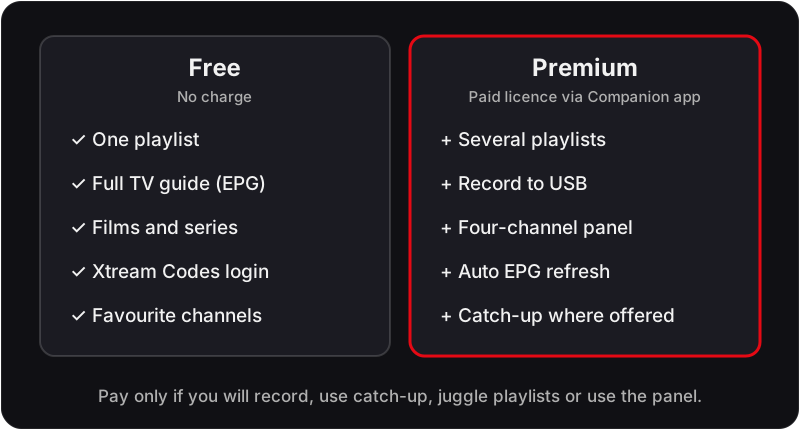
Free Version
- ✓Unlimited channels
- ✓EPG TV guide
- ✓VOD support
- ✓Xtream Codes login
- ✓Basic player settings
Premium (paid licence)
- ✓Everything in Free
- ✓Record programmes to USB
- ✓Multiple playlists
- ✓Panel layout (4 channels at once)
- ✓Auto-update EPG
- ✓Advanced parental controls
- ✓Backup & restore settings
Premium is a low yearly licence (a one-off lifetime licence is also offered), bought through the TiviMate Companion app on an Android phone; check the current UK price there before you buy. The recording feature alone — letting you record live sport to a USB drive — makes it worthwhile for sports fans.
TiviMate vs IPTV Smarters Pro
| Feature | TiviMate | IPTV Smarters Pro |
|---|---|---|
| EPG Quality | Excellent | Good |
| 4K Playback | Excellent | Good |
| iOS Support | No | Yes |
| Windows Support | No | Yes |
| Recording | Yes (Premium) | No |
| Price | Free / paid Premium | Free |
| UI Design | Excellent | Good |
| Firestick Performance | Excellent | Good |
Use TiviMate if you watch on Firestick or Android TV. Use IPTV Smarters Pro if you need iOS support or watch on multiple device types — see our IPTV iPhone & iPad setup guide for full iOS instructions. Read our full IPTV Smarters Pro review.
How to Set Up TiviMate with Flickhaven
See our complete step-by-step guide: How to Install IPTV on Firestick UK.
- 1Install TiviMate via the Downloader app on your Firestick.
- 2Open TiviMate and tap Add Playlist → Xtream Codes API.
- 3Enter your Flickhaven Server URL, Username, and Password.
- 4Tap Add — channels and EPG load automatically.
- 5If 4K stutters, try the other decoder option under Settings → Player.
Living with TiviMate Day to Day
The things that make TiviMate pleasant after the first week are not on any feature list. Channel groups can be reordered and hidden, so the dozens of categories in a large playlist collapse to the five or six you actually watch. Favourites live in their own group at the top, and the guide scrolls with the remote's direction keys, accelerating when held.
Catch-up is where the app earns its reputation: channels with archive data show a marker in the guide, and scrolling backwards lets you start a programme that has already aired. Our guide to how 7-day catch-up works on UK IPTV explains what the provider has to send for this to appear.
Troubleshooting TiviMate
Playlist will not load or says the server is unreachable
Check the server URL character by character, including http:// and the port number. Credentials are case-sensitive. If you pasted them from WhatsApp, a trailing space is the usual culprit.
Guide is empty after the channels have loaded
The EPG downloads separately from the channel list and can take a few minutes on first run. Go to Settings → EPG and trigger an update; if it stays empty, confirm the EPG source is set to the one your provider supplies.
Picture stutters or audio drifts out of sync
Switch the decoder in Settings → Player from hardware to software, or the other way, and test the same channel again. If the drift is on one channel only, it is the stream, not the app — our audio-sync fix guide covers the rest.
Channels buffer at the same time every evening
That pattern points at your connection, not TiviMate: a wired Ethernet adapter on the Firestick removes most of it. The buffering guide below walks through the checks in order.
For the connection side, see the IPTV buffering fix guide and the audio out of sync fix.
Should You Pay for Premium? What to Test First
Pay if you record, if you keep more than one playlist, or if you want the four-channel panel on a sports weekend. Do not pay if you watch live UK channels with the guide and nothing else; the free tier does that job in full, and you can add the licence later without reinstalling.
Use the free 24-hour trial to settle it. Add the playlist in the free tier, open the guide at the time you normally watch, and check three things: that the EPG matches what is on screen, that a 4K channel holds steady for a full programme, and, if catch-up is why you would buy Premium, that the catch-up marker appears on the channels you care about. If all three pass, the only question left is whether the Premium features are ones you will use.
TiviMate — Frequently Asked Questions
How much does TiviMate cost in the UK?+
TiviMate itself is free to install. TiviMate Premium adds recording, multiple playlists, the multi-channel panel and auto EPG refresh. Premium is a low yearly licence (a one-off lifetime licence is also offered), bought through the TiviMate Companion app on an Android phone; check the current UK price there before you buy. You activate it on the TV by signing in with the same account. There is no charge for the channels themselves, which come from your IPTV subscription.
Is TiviMate safe to use?+
Yes, as an app. TiviMate is a player published on the Google Play Store; it contains no channels of its own and only plays the playlist or Xtream Codes login you give it. What you watch through it is a matter of the IPTV service you subscribe to, not the app — see our guide to what makes an IPTV service legal in the UK.
Is TiviMate available in the UK, and on which devices?+
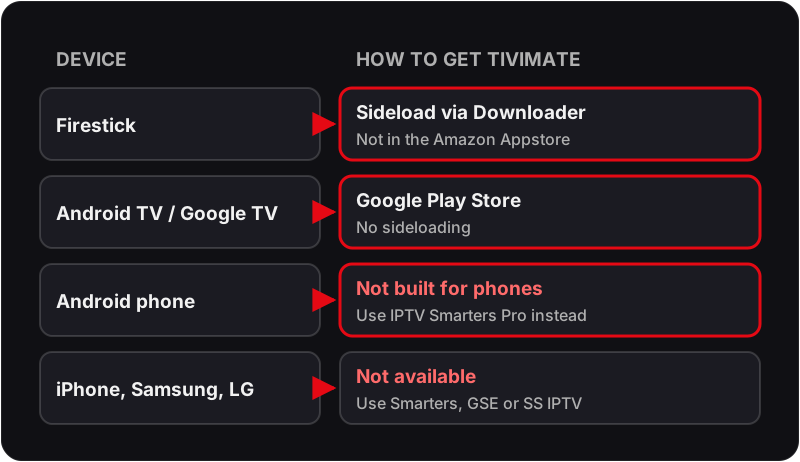
Yes. TiviMate runs on Android TV and Google TV devices — Firestick (sideloaded via Downloader, as it is not in the Amazon Appstore), Onn 4K, Chromecast with Google TV, Google TV Streamer, Nvidia Shield, Xiaomi boxes and Android TV sets. It is built for TV screens rather than phones, and it is not available for iPhone, iPad, Samsung Tizen or LG webOS; on those, IPTV Smarters Pro, GSE Smart IPTV or SS IPTV are the alternatives.
Does TiviMate have add-ons like Kodi?+
No. TiviMate is a closed player with no add-on system, which is a large part of why it is so stable. Everything it does — EPG, catch-up, recording, favourites, parental control — is built in, and the Premium features are unlocked with the licence rather than installed separately. If you are looking for add-ons, you are thinking of Kodi, which we cover in its own guide.
Is the TiviMate IPTV player Premium tier a subscription or a one-off payment?+
Either: a yearly licence or a one-off lifetime licence, both bought through the TiviMate Companion app; check the current UK price there. If a yearly licence lapses, the free tier keeps working indefinitely — you lose recording, the extra playlists and the panel view, not the app or your channel list.
Does TiviMate support catch-up TV?+
Yes, on Premium, when the provider sends catch-up data with the playlist. Channels that offer it show a small archive marker in the guide, and you scroll the EPG backwards to pick the programme you missed. With Flickhaven's EPG and 7-day catch-up the marker appears on the main UK channels; if it is missing everywhere, the playlist was added without catch-up enabled rather than the app lacking the feature.
Why is my TiviMate guide an hour out?+
Almost always the time offset, and it usually appears in the week the clocks change. Go to Settings → EPG and check the time-offset value; set it back to zero if it has been nudged, and make sure the Firestick's own time zone is set to London. The stream itself is live either way — only the labels are wrong.
Can I use TiviMate with two IPTV providers at once?+
Only with Premium, which allows multiple playlists and lets you switch between them from the side menu. The free tier holds one playlist. If you are running a trial alongside an existing subscription, that is the one situation where the licence pays for itself in the first week.
Try TiviMate with Flickhaven Free
Start your free 24-hour Flickhaven trial and set up TiviMate on your Firestick in under 5 minutes.
More on the basics: what IPTV costs in the UK, our provider comparison and try it free for 24 hours.