Flickhaven IPTV UK
Xtream IPTV (Xtream Codes) UK: What It Is and How to Set It Up
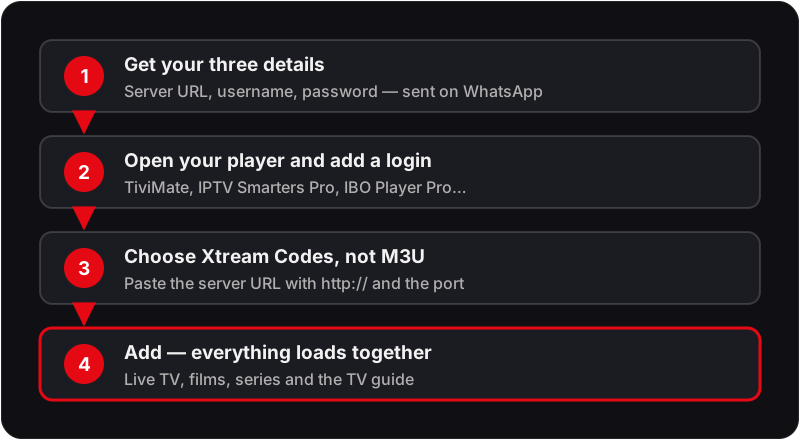
Xtream IPTV means IPTV delivered through an Xtream Codes login, the format most services use. Instead of a playlist file you receive three credentials — a server URL, a username and a password — and enter them into a player such as TiviMate, IPTV Smarters Pro or IBO Player Pro. The app pulls the channel list, guide and on-demand library from that login. It is a login format, not a provider, and setup takes about two minutes.

If you've just signed up to an IPTV subscription plan in the UK and received a server URL, username, and password instead of a playlist link — you've been given Xtream Codes. This guide explains exactly what they are, how they compare to M3U playlists, and how to get set up in under five minutes on every major device and app. If you were handed a playlist link instead, what an M3U file actually contains explains that format.
Xtream IPTV — IPTV delivered through an Xtream Codes login — is the most feature-rich way to connect to a service in a modern player. Unlike M3U links, it loads your electronic programme guide (EPG) with the login, organises your library into movies and series, and supports catch-up in players that offer it.
What Are Xtream Codes?
Xtream Codes (often called the Xtream API) are a standardised login system used by thousands of IPTV providers worldwide. Rather than downloading a static playlist file, your IPTV player app communicates directly and in real time with the provider's streaming server. Xtream Codes is a login format, not a provider — it is unrelated to the similarly named service in our Xstream IPTV UK guide.
When your IPTV provider (like Flickhaven) gives you Xtream Codes, you receive three pieces of information:
Enter these three credentials into any compatible IPTV app and it loads your channels, movies, series and EPG data in organised sections — no extra setup required.
Xtream Codes vs M3U — What's the Difference?
The two most common ways to connect to an IPTV service are M3U playlists and Xtream Codes. Here's how they compare:
| Feature | M3U Playlist | Xtream Codes ✓ |
|---|---|---|
| Setup method | Single playlist URL | Server URL + Username + Password |
| EPG (TV Guide) | Manual URL required | Loads automatically |
| VOD / Movies | Mixed into one list | Organised film library |
| Series / TV Shows | Flat list, no seasons | Organised by season & episode |
| Catch-up TV | Player-dependent | Supported in players that offer it |
| Player support | Almost every player, incl. VLC | Most dedicated IPTV players |
| Channel categories | Basic grouping | Automatic organised categories |
| Multi-device sync | Manual on each device | Same login across all devices |
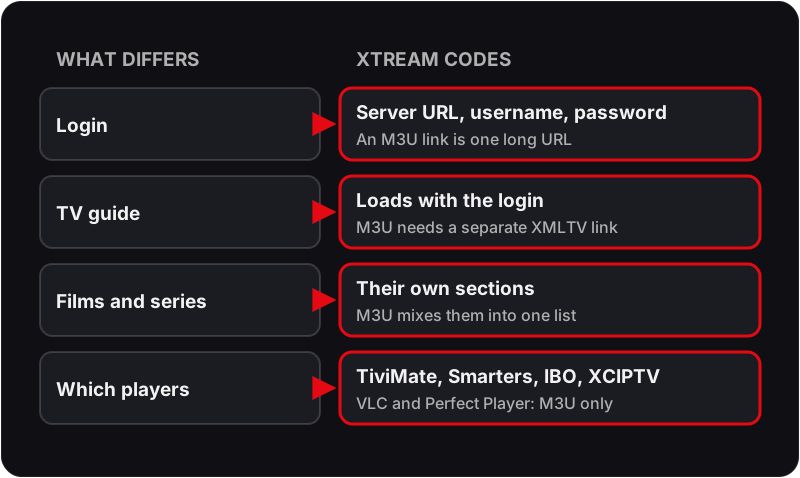
Bottom line: Xtream Codes are better in almost every way. Use M3U only if your app doesn't support Xtream Codes — which is rare with modern IPTV players, VLC being the main exception along with the no-longer-updated Perfect Player.
How to Set Up Xtream IPTV on TiviMate (Firestick & Android)
TiviMate is the most popular IPTV player in the UK for Firestick and Android TV. It offers the best EPG integration, picture quality, and user interface of any Xtream Codes-compatible app.
Open TiviMate
Launch TiviMate on your Firestick or Android device.
Tap Add Playlist
From the home screen, select Add Playlist then choose Xtream Codes.
Enter your credentials
Type in your Server URL, Username, and Password — all provided by Flickhaven after signup.
Tap Add
TiviMate connects to the server and automatically loads all your channels, EPG, VOD, and series.
Start watching
Browse 55,000+ live channels, movies, and series. EPG updates automatically.
Note: TiviMate is free to install; TiviMate Premium, a low yearly licence, adds recording, multiple playlists, the multi-channel panel and automatic EPG refresh. The free version takes one Xtream login and works fine for testing.
How to Set Up Xtream Codes on IPTV Smarters Pro
IPTV Smarters Pro is the best choice for beginners and runs on Firestick, Android and Android TV, with the iPhone and iPad version listed as IPTV Smarters Player.
Open IPTV Smarters Pro
Launch the app on your device. On Firestick, install it from the Amazon Appstore if it is listed, otherwise from the developer's official APK via Downloader.
Select Login with Xtream Codes API
On the login screen, choose the Xtream Codes API option (not M3U URL).
Fill in your details
Enter a nickname for your profile, then your Server URL, Username, and Password from Flickhaven.
Tap Add User
The app connects and loads all live channels, movies, series, and your electronic programme guide.
Browse your content
Open Live TV, Movies and Series from the home screen; catch-up appears on channels that offer it.
Best Xtream IPTV Player Apps in the UK
All of the following apps support Xtream Codes API login and work with Flickhaven IPTV. Prices are from each app's own store listing:
| App | Price | Best for | Devices |
|---|---|---|---|
| TiviMate | Free / Premium | Best overall | Firestick (sideload), Android TV |
| IPTV Smarters Pro | Free | Best for beginners | Android, Firestick; iPhone as Smarters Player |
| IBO Player Pro | 7-day trial, then activation | Same app on smart TVs | Firestick, Android, Samsung, LG, Apple |
| GSE Smart IPTV Pro | £2.99 iPhone · £4.99 Apple TV | Best for iPhone/iPad | iPhone, iPad, Apple TV |
| XCIPTV Player | Free with ads | Built-in DVR | Android TV, Android, Firestick (sideload) |
| Kodi + PVR IPTV Simple Client | Free | Most customisable | Most platforms |
Get Your Xtream Codes from Flickhaven
Subscribe to Flickhaven and receive your Server URL, Username, and Password via WhatsApp. 55,000+ channels, 4K UHD, full EPG, and VOD included. Free 24-hour trial — no credit card required.
What Do You Get with Xtream Codes IPTV from Flickhaven?
When you use Xtream Codes with a quality UK IPTV provider, you get far more than just live TV channels:
55,000+ Live Channels
Live sports, Premier League, premium entertainment, BBC, ITV, Channel 4, and more.
Full VOD Library
180,000+ movies and TV shows organised by genre, year, and popularity.
Automatic EPG
The TV guide loads with your login. No manual URL entry required.
Catch-up TV
Watch content up to 7 days after broadcast on compatible channels.
Series Library
Thousands of TV series organised by season and episode, binge-ready.
Multi-Device Plans
Plans cover 1 to 4 devices at once, depending on the tier you choose. The free trial is one connection.
Xtream Codes Setup Guides by Device
Xtream Codes work on virtually every internet-connected device. Select your device for a full step-by-step setup guide:
Xtream Codes Not Working? Common Fixes
If your Xtream Codes aren't connecting, try these fixes in order:
Double-check your credentials
Copy and paste your Server URL, Username, and Password directly from your provider's message. A single typo will prevent connection. Make sure the URL includes http:// or https:// and the correct port number.
Check your internet connection
Xtream Codes require a stable broadband connection. Run a speed test — you need at least 10 Mbps for HD and 25 Mbps for 4K. Try restarting your router if speeds are low.
Try a different IPTV app
If TiviMate isn't connecting, try IPTV Smarters Pro with the same credentials. If one app connects but another doesn't, the issue is app-specific rather than your subscription.
Check your subscription status
Xtream Codes stop working if your subscription has expired. Contact your IPTV provider via WhatsApp to confirm your account is active.
Contact Flickhaven support
Message us on WhatsApp and we'll check your credentials and server status within minutes, 24/7.
For more detailed help, see our guides on channels not loading, IPTV buffering, EPG not working and what an M3U playlist is.
Frequently Asked Questions
What are Xtream Codes for IPTV?
Xtream Codes (also called the Xtream API) are a login method used by IPTV providers. Instead of a single M3U playlist link, you receive three credentials — a server URL, a username, and a password — that your IPTV app uses to connect directly to the streaming server and load channels, EPG, VOD, and series automatically.
What is the difference between M3U and Xtream Codes?
An M3U link is a single URL containing your channel playlist. Xtream Codes use a server URL, username, and password that your app uses to communicate directly with the streaming server. With Xtream Codes the guide, films and series load in their own sections from the one login, while an M3U link usually needs a separate guide (XMLTV) link and mixes everything into one list.
How do I set up Xtream Codes on TiviMate?
Open TiviMate, tap Add Playlist, select Xtream Codes, then enter your server URL, username, and password from your IPTV provider. Tap Add and TiviMate will automatically load all your channels, EPG, VOD, and series.
How do I set up Xtream Codes on IPTV Smarters Pro?
Open IPTV Smarters Pro and tap Login with Xtream Codes API. Enter your name, the server URL, username, and password provided by your IPTV service. Tap Add User and the app will connect and load all your content.
Do Xtream Codes work on Firestick?
Yes. Xtream Codes work on Firestick through apps like TiviMate, IPTV Smarters Pro and IBO Player Pro. TiviMate is sideloaded; IPTV Smarters Pro is installed from the Appstore where it is listed, otherwise from the developer's APK; IBO Player Pro uses its developer's Downloader code.
Where do I get Xtream Codes for UK IPTV?
Xtream Codes are provided by your IPTV subscription service. When you subscribe to a provider like Flickhaven, you receive your server URL, username, and password on WhatsApp, ready to enter into any compatible IPTV app.
Are Xtream Codes better than M3U playlists?
For most users, yes. Xtream Codes give you an automatic guide, organised film and series sections and catch-up where the player supports it. M3U playlists work in more basic players such as VLC, but you add the guide separately and get one long list.
What is the best Xtream IPTV player?
On Firestick and Android TV, TiviMate is the most popular Xtream IPTV player, with IPTV Smarters Pro the easiest for beginners. IBO Player Pro and XCIPTV Player also take Xtream Codes, and on iPhone and Apple TV, GSE Smart IPTV Pro does. Perfect Player and VLC are M3U-only, so they cannot use an Xtream login.
Is Xtream IPTV a provider?
No. Xtream IPTV usually means IPTV delivered through the Xtream Codes login format — the server URL, username and password that most services, including Flickhaven, hand out. It is a way of logging in, not a channel provider, and unrelated to services with similar names.
Sources
- GSE SMART IPTV PRO for iPhone and iPad — UK App Store
- XCIPTV PLAYER by OTTRUN — Google Play listing
- Ibo Player Pro — UK App Store listing (7-day trial)
Checked on .
Related Guides
Ready to get your Xtream Codes?
Message Flickhaven on WhatsApp and receive your Server URL, Username, and Password within minutes. Free 24-hour trial with full access to 55,000+ channels, 4K quality, and complete VOD library. No credit card required.
Start Free Trial — Get Your Xtream CodesIf you want the wider context, start with our IPTV UK guide, best IPTV UK guide and test it free first.