Flickhaven IPTV UK
IPTV Smarters Pro Review UK 2026: Is the Free IPTV Smarters Player Any Good?
IPTV Smarters Pro is the best free IPTV player for households that watch on more than one kind of device. The same IPTV Smarters login works on Firestick, Android, iPhone, iPad and Windows, setup is the easiest of any IPTV app, and films and series browsing is excellent. It loses ground to TiviMate on the TV guide and recording. There is no Smarters Pro subscription: the app is free, and the channels come from your IPTV provider.
IPTV Smarters Pro
9.0/10
Verdict: IPTV Smarters Pro is the best free IPTV app and the most versatile across platforms. It's the only major IPTV app that works well on Firestick, Android, iPhone and iPad, and Windows. For multi-device households, nothing comes close.
Recommended for: Multi-device users, iPhone/iPad viewers, beginners, Windows PC users
IPTV Smarters Pro has been one of the most popular IPTV players for UK viewers for several years — and it's still going strong in 2026. New to IPTV? See our complete IPTV explainer for a full overview of how the technology works. Its biggest advantage over competitors like TiviMate is cross-platform support: one app that works on your Firestick, iPhone, Android phone, and Windows laptop.
This review looks at IPTV Smarters Pro with Flickhaven IPTV on four kinds of device, to give UK viewers an honest 2026 view of the app.
IPTV Smarters Pro Scores
Device Compatibility
Ease of Setup
EPG / TV Guide
Video Quality
Interface / Design
VOD / Series
Value for Money
Stability
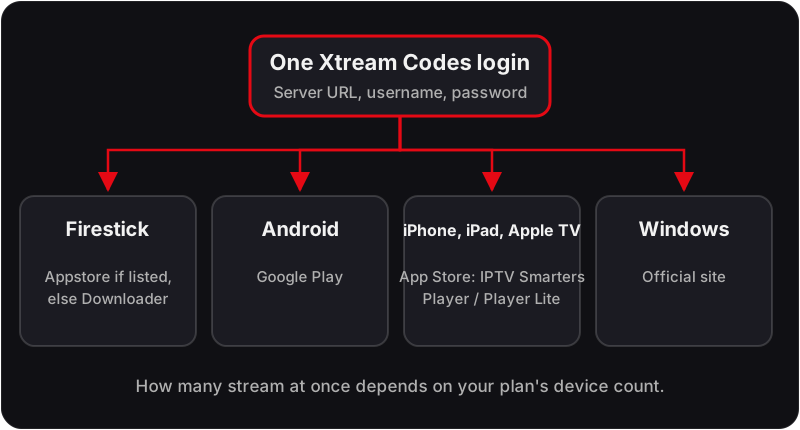
How Smarters Pro Runs on Each Platform
🔥 Firestick
ExcellentFast loading, smooth HD and 4K playback. EPG loads within 2 minutes. Occasional minor UI lag on older Firestick models.
🍎 iPhone / iPad
ExcellentOne of the best IPTV experiences on iOS, where the App Store lists it as IPTV Smarters Player or Smarters Player Lite. Clean interface, fast channel switching, full EPG.
🤖 Android Phone
ExcellentPerfect on Android. Available free on the Play Store with no sideloading required.
💻 Windows PC
GoodWorks well on Windows but the interface feels less polished than on mobile. Fine for occasional desktop viewing.
Using an iPhone or iPad? See our dedicated IPTV iPhone & iPad setup guide for the full step-by-step walkthrough on iOS.
How to Set Up IPTV Smarters Pro with Flickhaven
- 1Install IPTV Smarters Pro from your device's app store (Play Store; App Store as IPTV Smarters Player; on Firestick, the Amazon Appstore if listed or via Downloader).
- 2Open the app and tap Add User.
- 3Select Login with Xtream Codes API.
- 4Enter your Flickhaven Server URL, Username, and Password (from your WhatsApp activation).
- 5Tap Login — all channels, VOD, and series will load automatically.
- 6Use the Live TV tab for channels, VOD tab for movies, and Series tab for TV shows.
Everyday Features Worth Setting Up
The login takes a minute; these are the settings that decide whether the app feels good a month later.
Favourites
Long-press a channel to add it to Favourites. With 55,000+ channels in the full list, a favourites group of the twenty you watch is the difference between a usable guide and an endless scroll.
EPG refresh
The guide is downloaded on login and refreshed on a schedule you can set. If programme data looks stale, the manual refresh in the EPG settings pulls a fresh copy.
Parental control
A PIN can lock individual categories, such as adult or film groups, so they stay hidden until the PIN is entered. Useful on a shared Firestick.
External player
If a stream will not play in the built-in player, the app can hand it to another installed player such as VLC. Set this per stream type in the player settings.
The screen-by-screen walkthrough is in the IPTV Smarters Pro setup guide.
Troubleshooting IPTV Smarters Pro
Login fails or says the account is expired
Likely cause: A mistyped server URL, username or password, or a plan that has ended.
Check: Compare each field character by character with the WhatsApp activation message, including the port in the server URL.
Fix: Re-enter the details, or ask support to confirm the plan end date. The full list of causes is in the guide to the Smarters failed-to-authorise error.
Channels listed but the guide is empty
Likely cause: The EPG has not finished downloading, or the EPG source has been switched off.
Check: Open the EPG settings and look at the last update time.
Fix: Run a manual refresh and wait for it to complete. If it still stays blank, the steps in the Smarters EPG fix guide cover the stubborn cases.
A channel buffers every few seconds
Likely cause: Wi-Fi contention or evening congestion rather than the app.
Check: Play the same channel on a phone on mobile data. If it is smooth there, the home network is the limit.
Fix: Wire the device with Ethernet, move to 5 GHz Wi-Fi, or drop the stream from 4K to HD for that evening.
Sound plays but the picture is black
Likely cause: The built-in player cannot decode that stream's format on your device.
Check: Try the HD or SD variant of the same channel.
Fix: Switch the live player to the external or alternative decoder in settings, or change the stream format option.
Dedicated guides: fixing the Smarters failed-to-authorise error and fixing a blank EPG in IPTV Smarters Pro.
Who Should Pick Smarters — and What to Test First
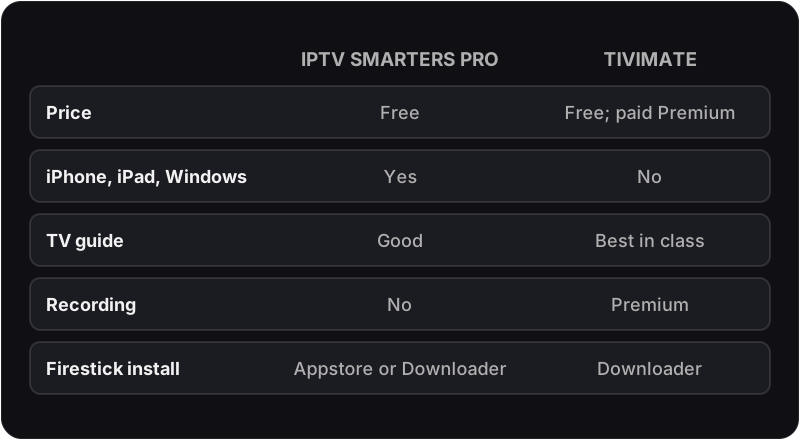
Pick Smarters if you watch on more than one kind of device, if anyone in the house uses an iPhone or iPad, or if you want the simplest possible login. Pick TiviMate instead if you have a single Android device and want recording.
During the free 24-hour trial, use Smarters to check:
- The Xtream Codes login works first time on the device you will use most.
- The guide fills within a few minutes and matches what is actually on the channel.
- Catch-up opens on a UK channel and plays something from yesterday.
- One on-demand series plays, pauses and resumes cleanly.
- An evening live stream holds for a full programme on your normal connection.
Pros & Cons
Pros
- ✓Completely free
- ✓Works on Firestick, Android, iOS, and Windows
- ✓Simple Xtream Codes setup
- ✓Good EPG TV guide
- ✓Excellent VOD and Series sections
- ✓Regular updates from developer
Cons
- ✗UI is less polished than TiviMate
- ✗EPG not as detailed as TiviMate
- ✗No recording feature
- ✗Occasional crashes on older Firesticks
- ✗No multi-screen panel view
Final Verdict — Should You Use IPTV Smarters Pro?
Yes — especially if you watch on multiple devices or use an iPhone.
IPTV Smarters Pro is the best option when you want one app that works across your entire household — Firestick in the living room, iPhone on the go, Android tablet in the bedroom, and laptop at your desk. It's free, easy to set up, and handles Flickhaven's 55,000+ channels without issues.
If you only watch on a Firestick or Android TV box and want the absolute best experience, consider TiviMate instead — it edges ahead on EPG quality and UI polish. See our full best IPTV apps UK comparison.
IPTV Smarters Pro — Frequently Asked Questions
Is IPTV Smarters Pro good?+
Yes — it is the best free IPTV player for households that watch on more than one kind of device. It scores 9.0/10 in this review: setup is the easiest of any IPTV app, VOD and series browsing are excellent, and it runs on Firestick, Android, iPhone, iPad and Windows. Where it loses marks is the dated interface, an EPG that is good rather than great, and the lack of recording.
Is IPTV Smarters Pro worth it?+
For most people, yes, because it costs nothing: there is no Premium tier to weigh up. The only real question is whether to use it or TiviMate. If you watch on a single Firestick or Android box and care about the programme guide, TiviMate (with its paid Premium tier for recording) is worth the switch; if you need iPhone, Windows or several device types on one account, Smarters is the better fit.
Is IPTV Smarters Pro free?+
Yes. IPTV Smarters Pro is free to download and use on Android, Firestick and Windows, and the iOS version (published as Smarters Player Lite) is free on the App Store. No in-app purchase is needed for live TV, VOD, series, EPG or catch-up. What you pay for is the IPTV subscription whose credentials you enter — the app itself carries no channels.
Do I need an IPTV Smarters Pro subscription?+
No. There is no IPTV Smarters Pro subscription: the app is a free player and sells no channels. What you need is a subscription from an IPTV provider, delivered as an Xtream Codes login or M3U link, which you enter on the Add User screen. Be wary of any site selling a "Smarters subscription" — it is selling an IPTV service under the app's name.
Is IPTV Smarters Pro legal and safe?+
The app is legal and safe: it is a player with no content of its own, published on Google Play and the App Store, and it only streams what your provider's login gives it. Legality therefore rests with the IPTV service you subscribe to, not with Smarters — our guide to IPTV legality in the UK explains how to tell a legitimate provider from a pirate one.
Which is better, IPTV Smarters Pro or TiviMate?+
TiviMate for the best experience on one Android device; IPTV Smarters Pro for flexibility across devices. TiviMate wins on EPG layout, interface polish and recording; Smarters wins on platform support (iOS and Windows), simplicity and price, since it is entirely free. Many households run both — TiviMate on the living-room Firestick, Smarters on phones and laptops.
Can I add more than one IPTV account to Smarters?+
Yes. The Add User screen accepts several logins, and the user list lets you switch between them without logging out. It is useful for running a trial alongside an existing provider, or for keeping a UK playlist and an international one separate.
Does IPTV Smarters Pro have catch-up?+
Yes, when the provider supports it. Channels with catch-up show an icon in the live list; open it to see recent programmes by day. Flickhaven's EPG and 7-day catch-up appear here without any extra setup beyond the Xtream Codes login.
Does Smarters work with an M3U link instead of Xtream Codes?+
Yes. The login screen offers an M3U option alongside Xtream Codes. Xtream Codes is the better choice when both are available, because the app can then pull the EPG, VOD and series categories automatically rather than relying on what is embedded in the playlist.
Try IPTV Smarters Pro with Flickhaven
Start your free 24-hour trial. IPTV Smarters Pro is available free on all your devices.
Worth reading next: Flickhaven's guide to IPTV in Britain, UK IPTV providers compared and test it free first.