Flickhaven IPTV UK
Xstream IPTV UK — Review, What We Could Verify & Alternatives (2026)
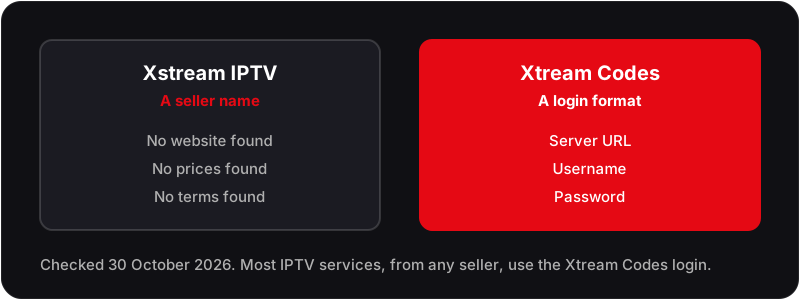
Xstream IPTV UK is a name UK viewers search for, but when we checked on 30 October 2026 we found no seller website, published prices or terms behind it, and nothing to support the never-stops, perfect-uptime promises attached to the name. It is not the same as Xtream Codes, the login format most IPTV services use. Ask any seller for its prices, refund terms and a free trial before paying. Flickhaven runs a competing service.
Competing-operator disclosure
Flickhaven operates a competing IPTV service, so this page about Xstream IPTV UK is a stated position, not an independent review. For a neutral view, seek out reviewers with no commercial relationship to either service.

Xstream IPTV UK is a name UK viewers search for, but when we checked on 30 October 2026 we could not find a seller website, published prices or terms behind it, and nothing to support the never-stops, perfect-uptime promises some pages attach to the name. It is also easily confused with Xtream Codes, the login format most IPTV services use. This Xstream IPTV review sets out what we could not verify, how to check any seller, and how Flickhaven compares.
Looking for an Xstream IPTV UK alternative?
Flickhaven: 55,000+ channels · 4K UHD · Live sport · Anti-Freeze · Free 24h trial
What is Xstream IPTV UK?
Xstream IPTV UK is sold as an IPTV service streaming live TV, sport, films and on-demand video over broadband. Beyond that, we could not verify who runs it, what it charges or what it carries. Promises that a stream will never stop are not something any IPTV service can guarantee, because buffering also depends on your broadband and Wi-Fi.
Do not confuse the name with Xtream Codes, the login system most IPTV services use, which is explained in our Xtream Codes IPTV guide. Whoever you buy from, you normally receive three credentials:
These go into an IPTV player app, such as TiviMate on Firestick and Android TV or IPTV Smarters Pro across platforms, and the channel list, on-demand library and guide load from the server.
Not sure how IPTV works? Read our complete guide to IPTV — what it is and how it works.
Xstream IPTV UK Channels — What Can You Watch?
A full-featured IPTV subscription covers three content categories: live television, video on demand and catch-up TV. We found no published Xstream IPTV UK channel list, so this is what to check by name during any trial.
UK Live TV — The Essential Package
All major UK terrestrial channels should be present in full HD: BBC One, BBC Two, BBC Three, BBC Four, ITV, ITV2, ITV3, ITV4, Channel 4, E4, More4, Channel 5, 5Star, 5Action, plus live sport (football, golf, F1, cricket and tennis), film and entertainment channels, and the major UK news channels.
Sports — The Primary Reason UK Viewers Switch to IPTV
Live sport is the single biggest driver of IPTV adoption in the UK. A complete sports package should cover the Premier League and EFL, European club football, Formula 1 and MotoGP, rugby union and league, golf, tennis, cricket and the NFL.
Specialist sports channels — European football, club channels and regional sports networks — should also be included in any premium package. For a full breakdown, see our best sports channels on UK IPTV guide.
VOD and Catch-Up TV
The on-demand library should include a large range of films and TV series: Hollywood films, UK drama box sets, documentaries, international cinema, and children's animation. Catch-up TV — the rolling archive of recently broadcast programmes — should cover a 7-day window on all major UK channels, functioning as a single interface for BBC iPlayer, ITVX, All 4, and My5 content.
Flickhaven lists 180,000+ on-demand titles and 7-day catch-up, its own published figures.
Xstream IPTV UK Pricing
We found no published Xstream IPTV UK pricing when we checked on 30 October 2026; ask any seller for the full price in writing before paying. The table below sets Flickhaven's published plans against a satellite TV base package.
| Provider | Monthly | 6 Months | 12 Months | Free Trial |
|---|---|---|---|---|
| Flickhaven | £15.00 | £35.00 | £55.00 (14 months) | ✓ 24 hours |
| Xstream IPTV UK | Not published | Not published | Not published | Not confirmed |
| Satellite TV (base package) | £26.00 | £156.00 | £312.00 | No |
Device Compatibility — Firestick, Smart TV, iPhone & More
If a seller uses Xtream Codes or an M3U playlist, as most do, its service will work on any device that runs a supported IPTV player app: TiviMate or IPTV Smarters Pro on Firestick and Android, SS IPTV on Samsung and LG Smart TVs, IPTV Smarters Pro or GSE Smart IPTV on iPhone and iPad, and VLC or the IPTV Smarters web player on a PC or Mac.
Device walkthroughs: Full Firestick setup guide, Samsung Smart TV setup guide, LG TV setup guide, Android TV setup guide, iPhone and iPad setup guide and Windows PC setup guide.
How to Set Up Xstream IPTV UK (Step-by-Step)
The setup process is identical for all Xtream Codes IPTV services. The steps below use TiviMate on a Firestick — the most popular IPTV setup in the UK — as the example.
Get Your Credentials
After subscribing to your chosen IPTV service, you will receive a Server URL, Username, and Password via WhatsApp, email, or your provider's account dashboard. These three items are all you need to set up on any device.
Enable Apps from Unknown Sources on Firestick
Go to Settings → My Fire TV → Developer Options → Apps from Unknown Sources and toggle it ON. This allows you to sideload apps that are not in the Amazon App Store.
Install Downloader and Download TiviMate
Search for and install 'Downloader' from the Amazon App Store. Open Downloader, enter the TiviMate APK download URL (available at tivimate.com), download, and install. TiviMate is free; a paid Premium licence, bought through the TiviMate Companion app, adds recording, multiple playlists and the multi-channel view.
Add Your IPTV Credentials
Open TiviMate → Add Playlist → Xtream Codes. Enter your Server URL, Username, and Password exactly as provided by your IPTV supplier. Press Next. TiviMate will connect to the server and download your channel list, VOD library, and EPG data.
Organise Favourites and Configure EPG
Once channels load, TiviMate automatically populates EPG data. Browse the full channel list, long-press any channel to add it to Favourites, and set your EPG update interval to every 12–24 hours for the freshest programme guide.
Start Streaming
Navigate to your Favourites or the Live TV section and select any channel. Press OK or Enter to start playback. Use the left/right remote buttons to switch channels in real time without returning to the main menu.
For platform-specific guides see: IPTV on Firestick, IPTV on Samsung Smart TV, IPTV on LG TV.
Xstream IPTV Buffering — Causes & Fixes
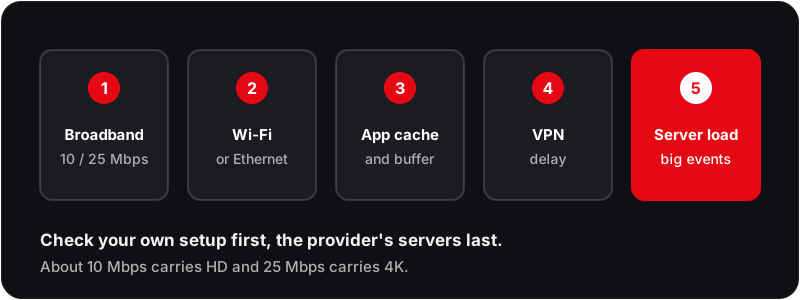
A promise that streams will never stop describes a hope, not something any provider can guarantee, because buffering has several causes, some outside the provider's control. Here are the most common causes and how to fix each one.
Slow or Congested Internet Connection
Most commonRun a speed test at fast.com or speedtest.net. You need a minimum of 10 Mbps for stable HD and 25 Mbps for 4K UHD. If your speed is sufficient but buffering persists, the issue is elsewhere — continue to the next checks.
Wi-Fi Interference or Weak Signal
Very commonSwitch from a 2.4 GHz Wi-Fi band to 5 GHz, or better still, connect your Firestick or streaming box directly to your router via Ethernet. A wired connection eliminates signal interference and distance degradation entirely — the single most effective fix for IPTV buffering.
IPTV Server Overload During Peak Events
Common on match daysWhen many subscribers open the same big match at once, under-resourced servers struggle. Signs: buffering that starts at exactly kick-off. Fix: switch to a backup stream if your provider offers one; Flickhaven's Anti-Freeze reroutes a busy stream to another server, which reduces freezing at peak times.
IPTV Player Cache Buildup
Common on older devicesOn Firestick: Settings → Applications → Manage Installed Applications → [your IPTV app] → Clear Cache and Clear Data. In TiviMate settings, increase the buffer size to 10–15 seconds under Player settings. Restart the app after changes.
VPN Routing Adding Latency
OccasionalIf you use a VPN, route it to the nearest UK server node rather than an overseas location. A VPN adding 100ms+ of latency can noticeably degrade live streams. For most UK viewers, a VPN is not necessary for IPTV — read our guide on the best VPN for IPTV UK if you do need one.
For a complete troubleshooting walkthrough see: IPTV not loading channels — full fix guide.
Is Xstream IPTV UK Legal?
IPTV as a technology is legal. BBC iPlayer, ITVX, All 4, Netflix, and Disney+ are all forms of IPTV — they deliver television over the internet, exactly as third-party IPTV services do. The technology itself is not what makes a service legal or illegal.
The legal question concerns content rights. An IPTV provider that streams sports coverage or Hollywood films without the appropriate rights is operating outside UK copyright law, however its marketing is worded.
Before subscribing to any IPTV service — Xstream IPTV UK or otherwise — look for a published business address, clearly written Terms of Service and Acceptable Use Policy, a GDPR Privacy Policy, and support you can reach before you pay.
Measured against that list, Flickhaven publishes an Acceptable Use Policy, terms, a privacy policy and its prices, and answers WhatsApp 24/7. It does not publish a registered company name or a broadcasting licence. For a full overview of IPTV and the law in the UK, read: the UK rules on IPTV legality
Xstream IPTV UK vs Flickhaven — Full Comparison
The Xstream column shows what we could find on 30 October 2026; the Flickhaven column is what we publish. Neither is an independent test.
| Feature | Xstream IPTV UK | Flickhaven |
|---|---|---|
| Seller website | Not found | flickhaven.com |
| Live Channels | Not published | 55,000+ |
| VOD Library | Not published | 180,000+ titles |
| Stream Quality | Not published | 4K UHD on supported channels |
| Anti-Buffering Technology | Not published | Anti-Freeze |
| Uptime | Not published | 99.9% target, not a guarantee |
| Free Trial | Not confirmed | 24 hours, no card required |
| Monthly Pricing | Not published | £15.00/month |
| 12-Month Pricing | Not published | £55.00 (14 months) |
| EPG and Catch-Up | Not confirmed | 7-day EPG and 7-day catch-up |
| Customer Support | Not confirmed | WhatsApp, 24/7 |
| Terms and Refund Policy | Not found | Published |
Note: Xstream IPTV UK details marked "Not found", "Not published" or "Not confirmed" could not be verified from public information on 30 October 2026.
Best Xstream IPTV UK Alternatives (2026)
If you are looking for an Xstream IPTV UK alternative that publishes its prices and terms and offers a free trial, these are the two we can describe from published figures. Both are run by the group that publishes this site, so this is not an independent ranking; for all eight of the group's brands, see our IPTV brands compared.
Flickhaven
Our service55,000+ live · 180,000+ on demand · Up to 4K UHD · From £15.00/month · Free 24h trial · No credit card
Built around the UK terrestrial lineup and Premier League, with Anti-Freeze, a 99.9% uptime target (not a guarantee), a 7-day EPG and 7-day catch-up, and WhatsApp support 24/7.
IG IPTV
Sister brand55,000+ live · 160,000+ on demand · SD to 4K Ultra HD · From £15.00/month · 24 hours, no card
Operated by the same group as Flickhaven, on the same plan prices. Its live lineup is weighted to UK and international feeds, and it lists the widest range of player apps.
More IPTV Guides — Explore Every Topic
Device setup: IPTV on Firestick — Full Setup Guide, IPTV on Samsung Smart TV and IPTV on LG Smart TV. Troubleshooting: IPTV Not Loading Channels — Fix Guide, Xtream Codes IPTV UK — Full Guide and Best VPN for IPTV UK. Choosing a service: IPTV legality in the UK, Best IPTV Providers UK 2026, Best Sports Channels on UK IPTV, IPTV Free Trial UK — No Credit Card, Premium IPTV UK Subscription Guide and IPTV vs Virgin Media — Full Comparison.
Xstream IPTV UK — Frequently Asked Questions
Is Xstream IPTV UK legal?+
Is Xstream IPTV the same as Xtream Codes?+
What is the best Xstream IPTV UK alternative?+
How much does Xstream IPTV UK cost?+
Why is Xstream IPTV UK buffering?+
Try Flickhaven as an Xstream IPTV Alternative
Flickhaven lists 55,000+ live channels, 4K UHD streams, Anti-Freeze, 180,000+ on-demand titles and WhatsApp support 24/7. Try it free for 24 hours, with no credit card and no commitment, and judge it yourself.
No credit card required · Cancel any time · Login details within minutes
For the full picture, see these guides: best IPTV providers UK guide, Xtream Codes IPTV UK guide and IPTV free trial UK.