Stremio IPTV: How to Watch
Live TV in Stremio
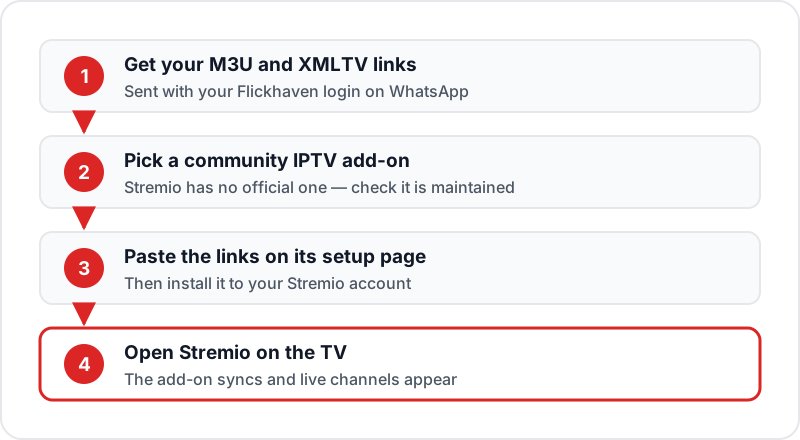
Stremio plays IPTV only through community add-ons, so it is a workaround rather than a first-choice route. Pick a maintained IPTV add-on from Stremio's Community add-ons (YourIPTV, formerly Xtremio, is now deprecated), paste your M3U playlist URL and XMLTV guide link on its setup page and install it. Live channels then appear in Stremio. The guide is thin and catch-up is missing, so for live TV a dedicated player remains better.
Stremio has no built-in IPTV support, but a community add-on can bring your live channels into it. Add your Flickhaven M3U link to one and watch 55,000+ channels inside Stremio — with the trade-offs this guide spells out.
💬 Get M3U URL for Stremio
Stremio IPTV Setup Steps
1Install Stremio on Your Device▼
Download Stremio from stremio.com/downloads for your platform: Windows, Mac, Linux, Android or Android TV (Google Play), or a Samsung (2019+) or LG (2020+) TV from its app store. On Firestick, install the Android TV APK listed on Stremio's download page using Downloader. On iPhone in the UK, use the web app at web.stremio.com.
2Create and Log In to a Stremio Account▼
Stremio requires a free account to install addons and sync them across devices. Go to stremio.com, click Sign Up, and create an account. Then log in on all your Stremio apps.
3Choose a Community IPTV Add-on▼
Stremio has no official IPTV add-on. On your PC or phone, open Stremio's Add-ons section and browse the Community list for an IPTV or M3U add-on. Before installing, check it is still maintained — YourIPTV (formerly Xtremio), once a popular choice, is now deprecated.
4Configure the Add-on with Your Links▼
Most IPTV add-ons open a configuration page when you click Install. Paste your Flickhaven M3U playlist URL in the playlist field and, if there is one, your XMLTV EPG URL in the guide field. If the add-on takes an Xtream Codes login instead, enter your server URL, username and password. Click Install.
5Find Your Channels in Stremio▼
Open Stremio on your TV or device. The add-on's channel catalogue appears on the Board and under Discover, usually grouped by category. Select any channel to start watching.
6Browse Channels and VOD▼
Navigate the add-on's groups — Sports, Entertainment, UK channels and so on. VOD from your IPTV subscription is better browsed in a dedicated IPTV app like IPTV Smarters — film and series support through IPTV add-ons is limited.
Stremio IPTV — Pros
- ✓Already installed on many devices
- ✓Works alongside existing Stremio content
- ✓Syncs channel list across all logged-in devices
- ✓Clean modern interface
- ✓No extra app installation if you already use Stremio
Stremio IPTV — Cons
- ✗Requires a community add-on — not officially supported
- ✗Add-ons can be deprecated (YourIPTV was)
- ✗Limited VOD/Series navigation vs dedicated IPTV apps
- ✗EPG integration less polished than TiviMate or IPTV Smarters
- ✗Not the best choice on Firestick (IPTV Smarters is easier)
Stremio vs IPTV in a Dedicated Player
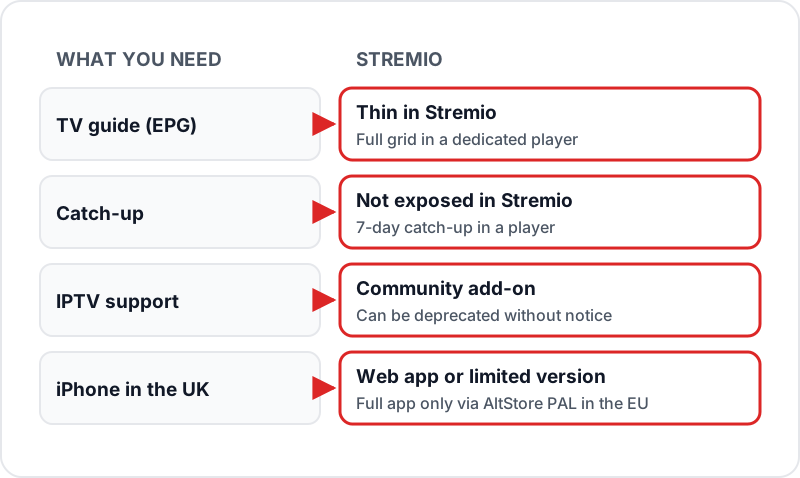
The same Flickhaven login works in both. What changes is how much of it you can use.
Before You Start: M3U or Xtream?
Dedicated players usually log in with an Xtream Codes API: a server URL, username and password. Most Stremio IPTV add-ons do not. They want a single M3U playlist URL, and optionally an XMLTV URL for the guide. Both are generated from the same account, so there is no second subscription to buy; you simply need the right format. If the difference is new to you, our explainer on what an M3U playlist is and how players use it covers it in a few minutes. You can test the whole Stremio setup on a free Flickhaven trial before you pay.
Have these ready before you install the addon:
- Your Flickhaven M3U URL, copied exactly. A single missing character returns an empty channel list rather than an error.
- Your XMLTV EPG URL if you want programme names in the guide.
- A Stremio account signed in on the device you will watch on.
- A phone or PC to open the add-on configuration page, which is easier to type into than a TV remote.
Troubleshooting Stremio IPTV
The Live TV section is empty after installing the addon
Likely cause: The playlist URL was pasted incompletely, or the addon has not synced to this device yet.
Check: Open the addon settings in Stremio and read the URL back. Compare it character by character with the one in your WhatsApp chat.
Fix: Remove the addon, reinstall it with the URL pasted fresh, then restart Stremio on the device.
Channels are listed but nothing plays
Likely cause: Another device is still streaming on the same login, or the stream format is one the built-in player on that device cannot decode.
Check: Try the same channel in VLC or a dedicated IPTV app on the same network. If it plays there, the problem is Stremio, not the service.
Fix: Close the stream on other devices, then on Stremio switch to the external player option in its settings if the platform offers one.
The guide shows channel names but no programmes
Likely cause: The EPG URL was left blank, or the guide has not finished its first download.
Check: Look for the EPG field in the addon configuration and confirm it is filled.
Fix: Add the XMLTV URL, save, and give it a few minutes before judging. A stale guide after that usually clears with a Stremio restart.
Streams buffer in Stremio but not in other apps
Likely cause: Stremio buffers differently from dedicated players, and on low-powered TV sticks it has less headroom.
Check: Play the same channel at the same time in a dedicated player on the same device.
Fix: Use Stremio for on-demand and keep a dedicated player for live TV, or move Stremio to a PC or phone where it is stronger.
Is Stremio the Right Home for Your IPTV?
Stremio suits people who already live in it: one app, one search box, and live channels sitting next to everything else. It is a poor fit if live television is the main reason you subscribe, because the guide is thin, catch-up is missing and channel switching is slower than in a purpose-built player.
The free 24-hour trial is the cheapest way to find out which group you are in. During the trial, test in this order: paste the M3U URL and confirm the Live TV section fills; play a UK channel for twenty minutes at peak evening time; open a 4K Ultra HD stream and check it holds; switch between five channels and note how long each takes to start; then try the same channels in a dedicated player and compare. If Stremio comes close enough for your habits, keep it. If not, nothing is lost, because the subscription works in either.
FAQ
QDoes Stremio support IPTV?▼
Only through community add-ons. Stremio has no official IPTV add-on; community ones take your M3U playlist link (some also take an Xtream Codes login) and add your live channels as a catalogue inside Stremio. They come and go, so check an add-on is still maintained before you rely on it.
QWhat happened to the YourIPTV Stremio add-on?▼
YourIPTV — previously called Xtremio — was one of the best-known IPTV add-ons for Stremio, taking an M3U link or Xtream Codes login. Its public page now says "YourIPTV is deprecated". If it was your route, move to another maintained community add-on, or use a dedicated player such as TiviMate or IPTV Smarters Pro with the same Flickhaven login.
QStremio vs IPTV: which should I use?▼
They do different jobs. Stremio is a media centre built around add-ons; IPTV is a live TV service you watch in a player. You can bring IPTV into Stremio with an add-on, but the guide is thin and catch-up is missing, so if live TV is the main reason you subscribe, a dedicated IPTV player gives the better experience.
QIs Stremio good for IPTV?▼
It's workable but not optimal. Dedicated IPTV apps like IPTV Smarters Pro or TiviMate offer better EPG integration, channel browsing, and VOD navigation. Stremio is best if you already use it and want to centralise your streaming.
QWhat devices does Stremio support for IPTV?▼
Stremio's own download page lists Windows, Mac and Linux, Android phones and Android TV (Google Play or APK), Samsung TVs from 2019 and LG TVs from 2020, and a web app. A Firestick uses the Android TV APK from stremio.com. On iPhone in the UK it is the web app or a limited version; the full iOS app is only via AltStore PAL in the EU, Brazil and Japan.
QCan I use my Xtream Codes login in Stremio?▼
It depends on the add-on. Many take only an M3U playlist URL; a few also accept a server URL, username and password. If yours is M3U-only, ask Flickhaven for the M3U URL that matches your account — it points at the same channels in the format the add-on understands.
QDoes catch-up work in Stremio?▼
Usually not. IPTV add-ons list live streams, so 7-day catch-up is not exposed the way it is in a dedicated player. If you rely on catch-up, keep a dedicated app installed alongside Stremio for that.
QWhy does the addon work on my PC but not on my TV?▼
Addon sync between devices is not instant and older TV builds of Stremio lag behind the desktop app. Log out and back in on the TV, wait a couple of minutes, then check the Live TV section again. If it still fails, remove the addon and re-add it from the TV itself.
QCould the add-on stop working after an update?▼
Yes — or stop altogether, as YourIPTV did. Add-ons are community-maintained and not part of Stremio, so an update or a developer stepping away can break them. If that happens, your Flickhaven subscription is unaffected: the same M3U URL opens in any other player straight away.
Sources
Checked on .
Full IPTV Setup Guide
All devices covered
Best Free IPTV Apps
Smarters, TiviMate and more
IPTV on Kodi
Alternative open-source player
Need Your M3U URL for Stremio?
Flickhaven includes an M3U URL with every subscription. Get a free 24-hour trial and test it in Stremio before committing.
💬 Get Free Trial + M3U URL