XC IPTV Player (XCIPTV)
Setup for Firestick & Android TV
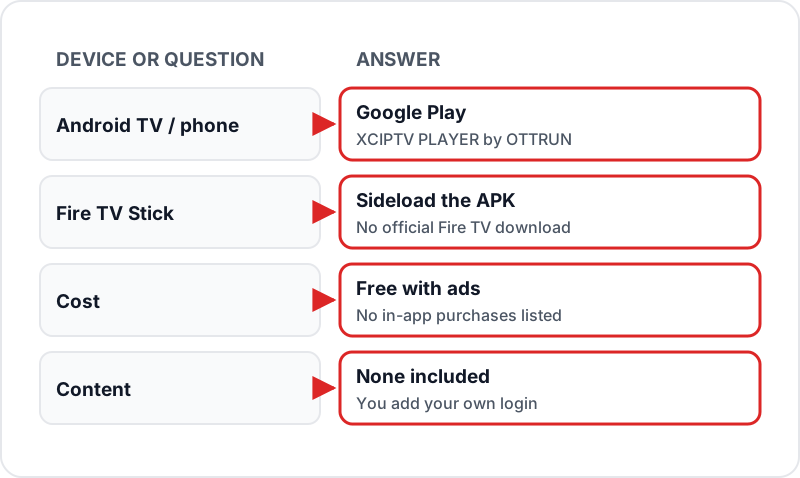
XC IPTV — XCIPTV PLAYER by OTTRUN — is a free, ad-supported IPTV player on Google Play for Android TV and phones, sideloaded on Firestick. It takes Xtream Codes or M3U, has a built-in EPG with catch-up, and can schedule recordings. Here's how to install it and connect your IPTV subscription. No login yet? A no-card Flickhaven trial gives you Xtream Codes details to test it with.
What is XC IPTV (XCIPTV Player)?
XCIPTV PLAYER is a free media player from OTTRUN for Android TV, Android phones and tablets, and it also runs on Fire TV when sideloaded. It presents channels and on-demand content as poster cards rather than the classic list view used by older IPTV apps, plays through its own ExoPlayer and VLC engines, and contains no channels of its own.
Firestick Installation
10 min1Enable Unknown Sources on Firestick▼
Press the Home button → Settings (gear icon) → My Fire TV → Developer Options → Apps from Unknown Sources (or Install Unknown Apps → Downloader). Toggle to ON.
2Install the Downloader App▼
Go back to the Firestick home screen. Use the search function to find "Downloader" and install the free app by AFTVnews from the Amazon App Store.
3Download the XCIPTV APK via Downloader▼
OTTRUN does not publish a Fire TV download or Downloader code, so use Downloader's browser to fetch the latest XCIPTV PLAYER APK signed by OTTRUN. Check the developer name before you install, and skip anything labelled "mod" or carrying another provider's branding.
4Install XCIPTV▼
Once downloaded, Downloader will prompt you to install the APK. Press Install. Wait 10–15 seconds for the installation to complete. Press Open when done.
5Add your login▼
On the XCIPTV welcome screen, add a new login and give it a name (e.g., "Flickhaven").
6Select Xtream Codes Login▼
Choose the Xtream Codes option. Enter your Flickhaven server URL, username, and password exactly as sent in your WhatsApp message.
7Load Your Playlist▼
Tap Connect. XCIPTV will load your channels, VOD library, and EPG data. This takes 30–60 seconds for a full 55,000+ channel playlist. Once loaded, you'll see the main XCIPTV interface.
Android TV / Google TV Setup
5 min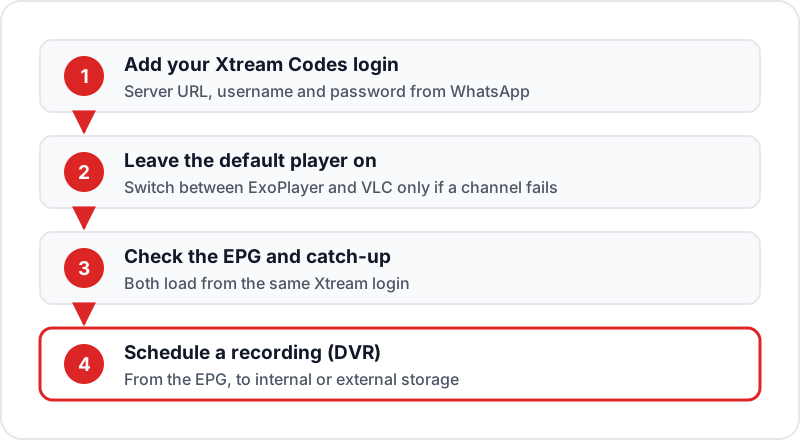
Open Google Play Store
Open the Play Store on your Android TV, Google TV, or Android box. Search for "XCIPTV".
Install XCIPTV
Select XCIPTV PLAYER by OTTRUN from the results and press Install. It is free, with ads.
Launch and Add Your Login
Open XCIPTV and add a new login with a name of your choice.
Enter Xtream Codes Credentials
Select the Xtream Codes option and enter your Flickhaven server URL, username, and password.
Start Watching
Tap Connect. Your channels and VOD load automatically. Navigate using your remote.
XCIPTV vs IPTV Smarters Pro
| Feature | XCIPTV | IPTV Smarters Pro |
|---|---|---|
| Platform | Android TV, Firestick, Android | Android, iOS, Windows, Mac |
| Where to get it | Google Play; sideload on Firestick | Google Play, App Store, official APK |
| Xtream Codes Support | ✓ | ✓ |
| M3U Support | ✓ | ✓ |
| EPG Guide | ✓ | ✓ |
| VOD / Series | ✓ | ✓ |
| Scheduled DVR recording | ✓ | — |
| Interface Style | Poster cards | Tab-based navigation |
| Cost | Free with ads | Free |
Both are solid free choices for Android/Firestick. If you also use iPhone, PC, or Mac — IPTV Smarters Pro covers more platforms.
Who XCIPTV Suits — and Who Should Pick Something Else
XCIPTV is the right pick if you watch mostly on a Firestick or Android TV, you use the on-demand library as much as live channels, and you want a poster-style layout without paying for an unlock. It is a weaker pick if you want several channels on screen at once, want an official Fire TV download, or watch on an iPhone or a Windows laptop as well.
- →Want a multi-channel panel? Read the TiviMate review for UK Firestick users — its paid tier is built around exactly those features.
- →Watch across iPhone, PC and TV? The IPTV Smarters Pro review covers the app that runs on all of them.
- →Still undecided? Our comparison of the best IPTV apps in the UK puts the free players side by side.
Five Settings Worth Changing After Setup
Pick the video player
XCIPTV ships with two built-in players, ExoPlayer and VLC. Leave the default in place first; only switch if a channel shows a black screen or stutters, then test the same channel again with the other one.
Set the EPG time zone
Open the EPG settings and confirm the time matches UK time. If every listing is exactly an hour out after the clocks change, this setting is the cause, not the stream.
Build a favourites group
A 55,000+ channel playlist is too long to browse on a remote. Mark the channels you actually watch as favourites and start there each evening; the full list is still a click away.
Set a recording location
XCIPTV can schedule recordings from the EPG to internal or external storage. A Firestick has little free space, so point recordings at a USB drive on an Android TV box where you can.
Back up your setup
Use backup and restore once everything works. It saves your login and favourites so a new device or a reinstall takes minutes rather than a full setup.
What to Test During the Free 24-Hour Trial
The trial is long enough to find out whether XCIPTV and Flickhaven behave on your hardware and your broadband. Use it on these checks rather than browsing.
- ✓Open the live list and play three channels from different groups — UK entertainment, sport and a 4K channel — and let each run for a full minute.
- ✓Open the EPG and confirm it is populated for today and tomorrow; a blank guide on day one rarely fixes itself later.
- ✓Play a movie from the on-demand section and skip forward twice; seeking should land within a few seconds.
- ✓Start a channel on a second device if your household will use one, to see how the connection count behaves.
- ✓Do all of this at the time you normally watch, because an evening test tells you more than a quiet afternoon one.
Troubleshooting XCIPTV
✗Parse error during installation on Firestick▼
The APK file is corrupted or the wrong version for your device. Delete the file via Downloader → My Files, then download a fresh copy.
✗Login fails with correct credentials▼
Verify your server URL includes http:// and the port number. Credentials are case-sensitive. Try copying from your Flickhaven WhatsApp message directly.
✗Channels load but videos won't play (black screen)▼
In XCIPTV settings, switch between the two built-in players (ExoPlayer and VLC). Some streams play better in one than the other.
✗EPG guide is blank▼
In XCIPTV → Settings → EPG → Force Update. Check your timezone is set to GMT/BST. EPG loading can take 3–5 minutes on first load.
✗App crashes on Firestick▼
Clear app data: Settings → Applications → XCIPTV → Clear Data. Reinstall with a fresh APK if crashes persist.
Sources
Checked on .
FAQ
QWhat is XC IPTV (XCIPTV Player)?▼
XC IPTV usually means XCIPTV PLAYER by OTTRUN: a media player for Android TV, phones and tablets with two built-in players (ExoPlayer and VLC), Xtream Codes and M3U support, an EPG with catch-up, films with IMDb info, series by season, and scheduled DVR recording. It contains no channels — you add your own login.
QIs XCIPTV Player free?▼
Yes, with ads. The Google Play listing shows XCIPTV PLAYER as free, with ads and no in-app purchases.
QHow do I install XCIPTV on Firestick?▼
Fire TV has no Google Play, and OTTRUN does not publish a Fire TV download or Downloader code. On a Firestick you sideload the APK: enable Apps from Unknown Sources, install Downloader, and fetch the latest OTTRUN-signed XCIPTV PLAYER APK. Avoid "mod" or rebranded copies. On an Android TV or Google TV device, install it from Google Play instead.
QHow does XCIPTV compare to IPTV Smarters Pro?▼
Both support Xtream Codes and M3U and include EPG, films and series. XCIPTV adds scheduled DVR recording and a choice of ExoPlayer or VLC playback; IPTV Smarters Pro covers more platforms (iOS, Windows, Mac). On Android TV both are free; on Firestick both are usually sideloaded.
QCan I use XCIPTV on more than one device with the same login?▼
You can install it on as many Firesticks and Android devices as you like and add the same profile on each. How many of them can play at the same time is set by your Flickhaven plan, not by the app — if a second screen starts and the first stops, you have hit the plan's connection count rather than an XCIPTV fault.
QDoes XCIPTV work with an M3U link as well as Xtream Codes?▼
Yes. When you add a profile you can choose an M3U playlist URL instead of the Xtream Codes login. Xtream Codes is the better choice where both are offered, because it loads the live, movies and series sections separately and keeps the EPG attached without a second URL.
QDo I need a VPN to use XCIPTV?▼
No. The app does not require one and works on an ordinary home connection. Some people run a VPN for privacy or because their broadband provider slows video traffic at peak times; if you do, choose the server closest to you, because a distant server adds delay that looks like buffering.
Ready to Test XCIPTV with Flickhaven?
Get your free 24-hour trial credentials via WhatsApp and test XCIPTV with 55,000+ live channels and 180,000+ films and series.
💬 Get Free Trial for XCIPTV