Televizo IPTV Player
Android & Firestick Setup and Review
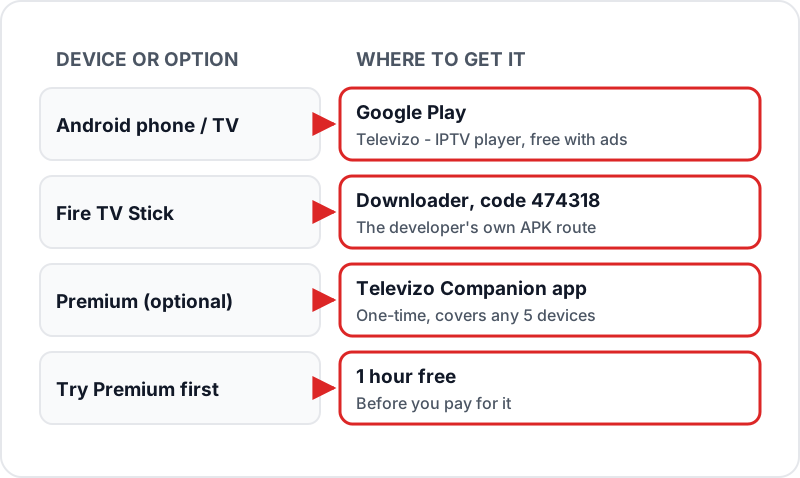
Televizo is a free, ad-supported IPTV player for Android phones, tablets and TV boxes, listed on Google Play as Televizo - IPTV player. On a Firestick, install Downloader and enter the developer code 474318. Add your playlist as an Xtream Codes login or M3U URL and the guide loads with it. Multiple playlists are free, which TiviMate keeps for Premium; Televizo Premium is a one-time purchase covering 5 devices.
Televizo is a free, ad-supported IPTV player on Google Play for phones, tablets and Android TV, installed on Firestick with the developer's Downloader code 474318. It takes Xtream Codes or M3U and has a built-in EPG guide. Here's how to install it and connect your Flickhaven subscription.
What is Televizo?
- ✓Free IPTV player from developer Andrey Menscikov (televizo.net), listed on Google Play as “Televizo - IPTV player”
- ✓Supports M3U playlists and Xtream Codes API — both formats work with Flickhaven
- ✓Clean, modern interface with built-in EPG TV guide and channel category browsing
- ✓Runs on Android phones, tablets and Android TV from Google Play, and on Fire TV Stick through the developer's Downloader code 474318
- ✓Free with ads; the one-time Premium version removes ads, unlocks backup and restore, parental control and automatic full-screen, and covers any 5 devices
- ✓A media player only — it contains no channels, so you add your own playlist
Key Features
M3U & Xtream Codes
Supports both M3U URL playlists and Xtream Codes API — the two most common IPTV subscription formats.
Built-in EPG Guide
Full TV guide with now/next information and schedule browsing — loads automatically with Xtream Codes.
Multi-playlist management
Add and manage multiple IPTV playlists from different providers within a single app.
Catch-up support
Plays catch-up (archive) programmes where the playlist provides them — test the timing with your own playlist.
Favourites, sorting & search
Pin your most-watched channels to favourites and search or sort a long channel list.
Chromecast
Send playback from a phone or tablet to a Chromecast on the same network.
Parental control (Premium)
Lock channels through the playlist editor — one of the features unlocked by the Premium version.
Tracks & subtitles
Choose video tracks, audio tracks and subtitles where the stream offers more than one.
Installing Televizo on Firestick
~3 min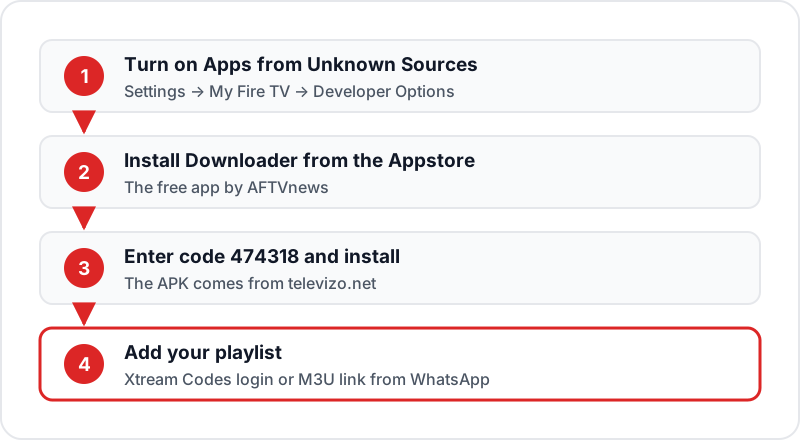
1Enable Apps from Unknown Sources▼
From the Firestick home screen, go to Settings → My Fire TV → Developer Options → Apps from Unknown Sources (or Install Unknown Apps → Downloader) and turn it on.
2Install Downloader▼
Search the Amazon Appstore for "Downloader" by AFTVnews and install it. It is free.
3Enter the Televizo code 474318▼
Open Downloader, type 474318 in the address box and press Go. The code is published by the Televizo developer and fetches the APK from televizo.net. Press Install when prompted.
4Open Televizo▼
Once installation completes, press Open. Televizo launches to the home screen where you can add your first playlist. You can delete the downloaded APK file in Downloader afterwards to free space.
Adding Playlist via Xtream Codes (Recommended)
Open Televizo and tap Add Playlist
On the Televizo home screen, tap the "Add Playlist" button or the + icon.
Select Xtream Codes
Choose the Xtream Codes option from the playlist type options.
Enter your credentials
Fill in: Playlist Name (any label, e.g., "Flickhaven"), Server URL, Username, and Password — copied exactly from your Flickhaven WhatsApp message.
Tap Add
Press Add. Televizo connects to the server and automatically loads your channels and EPG guide. First load takes 30–90 seconds depending on playlist size.
Browse your content
Open the live TV, films and series sections from the home screen. Your EPG guide is populated from the same login — no extra steps needed.
Adding Playlist via M3U URL
Open Add Playlist
In Televizo, tap Add Playlist and select "M3U playlist" as the type.
Enter a playlist name
Type any label for this playlist (e.g., "Flickhaven M3U").
Paste your M3U URL
Paste your Flickhaven M3U URL into the URL field. It comes with your login on WhatsApp — on Xtream-based services it is a get.php address carrying your username and password.
Tap Add
Press Add. Channels load within a minute. If your playlist is large (55,000+ channels), it may take up to 90 seconds on first load.
EPG TV Guide Setup (M3U Method)
When using Xtream Codes, EPG loads automatically — skip this section. If you added your playlist via M3U URL, follow these steps to add the EPG guide.
Open playlist settings
In the Televizo playlist list, press the pencil (edit) icon next to your M3U playlist.
Find the EPG section
Scroll down within the playlist settings until you see the "EPG" section.
Enter your XMLTV URL
Paste your XMLTV EPG URL (sent with your login on WhatsApp) into the EPG URL field.
Save and refresh
Tap Save, then press "Refresh EPG" to load the TV guide. EPG data populates within 2–5 minutes.
Customising Televizo
Trim the channel list
A 55,000+ channel list is long. Use the sorting and search tools to keep the UK groups you watch near the top, and hide the rest in the playlist editor.
Pin favourites
Add the channels you watch most to Favourites so they are one press away instead of a long scroll.
Back up your setup (Premium)
With Premium, backup and restore saves your playlists and settings, which is handy when you move to a new Firestick. Try Premium free for an hour before you buy it.
Televizo vs Alternative IPTV Players
| Feature | Televizo | TiviMate | IPTV Smarters | Perfect Player |
|---|---|---|---|---|
| Where to get it | Google Play; Firestick via Downloader code 474318 | Google Play; sideload on Firestick | Google Play; Firestick APK if not in the Appstore | No longer listed anywhere |
| Xtream Codes | ✓ | ✓ | ✓ | ✗ |
| M3U Playlist | ✓ | ✓ | ✓ | ✓ |
| Built-in EPG | ✓ | ✓ | ✓ | ✓ |
| Cost | Free with ads; one-time Premium | Free / Premium | Free | Free |
| Still updated | ✓ | ✓ | ✓ | ✗ (since 2021) |
| Best For | Free all-rounder | Power users | Beginners | Existing installs only |
Troubleshooting Televizo
✗Playlist not loading▼
Verify your M3U URL or Xtream Codes credentials are entered exactly as provided — no trailing spaces. Try switching from Wi-Fi to Ethernet for a more stable connection. If using M3U, check that the URL is accessible by pasting it into a browser on your phone.
✗EPG not showing or not updating▼
Tap the playlist settings (pencil icon) → scroll to EPG → press Refresh EPG. Wait 2 minutes for EPG data to load. Ensure your device timezone is set to GMT/BST.
✗Buffering during playback▼
Check your speed on the device itself: you need about 10 Mbps for HD, 15 Mbps for Full HD and 25 Mbps for 4K. Move the Firestick to 5 GHz Wi-Fi or Ethernet, and if one channel still buffers on a good connection, message Flickhaven support on WhatsApp so the stream can be checked.
✗App crashes or freezes▼
Clear app cache: on Firestick go to Settings → Applications → Manage Installed Applications → Televizo → Clear Cache. On Android go to Settings → Apps → Televizo → Clear Cache.
✗Channels load but some do not play▼
Some individual streams may be temporarily offline. Try a different stream for the same channel if available. If many channels are affected, contact Flickhaven support via WhatsApp.
Sources
- Televizo - IPTV player — Google Play listing
- Televizo — developer site and Downloader code (televizo.net)
- Televizo Premium — what it unlocks and the 5-device licence (televizo.net)
Checked on .
Related Guides
Best IPTV Apps UK 2026
Compare every major IPTV app for Firestick, Android, iOS, and smart TVs.
Best IPTV Apps for Firestick
Full 2026 roundup of the best Firestick IPTV players — including Televizo.
Perfect Player Firestick Guide
Perfect Player is no longer in any store — what that means if you still use it.
Get a Free IPTV Trial
Try Flickhaven free for 24 hours via WhatsApp — no payment needed.
Frequently Asked Questions
QHow do I install Televizo on a Firestick? (Downloader code)▼
The developer's own route is the Downloader app. Turn on Apps from Unknown Sources, install Downloader by AFTVnews from the Amazon Appstore, then enter the Televizo code 474318 — it fetches the APK from televizo.net. Install it, open it and add your playlist. Avoid Televizo APKs from other sites, including "mod" versions.
QIs Televizo free?▼
Yes, with ads. Televizo is free on Google Play and contains ads. The optional Premium version is a one-time purchase made in the Televizo Companion app; it removes ads, unlocks features such as backup and restore, parental control and automatic full-screen, and covers any 5 devices on your Televizo account. You can try Premium free for one hour first.
QDoes Televizo support Xtream Codes?▼
Yes. Televizo supports Xtream Codes API login. Enter your server URL, username, and password to automatically load your full channel list, VOD library, and EPG guide. This is the recommended login method for Flickhaven subscribers.
QWhat is the difference between Televizo and TiviMate?▼
Both are on Google Play and both are sideloaded on a Firestick. Televizo lists multiple playlists, catch-up and Chromecast on its free tier and its one-time Premium covers 5 devices; TiviMate keeps catch-up and multiple playlists for TiviMate Premium. TiviMate is generally preferred by power users for its guide layout, while Televizo is the simpler free option.
QIs Televizo IPTV player any good? (our review)▼
For a free player it is a strong pick: it is actively updated (the Google Play listing was updated in October 2026), runs on phones, tablets and TVs, and lists EPG, catch-up, multiple playlists, Chromecast and favourites. The trade-offs are ads on the free tier, a Firestick install that goes through Downloader, and some reviewers reporting catch-up timing quirks with certain playlists — test catch-up during your free trial.
QCan I use Televizo on my Android phone?▼
Yes. Televizo - IPTV player is on Google Play for Android phones, tablets and Android TV. Install it like any other Android app, then add your Flickhaven M3U or Xtream Codes playlist.
Ready to Try Televizo with Flickhaven?
Get your Xtream Codes credentials and a free 24-hour trial via WhatsApp. Works in Televizo on Android and Firestick — 55,000+ live channels and 180,000+ films and series.