Flickhaven IPTV UK
SS IPTV on LG and Samsung TVs: Install, Playlists and Fixes
SS IPTV(Simple Smart IPTV) is a free player for smart TVs. On LG it installs from the LG Content Store. It is not in Samsung's app store: the developer offers a USB-stick version for Samsung TVs made from 2012 to 2019 only. SS IPTV plays playlists, not logins: you add an M3U link under External playlists, or upload a file with a connection code from its website. It has no Xtream Codes login screen, so ask your provider for the M3U link.

What SS IPTV is and what it costs
SS IPTV is free and comes with no channels. Its developer calls it “a free generic video player for Smart TV” and says there is no activation process. The SS IPTV team distributes no content, sells nothing and accepts no payments, so anyone charging you to “activate SS IPTV” is not the developer. Its only support channels are email and its forum; the developer says it has no WhatsApp, Viber or Telegram support.
The channels come from your IPTV provider as a playlist, and SS IPTV simply plays it. Note the name: SS IPTV (ss-iptv.com) is a different app from Smart IPTV, also called SIPTV (siptv.app), which has its own activation terms and is covered in our Smart IPTV (SIPTV) setup guide. For how it sits next to the other players, see our comparison of IPTV player apps.
SS IPTV on an LG TV
Yes, SS IPTV is in the LG Content Store. The developer says it “may be installed from official LG Smart World on this platform, in any country”. LG Smart World is the store's old name, and the developer still uses it; on your TV, open the LG Content Store, search for SS IPTV and install it.
The app has a long history on LG. According to the developer, it was the first app in LG Smart World to offer IPTV viewing, and it won the main nomination of the LG Smart TV Apps Contest 2012.
Once it is installed, the app is empty until you add a playlist, which the sections below explain. If you would rather use a player that takes a full login, or want to compare the options on webOS, our guide to IPTV on an LG TV covers the other players.
SS IPTV on a Samsung TV: not in the app store
No, you cannot download SS IPTV from the Samsung app store. The developer's install page says: “The application is not available in Samsung Smart TVs App Store (Smart Hub).” Instead it publishes USB-stick packages for Samsung TVs made from 2012 to 2019, and the app runs only while the stick stays in the TV.
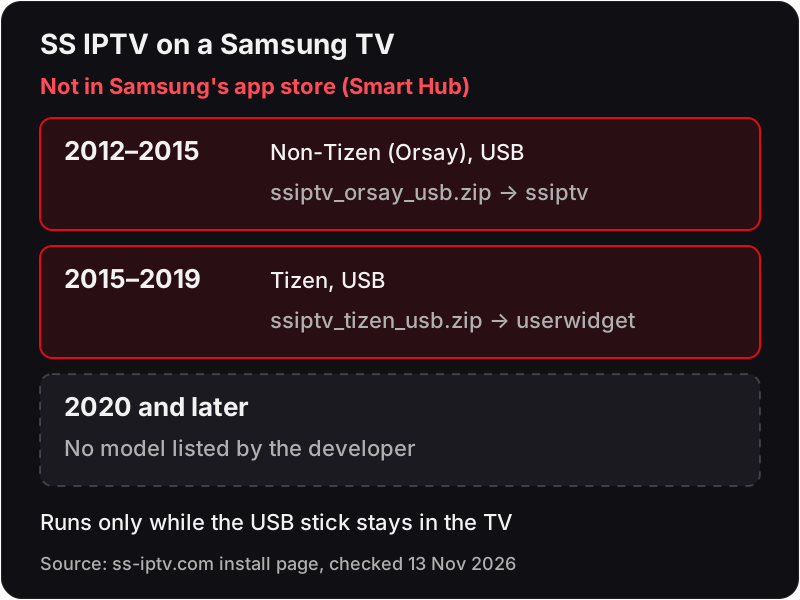
| Samsung model years | System | Developer's package | Folder on the USB root |
|---|---|---|---|
| 2012–2015 | Non-Tizen (Orsay) | ssiptv_orsay_usb.zip | ssiptv |
| 2015–2019 | Tizen | ssiptv_tizen_usb.zip | userwidget |
| 2020 and later | Tizen | None listed | None |
The steps are short. Download the package for your model year from the developer's install page, unzip it to the root of a USB stick so the folder sits at the top level (the developer stresses that the path matters), then plug the stick into the TV. The install page lists the supported model codes, from the 2012 E series to the 2019 range, so check yours against it first.
The developer still publishes the USB packages, but that is not a promise they run on every listed model with current firmware. For a Samsung made in 2020 or later, the developer lists no model at all. Our guide to the IPTV apps in Samsung's own store covers the players you can install on those sets.
Xtream Codes or M3U: what SS IPTV accepts
SS IPTV takes playlists, not an Xtream Codes login. Its own guides describe playlists only, so use your provider's M3U link rather than an Xtream login. None of the developer's user pages, from the FAQ and upload guide to the M3U notes and playlist editor, describes a screen for a server URL, username and password.
That matters because many setup guides tell you to type a login into SS IPTV. If the app shows nowhere to put one, nothing is broken. Our explainer on how an Xtream Codes login differs from a playlist covers the three login fields, and what an M3U playlist link contains explains the format SS IPTV reads.
Flickhaven sends login details (server URL, username and password) on WhatsApp within minutes of payment, and the M3U link on request. For SS IPTV, ask support for the M3U link. You can try it first with the free 24-hour trial on WhatsApp: no card needed, one device at a time, and the trial is the full service. Add the link under External playlists and check it loads on your TV before you buy.
Two ways to load a playlist: link or connection code
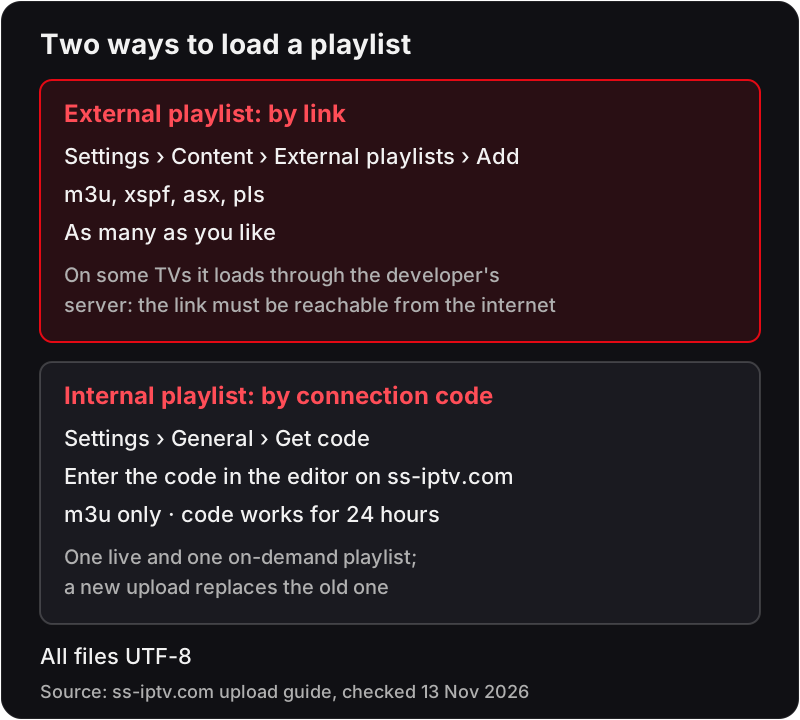
You add a playlist by link inside the app, or by uploading a file from a computer with a connection code. The link route is called an external playlist; the file route is the internal playlist.
| Detail | External playlist (link) | Internal playlist (code) |
|---|---|---|
| Where | Settings, Content, External playlists, Add | Settings, General, Get code, then the playlist editor on ss-iptv.com |
| Formats | m3u, xspf, asx, pls | m3u only |
| How many | As many as you like | One live and one on-demand |
| On screen | Its own tile | The “My playlist” tile |
For the link route, open Settings, then Content, then External playlists, choose Add, type a title and paste the link, then Save. On some TV models the developer says external playlists load through its application server, so the link must be reachable from the internet, not just from your home network.
For the code route, open Settings, then General, and choose Get code. On a computer, open the playlist editor on ss-iptv.com, enter the code, choose Add Device, pick your M3U file and Save. The code works for 24 hours or until you generate a new one, and the editor keeps the connection until you disconnect it, so you do not need a fresh code for every upload. A new internal upload replaces the old one. Save every file as UTF-8.
“Failed to load remote content” and other errors
“Failed to load remote content” means SS IPTV cannot reach the playlist link. The developer's FAQ gives four causes:
- The link is broken or mistyped.
- The server restricts access by User-Agent or another header.
- The server restricts access by IP address.
- A CORS issue: the TV needs an “Access-Control-Allow-Origin: *” header from the server. The check link next to an external playlist in the editor tests this.
Re-enter the link first. If it still fails, open it in VLC on a computer: if it plays there but not in SS IPTV, the cause is one of the last three, and only your provider can change those.
A blank screen when the app opens is usually the connection. Check the TV is online and try opening ss-iptv.com in the TV's browser; if that fails, the developer suggests setting the TV's DNS to 8.8.8.8, 8.8.4.4, 1.1.1.1 or 9.9.9.9. Sound with no picture means the TV's hardware does not support that stream's codec or profile. If playback keeps stopping, test the playlist in VLC, check your speed and ask your provider whether HLS streams are available.
Parental PIN, speed and other TVs
The default SS IPTV parental PIN is 12345. Parental control is on by default, and a soft reset of the app clears a forgotten PIN, according to the developer's FAQ. Our guide to IPTV parental control passwords covers PINs in other players.
The developer's minimum speeds are 5 Mbps for SD, 10 Mbps for HD and 30 Mbps for 4K or UHD. For our own advice on connections, see how much internet speed IPTV needs.
Support for Philips and Sony smart TVs is in “beta-testing”, the developer says. On a Philips you open app.ss-iptv.com in the TV browser; on a Sony from 2013 onward that is not an Android TV, you use Hotel or Pro mode with the start-up address http://app.ss-iptv.com. Our guide to IPTV on a Philips TV covers the other routes on those sets.
Sources
- SS IPTV — Installing (LG store; Samsung USB packages for 2012–2019; Philips and Sony beta)
- SS IPTV — How to upload a playlist (external links and 24-hour connection codes)
- SS IPTV — FAQ (free, no activation; errors; default PIN; speeds)
- SS IPTV — Playlist editor
- SS IPTV — M3U playlist format
- SS IPTV — Home page (LG Smart TV Apps Contest 2012)
Checked on .
Questions people ask
Is SS IPTV free?+
Yes. The developer says it is free to use with no activation, and it sells nothing. Anyone charging you to activate SS IPTV is not the developer.
Is SS IPTV in the Samsung app store?+
No. The developer says it is not in Samsung's Smart Hub store and offers USB-stick packages for 2012 to 2019 models only.
Does SS IPTV support Xtream Codes?+
Its own guides describe playlists only, so use your provider's M3U link rather than an Xtream login.
How do I get the SS IPTV connection code?+
In the app, open Settings, then General, and choose Get code. Enter it in the playlist editor on ss-iptv.com within 24 hours.
What is the SS IPTV default PIN?+
12345, according to the developer's FAQ. A soft reset of the app clears a forgotten PIN.
Check your M3U link in SS IPTV before you buy
Ask for the M3U link with the free 24-hour trial on WhatsApp: no card needed, one device at a time. Add it under External playlists and see if it loads on your TV. Support runs 24/7.
No credit card · No contract · Instant activation
See also: Smart IPTV (SIPTV) Setup · IPTV on an LG TV · IPTV on a Samsung TV.