Flickhaven IPTV UK
IPTV on a Philips TV: Google TV, Android TV or Titan OS
How you get IPTV on a Philips TV depends on the system it runs. Philips sets on Android TV or Google TV install IPTV players from the Play Store, like any Android TV. Titan OS, used on select Philips sets for a couple of years and on the whole 2026 range, runs web apps instead of Android apps. Its player choice is smaller, though at least one M3U player lists Titan OS. If yours has no suitable player, plug a streaming stick into a spare HDMI port.
Which system your Philips TV runs
Look for the Play Store. If your Philips home screen has the Google Play Store, the TV runs Android TV or Google TV; if it has no Play Store, it runs Titan OS. That one check decides every step that follows, so do it before you download anything.
Philips has sold sets on two quite different systems. Earlier and higher-end Philips sets run Android TV or Google TV, the same Google software found on many other brands' televisions and streaming boxes. Titan OS is a separate system that Philips has used on select sets for a couple of years, and, according to 9to5Google, on every model of the 2026 range. The model name on the box will not tell you much; the home screen will.
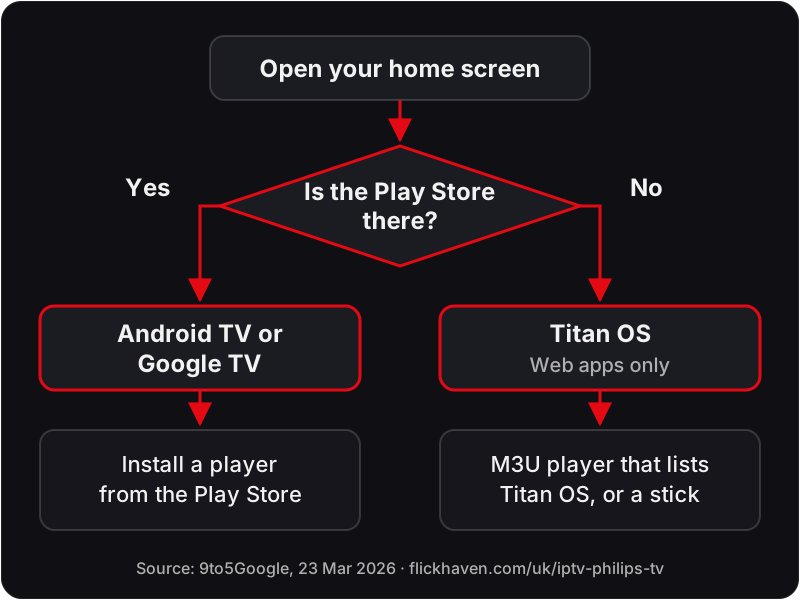
| What you see | System | Route to IPTV |
|---|---|---|
| Google Play Store on the home screen | Android TV or Google TV | Install a player from the Play Store |
| No Play Store, apps added to the home screen | Titan OS | Look for an M3U player that lists Titan OS, or add a streaming stick |
| A 2026 Philips set | Titan OS | Same as above |
Guides written before 2026 tell every Philips owner to open the Play Store. That advice is right for an Android TV or Google TV set and wrong for a Titan OS one, so the rest of this page splits by system.
IPTV on a Philips Google TV or Android TV
On a Philips Android TV or Google TV set, you install an IPTV player from the Google Play Store, exactly as you would on any other Android TV. The TV is running Google's software, so the app choice and the steps are the same as on a dedicated Android TV box.
- Open the Google Play Store from the home screen and search for the player by name.
- Install it and open it from your apps row.
- Choose the Xtream Codes option if the app offers one, or paste your M3U link.
- Wait for the channel list and programme guide to load before you start browsing.
The full walkthrough, with the settings for each app, is in our IPTV setup guide for Android TV. Most of the popular players are listed there, and our comparison of the main IPTV player apps explains how they differ.
Smart IPTV is one example of a player that works on these sets: its developer lists Android, Google TV and Fire TV builds on siptv.app (fetched 18 Oct 2026), so it installs through the Play Store route. Note that Smart IPTV activates per device, so check the developer's page for its terms before you commit.
Google TV sets also include Google Cast. That lets you send video from a phone, but a player app on the TV itself is the steadier way to watch live channels. Our guide to IPTV on Chromecast with Google TV covers the same system on a plug-in stick.
IPTV on a Philips Titan OS TV
Yes, but your choice of player is much smaller. Titan OS does not run Android apps or APKs, so the Play Store guides do not apply to it, and you cannot sideload an Android player either. You need a player built for Titan OS itself.
According to 9to5Google (23 Mar 2026), Titan OS uses web-based apps instead of native apps, and you add them to the home screen rather than download them. That changes what is available. Most IPTV players are written as Android apps, and a web-app system cannot run them.
At least one M3U player does list it. The developer of M3U IPTV shows “Titan OS 2024+ Available” in its compatibility table on m3u-ip.tv (fetched 18 Oct 2026). Its premium licence is a one-time payment, and the developer notes the price may vary by region, so check the current price on the developer's page before you buy. Smart IPTV, by contrast, does not list Titan OS on its site.
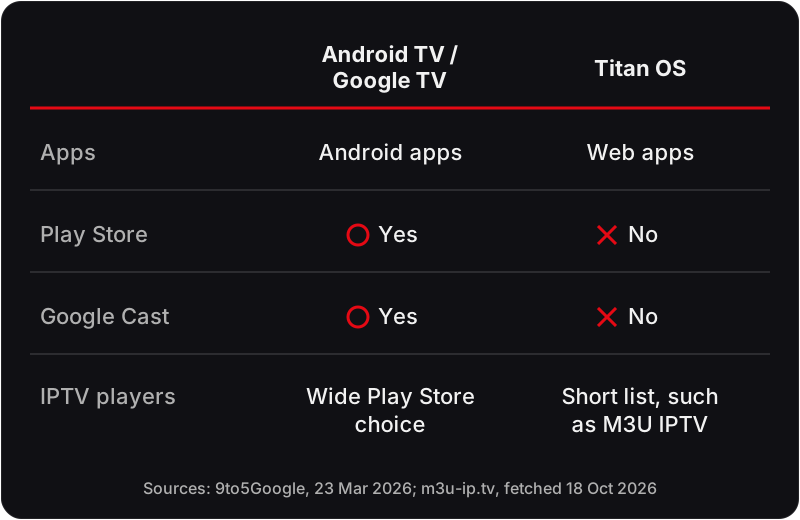
| Feature | Android TV or Google TV | Titan OS |
|---|---|---|
| Apps | Android apps | Web apps |
| Google Play Store | Yes | No |
| Google Cast | Yes | No |
| IPTV players | Wide Play Store choice | Short list, such as M3U IPTV |
The practical rule for a Titan OS set is simple: if a player you trust lists Titan OS on its own developer page, try it with your login. If none does, or the one you try does not suit you, the streaming stick route below gives you the full Android choice without changing the TV.
Bought a 2026 Philips? What changed
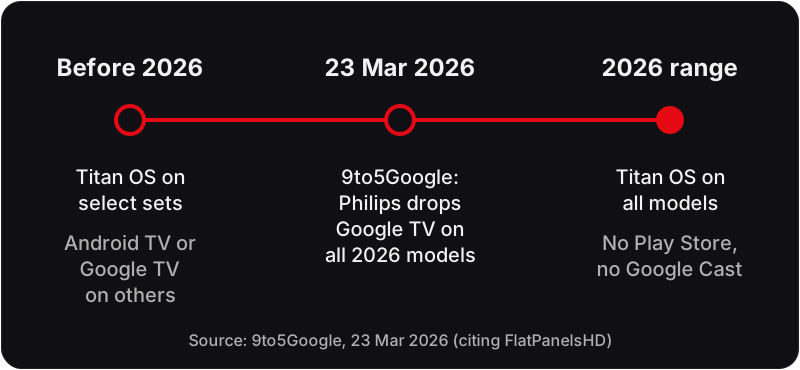
No, 2026 Philips TVs do not have Google TV. According to 9to5Google (23 Mar 2026, citing FlatPanelsHD), Philips is dropping Google TV on all models of its 2026 lineup and moving them to Titan OS.
For an IPTV viewer, that means a new Philips set will not have the Play Store, will not run Android apps, and will not accept a Google Cast stream from a phone. Before 2026, Titan OS was already on select Philips sets, while earlier and higher-end models ran Android TV or Google TV. If you are replacing an older Philips that ran a Play Store player, do not expect the same app to appear on the new one.
The streaming stick route
The easiest way to get IPTV on a Philips TV without the Play Store is a streaming stick in a spare HDMI port. The stick brings its own app store and remote, so the TV's system stops mattering: you switch to that HDMI input and use the stick's players instead.
Two common choices are an Amazon Fire TV Stick and a Google TV streamer or stick. Both run Android-based software and install the same players you would use on a Philips Android TV. Our Firestick IPTV setup guide walks through the Fire TV version, and the Google TV guide linked above covers the other.
This route also suits anyone with a Titan OS set who wants a particular Android player. If you own other brands that face the same question, see our guides to IPTV on a Hisense TV and IPTV on a Panasonic TV, or browse the IPTV device setup hub for every device we cover.
Entering your login: Xtream Codes or M3U
Whichever player you use on a Philips TV, it needs one of two logins: an Xtream Codes login (server URL, username and password) or an M3U playlist link. Flickhaven sends you both, so pick whichever your player asks for.
Choose Xtream Codes where the app offers it, because it loads the channels, the guide and the films together. Enter the server URL exactly as sent, including the http:// or https:// prefix and any port number; usernames and passwords are case-sensitive. Use the M3U link when an app accepts only a playlist, which is common among web-based players. Our explainer on how an Xtream Codes login works covers the three fields, and what an M3U playlist link is explains the playlist option.
No login yet? Start a free 24-hour trial on WhatsApp with no card needed. It streams on one device at a time, so you can test the player on your Philips before paying. After the trial, the 1-month plan is £15.00.
Casting from a phone is not a fix on Titan OS
No, you cannot use Google Cast with a Philips Titan OS TV. 9to5Google (23 Mar 2026) reports that Titan OS lacks Google Cast, so the cast button in a phone app will not find the TV.
On a Philips Android TV or Google TV set, casting works, but it still ties the stream to your phone, which is a weaker way to watch live channels than a player on the TV. On a Titan OS set, use a player that lists Titan OS or plug in a streaming stick. If you are unsure which system you have, message our support on WhatsApp with the model number; support runs 24/7.
FAQ
Does Titan OS have the Google Play Store?+
No. Titan OS uses web-based apps that you add to the home screen, according to 9to5Google, and it does not run Android apps, so there is no Play Store.
Can I install IPTV Smarters on a Philips Titan OS TV?+
Not the Android version. Titan OS does not run Android apps or APKs, so the Play Store build of IPTV Smarters will not install. Use a player whose developer lists Titan OS, such as M3U IPTV, or add a streaming stick.
Is my Philips TV Android or Titan OS?+
Check the home screen for the Google Play Store. If it is there, the TV runs Android TV or Google TV; if it is not, the TV runs Titan OS.
Do 2026 Philips TVs have Google TV?+
No. 9to5Google reported on 23 Mar 2026 that Philips is dropping Google TV on all models of its 2026 lineup for Titan OS.
Can I cast to a Philips Titan OS TV?+
Not with Google Cast, which Titan OS lacks according to 9to5Google. Use a player on the TV or a streaming stick instead.
Not sure which system your Philips runs?
Message WhatsApp with your Philips model number and we will point you to the right player. Support runs 24/7.
No credit card · No contract · Instant activation
See also: IPTV on Android TV · Xtream Codes IPTV Explained · What Is an M3U Playlist?.