GSE Smart IPTV Pro
iPhone, iPad & Apple TV Setup and Review
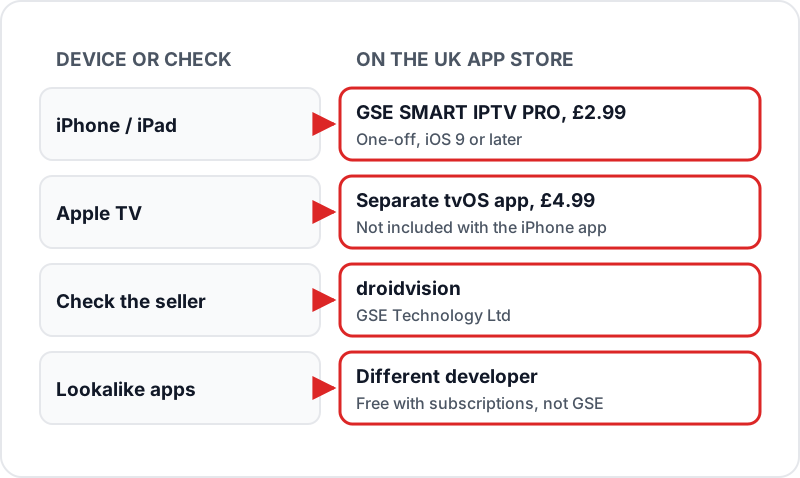
GSE Smart IPTV is sold on the App Store as GSE SMART IPTV PRO by droidvision: £2.99 one-off for iPhone and iPad, with a separate £4.99 app for Apple TV. Buy it, open the menu, choose Xtream Codes API, tap + and enter your server URL, username and password. Live TV, films, series and the guide load from that one login. M3U users add the EPG separately as an XMLTV source.
GSE Smart IPTV is a paid IPTV player for Apple devices: £2.99 on iPhone and iPad, with a separate £4.99 Apple TV app. It takes an Xtream Codes login or an M3U playlist, loads an XMLTV guide, and contains no channels of its own.
Get Your GSE Login Credentials via WhatsApp
What is GSE Smart IPTV?
GSE Smart IPTV — sold on the App Store as GSE SMART IPTV PRO by droidvision (GSE Technology Ltd) — is an IPTV player for iPhone and iPad, with a separate Apple TV app. Like every player, it ships with no channels: you add your own Xtream Codes login or M3U playlist. The App Store listing covers AirPlay to an external display, Chromecast, parental controls and live TV recording.
📱 Devices
iPhone & iPad (iOS 9+); Apple TV as a separate app (tvOS 12+)
🔗 Connection methods
Xtream Codes API, M3U URL
📞 EPG
XMLTV URL (auto with Xtream Codes)
🌎 AirPlay
Yes — full screen on an external display
📡 Chromecast
Yes
💳 Cost
£2.99 iPhone/iPad, £4.99 Apple TV (one-off)
🔒 Parental controls
Yes
⏺ Recording
Record live TV (listed feature)
📺 Channels included
None — bring your own login
Step 1 — Install GSE Smart IPTV on iPhone or iPad
- 1
Open the App Store on your iPhone or iPad
Make sure you are signed into your Apple ID — GSE SMART IPTV PRO is a paid app (£2.99), so you will be asked to confirm the purchase.
- 2
Search for "GSE Smart IPTV"
The listing is "GSE SMART IPTV PRO" and the seller is droidvision (GSE Technology Ltd). Several lookalike apps put "GSE" in their names — skip any that are free with subscriptions or from a different developer.
- 3
Tap the £2.99 price button to buy and download
It is a one-off purchase, not a subscription. The Apple TV app is bought separately — see the Apple TV section below.
- 4
Open the app and accept the terms if prompted
GSE Smart IPTV may request access to your local network — allow this for proper functionality on your home Wi-Fi.
Step 2 — Add Your IPTV Playlist via Xtream Codes API
The Xtream Codes method is recommended over M3U — it loads your channels, VOD, series, and EPG automatically from a single login. No manual EPG URL entry required.
- 1
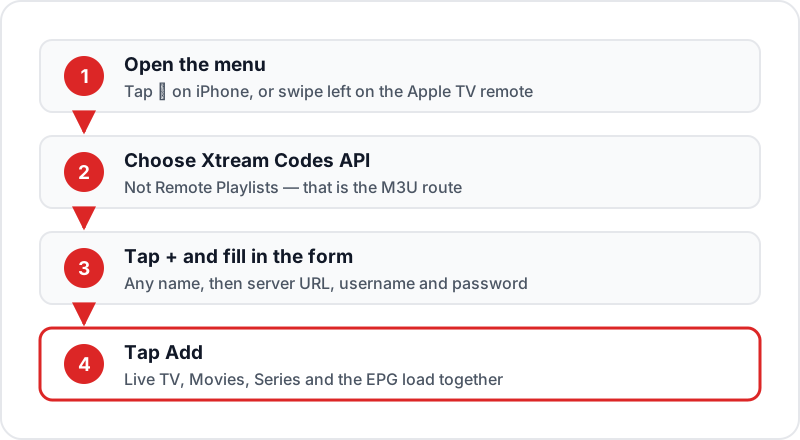
Tap the menu icon (≡) in the top-left corner of the app
On Apple TV, press the menu button or swipe left on the Siri remote trackpad to open the sidebar.
- 2
Select "Xtream Codes API" from the menu
This is the first option in the playlist section of the menu. Do not select "Remote Playlists" — that is for M3U, covered separately below.
- 3
Tap the + (plus) icon to add a new playlist
A form will appear with fields for Playlist Name, Server URL, Username, and Password.
- 4
Fill in your Flickhaven credentials
Enter any Playlist Name you like (e.g. "Flickhaven"). Then enter the exact Server URL, Username, and Password from your Flickhaven credentials — these are sent via WhatsApp after purchase. The Server URL typically starts with http:// and includes a port number.
- 5
Tap "Add" — your channels load automatically
GSE Smart IPTV connects to the server and downloads your full channel list, VOD library, and TV series. This takes 30–90 seconds depending on your connection speed.
- 6
Navigate via Live TV, Movies, and Series tabs
Live TV contains all 55,000+ channels. Movies and Series contain the 180,000+ VOD titles. The TV Guide button opens the EPG — it loads automatically from your Xtream Codes connection.
Xtream Codes is the recommended method
When you add your playlist via Xtream Codes API, your Live TV channels, VOD movies, TV series, and EPG (TV guide) all load from a single login. No separate M3U URL or EPG URL is needed. This is faster and more reliable than M3U for most users.
Alternative — Add Playlist via M3U URL
Use the M3U method only if your IPTV provider does not support Xtream Codes, or if you have been given an M3U URL specifically. You will need to add EPG separately.
- 1
Open the menu (≡) and tap "Remote Playlists"
- 2
Tap the + icon, then select "Add M3U URL"
- 3
Enter a Playlist Name and paste your M3U URL
Your M3U URL comes with your Flickhaven login on WhatsApp. On Xtream-based services it is a get.php address that carries your username and password.
- 4
Tap "Add" — channels load within a minute
The channel list downloads from the server. With 55,000+ channels, the initial load may take a minute or two on slower connections.
EPG Setup — Adding the TV Guide (M3U Method Only)
If you used the Xtream Codes API method above, skip this section — your EPG loads automatically. Only follow these steps if you added your playlist via M3U URL.
- 1
Open the menu and tap "EPG Program Guide"
- 2
Tap the + icon to add an EPG source
- 3
Enter your XMLTV EPG URL
Your XMLTV EPG URL comes with your Flickhaven login on WhatsApp. On Xtream-based services it is an xmltv.php address that carries your username and password — not the get.php playlist link.
- 4
Tap Save — the TV guide populates within a few minutes
EPG data downloads in the background. After a few minutes, open the TV Guide in GSE to see programme schedules for all channels that have EPG data. Not all 55,000+ channels carry EPG — UK channels are the ones most likely to show full schedules.
GSE Smart IPTV on Apple TV — Full Setup Guide
GSE Smart IPTV on Apple TV is a separate app: GSE SMART IPTV PRO for tvOS, £4.99 on the UK App Store, needing tvOS 12 or later. Buying the iPhone app does not unlock it. Setup is the same Xtream Codes form, navigated with the Siri Remote.
Installation on Apple TV
- On your Apple TV home screen, open the App Store
- Search for GSE Smart IPTV — select GSE SMART IPTV PRO, sold by droidvision
- Click the £4.99 price button to buy and install
- Open the app once installed
Xtream Codes Setup on Apple TV
Identical to the iPhone setup, but navigated with the Siri Remote:
- Swipe left on the Siri remote trackpad (or press the Menu button) to open the sidebar
- Navigate to Xtream Codes API using the trackpad
- Press click to select, then navigate to the + button to add a playlist
- Use the on-screen keyboard to enter your Playlist Name, Server URL, Username, and Password
- Navigate to Add and click — your channels load automatically
Tip: Keep your Flickhaven WhatsApp message open on your iPhone — when the Apple TV keyboard appears, your iPhone offers a keyboard prompt so you can paste the server URL, username and password instead of typing them with the remote.
Apple TV Settings for Best 4K Quality
- ➜Set Apple TV output: Settings → Video and Audio → Format → 4K (HDR if your TV supports it)
- ➜Enable Match Content (frame rate and dynamic range) in Apple TV video settings
- ➜On Apple TV 4K models with an Ethernet port, use a cable rather than Wi-Fi for 4K streams
Tips for Best Performance on Apple Devices
Use Ethernet for Apple TV where you can
Wi-Fi is the most common cause of 4K buffering on Apple TV. Apple TV 4K models with a built-in Ethernet port can be plugged straight into the router, which gives a steadier connection than Wi-Fi for 4K streams.
Check your speed against the stream quality
Run a speed test on the device you watch on, not your phone in another room. As a guide you need about 10 Mbps for HD, 15 Mbps for Full HD and 25 Mbps for 4K, and more if others in the house are streaming at the same time.
Add favourite channels for quick access
Add the channels you watch most to Favourites in GSE Smart IPTV so you are not scrolling through 55,000+ channels every time. Set up a Favourites group for UK sports channels on day one.
Use AirPlay to cast from iPhone to TV
If you do not have an Apple TV, GSE can send playback over AirPlay to an AirPlay 2 TV (many recent Samsung, LG and Sony models support it), or to a Chromecast. Swipe down for Control Centre on iPhone, tap Screen Mirroring, and select your TV — keep both devices on the same Wi-Fi network.
Use 5 GHz Wi-Fi, not 2.4 GHz
If you cannot use Ethernet, connect to your router's 5 GHz Wi-Fi band rather than 2.4 GHz. The 5 GHz band has shorter range but higher throughput and less interference, which helps with intermittent buffering.
GSE Smart IPTV Review: How It Compares on Apple Devices
| App | Devices | Price | Xtream | M3U | EPG |
|---|---|---|---|---|---|
| GSE SMART IPTV PRO | iPhone & iPad | £2.99 | ✓ | ✓ | ✓ |
| GSE SMART IPTV PRO (tvOS) | Apple TV | £4.99 | ✓ | ✓ | ✓ |
| IPTV Smarters Player / Lite | iPhone & iPad | Free | ✓ | ✓ | ✓ |
Prices from the UK App Store, October 2026. All three take the same Flickhaven Xtream Codes login; GSE adds AirPlay, Chromecast, parental controls and recording, and is the only one here with its own Apple TV app.
Sources
Checked on .
Related Guides
Frequently Asked Questions
Is GSE Smart IPTV free?+
Does GSE Smart IPTV work on Apple TV?+
What is the difference between GSE Smart IPTV and IPTV Smarters?+
How do I add EPG to GSE Smart IPTV?+
Why are my channels buffering on GSE Smart IPTV?+
Is GSE Smart IPTV Pro worth it? (our review)+
Get Your GSE Login Credentials via WhatsApp
Flickhaven works on iPhone, iPad, and Apple TV. Get your Server URL, Username, and Password via WhatsApp — set up GSE Smart IPTV in under 5 minutes. 55,000+ channels from £15.00/month.
No contract · Works on iPhone, iPad & Apple TV · From £15.00/month