Smart IPTV (SIPTV):
Install, Upload Your Playlist, Activate
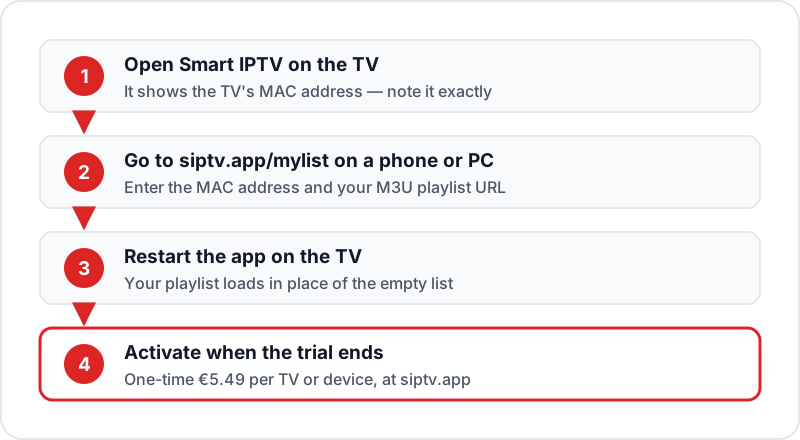
Smart IPTV, also called SIPTV, is a playlist player for Samsung and LG smart TVs, Android TV and Fire TV. Install it from the TV app store, note the MAC address it shows, then upload your M3U playlist at siptv.app/mylist on a phone or PC and restart the app. It ships with no channels. After a free trial the developer charges a one-time €5.49 activation per TV or device.
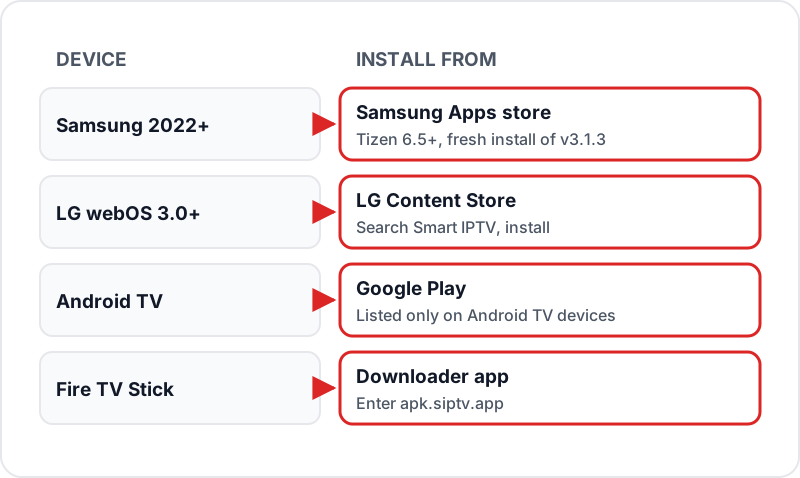
Smart IPTV is a playlist player you install from the Samsung or LG TV app store, Google Play on Android TV, or by APK on a Fire TV Stick. It ships with no channels — you upload your own M3U playlist at siptv.app. Here's how to set it up.
What is Smart IPTV (SIPTV)?
Smart IPTV (also written smartiptv or SIPTV) is a cross-platform IPTV player that installs from the Samsung and LG TV app stores without sideloading. The developer describes it as just a media player: no channels are included. It works by loading M3U playlists — you provide your playlist URL through the siptv.app web portal, and it streams the channels on your Smart TV.
A free trial starts when you first open the app. When it ends, a one-time €5.49 activation unlocks the app on that specific TV or device — no ongoing subscription required.
Which Samsung & LG TVs Are Common in the UK?
UK retailers (Currys, John Lewis, AO, Argos) have sold a fairly narrow band of Samsung and LG models over the past few years — useful to know before you start, since Smart IPTV and SS IPTV behave slightly differently depending on the Tizen or webOS build a TV shipped with:
Samsung (Tizen)
- 2020–21: Crystal UHD AU7100/TU7000 — Tizen 5.5
- 2022–23: Crystal UHD CU7100/CU8000, QLED Q60–Q80 — Tizen 6.5–7.0
- 2023–24: OLED S90C/S95C, Crystal UHD DU7100 — Tizen 7.0+
LG (webOS)
- 2020: NanoCell NANO75/86, OLED CX — webOS 5.0
- 2021–22: UHD UP75/UQ7500, OLED C1/C2 — webOS 6.0 / webOS 22
- 2023–24: UHD UR78/UR80, OLED C3/C4 — webOS 23 / webOS 24
The playlist steps below apply across all of these. The one split is on Samsung: 2022 and later sets (Tizen 6.5+) run Smart IPTV 3.1.3, a separate install from the Apps store, while earlier sets keep the older 3.0.105 app.
Samsung Smart TV Setup
10 min1Open Samsung App Store▼
Press the Home button on your Samsung remote. Navigate to Apps → search icon → type "Smart IPTV". Select the app and install it. On a 2022 or later Samsung (Tizen 6.5+) this installs the current 3.1.3 version. The free trial starts when you first open it.
2Launch Smart IPTV & Note MAC Address▼
Press Open or find Smart IPTV in your app drawer. The app's home screen shows your TV's MAC address (e.g., AA:BB:CC:DD:EE:FF). Write this down or photograph it with your phone.
3Go to siptv.app/mylist on Phone/PC▼
On a phone or computer, open a browser and go to siptv.app/mylist (the "My List" page). You'll see a form asking for your TV's MAC address and M3U URL.
4Enter Your Flickhaven M3U URL▼
Paste your Flickhaven M3U playlist URL in the "M3U URL" field. Enter your TV's MAC address. Press "Send URL". A success message confirms the playlist has been sent to your TV.
5Reload Smart IPTV on Your TV▼
Back on the TV, close Smart IPTV completely (hold the back button until it exits). Reopen it. Your full channel list will load — this takes 30–60 seconds on first load.
6Add EPG (Optional)▼
In Smart IPTV settings, go to EPG settings. Enter your Flickhaven XMLTV EPG URL. Press Save and reload. The EPG guide will populate within a few minutes.
LG Smart TV Setup
8 minInstall Smart IPTV from LG Content Store
On your LG TV go to Home → LG Content Store → search "Smart IPTV". Install the app. The developer supports LG webOS 3.0 and later (2016 onward), with a separate older version for Netcast and webOS 1.0–2.0 sets.
💡 If Smart IPTV or SS IPTV don't appear in search, check Settings → General → Location & Language → Country is set to United Kingdom — the LG Content Store shows a different app catalogue per region, and imported or refurbished sets sometimes default elsewhere.
Note the MAC Address
Launch Smart IPTV on your LG TV. The MAC address is displayed on screen. Note it.
Upload Playlist at siptv.app
On a phone or computer go to siptv.app/mylist. Enter your LG TV's MAC address and your Flickhaven M3U URL. Press Send.
Reload and Browse
Close and reopen Smart IPTV on your LG TV. Your channels will load.
💡 For LG TVs, SS IPTV (free, no activation fee) is often a simpler alternative. See our LG TV IPTV guide for the comparison.
Firestick Setup
12 minEnable Unknown Sources
Go to Settings → My Fire TV → Developer Options → Apps from Unknown Sources. Toggle ON.
Install Downloader App
Search the Amazon Appstore for "Downloader" by AFTVnews and install it.
Download Smart IPTV APK
Open Downloader and enter apk.siptv.app — the developer's own APK address. Download and install the APK. (On an Android TV box, install Smart IPTV from Google Play instead.)
Launch and Note MAC Address
Open Smart IPTV. Write down the MAC address shown on screen.
Upload Playlist at siptv.app on Phone
On your phone, go to siptv.app/mylist. Enter the MAC address and your Flickhaven M3U URL. Press Send.
Reload and Watch
Back on Firestick, restart Smart IPTV. Your channels load automatically.
Troubleshooting Smart IPTV
✗Channels not loading after setup▼
Wait 2–3 minutes after uploading at siptv.app before reloading the app. The server needs time to process the playlist.
✗MAC address not found at siptv.app▼
Ensure you've entered the MAC address exactly as shown — including colons (AA:BB:CC). On Android 10–12 devices on Wi-Fi, set the connection to use the device MAC rather than a randomised one, or the address changes on reconnect.
✗App asks to activate when the trial ends▼
Pay the one-time €5.49 activation at siptv.app, entering the MAC address the app shows. The fee is per TV or device. The developer warns not to pay if channels are not working yet — activation does not fix a playlist problem.
✗EPG guide is empty▼
Go to Smart IPTV settings → EPG. Check your XMLTV URL is correct. Press "Reload EPG". Full EPG loading can take 5 minutes.
✗Some channels show black screen▼
The specific stream server may be down. Try the SD version of the same channel. Refresh your playlist at siptv.app with an updated M3U URL.
FAQ
QHow much does Smart IPTV cost?▼
Smart IPTV is free to download and starts with a free trial. After the trial, the developer charges a one-time activation fee of €5.49 for each TV or device, paid at siptv.app. It is a single payment, not a subscription.
QDoes Smart IPTV work on Samsung Smart TV?▼
Yes. Smart IPTV is in the Samsung Apps store on Tizen, so no sideloading is needed. On 2022 and later Samsung models (Tizen 6.5+) the current version is 3.1.3, and the developer says it is a fresh install from the Apps store rather than an update to the older 3.0.105 app.
QCan Smart IPTV be used without a PC?▼
Initial setup requires visiting siptv.app on a phone or computer to upload your playlist via MAC address. Once set up, you use Smart IPTV entirely from your TV remote.
QWhat's the difference between Smart IPTV and SS IPTV?▼
Smart IPTV (SIPTV) has a one-time €5.49 fee per TV and loads your playlist via web upload at siptv.app. SS IPTV is free, LG Content Store native, and supports direct Xtream Codes input on the TV. For LG TVs, SS IPTV is recommended.
QDoes Smart IPTV work on older UK Samsung and LG TVs?▼
Usually, yes. The developer lists versions for LG webOS 3.0+ (2016 onward) and for older LG Netcast and webOS 1.0–2.0 sets, and Samsung Tizen sets before 2022 run the older 3.0.105 app. The MAC-address and playlist-upload workflow is the same on all of them.
QHow do I upload a Smart IPTV playlist?▼
Open the app on the TV and note the MAC address it shows. On a phone or PC go to siptv.app/mylist, enter that MAC address and your M3U playlist URL, and send it. Restart Smart IPTV on the TV and the playlist replaces the empty list. Flickhaven sends your M3U URL on WhatsApp.
QHow do I activate Smart IPTV (SIPTV)?▼
Activation happens at siptv.app, not on the TV. When the trial ends the app shows an activation notice with your MAC address; go to siptv.app on a phone or PC, open the activation page, enter that MAC address exactly as displayed and pay the one-time €5.49. There is no activation code to type on the TV — the licence is tied to the MAC, and the app unlocks on its next launch, usually within a few minutes.
QWho provides Smart IPTV support — the app or my IPTV provider?▼
It depends on the symptom. Activation, MAC-address, playlist-upload and "app asks to activate again" problems belong to the Smart IPTV developer via the contact details on siptv.app. Channels that will not play, buffering, missing channels or a dead M3U URL are playlist problems, which your IPTV provider fixes — Flickhaven handles those over WhatsApp.
QIs SIPTV the same as SS IPTV or Set IPTV?▼
No — three different apps with confusingly similar names. Smart IPTV (SIPTV) is the €5.49 one-time player set up through siptv.app. SS IPTV is a separate free player that accepts Xtream Codes directly on the TV. Set IPTV is another paid playlist player with its own upload site. All three run on Samsung Tizen and LG webOS and all work with a Flickhaven M3U or Xtream login.
Sources
- Smart IPTV — developer site and supported app versions (siptv.app)
- Smart IPTV activation — one-time fee per TV or device (siptv.app)
- Smart IPTV on Android TV and Fire TV — install instructions (siptv.app)
Checked on .
Full Samsung IPTV Guide
SS IPTV, Smart IPTV Samsung & IPTV Smarters — complete setup for all Samsung models
Free IPTV Trial UK
24 hours free, no credit card — get your M3U URL via WhatsApp
Best Free IPTV Apps UK
Full ranked list of IPTV apps for every device in 2026
IPTV on LG TV
SS IPTV and Smart IPTV setup guide for LG webOS TVs
Need Your M3U URL to Set Up Smart IPTV?
Flickhaven includes an M3U URL with every subscription. Start a free 24-hour trial and get your credentials via WhatsApp.
💬 Get Free Trial + M3U URL