IPTV Smarters Lite (Smarters Player Lite)
iPhone, iPad & Apple TV Setup
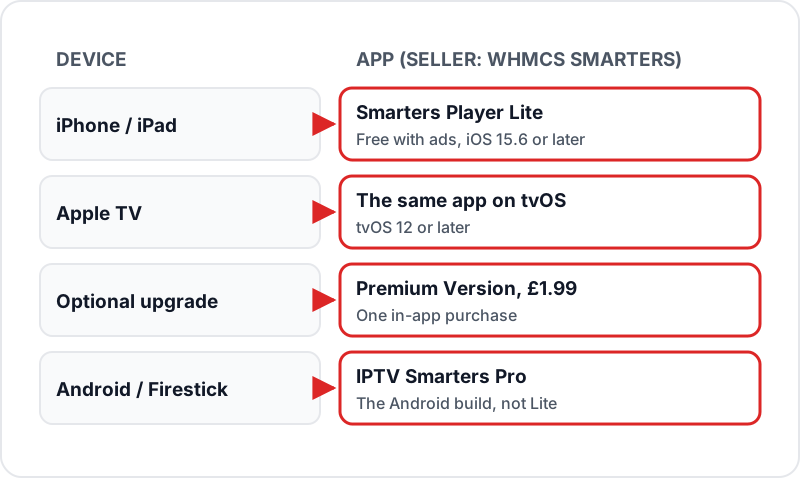
IPTV Smarters Lite is listed on the App Store as Smarters Player Lite, from WHMCS Smarters. It is free with ads, with an optional £1.99 Premium Version, and runs on iPhone and iPad (iOS 15.6+) and Apple TV (tvOS 12+). Install it, tap Add User, choose Login with Xtream Codes API and enter the server URL, username and password from your subscription. Channels, films, series and the guide load from that login.
IPTV Smarters Lite is listed on the App Store as Smarters Player Lite — a free, ad-supported player for iPhone, iPad and Apple TV from WHMCS Smarters, with an optional £1.99 Premium Version. Here's the setup — from download to streaming in under 5 minutes.
What is Smarters Player Lite?
- ✓Free IPTV player for iPhone, iPad, and Apple TV — on the Apple App Store, no sideloading or third-party sources needed
- ✓Sold by WHMCS SMARTERS, the developer of IPTV Smarters Pro on Android and Firestick
- ✓Takes an Xtream Codes login or an M3U playlist URL — both work with Flickhaven
- ✓Free with ads; an optional Premium Version is a single £1.99 in-app purchase
- ✓Works on iPhone and iPad (iOS 15.6 and above) and Apple TV (tvOS 12 and above)
- ✓A standalone media player — it contains no channels, so you add your own login
Smarters Player Lite vs IPTV Smarters Pro
| Feature | Smarters Player Lite (iOS) | IPTV Smarters Pro (Android) |
|---|---|---|
| Platform | iPhone, iPad, Apple TV | Android, Firestick, Android TV |
| Where to get it | Apple App Store | Google Play; on Firestick the official APK via Downloader if the Appstore has no listing |
| Cost | Free with ads, £1.99 premium | Free |
| Xtream Codes | ✓ | ✓ |
| M3U Playlist | ✓ | ✓ |
| Interface | iOS-optimised, touch-friendly | Android-native, TV-remote-friendly |
| Advanced Player Settings | Simplified | More options |
| Best For | iPhone, iPad, Apple TV users | Firestick, Android TV, Android phone users |
Installing on iPhone or iPad
~2 minOpen the App Store
Open the App Store on your iPhone or iPad.
Search for Smarters Player Lite
Search "Smarters Player Lite" and check the seller is WHMCS SMARTERS. Apps with similar names from other developers (for example "IPTV Smart Player Lite") are not the Smarters app.
Tap Download
Tap Get. The app is free (with ads) — the £1.99 Premium Version is optional and can be bought later inside the app. It may ask for your Apple ID password or Face ID to confirm the download.
Open the app
Once downloaded, tap Open. The app launches to the Add User screen where you can connect your IPTV subscription.
Adding Subscription via Xtream Codes (Recommended)
1Open Smarters Player Lite and tap Add User▼
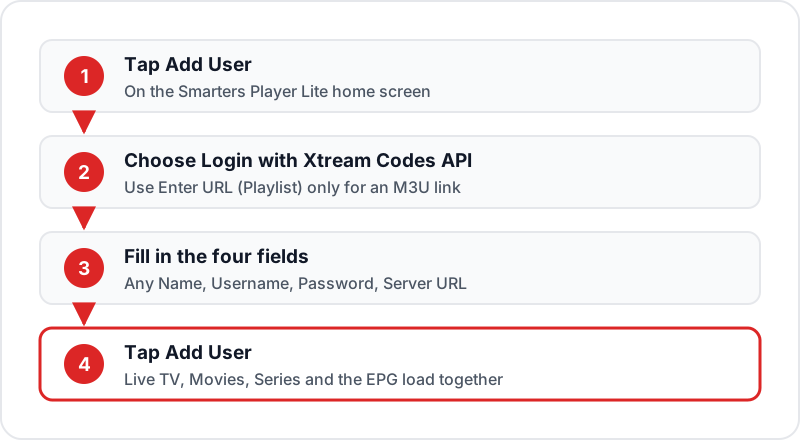
On the Smarters Player Lite home screen, tap the "Add User" button.
2Select Login with Xtream Codes API▼
Choose "Login with Xtream Codes API" from the login method options.
3Fill in your credentials▼
Enter the following fields — all values are in your Flickhaven WhatsApp message: • Any Name: your label for this profile (e.g., "Flickhaven") • Username: your Flickhaven username • Password: your Flickhaven password • URL: your server URL, copied exactly as sent
4Tap Add User▼
Press the "Add User" button. The app connects to the server and loads your full playlist. First load takes 30–60 seconds depending on connection speed.
5Browse your content▼
Open the Live TV, Movies and Series sections from the home screen. Your EPG TV guide is populated from the same login — no additional setup needed.
Adding Subscription via M3U URL
Tap Add User
On the Smarters Player Lite home screen, tap "Add User".
Select Enter URL (Playlist)
Choose "Enter URL (Playlist)" from the login method options.
Enter a playlist name
Type any label for this playlist (e.g., "Flickhaven M3U").
Paste your M3U URL
Paste your Flickhaven M3U URL into the URL field. It comes with your login on WhatsApp — on Xtream-based services it is a get.php address carrying your username and password.
Tap Add
Press Add. Channels load within 1–2 minutes depending on your playlist size. A progress indicator shows loading status.
Apple TV Setup
tvOS 12+1Open App Store on Apple TV▼
Navigate to the App Store on your Apple TV home screen.
2Search for Smarters Player Lite▼
Use the search function to find "Smarters Player Lite". Select the app from results and tap Download. The app is free.
3Add your subscription▼
Open the app → tap Add User → choose Login with Xtream Codes API → enter your Flickhaven server URL, username, and password. The same process as iPhone — your credentials work on all Apple devices.
4Navigate with Siri Remote▼
Use the Siri Remote trackpad to swipe through channels and categories. Swipe right/left to browse, click to select, and swipe down for channel info and EPG.
5Enable 4K HDR output▼
Go to Apple TV Settings → Video and Audio → Format and choose 4K (HDR if your TV supports it), then turn on Match Content in the same menu so each stream plays at its own frame rate and dynamic range.
EPG TV Guide Setup
Using Xtream Codes
EPG is automatic — no extra steps. Your full TV guide populates within a few minutes of adding the playlist. Browse the EPG from the Live TV tab by pressing the info button on a channel.
Using M3U Playlist
- 1.Go to app Settings → EPG URL.
- 2.Paste your Flickhaven XMLTV EPG URL (sent with your login on WhatsApp) into the EPG URL field.
- 3.Tap Save. EPG loads within 3–5 minutes on first use. Force refresh from the settings menu if needed.
Tips for Best Performance on Apple Devices
4K on Apple TV: use Ethernet where you can
Apple TV 4K models with a built-in Ethernet port can be plugged straight into the router, which is steadier than Wi-Fi for 4K streams. Apple TV has no USB port for an Ethernet adapter, so Wi-Fi-only models should sit close to the router on 5 GHz.
Check your speed against the stream quality
Run a speed test on the device you watch on. As a guide you need about 10 Mbps for HD, 15 Mbps for Full HD and 25 Mbps for 4K, and more if others in the house are streaming at the same time.
Use Xtream Codes over M3U
Xtream Codes gives you better EPG integration and automatic series organisation with seasons and episodes. M3U works well but requires a separate EPG URL and lacks native series hierarchy.
Add key channels to Favourites
Add the channels you watch most to Favourites so you are not scrolling through 55,000+ channels every time.
Screen Mirroring to a TV
On iPhone or iPad, open Control Centre, tap Screen Mirroring and pick an Apple TV or AirPlay 2 TV on the same Wi-Fi network. If you have an Apple TV, installing Smarters Player Lite on it directly gives a steadier picture than mirroring.
Troubleshooting Smarters Player Lite
✗Login fails or "Authentication error"▼
Ensure your URL starts with http:// or https:// and has no trailing slash. Verify username and password have no trailing spaces — copy-paste from your WhatsApp message. Credentials are case-sensitive.
✗Channels not loading after login▼
Tap the user icon in the top-right corner and select "Refresh Playlist". If the problem persists, delete the profile and re-add it with your credentials.
✗Buffering on iPhone▼
Toggle airplane mode on and off to refresh your network connection. Switch from Wi-Fi to 4G/5G (or vice versa) to test which connection is more stable. Also try closing other background apps.
✗Apple TV 4K buffering▼
Use Ethernet instead of Wi-Fi where your Apple TV 4K has the port. Also check that your router firmware is up to date and that no other devices are saturating your connection.
✗EPG guide not loading (M3U method)▼
Go to app Settings → EPG URL → paste your Flickhaven XMLTV URL → Save. Then force-refresh EPG from the settings menu. EPG can take 3–5 minutes to fully populate on first load.
✗App crashes or freezes on launch▼
Force-close the app (swipe up from app switcher) and relaunch. If the issue persists, delete and reinstall Smarters Player Lite from the App Store, then add your login again from your WhatsApp message.
Sources
Checked on .
Related Guides
Fix 'Failed to Authorize'
Every fix for the Smarters login error — credentials, expired plans, VPN and ISP blocks.
GSE Smart IPTV iOS Guide
A paid (£2.99) alternative player for iPhone and iPad, with a separate Apple TV app.
IPTV on iPhone & iOS
Full overview of the best IPTV apps for iPhone and iPad in 2026.
Best IPTV Apps UK 2026
Compare every major IPTV app across Firestick, Android, iOS, and smart TVs.
Get a Free IPTV Trial
Try Flickhaven free for 24 hours via WhatsApp — no payment needed.
Frequently Asked Questions
QIs Smarters Player Lite free on iPhone?▼
Yes, with ads. Smarters Player Lite is a free download from the UK App Store and the listing says it contains advertising. An optional "Premium Version" is available as a single £1.99 in-app purchase. You do not need it to log in with Xtream Codes or watch Live TV, films and series.
QWhere do I download IPTV Smarters Player Lite?▼
From the App Store on your iPhone, iPad or Apple TV — search "Smarters Player Lite" and check the seller is WHMCS SMARTERS. It needs iOS 15.6 or later on iPhone and iPad, and tvOS 12 or later on Apple TV. There is no separate download site for iOS; skip lookalike apps with similar names from other developers.
QWhat is the difference between Smarters Player Lite and IPTV Smarters Pro?▼
Smarters Player Lite is the App Store version, for iPhone, iPad and Apple TV, from the same developer (WHMCS Smarters). IPTV Smarters Pro is the Android and Firestick version. Both support Xtream Codes and M3U. The Lite version has a slightly simplified interface optimised for iOS, while the Pro version has more advanced player settings on Android.
QDoes Smarters Player Lite work on Apple TV?▼
Yes. The same Smarters Player Lite listing covers Apple TV, with tvOS 12 or later. Search "Smarters Player Lite" on your Apple TV, install it for free, and add your Flickhaven Xtream Codes login. For 4K, use the Ethernet port if your Apple TV 4K has one and turn on Match Content in Apple TV Settings.
QHow do I add my IPTV subscription to Smarters Player Lite?▼
Open Smarters Player Lite, tap "Add User", and choose "Login with Xtream Codes API". Enter your Any Name label, Username, Password, and Server URL — all sent to you on WhatsApp when your Flickhaven trial or plan starts. Tap Add User and your full channel list, VOD, and EPG load automatically within 30–60 seconds.
QWhy are my channels buffering on Smarters Player Lite?▼
On iPhone, toggle airplane mode on and off to refresh your network connection, or switch between Wi-Fi and 4G/5G to identify whether the issue is your home network or the stream. On Apple TV, use Ethernet instead of Wi-Fi where your model has the port. Aim for at least 10 Mbps for HD, 15 Mbps for Full HD and 25 Mbps for 4K.
Ready to Use Smarters Player Lite with Flickhaven?
Get your Xtream Codes credentials and a free 24-hour trial via WhatsApp. Works in Smarters Player Lite on iPhone, iPad, and Apple TV — 55,000+ live channels and 180,000+ films and series.