Flickhaven IPTV UK
IPTV on Xbox — MyIPTV Player & Kodi Setup Guide
Unlike the PS5, an Xbox runs IPTV natively. Install the free MyIPTV Player from the Microsoft Store on any Xbox Series X, Series S or Xbox One, add your provider's M3U playlist URL and EPG link, and live channels with a programme guide appear in about five minutes. Prefer a full media centre? Kodi is in the Store too, with IPTV via its PVR Simple Client add-on. Both methods below, step by step.
For other screens, see the complete device compatibility guide.
On a PlayStation instead, see IPTV on PS5 for the workarounds that console needs. For Firestick, Smart TVs and phones, use the IPTV installation guide for every device.
Before you start: two URLs from your provider
Every method needs the same two things any IPTV service issues at signup: your M3U playlist URL (with your username and password embedded, or as separate Xtream Codes credentials) and an XMLTV EPG URL for the programme guide. Have both to hand — on Xbox you'll type them once with the controller or paste them via the on-screen keyboard's companion-app input.
Method 1 — MyIPTV Player, the simplest IPTV app for Xbox
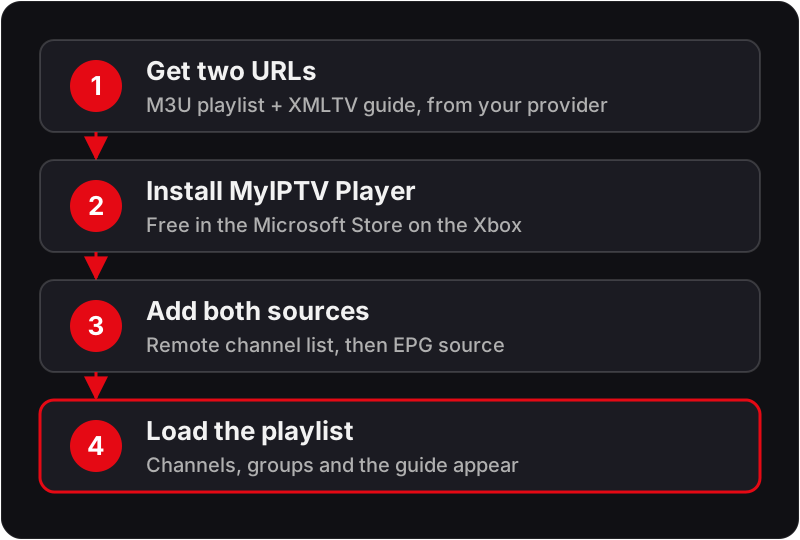
- Open the Microsoft Store on the Xbox and search for MyIPTV Player; install it (free).
- Launch it and go to Settings → Add new playlist & EPG source.
- Choose Remote channel list, give it a name, and enter your M3U playlist URL, then save.
- Under EPG source, add your XMLTV URL the same way and let the guide download.
- Back on the home tab, select your playlist to load the channels — favourites, groups and the EPG grid are all on the left rail.
First load of a large playlist can take a minute or two; after that, channels open in seconds. If channels load but the guide stays empty, re-download the EPG from settings — and if the playlist itself won't load, our channels-not-loading checklist covers the usual causes.
Method 2 — Kodi with PVR IPTV Simple Client
Kodi's Xbox build is the same media centre we cover in the full Kodi IPTV guide, so the short version:
- Install Kodi from the Microsoft Store.
- In Kodi: Add-ons → Install from repository → PVR clients → PVR IPTV Simple Client.
- Configure the client: General → Location = Remote path, paste the M3U URL; EPG tab → paste the XMLTV URL.
- Enable the add-on and restart Kodi — Live TV appears in the main menu with the guide populated.
Choose Kodi over MyIPTV Player when you want one interface for IPTV plus your own media library, or finer control over buffering — its advanced settings help on busy evenings, as does anything in our buffering fix guide.
Method 3 — Edge browser (for a quick look)
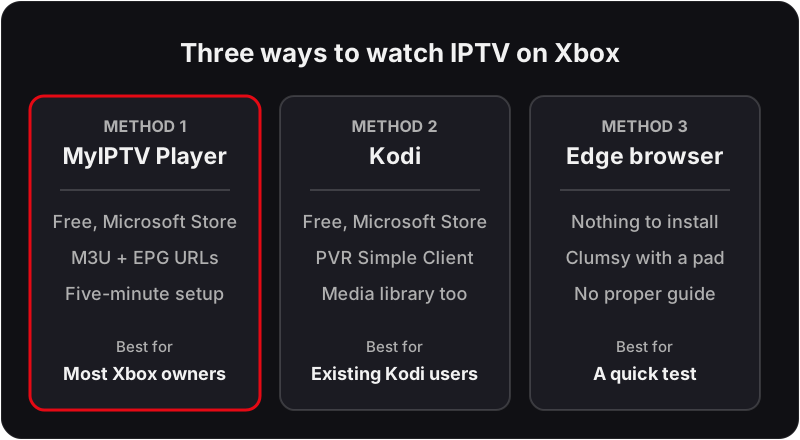
Xbox consoles include full Microsoft Edge, so if your provider offers a web player you can sign in and watch without installing anything. It works — but controller navigation is clumsy and there's no proper EPG, so treat it as a way to test a service before doing the five-minute MyIPTV Player setup, not as your daily player.
IPTV on Xbox One vs Xbox Series X and S
A Series X or S handles FHD and 4K IPTV streams without drama. On an older Xbox One, keep the playlist lean (ask your provider for a UK-focused list rather than the full international catalogue) and expect the EPG to take longer on first load. Wired ethernet beats Wi-Fi for evening sport on any model. And a plain statement competitors tend to skip: an Xbox is a genuinely good IPTV device — if you already own one, you don't need to buy a dedicated box unless you want TiviMate-class apps.
Entering long URLs without the controller
The slowest part of any Xbox setup is typing a playlist URL character by character with a thumbstick. Three ways round it:
- Xbox mobile app keyboard. When a text field is open on the console, the companion app on your phone offers a keyboard; paste the URL there and it appears on screen.
- USB keyboard. Any wired USB keyboard plugged into the console works in text fields, including the Store and app settings.
- Type the shorter link first. The EPG URL is usually shorter than the playlist URL; save it and confirm it loads before starting the longer one.
Whichever you use, watch for the on-screen keyboard auto-capitalising the first letter; that breaks the link silently. If you are unsure what the link should look like, what an M3U playlist is and how its URL is built shows the format.
Troubleshooting IPTV on Xbox
Most Xbox problems are one of the four below.
Playlist saved but no channels appear
Likely cause: The URL was mistyped, or it points to a playlist the account is not entitled to.
Check: Open the same URL in the Edge browser on the console. A valid link downloads or displays a text file starting with #EXTM3U; an error page means the link is wrong.
Fix: Re-enter the URL using the phone keyboard, paying attention to the username and password section, then reload the playlist.
Channels load but the guide is blank
Likely cause: The EPG source has not downloaded yet, or the EPG URL was saved under the wrong playlist.
Check: In the app settings, confirm the EPG entry is attached to the playlist you are using and that a download has completed.
Fix: Re-download the EPG and wait for it to finish before opening the guide. Channel names in the playlist must match the EPG IDs, so a provider-supplied EPG link is more reliable than a third-party one.
Stream starts, then freezes every few seconds
Likely cause: Wi-Fi contention or evening congestion rather than the console.
Check: Play the same channel on a phone on the same network. If it stutters too, the network is the problem.
Fix: Connect the console by Ethernet, or move it to the 5 GHz band and away from the router's obstacles. In Kodi, raise the buffer in the PVR client's advanced settings.
Audio plays but the picture is black
Likely cause: The stream uses a codec or container the player cannot decode on the console.
Check: Try a different channel in the same group. If most play and one does not, the channel's encoding is the issue, not your setup.
Fix: Switch to the HD or SD variant of the channel, or try the same stream in the other app (MyIPTV Player versus Kodi) since they use different decoders.
Is an Xbox the right IPTV device for you?
It suits anyone who already has the console under the main TV and watches mostly live channels. It is a poor fit if you want recording or a polished EPG. Use the free 24-hour trial to decide rather than guessing. During the trial:
- Load the playlist in MyIPTV Player and time how long the first load takes on your console.
- Open the guide and check that the channels you care about carry programme data.
- Play a live channel for a full programme in the evening, on the connection the console normally uses.
- If the Xbox shares the house with another screen, note that the trial is one connection; streaming on both at once needs a plan with two or more devices.
If the trial passes those checks, the paid plan behaves the same on the console.
FAQ
What is the best IPTV app for Xbox?+
MyIPTV Player for most people: it is free in the Microsoft Store, loads an M3U playlist and XMLTV guide, and is set up in about five minutes. Kodi with the PVR IPTV Simple Client is the better pick if you also want a media library in the same app.
Is there a free IPTV app for Xbox?+
Yes — MyIPTV Player is a free download from the Microsoft Store on Xbox Series X, Series S and Xbox One. Kodi is also free in the Store and adds IPTV through its PVR IPTV Simple Client add-on. Both load a standard M3U playlist and XMLTV EPG from any provider.
Can I get IPTV Smarters or TiviMate on Xbox?+
No. IPTV Smarters and TiviMate are Android apps and are not in the Microsoft Store. On Xbox the equivalent roles are filled by MyIPTV Player (simple playlist player) and Kodi (full media centre with an IPTV add-on).
Which Xbox models can run IPTV?+
Xbox Series X, Series S and all Xbox One models run MyIPTV Player and Kodi from the Microsoft Store. The Series consoles handle large playlists and FHD/4K streams more smoothly; an original Xbox One manages standard channel lists fine but loads big EPGs more slowly.
Can I record IPTV on an Xbox?+
Not on the console itself — neither MyIPTV Player nor Kodi's IPTV client offers dependable DVR on Xbox. If recording matters to you, run the recording on a PC or NAS instead; our IPTV DVR guide walks through the working setups.
Does IPTV on Xbox need a VPN?+
No. On your home broadband a legitimate IPTV service streams without any VPN. A VPN is only relevant for specific situations such as travelling abroad, or ISP-level traffic shaping at peak hours — see our VPN guide for when it genuinely helps.
Do I need Xtream Codes or an M3U link for Xbox?+
An M3U playlist URL plus an XMLTV EPG URL. Neither MyIPTV Player nor Kodi's IPTV Simple Client has an Xtream Codes login screen, so if your provider only gave you a server address, username and password, ask for the M3U and EPG links — every Xtream-based service can issue them from the same account.
Why does my playlist take so long to load on Xbox?+
Large international playlists and full-week EPG files are the usual reason. The console parses the whole file before showing anything, so a UK-only playlist and a shorter EPG window load far faster. Once cached, later launches are quick.
Can I use the Xbox and the living-room TV at the same time?+
Only if your plan allows two simultaneous connections. The Xbox counts as one connection like any other device; on a single-connection plan, starting a stream on the Xbox stops the one on the TV. The multi-device guide explains how connection counts work.
Try it on your Xbox tonight — free for 24 hours
Get a trial playlist for MyIPTV Player or Kodi in minutes — no credit card, no contract.
No credit card · No contract · Instant activation
See also: IPTV on Kodi — PVR Setup · How to Record IPTV (DVR) · IPTV on Windows PC.