Flickhaven IPTV UK
Formuler Box IPTV Setup: MyTVOnline IPTV Player on Z8, Z10 & Z11
Formuler box IPTV runs through MyTVOnline, the IPTV player built into every Formuler Z, so there is no separate app to install. Open the profile screen, add a profile, and choose Xtream Codes API if your provider issued a server URL, username and password, or Portal if they issued a portal address and registered the MAC MyTVOnline shows. Save, then let the channel list and EPG download. Setup takes about five minutes on a Z8, Z10 or Z11.
Formuler boxes are set up through MyTVOnline, not through a separate player app, and the one decision that matters is whether your subscription is an Xtream Codes login or a portal login. Get that right and setup takes five minutes. Get it wrong and you get an authorisation error that looks exactly like a dead account. This guide covers both routes on the Z8, Z10 and Z11, plus MAC registration, EPG and the three faults behind nearly every Formuler portal failure. Related: Xtream Codes explained and MAG box setup.
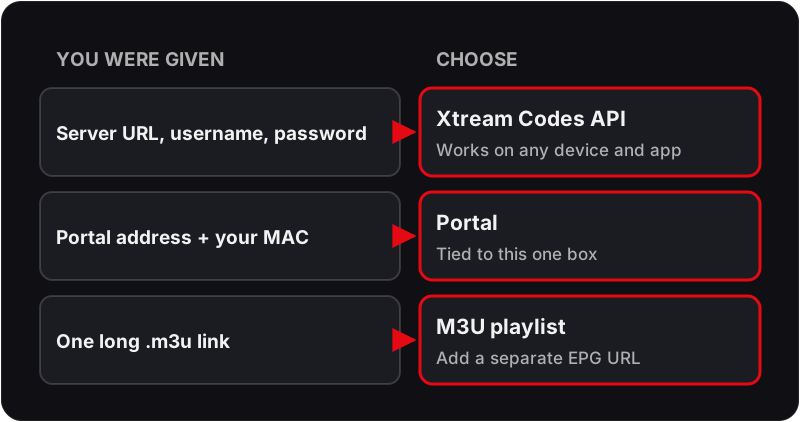
Xtream Codes or Portal — Which Do You Have?
- ▸ Xtream Codes — you were given a server URL, a username and a password. Works on any device and any app. This is what most UK providers issue.
- ▸ Portal — you were given a portal address and asked for the box's MAC. Tied to that one box; a hardware swap needs re-registration.
- ▸ M3U link — you were given a single long URL ending in .m3u or .m3u8. Simplest of the three, but usually carries no EPG unless a separate guide URL was supplied.
- ▸ Flickhaven issues Xtream Codes credentials, so use the Xtream Codes API option.
Setting Up IPTV on a Formuler Z — Step by Step
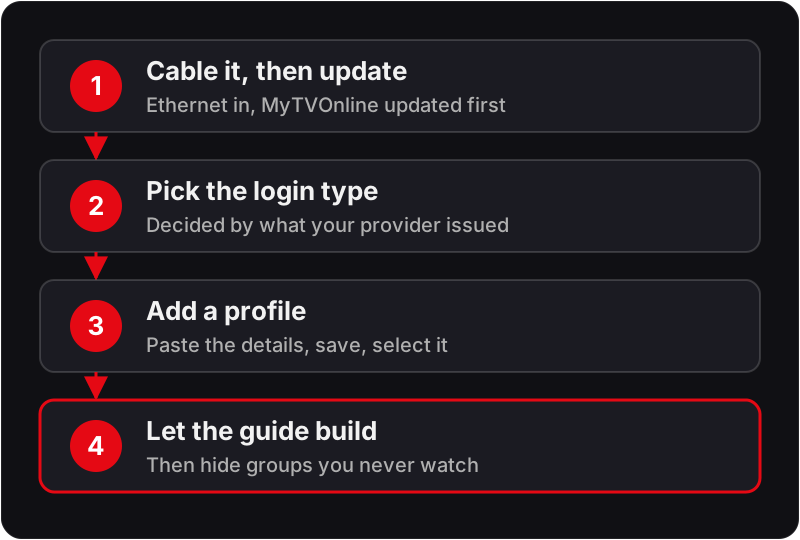
Step 1: Cable it, then update
Formuler boxes have a proper Ethernet port and it is the single reason to prefer one over a streaming stick. Use it. Then update MyTVOnline before adding anything, because a stale build is behind a surprising share of playlist problems.
- 1Connect the box to the router by Ethernet and to the TV by HDMI.
- 2Complete the first-run wizard and set the display output to match your TV — 2160p 50Hz for a 4K set in the UK.
- 3Open MyTVOnline → Settings → check for an update and apply any that is offered.
- 4Reboot from the menu rather than pulling the power.
Step 2: Choose the right login type
This is where most people go wrong, because the two methods look similar and are not interchangeable. Which one you use is decided by what your provider issued, not by preference.
- 1Issued a server URL, username and password? Use Xtream Codes API.
- 2Issued a portal address and asked for your MAC? Use Portal.
- 3Issued an .m3u link? Use the M3U playlist option and paste the full URL including the query string.
- 4If unsure, ask support which type your account is — trying the wrong one produces an authorisation error that looks like a broken account.
Step 3: Add the profile in MyTVOnline
MyTVOnline keeps multiple profiles, so you can hold a trial and a paid line side by side and switch between them without re-entering anything.
- 1Open MyTVOnline and press the menu button to reach profile management.
- 2Select Add Profile and give it a name you will recognise later.
- 3Enter the credentials for your chosen login type, exactly as issued — paste rather than type where you can.
- 4Save, then select the profile to activate it.
Step 4: Let the guide build, then tidy the list
A full UK channel list with EPG is a large download. Give it time on first load, then spend five minutes hiding what you will never watch — it is the difference between a usable channel bar and an unusable one.
- 1Wait for the channel list and EPG to finish downloading before judging anything.
- 2Open the group editor and hide country groups you do not need.
- 3Add your regular channels to Favourites and set that group as the default view.
- 4Set the EPG time zone to United Kingdom so programme times line up with the broadcast.
Credentials for your Formuler
Xtream Codes login, issued in minutes
Flickhaven issues a server URL, username and password that drop straight into the MyTVOnline Xtream Codes API screen — no MAC registration, no portal address, and the same credentials work on a phone or a second TV (one at a time on a 1-device plan). The free 24-hour trial issues them without a card.
Formuler Z Box IPTV Models Compared: Z8, Z10 and Z11
| Model | Best for | Notes |
|---|---|---|
| Z8 / Z8 Pro | Budget and second rooms | Still perfectly capable of 4K playback. The interface is slower with very large channel lists, so trim groups aggressively. |
| Z10 / Z10 Pro | The mainstream choice | More memory than the Z8, which shows in EPG loading and channel-change speed rather than in picture quality. |
| Z11 / Z11 Pro Max | Main living-room box | Fastest interface of the range and the most comfortable with a full UK list plus a week of guide data loaded. |
| SE variants | Cost-conscious buyers | Trimmed hardware at a lower price. Fine for HD-first viewing; less comfortable as the channel list grows. |
Worth saying plainly: no Formuler model gives you access to different channels. The subscription determines what you can watch, and the box determines how pleasant it is to navigate. Buy for interface speed, not for content.
Common Formuler Problems
Portal will not load
Check three things in order: that the MAC registered with the provider matches the one under Settings → System Information, that the portal URL is exact including any trailing slash, and that the box has a working network connection at all.
Authorisation failed on Xtream Codes
Almost always a trailing space on the server URL or a character transposed in the password. Delete the profile entirely and re-create it by pasting rather than typing.
EPG is empty or shows the wrong times
Set the time zone to United Kingdom in the MyTVOnline settings, then force an EPG refresh. A large guide takes several minutes and refreshes roughly once a day thereafter.
Channel list takes minutes to open
Too many groups loaded. Hide the country groups you do not watch — this has more effect on interface speed on Formuler hardware than any other single change.
Picture stutters on 4K but HD is fine
Confirm the HDMI output is set to 2160p at 50Hz rather than 60Hz for UK broadcast content, and that the box is on Ethernet rather than Wi-Fi.
Box reboots during playback
Usually power. Use the supplied power adapter rather than a substitute, and if a USB drive is attached, power it separately rather than from the box.
If the fault is not on this list, the troubleshooting hub has the symptom-to-cause table for every common IPTV problem regardless of device.
Formuler Z IPTV — Frequently Asked Questions
How do I set up IPTV on a Formuler Z box?+
Open MyTVOnline on the Formuler home screen, go to the profile or playlist screen, and add a new profile. Choose Xtream Codes API if your provider issued a username and password, or Portal if they issued a portal address and registered your MAC. Enter the details, save, and the channel list and EPG download automatically. The whole process takes about five minutes.
What is the difference between a portal and Xtream Codes on Formuler?+
A portal login identifies the box by its MAC address, so the provider registers the MAC and the box needs no username. Xtream Codes identifies the account by a server URL, username and password, so it works on any device and any app. Xtream Codes is the more flexible of the two and is what most UK providers issue by default.
Where do I find the MAC address on a Formuler Z?+
For a portal login, read the MAC that MyTVOnline shows on its own settings or portal screen. It can differ from the hardware MAC printed on the sticker underneath the box, and the provider needs the one MyTVOnline presents. The hardware MAC is also listed under Settings, then System Information or About.
What is the MyTVOnline IPTV player?+
MyTVOnline is the IPTV player Formuler builds into its Z-series boxes. It takes an Xtream Codes login, a portal address or an M3U playlist, and handles the channel list, the TV guide, favourites and recording in one app, so a Formuler box needs no separate player.
Which Formuler models work with IPTV?+
All of the current Z-series run MyTVOnline and take a standard IPTV subscription — the Z8, Z10, Z11 and their Pro and SE variants. The newer models bring more memory and a faster interface rather than access to different channels. Any of them will play the same streams; the difference is how quickly the guide loads and how well a large channel list scrolls.
Why is my Formuler portal not loading?+
Three causes account for nearly all of them. The MAC registered with the provider does not match the box, which happens after a hardware swap. The portal URL has a typo or a missing trailing slash. Or the box has no working DNS — check Settings, Network and confirm it has an IP address and can reach the internet before assuming the portal is at fault.
How do I update MyTVOnline on a Formuler box?+
From the MyTVOnline settings screen there is a check-for-update option, and the box also prompts on boot when a new build is available. Keep it current: EPG handling and playback stability improve between releases, and providers occasionally change how they issue playlists in ways older builds do not handle.
Can I record on a Formuler Z?+
Yes, with a USB drive or an external hard disk connected to the box. Format it from the Formuler menu rather than on a computer so the box writes its own file system, then set recordings from the EPG. Recording a live stream is bounded by the drive speed as much as the connection, so use a powered drive rather than a small flash stick.
Does a Formuler Z need a VPN in the UK?+
Not as a rule. Add one only if you have established that your home line is interfering with the stream — the test is whether the same account plays cleanly on mobile data. Formuler boxes support VPN through an app or through router-level configuration; the router route is usually the better one because it does not depend on the box's own limited VPN support.
Related Guides
For the wider context, start with our IPTV installation guide, all supported devices and start a free trial.