Flickhaven IPTV UK
IPTV on PS5: Is There an IPTV App for PlayStation 5?
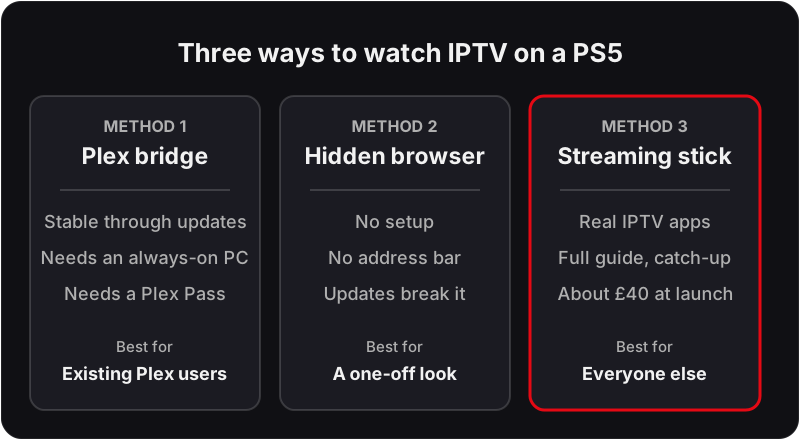
There is no IPTV app for PS5 — the PlayStation Store simply doesn't carry playlist players. You can still watch IPTV on a PS5 three ways: bridge your playlist into Plex with a free tuner emulator and a Plex Pass (the only stable method), reach a provider web player through the console's limited browser (fragile), or skip the workarounds and plug a cheap dedicated streamer into the same TV. This guide covers all three honestly, including the parts that don't work.
Because the PS5 has no native IPTV player, most readers end up on one of the devices that do support IPTV natively.
Own an Xbox as well? IPTV on Xbox is far simpler, because the Microsoft Store carries a playlist player. For every non-console device, the step-by-step IPTV installation guide is the place to start.
Why there's no IPTV player for PS5
Every guide promising an "IPTV app for PS5" is describing something else. Sony curates the PlayStation Store tightly around games and major broadcasters' own apps; generic M3U/Xtream playlist players — the IPTV Smarters and TiviMate class of app you'd install on a Firestick or Android TV — have never been admitted, and the PS5 has no sideloading path. So the honest starting point is: anything that works on PS5 works around the console, not on it.
Method 1 — Plex as an IPTV bridge (the stable route)
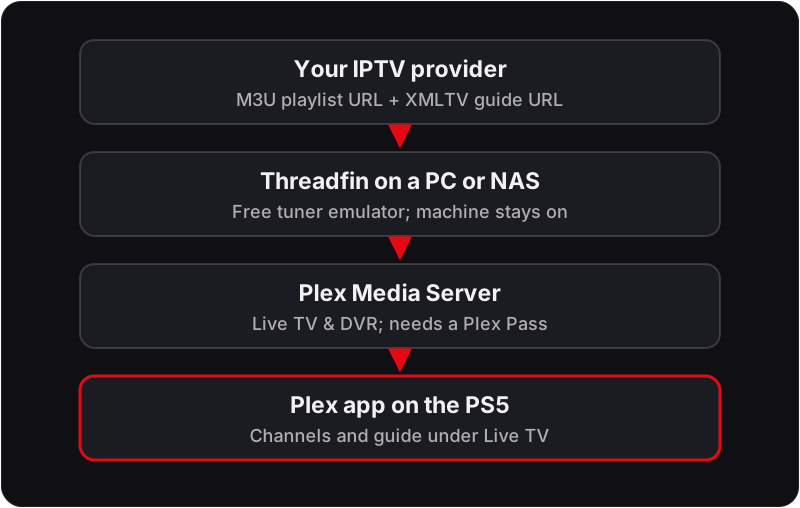
The PS5 does have an excellent Plex app. Plex's Live TV feature expects a network TV tuner — and a small open-source tool can impersonate one, feeding your IPTV playlist into Plex as if it were an aerial. Once configured, the PS5 just sees Plex with a live TV guide.
- Install Plex Media Server (free) on a computer or NAS that stays on your home network.
- Install Threadfin (or its predecessor xTeVe) — a free tuner emulator — on the same machine.
- In Threadfin, add your provider's M3U playlist URL and XMLTV EPG URL, then note the emulated tuner address it gives you.
- In Plex's Live TV & DVR settings (a Plex Pass feature), add that address as an HDHomeRun tuner and map the EPG.
- Open Plex on the PS5 — your channels appear under Live TV with a working guide.
Limitations, stated plainly: setup takes 30–60 minutes the first time; you need a Plex Pass; the bridge machine must stay on; very large playlists need trimming (Plex handles hundreds of channels better than tens of thousands); and channel zapping is a beat slower than a native player. It is, however, the only PS5 method that survives system updates.
Making the Plex bridge behave
Most Plex-bridge failures come from feeding it too much. Plex's Live TV was designed for an aerial with a few dozen channels, so a full IPTV playlist needs trimming before it goes anywhere near the console.
- ·Filter in Threadfin, not in Plex. Threadfin lets you include only the channel groups you want, so keep UK entertainment, sport and the handful of film channels you watch, and leave the rest out. A few hundred channels is comfortable; tens of thousands is not.
- ·Map the guide channel by channel. Plex matches EPG entries to channels by name and ID, and IPTV channel names rarely match the XMLTV file exactly. Threadfin's mapping screen is where you fix that, and it is the step most people skip and then blame on Plex.
- ·Use the M3U and EPG links for your account, not the app login. Threadfin needs playlist URLs rather than an Xtream Codes username. If you are unsure which is which, our guide to what an M3U playlist is and how it differs from an Xtream login explains both.
- ·Wire the bridge machine. The stream goes provider → bridge → Plex → PS5, so the bridge is the one hop you control. Ethernet on that machine removes most of the stutter people attribute to the console.
Troubleshooting the Plex route
Plex on the PS5 shows no Live TV section at all
The server has not registered the tuner. Open the Plex web dashboard on the bridge machine, go to Live TV & DVR, and check the Threadfin address is listed and reachable. If the machine has slept or changed IP, re-add it.
Channels are listed but will not play
Plex is being asked to transcode a stream it cannot handle. Try a different channel first; if nothing plays, lower the stream quality setting in the PS5 Plex app, and check the bridge machine is not maxed out on CPU.
The guide is blank or shows the wrong programmes
An EPG mapping problem, not a stream problem. Go back to the Threadfin mapping screen and confirm each channel is tied to the right XMLTV ID, then refresh the guide data in Plex.
Method 2 — the limited browser (fragile, but real)
The PS5 ships with a browser Sony never surfaces: there's no icon and no address bar, but account-linking screens (such as linking a social account) open a web view you can navigate out of. If your IPTV provider offers a web player, it may load there and play. We list this because it genuinely exists — and we'll be equally clear that it's a poor experience: no proper remote-control navigation, no reliable fullscreen, and Sony can (and does) close the route in firmware updates. Don't build your evening TV around it.
Method 3 — the honest answer: a streaming stick
Most articles about IPTV on PS5 won't say this, so we will: the best IPTV device for a PS5 owner is not the PS5. A Fire TV Stick or a dedicated Android TV box in the TV's spare HDMI port runs real IPTV apps with a full EPG and catch-up, plus 4K on 4K models — no bridge computer, no browser tricks. See our best IPTV box UK comparison for current picks; most cost less than a single new PS5 game.
The same logic applies to a PS4, which shares the store policy and has an even weaker workaround story.
Which route suits which household
Already running a Plex server?The bridge is an hour's work and you keep one app for everything. Have a spare HDMI port and no server? Buy the stick; the Plex route costs more in evenings than the hardware costs in pounds. Just curious? Try the browser once, then stop.
Whichever you pick, use the free 24-hour trial to test the route itself, not just the channels: start a live channel, zap to another, open the guide, and leave a stream running for a full programme at the time of evening you normally watch. If the Plex bridge survives that, it will survive a season.
What about DLNA and the PS5 Media Player?
Some guides suggest streaming to the PS5 from a DLNA media server and call that an "IPTV method". Support on the PS5 is patchier than it was on the PS4, and in any case DLNA is built for stored video files, not continuous live streams — live channels stall, seeking misbehaves and the EPG doesn't exist. For video-on-demand files you already host it's fine; for live TV it isn't a method, and we won't pretend otherwise.
FAQ
Is there an IPTV app on PS5?+
No. The PlayStation Store has no IPTV player apps — no IPTV Smarters, no TiviMate, no XCIPTV. Sony's store policy does not carry generic playlist players, so every 'IPTV on PS5' method is a workaround rather than a native app.
Can I use IPTV Smarters on a PS5?+
Not as an app. IPTV Smarters is not in the PlayStation Store and cannot be sideloaded on a PS5. If your provider offers a web player you may be able to reach it through the console's limited browser, but the reliable route is the Plex bridge or a dedicated streaming device.
Does the PS5 hidden browser work for IPTV?+
Sometimes, briefly. The PS5 has a limited browser you can only reach indirectly (for example through account-linking screens). Some web players load in it, but there is no address bar by design, playback controls are poor, and system updates regularly break the trick. Treat it as a curiosity, not a setup.
Is the Plex method free?+
Not entirely. Plex Media Server, the Plex app on PS5 and an open-source tuner bridge such as Threadfin or xTeVe are free, but Plex lists Live TV and DVR from your own tuner as a Plex Pass feature, so you need a Plex Pass. You also need a computer or NAS on your network left running.
Should I even use my PS5 for IPTV?+
Honestly — only if you refuse to add hardware. A Fire TV Stick or Android box on the same TV gives you real IPTV apps and a proper guide, with 4K on 4K models, and none of the workarounds. The PS5 is a brilliant console and a poor IPTV box.
Is there an IPTV app for PS4?+
No — the PS4 shares the PS5's store policy. The Plex bridge does work on a PS4 too: the PS4 has a Plex app, and the bridge lives on your computer or NAS rather than on the console, so the same Threadfin and Plex Media Server setup serves both. The PS4 app is slower to open and to zap between channels, but the method is identical.
Can I record with the Plex route?+
Yes, with the same Plex Pass the Live TV route already needs: Plex's DVR schedules and stores recordings from the emulated tuner. If recording matters to you, a Firestick running TiviMate Premium does it with far less setup, which is another point for the extra-hardware route.
Will Plex keep working if the computer running it goes to sleep?+
No. The PS5 app only sees channels while Plex Media Server and Threadfin are both running, so a laptop that sleeps when the lid closes will drop every channel mid-programme. Set the bridge machine's power settings to stay awake, or run it on a small always-on box such as a NAS or a mini PC.
Test your setup with a free 24-hour trial
Try Flickhaven on Plex, a Firestick or any device on your TV — no credit card, no contract.
No credit card · No contract · Instant activation
See also: IPTV on Firestick — Setup Guide · Best IPTV Box UK · IPTV on Android TV.