4K IPTV UK 2026
4K UHD IPTV — Devices, Speed & Channels
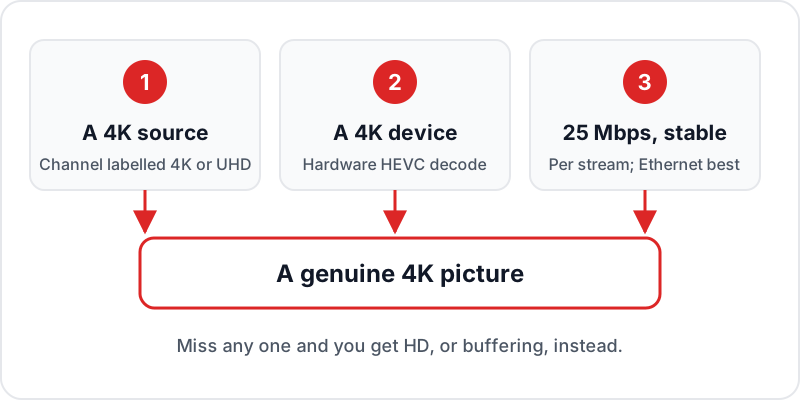
4K IPTV in the UK needs three things aligned: a service carrying genuine 4K streams, a device capable of decoding them, and about 25 Mbps of stable bandwidth. A Fire TV Stick 4K Max or Android TV box handles the decode; older Firesticks do not. Not every channel is broadcast in 4K regardless of provider, so the realistic expectation is 4K on selected sport and film content rather than across the full lineup.
4K IPTV in the UK is now mainstream on the content that is broadcast in 4K: selected premium live sports and major fight nights, plus 4K films and series. Here is everything you need to know to get the best 4K picture from a prepaid IPTV subscription.
4K playback also depends on the hardware; see every device that supports IPTV.
Test 4K IPTV Free for 24 Hours
What is 4K IPTV? A Plain-English Explainer
4K IPTV refers to live television and video-on-demand content delivered via internet at 3840 × 2160 resolution — four times the pixels of standard Full HD (1920 × 1080). Instead of arriving via a satellite dish or aerial, the video stream travels over your broadband connection directly to your streaming device. It is the same route our UK IPTV service uses for its 4K channels.
Resolution
3840 × 2160 pixels
4× more pixels than Full HD
Codec
HEVC / H.265
50% more efficient than H.264
Genuine 4K bitrate
20+ Mbps
Budget services upscale at 6–8 Mbps
Genuine 4K vs “Fake 4K” — Know the Difference
Not all “4K” IPTV is equal. Genuine 4K IPTV streams at 20+ Mbps bitrate using HEVC/H.265 encoding — you can see the difference in fine detail, especially during fast motion in sport. Budget IPTV services may upscale standard HD content to a 4K-labelled stream at only 6–8 Mbps bitrate — this looks worse than a properly compressed HD stream because the upscaling introduces artefacts. Use the free trial to check a 4K channel's detail during fast motion before you pay.
To receive 4K IPTV, you need three things: a 4K-capable TV or streaming device, a stable internet connection of about 25 Mbps per 4K stream, and a compatible IPTV app with hardware HEVC decode enabled. All three are covered in detail below.
Internet Speed Requirements for 4K IPTV
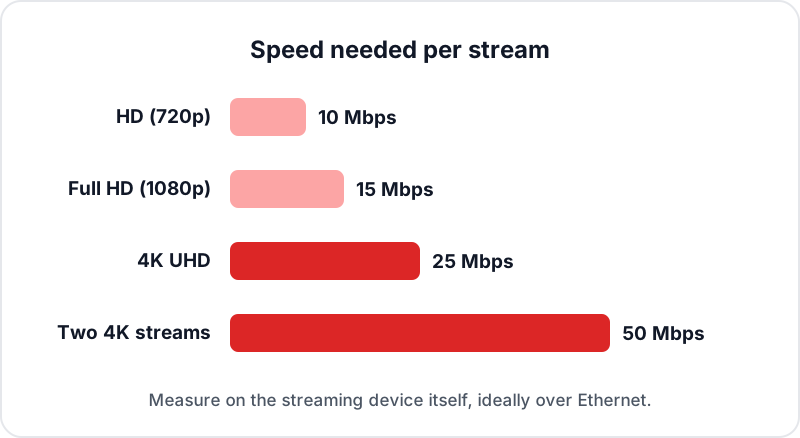
| Quality | Resolution | Minimum Speed | Recommended | Notes |
|---|---|---|---|---|
| HD | 720p | 10 Mbps | 15 Mbps | Watchable on most connections |
| Full HD | 1080p | 15 Mbps | 20 Mbps | Recommended for most viewers |
| 4K UHD | 2160p | 25 Mbps | 35 Mbps | Wired Ethernet strongly recommended; HDR needs no extra |
| 2 simultaneous 4K streams | 2160p ×2 | 50 Mbps | 70 Mbps | Add 25 Mbps per additional 4K stream |
Speed test tip: Run a speed test at fast.com or speedtest.net from your streaming device (not your phone) to get an accurate reading. Wi-Fi speed is often significantly lower than the broadband headline speed — if your speed test shows under 25 Mbps at the device, switch to Ethernet. For other causes, see our general IPTV buffering guide.
Compatible Devices for 4K IPTV in the UK
The cheapest route is IPTV on a Firestick 4K: the Fire TV Stick 4K Max plays 4K HDR through a sideloaded player, with an Ethernet adapter for stability. A dedicated 4K IPTV box such as the Nvidia Shield TV Pro or Google TV Streamer adds Gigabit Ethernet built in. Our IPTV box comparison ranks eight devices.
✓ Supported — 4K IPTV Capable
- ✓Amazon Fire TV Stick 4K Max (2nd gen)Best value — Wi-Fi 6E + 4K HDR10+
- ✓Amazon Fire TV Stick 4K (2nd gen)Excellent — 4K Dolby Vision
- ✓Nvidia Shield TV ProBest overall — Gigabit Ethernet + AI upscaling
- ✓Samsung Smart TV 2020+IPTV players from the Samsung app store
- ✓LG Smart TV 2020+ (webOS 5+)SS IPTV available on Content Store
- ✓Apple TV 4K (3rd gen)GSE Smart IPTV or Smarters — Ethernet on the 128GB model
- ✓Google TV StreamerFull Google Play Store — TiviMate direct
- ✓Formuler Z11 Pro MaxDedicated IPTV box — MyTVOnline 2 native
- ✓Android TV 9+ devicesAny box running Android 9 or later
- ✓Amazon Fire TV Cube (3rd gen)Most powerful Fire TV device
✗ Not Suitable for 4K IPTV
- ✗Fire TV Stick LiteLimited to 1080p — no 4K output
- ✗Fire TV Stick (3rd gen, non-4K)Limited to 1080p — no 4K
- ✗Fire TV Stick (older than 3rd gen)Outdated chip — HD only, slow
- ✗Smart TVs older than 2018No H.265/HEVC hardware decode in most
- ✗Chromecast (1st/2nd gen)No 4K support — replaced by Google TV Streamer
- ✗Very old Android boxes (Android 5/6)No HEVC hardware decode, too slow
Not sure if your TV supports 4K HEVC? Go to your TV's settings and look for “Supported formats” or check the manufacturer spec page for “HEVC” or “H.265” in the codec list.
What Channels Stream in 4K on Flickhaven
Flickhaven's 4K channels are the premium tier of the channel list. Not all 55,000+ channels are in 4K — live channels in 4K are specifically the sports and fight-night tier. Standard UK broadcast channels (BBC, ITV, Channel 4, Channel 5) broadcast in HD and do not have 4K versions. Look for channels labelled “4K” or “UHD” in your IPTV app.
Live 4K Channels
- ✓Premium live sports in 4K
- ✓Premier League football in 4K
- ✓Live football in 4K
- ✓Formula 1 in 4K
- ✓Live cricket in 4K
- ✓Major fight nights in 4K where broadcast in 4K (boxing, UFC, WWE)
4K VOD & Other
- ✓8,000+ VOD titles in 4K UHD
- ✓Latest blockbuster releases in 4K
- ✓Hollywood and UK series in 4K
- ✓4K documentaries and nature content
- ✓Champions League — 4K when broadcast
- ✓Europa League — 4K when broadcast
Note: BBC One, BBC Two, ITV, Channel 4, and standard UK channels do not broadcast in 4K — these exist in HD quality only. Premium sports broadcasters produce native 4K broadcasts for selected events (typically major sports events). Flickhaven carries these 4K broadcasts where available.
4K IPTV vs Satellite 4K TV — Full Comparison
| Feature | Satellite 4K TV | Flickhaven 4K IPTV |
|---|---|---|
| Monthly cost | £86–£115+/month | From £15.00/month |
| Contract | 18–24 months | No contract |
| Hardware required | Dedicated satellite 4K box (£50–£100 one-off) | Your existing 4K streaming device |
| 4K sports channels | Selected premium sports events | Premium live sports 4K + fight nights |
| 4K VOD | Premium 4K movie channels (limited selection) | 8,000+ 4K VOD titles |
| Fight nights in 4K | Extra charge per event (£19.95+) | Included in subscription |
| Setup | Engineer visit (days/weeks wait) | Self-setup in 5 minutes |
| Devices supported | Satellite box + provider app | Any 4K device — multi-device plans available |
| Exit fees | Yes (up to £90+) | None |
Bottom line: Satellite 4K TV and Flickhaven 4K carry the same broadcast sports content. The 4K picture quality is equivalent — you are watching the same game from the same source in the same resolution. The difference is cost: Flickhaven starts at £15.00/month vs £86–£115+/month for a satellite 4K package, and works on devices you already own rather than requiring a dedicated satellite set-top box.
6 Tips for the Best 4K IPTV Experience
Use wired Ethernet — not Wi-Fi
Wi-Fi is the single biggest cause of 4K IPTV buffering. Even Wi-Fi 6 can suffer from packet loss and interference that causes 4K streams to buffer. A £5–£12 Ethernet adapter plugged directly into your router and streaming device eliminates this instantly. This is the most impactful single change you can make.
Use hardware decode in your IPTV app
In TiviMate, go to Settings → Player and choose the hardware decoder. In IPTV Smarters, enable Hardware Acceleration. In GSE Smart IPTV, enable Hardware Decoder. Hardware decode offloads 4K HEVC processing to your device's dedicated chip — without it, even fast devices may stutter on 4K streams.
Enable HDR output on your device and TV
For the best picture quality, make sure HDR is enabled both on your streaming device (Firestick: Display → HDR; Apple TV: Settings → Video & Audio → Match Dynamic Range) and on your TV (input settings → HDMI HDR mode set to 'On' or 'Auto'). Some TVs turn off HDR on HDMI inputs by default — check each input's picture settings.
Look for UHD or 4K-labelled channels
In your IPTV app, 4K channels are typically labelled with '4K', 'UHD', or 'Ultra HD' in the channel name. In TiviMate, you can search for '4K' to filter these channels. Do not assume a channel is 4K just because your TV output is set to 4K — the source stream must also be 4K.
Close other apps to free bandwidth during 4K streams
If other devices on your network are downloading, streaming, or gaming simultaneously, your available bandwidth may drop below the 25 Mbps needed for a 4K stream. During major events (Premier League, Champions League, boxing fight nights), pause or pause downloads on other devices and disconnect devices not in use from Wi-Fi.
Restart your router before major events
ISP routers can develop latency issues after days or weeks of continuous operation. A quick restart (unplug, wait 30 seconds, replug) refreshes your IP connection and often improves stream stability. Do this 10–15 minutes before a major 4K event to ensure you are on the cleanest possible connection from the start.
Common 4K IPTV Problems & Fixes
Buffering on 4K streams
Likely cause: Wi-Fi instability or insufficient speed
- 1Switch from Wi-Fi to wired Ethernet first — it is the most common fix
- 2Run a speed test at the device: about 25 Mbps per 4K stream, with headroom
- 3Temporarily switch to 1080p HD to confirm the stream works — if HD works fine, it is a bandwidth issue
- 4Disconnect other devices from Wi-Fi during the stream
- 5Enable hardware decode in your IPTV app player settings
4K channel appears to stream in HD quality
Likely cause: HDR or display settings misconfigured on device or TV
- 1Enable HDR on your streaming device output settings (not just the TV input)
- 2Check your TV's HDMI input is set to HDMI Enhanced / HDMI 2.0 / HDR mode — on some TVs this defaults to off
- 3Make sure your IPTV app player is set to hardware decode (not software/auto)
- 4Confirm the channel name includes 4K/UHD — the channel list is the source of truth
- 5Try a different IPTV player app — some apps cap resolution in their free tier
Black screen when opening 4K channels
Likely cause: HDR format mismatch between stream and display
- 1Toggle HDR off on your TV input, then back on — this forces the handshake to re-negotiate
- 2If using an HDMI splitter or AV receiver, bypass it and connect directly to the TV
- 3On Apple TV: disable Match Dynamic Range temporarily, test the stream, then re-enable
- 4Try a different HDMI cable rated for 4K 60Hz (HDMI 2.0 or 2.1)
- 5On Firestick: Settings → Display → Video Resolution → set to 4K Ultra HD manually
Related Guides
Frequently Asked Questions
Does IPTV support 4K in the UK?+
What internet speed do I need for 4K IPTV?+
Which IPTV app is best for 4K streaming?+
Do all IPTV channels stream in 4K?+
Is IPTV 4K better than satellite 4K TV?+
Can I watch 4K IPTV on a Firestick 4K?+
What is the best 4K IPTV box?+
Why does my 4K IPTV buffer?+
Test 4K IPTV Free for 24 Hours
Premium live sports 4K, 8,000+ VOD titles in Ultra HD — from £15.00/month. No contract, no engineer visit, 5-minute setup on your existing 4K device.
Try completely free for 24 hours — no card required.
From £15.00/month · No contract · Works on Fire Stick 4K, Nvidia Shield, Apple TV, Samsung Smart TV & more