Flickhaven IPTV UK
IG IPTV — The Complete UK Guide 2026
IG IPTV is an IPTV service marketed to UK viewers, with a large on-demand catalogue and pricing quoted in pounds. This page sets out what it includes, how it installs across Firestick, Android and smart TV, and where it sits against alternatives on channels, device support and cost. IG IPTV is a sister brand run by the same group as Flickhaven, and that relationship is disclosed here rather than presented as an independent review.
Ownership disclosure
IG IPTV is one of the eight IPTV brands operated by the same group that publishes Flickhaven — see our IPTV brands. This is not an independent review. The IG IPTV figures below are taken from its own site, igiptv.tv, and we have not tested either service independently. For a neutral view, seek out reviewers with no commercial relationship to either brand.
What Is IG IPTV?
IG IPTV (igiptv.tv) is a UK-focused IPTV service operated by the same group that publishes Flickhaven. It delivers live TV channels, sport and on-demand content over your broadband connection, billed in pounds sterling from £15.00/mo, without a Virgin Media or satellite TV contract.
IG IPTV lists 55,000+ live channels and 160,000+ on-demand titles, SD to 4K Ultra HD quality, live sport and a trial of 24 hours, no card. Its 160,000+ library is the joint second-largest of the eight brands, behind Flickhaven's 180,000+.
If you've been pointed toward IG IPTV by a friend or seen it advertised online, this guide sets out what the service publishes, how it differs from its sister service Flickhaven, how it sits against other IPTV subscriptions in the UK, and what to check during a trial so you know it works when you need it most.
How IG IPTV (and All IPTV Services) Actually Work
Before evaluating IG IPTV specifically, it helps to understand how IPTV technology works — because all providers, including IG IPTV, use the same underlying delivery method.
IPTV (Internet Protocol Television) delivers TV channels and video-on-demand content over your home broadband connection rather than through a satellite dish or cable. Instead of receiving a broadcast signal, your device connects to a server that streams video data in real time. The quality of that stream — and the reliability of your viewing experience — depends almost entirely on the quality of the provider's server infrastructure.
M3U Playlist
A file containing a list of channel stream URLs. Loaded into apps like IPTV Smarters Pro, TiviMate, or VLC. Most basic IPTV providers use this method.
Xtream Codes / API
A more robust delivery system where you log in with a username, password, and server URL. Supports better EPG integration, VOD libraries, and series sections.
Dedicated App
Some premium IPTV services build their own apps for specific platforms. This allows better quality control, automatic updates, and device-specific optimisation.
Like every brand in the group, IG IPTV sends you login credentials to load into a compatible player app — it lists IPTV Smarters Pro, TiviMate, GSE, Perfect Player and Kodi. The critical question — the one that separates a reliable UK IPTV service from a frustrating one — is what happens on the server side when thousands of people are all watching the same Premier League match at the same time.
IG IPTV Review: What the Service Publishes
We operate IG IPTV and Flickhaven, so we are not a neutral judge of either and have not run an independent test. What follows is what IG IPTV publishes on its own site, with the points worth checking during the trial.
Channels and On-Demand Library
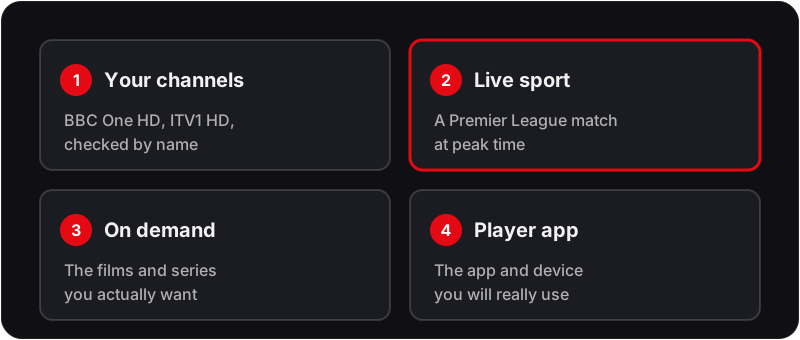
IG IPTV lists 55,000+ live channels and 160,000+ movies and series. Its live lineup is weighted to UK and international feeds. A published count is not the same as the channels you watch working at 8pm on a Saturday, so check your own channels — BBC One HD, ITV1 HD, the premium sports channels — during the trial.
Stream Quality
IG IPTV lists SD, HD, FHD and 4K Ultra HD streams. It shares infrastructure with the other brands in the group. Peak-hour performance on your own connection is the thing to test: run a live Premier League match during the trial.
Pricing
IG IPTV bills in pounds sterling on the same plan ladder as Flickhaven — 1mo £15.00 · 3mo £25.00 · 6mo £35.00 · 12mo+2 free £55.00 — so price is not a reason to choose one over the other.
Trial and Refunds
IG IPTV offers a trial of 24 hours, no card, and its refund window is 7 days. Read its refund terms before paying, as you would with any provider. For the general rules on IPTV and UK law, see our guide on whether IPTV is legal in the UK.
IG IPTV vs Flickhaven — Full Feature Comparison
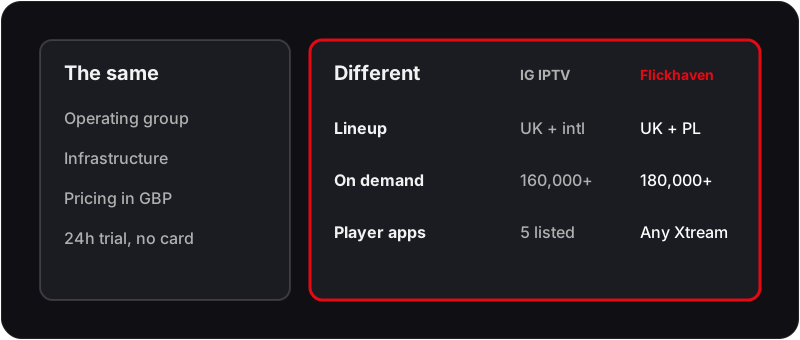
Both services are operated by the same group. Here is how IG IPTV and its sister service Flickhaven compare on what each publishes.
| Feature | IG IPTV | Flickhaven |
|---|---|---|
| Operator | Same group as Flickhaven | Same group as IG IPTV |
| Live Channels | 55,000+ | 55,000+ |
| VOD Library | 160,000+ titles | 180,000+ titles |
| Lineup Focus | UK and international feeds | Full UK terrestrial lineup and Premier League |
| Stream Quality | SD, HD, FHD and 4K | Up to 4K UHD |
| Starting Price | £15.00/mo | £15.00/mo |
| 12-Month Plan | £3.93/mo effective on the 12-month plan | £3.93/mo effective on the 12-month plan |
| Billing | Pounds sterling | Pounds sterling |
| Free Trial | 24 hours, no card | 24 hours, no card |
| Player Apps Listed | Smarters Pro, TiviMate, GSE, Perfect Player, Kodi | Any Xtream Codes player |
| Customer Support | WhatsApp activation | WhatsApp, 24/7 |
The two share infrastructure, pricing and a common feature set, so the real difference is lineup focus and player-app support rather than reliability. For all eight of the group's brands side by side, see Flickhaven and our 7 sister brands compared. If you are looking for an IG IPTV alternative outside the group, run any provider through the same trial checks.
How to Set Up IG IPTV (or Any IPTV Service) on Your Device
Whether you're using IG IPTV or switching to a more reliable alternative, the setup process is the same across providers. All modern IPTV services use either an M3U playlist URL or Xtream Codes credentials(a server URL, username, and password) that you enter into a compatible IPTV app.
The 4-Step IPTV Setup Process
Step 1: Choose your IPTV app
The app is the player — it displays your channels, EPG (TV guide), and VOD library. The best free app is IPTV Smarters Pro. The best premium app is TiviMate (Android only). Both support M3U and Xtream Codes.
Step 2: Install the app on your device
Every major device has a way to install IPTV apps. Firestick uses the Downloader app. Samsung Smart TV uses a Samsung Account workaround. Android TV installs directly from the Play Store. See the device-specific guides below.
Step 3: Enter your provider credentials
Open the app and select 'Add Playlist' or 'Add Provider'. Enter the M3U URL or your Xtream Codes server/username/password that your provider sent after you subscribed. The channel list loads automatically.
Step 4: Configure your EPG
EPG (Electronic Programme Guide) shows you what's on now and next. Most good providers include an EPG URL with your credentials. Enter it in the app settings under 'EPG / TV Guide' to enable the on-screen TV guide.
Device-Specific Setup Guides
The exact steps vary slightly by device. Use the guides below for your specific hardware — each covers the complete setup process including app installation, credentials entry, and EPG configuration.
Common IG IPTV Problems and How to Fix Them
Whether you're already on IG IPTV or troubleshooting any IPTV service, these are the most common issues UK viewers encounter and the quickest ways to resolve them.
Buffering or freezing during live sport
Cause: The most common cause is server overload on the provider's end — too many concurrent viewers on underpowered infrastructure. Secondary causes include slow broadband, Wi-Fi interference, and VPN overhead.
Fix: First test your internet speed (you need at least 25 Mbps for stable HD/4K IPTV). Switch from Wi-Fi to a wired Ethernet connection if possible. If the problem persists, the issue is almost certainly the provider's server capacity. See our full guide on fixing IPTV buffering.
Full guide →Black screen on channels
Cause: A black screen with audio, or a completely blank screen, is usually caused by a codec mismatch, an expired stream URL, or a geo-blocked channel.
Fix: Try switching the video decoder in your IPTV app from hardware to software decoding (or vice versa). If the channel shows as 'expired', your provider needs to refresh the stream URL — contact support. See our dedicated black screen fix guide.
Full guide →EPG (TV Guide) not working
Cause: EPG data needs a separate URL that updates regularly. If your provider has sent an EPG URL that is broken or outdated, the guide will show as empty.
Fix: Contact your provider for a fresh EPG URL. In the meantime, most IPTV apps have a 'Force Refresh EPG' option. If you're on Flickhaven, EPG is automatically maintained — no manual steps needed.
Full guide →IPTV not loading channels
Cause: This typically means the M3U URL or Xtream Codes credentials have expired, been suspended, or the server is down.
Fix: First confirm your subscription is active and paid. Then check whether other channels load — if none do, the server is likely down. Contact your provider. If you're regularly experiencing this, it's a sign your provider's infrastructure is unreliable.
Full guide →Flickhaven: IG IPTV's Sister Service for UK Viewers
Flickhaven was built specifically for the UK market, with a channel list built around UK viewer priorities and WhatsApp support 24/7. Here is what every Flickhaven subscriber gets from day one:
If you are weighing IG IPTV against a Virgin Media or satellite TV contract, IPTV can deliver significantly better value than traditional TV packages — provided the provider's servers hold up at peak time, which is what the trial is for.
55,000+ Live Channels
UK channels including BBC, ITV, Channel 4 and Channel 5, live sport with no per-event fees, plus international packages.
180,000+ VOD Titles
A films and TV series library counted in titles and episodes, with a dedicated Kids section. Titles rotate, so search for yours during the trial.
4K UHD Streams
4K Ultra HD on supported channels, on your 4K TV, Firestick 4K or Android TV box, if your broadband keeps up.
Anti-Freeze Technology
When a server is busy, the stream is rerouted to another path, which reduces freezing at peak times. Test it during a live match in the trial.
7-Day Catch-Up TV
Missed last night's game? Watch any show or match from the past 7 days directly in your TV guide — no separate app needed.
WhatsApp Support, 24/7
Real human support via WhatsApp, any time.
Instant Activation
Subscribe and receive your credentials via WhatsApp within minutes — not hours. Start watching the same day.
No Contract
Monthly, 3-month, 6-month, and 12-month plans. Cancel any time. No penalties, no hidden fees.
Try Flickhaven Free — No Payment Required
Before you commit to any IPTV subscription — including IG IPTV — test Flickhaven for free on your actual device. Our free IPTV trial gives you full access to the live channel lineup, VOD library, and EPG so you can verify the quality on your specific TV, broadband connection, and location.
Plans from £15.00/month — 55,000+ channels — WhatsApp support 24/7 — instant activation
How Much Does IG IPTV Cost vs Flickhaven?
IG IPTV and Flickhaven bill on the same plan ladder in pounds sterling, taken from the group's published pricing.
| Plan | IG IPTV | Flickhaven |
|---|---|---|
| 1 Month | £15.00 | £15.00 (£15.00/mo) |
| 3 Months | £25.00 | £25.00 (£8.33/mo) |
| 6 Months | £35.00 | £35.00 (£5.83/mo) |
| 12 Months + 2 FREE | £55.00 | £55.00 (£3.93/mo) |
| Free trial | 24 hours, no card | 24 hours, no card |
Because the prices match, choose on lineup and player-app fit, and use the trial to check both on your own connection. For a full breakdown of UK IPTV subscription pricing, see our dedicated comparison.
IG IPTV — Frequently Asked Questions
Is IG IPTV legal in the UK?+
IPTV technology is legal in the UK. Whether a particular service is lawful depends on whether it holds the rights to what it shows. IG IPTV and Flickhaven are operated by the same group, so we cannot give you an independent view on either — read each service's terms and refund policy before paying, and see our guide on whether IPTV is legal in the UK for the general rules.
How do I set up IG IPTV on a Firestick?+
IPTV setup on Firestick involves installing an IPTV app (usually IPTV Smarters Pro or TiviMate) via the Downloader app, then entering your M3U URL or Xtream Codes credentials. Our full Firestick IPTV setup guide covers every step.
Why does IG IPTV keep buffering?+
Buffering on any IPTV service is usually caused by slow broadband (below 25 Mbps), Wi-Fi interference or VPN overhead, and sometimes by server load at peak times. Test on a wired connection first; if buffering happens consistently during weekend sport on a fast connection, contact the provider's support with the channel and time.
What is the best IG IPTV alternative?+
IG IPTV and Flickhaven are sister services operated by the same group, so we do not present either as an independent alternative to the other. They share infrastructure and a common feature set. Flickhaven is built around the full UK terrestrial lineup and Premier League; IG IPTV's live lineup is weighted to UK and international feeds and it lists the widest range of player apps. Both offer a 24-hour trial with no card, so the practical way to choose is to trial both on your own device.
Does IG IPTV include premium sports channels?+
IG IPTV lists live sport on its site, as Flickhaven does. As with any IPTV service, check the specific sports channels you watch during the trial, ideally during a live match.
The related guides cover each part of this picture in depth: Flickhaven & Our 7 Sister Brands Compared, IPTV Free Trial UK — Best Offers, IPTV on Firestick — Full Setup Guide, IPTV on Samsung Smart TV, IPTV Buffering Fix — 9 Proven Solutions, IPTV vs Virgin Media UK — Which Is Better?, Is IPTV Legal in the UK?, IPTV Smarters Pro Review UK, TiviMate Review UK and IPTV Subscription UK — Plans & Prices.
The Bottom Line on IG IPTV
IG IPTV and Flickhaven are run by the same group, so the honest advice is the same for either: start with a free trial and verify the quality yourself before committing to any subscription. For all eight of the group's brands side by side, see our IPTV brands.