Flickhaven IPTV UK
Kemo IPTV — Complete Guide, Review & Best UK Alternative (2026)
Kemo IPTV is an IPTV service sold at buykemoiptv.com with prices in dollars, from $20 for 3 months to $69 for 24 months. It advertises 22,000+ live channels and 150,000+ on-demand titles, and offers a refund offer within 7 days instead of a free trial, so you pay before you test. Flickhaven runs a competing service, so this page is a stated position: it sets out what Kemo publishes, how to set it up and what to test.
Competing-operator disclosure
Flickhaven operates a competing IPTV service, so this page about Kemo IPTV is a stated position, not an independent review. For a neutral view, seek out reviewers with no commercial relationship to either service.
1. What is Kemo IPTV?
Kemo IPTV is a subscription internet television service sold at buykemoiptv.com that delivers live TV channels, sport, films and on-demand content over broadband. When we checked its site on 30 October 2026, it advertised 22,000+ live channels, 150,000+ on-demand titles, “Anti Freezing™” and a high uptime figure. Those are Kemo's own claims; we have not tested them.
Kemo prices its plans in dollars, which suggests a primary market outside the UK. UK viewers reach it the same way as any IPTV service: a third-party player app and a set of login credentials, which Kemo says an agent sends by email or WhatsApp.
For a UK subscriber, three points matter most. Kemo offers no free trial, only a refund offer within 7 days, so you pay before you can test. Its shortest plan is 3 months. And the site does not state where it is based or who runs it; it describes its support as 24/7 live chat. Check the current terms before paying.
2. Kemo IPTV Features (2026)
📡22,000+ Live Channels (Kemo's claim)
Kemo advertises 22,000+ live channels. Channel counts vary as streams go offline and new ones are added, so a figure like 22,000 is a snapshot. What matters is whether your own channels are in it, which you can only check after paying, because there is no free trial.
🎬150,000+ Movies & Series (Kemo's claim)
Kemo advertises 150,000+ on-demand titles. As with live channels, the library changes as titles are added and removed, so search for the films and series you want during the 7 days for a refund.
⚡Anti-Freezing Technology
Kemo lists 'Anti Freezing™' on every plan and publishes a high uptime figure. It does not publish how the technology works or its server capacity, so the practical test is a busy live match, such as a Premier League Saturday kick-off, inside the refund window.
📋EPG (Electronic Programme Guide)
An EPG is the TV guide that shows what is on now and next, channel by channel. Guide quality varies by channel on any IPTV service, and the player app you use (TiviMate, IPTV Smarters, SS IPTV) decides how it looks. Check the guide on your own channels before the refund window closes.
3. Kemo IPTV Channels — What to Check by Name
Kemo does not publish a full Kemo IPTV channel list we could check, so these are the categories to test by name before Kemo's 7 days for a refund run out.
| Category | Check by name |
|---|---|
| UK Live TV | BBC One, BBC Two, ITV1, Channel 4, Channel 5 |
| Sport | Premier League and other live football, F1, cricket, rugby |
| US / North America | NBC, CBS, ABC, CNN, Fox News |
| International | Arabic, French, German, Spanish, Italian, Portuguese, Hindi |
| Movies and Series | The on-demand titles you actually want, searched by name |
| Kids | CBeebies, CBBC, Nickelodeon, Cartoon Network |
| News | BBC News, CNN, Al Jazeera |
UK sport is the critical test for British subscribers. Because Kemo has no free trial, test a live Premier League match on your own connection early in Kemo's 7-day period for a refund, not on day seven.
4. Kemo IPTV Pricing & Plans (2026)
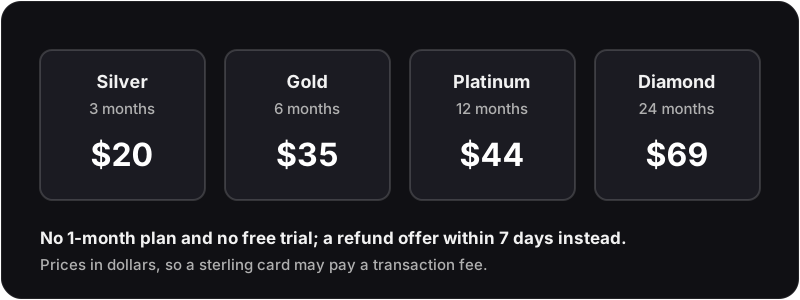
Kemo IPTV offers four subscription tiers, priced in dollars ($) on its site when checked on 30 October 2026. UK buyers paying by a sterling card may be charged a non-sterling transaction fee by their bank on top of the listed price. All plans list the same features; the difference is duration and cost per month. By comparison, a sterling-priced UK IPTV subscription avoids those conversion fees.
Silver Pack
3 Months
$20
$6.67/mo
Gold Pack
6 Months
$35
$5.83/mo
Platinum Pack
12 Months
$44
$3.67/mo
Best ValueDiamond Pack
24 Months
$69
$2.88/mo
For a sterling benchmark: Flickhaven charges £15.00 for 1 month and £55.00 for 12 months + 2 free (14 months), with no currency conversion on a UK card.
5. How to Set Up Kemo IPTV — Device-by-Device Guide
The same three credentials (Server URL, Username, Password) work on every device. The only difference is which player app you use.
Amazon Firestick / Fire TV
RecommendedPlayer app: IPTV Smarters Pro
- 1On your Firestick: Settings → My Fire TV → Developer Options → enable Apps from Unknown Sources.
- 2Install Downloader from the Amazon App Store (search 'Downloader' — it is free).
- 3Open Downloader and enter the IPTV Smarters Pro APK URL (search 'IPTV Smarters Pro APK download' on your phone for the current link).
- 4Install the APK, then open IPTV Smarters Pro from your Firestick home screen.
- 5Tap Add User → Login with Xtream Codes → enter your Kemo Server URL, Username, and Password.
- 6Press Login — your full channel list loads automatically.
Samsung Smart TV
RecommendedPlayer app: SS IPTV (App Store — free)
- 1Smart Hub → Samsung App Store → search 'SS IPTV' → Install (free, no sideloading).
- 2Open SS IPTV → Settings → Playlist → Add Playlist.
- 3Enter the playlist link or login details Kemo sent you → Save.
- 4Your channels load once the playlist is read.
LG Smart TV (webOS)
Player app: SS IPTV (LG Content Store — free)
- 1LG Home → LG Content Store → search 'SS IPTV' → Install.
- 2Open SS IPTV → Settings → Playlist → Add Playlist.
- 3Enter the playlist link or login details Kemo sent you → Save.
Android TV / Box / Phone
Player app: TiviMate or IPTV Smarters Pro
- 1Open Google Play Store → search 'TiviMate' (or IPTV Smarters Pro) → Install.
- 2Open TiviMate → Add Playlist → Xtream Codes → enter Kemo Server URL, Username, Password.
- 3TiviMate loads all channels, VOD, and EPG automatically.
iPhone / iPad (iOS)
Player app: IPTV Smarters Pro or GSE Smart IPTV
- 1App Store → search 'IPTV Smarters Pro' or 'GSE Smart IPTV' → Install.
- 2Open the app → Add New User → Xtream Codes → enter Kemo credentials.
- 3Channels and VOD load automatically — tap any channel to stream.
All setup steps above work identically with Flickhaven IPTV credentials — simply swap in your Flickhaven Server URL, Username, and Password instead.
6. Kemo IPTV vs Flickhaven — Point-by-Point Comparison
Kemo's column is what buykemoiptv.com published on 30 October 2026; Flickhaven's is what we publish. Neither column is an independent test.
| Feature | Kemo IPTV | Flickhaven |
|---|---|---|
| Live Channels | 22,000+ (Kemo's claim) | 55,000+ |
| VOD Library | 150,000+ (Kemo's claim) | 180,000+ titles |
| 4K UHD Streams | Not stated on plans | Yes, on supported channels |
| Anti-Buffering Tech | Anti Freezing™ (Kemo's claim) | Anti-Freeze (reroutes busy streams) |
| Uptime | Self-published figure (Kemo's claim) | 99.9% target, not a guarantee |
| UK Channels | Listed; check by name | BBC, ITV, Channel 4, Channel 5 and live sport |
| EPG / TV Guide | EPG included | 7-day EPG + 7-day catch-up |
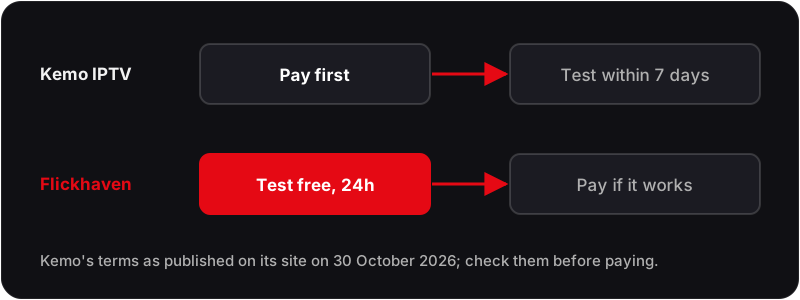
| Free Trial | None; refund offer within 7 days, pay first | 24-hour free trial, no card |
| Shortest Plan | 3 months, $20 | 1 month, £15.00 |
| 12-Month Price | $44 | £55.00 (14 months, 2 free) |
| Currency | Dollars ($) | Pounds sterling |
| Customer Support | 24/7 live chat (Kemo's claim) | WhatsApp, 24/7 |
| Activation | 15 to 30 minutes (Kemo's process page) | Login details by WhatsApp within minutes |
| Published T&Cs / Refunds | Refund terms in its FAQ | Terms and refund policy published |
7. Kemo IPTV Review — Strengths and Weak Points for UK Viewers
This Kemo IPTV review is drawn from what Kemo publishes on its own site, not from user surveys or our own testing. We run a competing service, so weigh it accordingly, and read recent independent user reviews before you pay.
What Kemo offers
- ✓Large advertised catalogue: 22,000+ live channels and 150,000+ on-demand titles
- ✓Long plans: up to 24 months, the lowest cost per month on its site
- ✓A refund offer within 7 days of purchase
- ✓24/7 live chat support (Kemo's claim)
- ✓Standard login details that work in common player apps
Weak points for a UK household
- ✗No free trial: you pay first and rely on the refund window
- ✗Shortest plan is 3 months
- ✗Dollar pricing, so a sterling card may pay a transaction fee
- ✗The site advertises instant activation but its process section says 15 to 30 minutes
- ✗No published operator, location or server details
- ✗Its uptime figure and Anti Freezing™ are self-published, with no detail behind them
8. Best Kemo IPTV Alternative — Flickhaven
Flickhaven offers 55,000+ channels against Kemo's advertised 22,000, 180,000+ movies and series, 4K Ultra HD streams, a 99.9% uptime target behind Anti-Freeze 8.1, EPG and 7-day catch-up, sterling pricing, WhatsApp support 24/7, and a free 24-hour trial with no card. We run it, so treat this as our stated position.
Try the best Kemo IPTV alternative free — 24 hours
55,000+ channels · 4K UHD · Anti-Freeze · Live sport · Login details within minutes · No card
9. Kemo IPTV Troubleshooting — Common Problems & Fixes
These fixes apply to Kemo IPTV and any Xtream Codes-based IPTV service.
?Kemo IPTV credentials rejected — 'wrong username or password'+
?Kemo IPTV buffering / freezing during live sport+
?Kemo IPTV black screen — channels load but no picture+
?Kemo IPTV EPG not loading or showing wrong times+
?Kemo IPTV working on phone but not on TV+
?Kemo IPTV channels keep disappearing+
10. Kemo IPTV — Frequently Asked Questions
How much does Kemo IPTV cost?+
Does Kemo IPTV have a free trial?+
Why is Kemo IPTV buffering?+
Is Kemo IPTV good for UK sport?+
What is the best Kemo IPTV alternative for UK viewers?+
Ready to Try the Best Kemo IPTV Alternative? — Free for 24 Hours
Flickhaven gives you 55,000+ live channels, 4K UHD streams, Anti-Freeze and WhatsApp support 24/7 — all in sterling, with no credit card required for the free trial. Compare it against Kemo on your own device before you decide.
No credit card · Sterling pricing · No auto-renewal · Instant WhatsApp activation