Flickhaven IPTV UK
Hot IPTV for Samsung Smart TV — Player App Setup, Costs & Fixes (2026)
Hot IPTV, also called HOT IPTV Player or HotPlayer, is a player app for Samsung Smart TVs, not a TV service: it includes no channels. Install it from the Samsung store, note the MAC address it shows, and upload your M3U link or Xtream Codes login at hotplayer.app/upload. On 30 October 2026 it allowed 30 days of use before paying, then a one-time activation of about €14.99 per device. Channels come from your IPTV subscription.
Who wrote this
Flickhaven sells an IPTV subscription. Hot IPTV is a player app, not a competing TV service, and a Flickhaven login can be loaded into it. Hot IPTV figures are from hotplayer.app, checked on 30 October 2026; we have not tested the app independently.
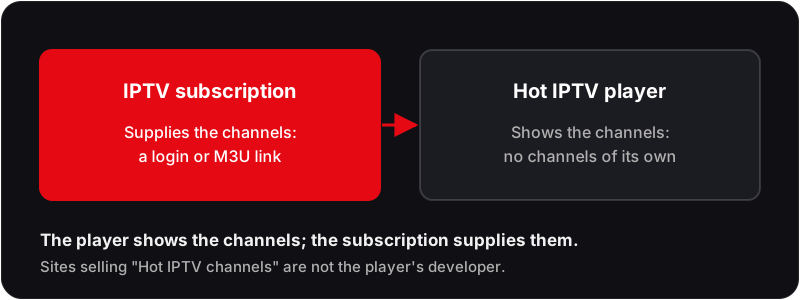
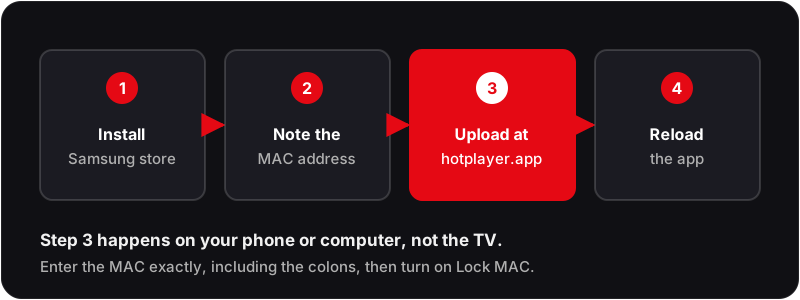
Hot IPTV, also called HOT IPTV Player or HotPlayer, is a player app, not a TV service. The Hot IPTV app plays a playlist you already have, an M3U link or Xtream Codes login from an IPTV subscription; it includes no channels of its own. On a Samsung Smart TV you install it from the Samsung store, note the MAC address it shows, and upload your playlist from a phone or computer.
That means you need two things: the player, and a subscription to play in it. This guide covers installing and activating the Hot IPTV player on a Samsung TV, what it costs, the errors people hit, and the other Samsung players. For the wider picture, see our full Samsung Smart TV IPTV guide.
Need a subscription to load into Hot IPTV?
Flickhaven: 55,000+ channels · Xtream Codes login · Free 24h trial · No credit card
What is the Hot IPTV Player?
hotplayer.app describes the app as a media player with no channels included: users supply their own content. When we checked on 30 October 2026 it listed the Samsung TV store, LG, Google Play and Roku among the places to get it, and let you use the app for 30 days before paying, then charged a one-time activation of about €14.99 per TV or device, or about €5.99 for a year.
The same site warns that unauthorised websites use its name to sell IPTV subscriptionsand are not affiliated with it. If a site offers you “Hot IPTV channels”, it is not the player's developer.
The player loads the login your IPTV provider sends, usually three Xtream Codes credentials:
0
Channels in the app
Load your own playlist
30 days
Before you pay
Then a one-time activation
~€14.99
One-time activation
Per TV or device
MAC
How you upload
At hotplayer.app/upload
Which Samsung Smart TV Models Run IPTV Players?
Store IPTV players such as SS IPTV and Smart IPTV run on Samsung Smart TVs from 2016 onwards running Tizen OS. Check the Samsung store on your own TV for the Hot IPTV app, as availability can vary by model and region.
| Samsung Series | Years | SS IPTV | Smart IPTV | Install Method |
|---|---|---|---|---|
| QLED / Neo QLED (Q / QN) | 2017–2026 | ✓ | ✓ | App Store — no setup needed |
| The Frame / Serif / Sero | 2017–2026 | ✓ | ✓ | App Store — no setup needed |
| Crystal UHD (AU / BU / CU) | 2019–2026 | ✓ | ✓ | App Store — no setup needed |
| Samsung OLED (S95 series) | 2022–2026 | ✓ | ✓ | App Store — no setup needed |
| 4K UHD (MU / NU / RU) | 2017–2020 | ✓ | ✓ | App Store — no setup needed |
| Full HD Smart TV | 2016–2019 | ✓ | ✓ | App Store — no setup needed |
| Older Samsung Smart TV | 2015 & earlier | ✗ | ✗ | Use Firestick via HDMI instead |
Not sure of your TV year? Press Home → Settings → Support → About This TV. The model number contains the year (e.g., QN65Q80C = 2023 model).
How to Install the Hot IPTV App on Samsung Smart TV (Step-by-Step)
Install the player, then upload your provider's playlist from a phone or computer. The same steps work with a Flickhaven login.
Hot IPTV Player from the Samsung Store
SS IPTV — No Activation Fee
Smart IPTV — Traditional TV Guide
Hot IPTV and Other Samsung IPTV Players — Compared
All four players load a login or playlist from your IPTV provider, including a Flickhaven login. The player does not affect stream quality; that depends on your provider and connection speed.
Hot IPTV (HotPlayer)
This page's subject30 days before paying, then about €14.99 once
- ✓Listed for the Samsung TV store, LG, Google Play and Roku
- ✓Loads M3U links and Xtream Codes logins
- ✓Playlist uploaded from a phone or PC against the TV's MAC address
- ✓Lock MAC setting to stop others replacing your playlist
SS IPTV
No activation feeFree
- ✓In the Samsung App Store, no sideloading
- ✓Loads M3U playlists and logins from your provider
- ✓Simple layout for the Samsung remote
Smart IPTV (SIPTV)
Traditional TV guideSIPTV (free 7-day trial, then a one-time €5.49 activation)
- ✓Grid-style TV guide layout
- ✓MAC address activation via its website
- ✓One-time payment, no app subscription
IPTV Smarters Pro
Most featuresDeveloper mode needed
- ✓Live TV, on-demand and series in one interface
- ✓Parental controls and multiple profiles
- ✓Full Xtream Codes support
Hot IPTV App vs an IPTV Subscription — What Each Does
Hot IPTV and Flickhaven are different things that work together: one is the player, the other supplies the channels.
| Feature | Hot IPTV app | Flickhaven |
|---|---|---|
| What it is | A player app | An IPTV subscription |
| Channels included | None: load your own playlist | 55,000+ live channels |
| On-demand library | From your playlist | 180,000+ titles |
| How you get it | Samsung TV store, then upload a playlist | Login details by WhatsApp within minutes |
| Try before paying | 30 days (app only) | 24-hour trial, no card |
| Cost | About €14.99 once per device, or about €5.99 a year | From £15.00/month |
| Works together? | Yes: it can load a Flickhaven login | Yes: works in Hot IPTV and other players |
Hot IPTV figures are from hotplayer.app on 30 October 2026 (prices shown there in Moroccan dirhams with euro equivalents); Flickhaven figures are our own published ones.
Try Flickhaven free on your Samsung TV — 24 hours
Load the Flickhaven login into Hot IPTV, SS IPTV or Smart IPTV and test your own channels.
Hot IPTV Not Working on Samsung Smart TV — Troubleshooting
❓Hot IPTV says it cannot communicate with your playlist+
❓Hot IPTV or SS IPTV not finding channels+
❓SS IPTV not available in Samsung App Store+
❓IPTV buffering on Samsung Smart TV+
❓4K channels buffering or not loading+
❓Black screen when opening a channel+
❓EPG (TV guide) not loading or showing wrong times+
❓App crashes or Samsung TV freezes during streaming+
❓Hot IPTV or Smart IPTV shows 'Not activated'+
For a complete guide see: How to fix IPTV buffering — 15 solutions for 2026
More Samsung TV & IPTV Guides
Hot IPTV Samsung Smart TV — Frequently Asked Questions
What is Hot IPTV?+
Is there a Hot IPTV app for Samsung Smart TV?+
How much does the Hot IPTV app cost?+
Why does Hot IPTV say it cannot communicate with your playlist?+
Does Hot IPTV sell channels or subscriptions?+
What is the best IPTV app for Samsung Smart TV?+
Load a Free Flickhaven Trial Into Your Samsung Player
Install Hot IPTV, SS IPTV or Smart IPTV from your Samsung store, then load a free 24-hour Flickhaven login: 55,000+ channels, 4K UHD streams, Anti-Freeze and WhatsApp support 24/7. No credit card.
No credit card · No contract · Login details within minutes
For the full picture, see these guides: Samsung Smart TV IPTV guide, best IPTV providers UK 2026 and IPTV free trial UK.