Free IPTV Apps UK 2026
— 8 Free IPTV Players Compared
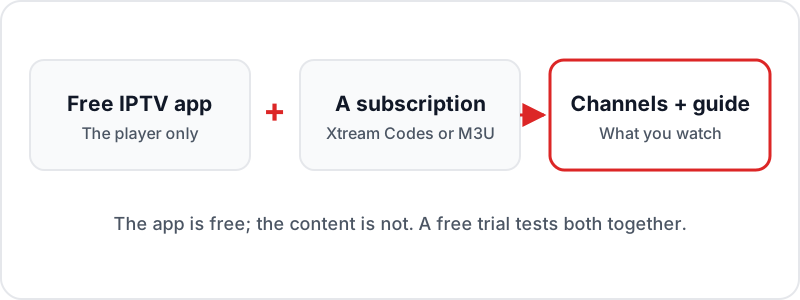
The best free IPTV app for most people is IPTV Smarters Pro, a free IPTV player that runs on every major platform. On a TV box, the free tier of TiviMate gives the best guide, and on an Android phone OTT Navigator is a polished alternative. Every free IPTV application is a player only: it needs a subscription, delivered as an Xtream Codes login or M3U link, before any channels appear.
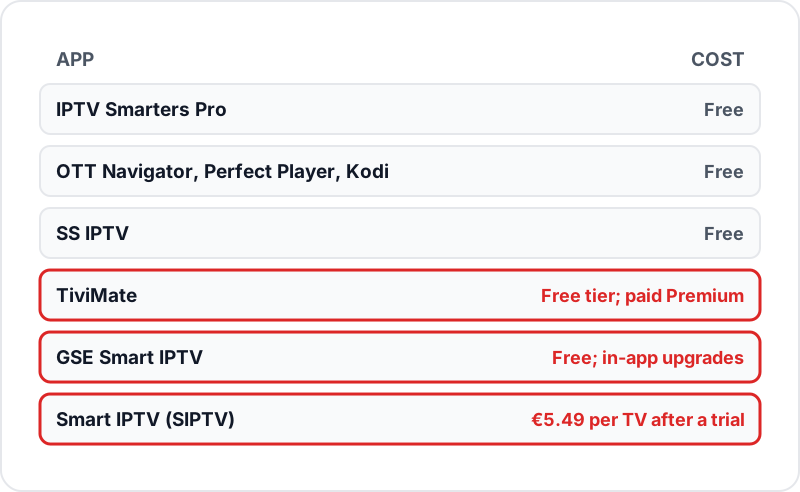
All 8 apps below are free to download, and only Smart IPTV charges a one-time activation per TV after its trial. They need an IPTV subscription to load content — or a free Flickhaven trial while you test — but the apps themselves cost nothing. Here's which one to pick for your device. XCIPTV is one more free option for Firestick and Android TV — see our XCIPTV Player setup guide — and our best IPTV apps UK ranking includes the paid apps too.
💬 Get a Free Trial to Test Any App
Quick Reference: Best App by Device
| 🔥 Firestick | TiviMate, IPTV Smarters Pro, OTT Navigator |
| 🤖 Android TV/Box | TiviMate, IPTV Smarters Pro, Perfect Player |
| 📺 Samsung Smart TV | Smart IPTV (SIPTV) |
| 🖥 LG Smart TV | SS IPTV (free, Content Store) |
| 📱 iPhone/iPad | IPTV Smarters Pro, GSE Smart IPTV |
| 💻 Windows/Mac | IPTV Smarters Desktop, Kodi, GSE Smart IPTV (Mac) |
IPTV Smarters Pro
Best OverallFree9.5
/10
The most versatile free IPTV player available. Supports both Xtream Codes API and M3U playlist formats, has dedicated sections for Live TV, Movies, Series, and Catch-Up, and includes a built-in EPG guide. Works across every major platform.
Pros
- ✓Xtream Codes + M3U support
- ✓Full VOD/Series UI
- ✓EPG guide built-in
- ✓Multi-profile support
- ✓Available on all platforms
Cons
- ✗UI can feel cluttered on smaller screens
- ✗Often missing from the UK Amazon Appstore, so usually sideloaded on Firestick
- ✗Occasional minor bugs
TiviMate IPTV Player
Best for TVFree (paid Premium tier)9.3
/10
The gold standard for Firestick and Android TV IPTV. TiviMate's EPG grid looks and feels like a proper Freeview-style TV guide. The free version handles one playlist perfectly — the premium unlock adds multi-playlist and recording.
Pros
- ✓Best EPG grid interface for TV screens
- ✓Smooth and fast performance
- ✓Free tier covers one playlist
- ✓Catch-up TV support
- ✓Excellent remote navigation
Cons
- ✗Android TV / Firestick only (not iOS or PC)
- ✗Free version limited to 1 playlist
- ✗Some premium features require unlock
SS IPTV
Best for LG TVFree9
/10
SS IPTV is the easiest IPTV app for Smart TV users — it's completely free and available directly in the LG Content Store. Supports Xtream Codes API and M3U playlists with automatic EPG loading. No sideloading or developer mode required.
Pros
- ✓Free and in LG Content Store
- ✓No sideloading or developer mode
- ✓Supports Xtream Codes + M3U
- ✓Auto EPG loading
- ✓Category browsing
Cons
- ✗Interface less polished than IPTV Smarters
- ✗No multi-profile support
- ✗Limited VOD UI compared to Smarters
GSE Smart IPTV
Best for iPhoneFree (in-app upgrades)8.7
/10
The most polished IPTV player for Apple devices. GSE Smart IPTV supports both M3U and Xtream Codes, has an excellent EPG guide, and integrates cleanly with AirPlay for Apple TV streaming. The free version covers all essential features.
Pros
- ✓Excellent native iOS/Mac design
- ✓Xtream Codes + M3U support
- ✓AirPlay integration
- ✓Built-in catch-up TV
- ✓Parental controls
Cons
- ✗Some advanced features behind paid unlock
- ✗Interface less intuitive on non-Apple devices
- ✗Android version less polished than iOS
OTT Navigator
Best DesignFree8.5
/10
OTT Navigator has the most visually polished interface of any free IPTV app — it looks and feels like a premium product. Excellent for users who want a beautiful UI without paying for it. Full Xtream Codes and M3U support.
Pros
- ✓Most visually appealing free interface
- ✓Smooth 60fps animations
- ✓Xtream Codes + M3U support
- ✓EPG with catch-up
- ✓Customizable categories
Cons
- ✗Heavier on RAM than simpler apps
- ✗Some users find it overwhelming
- ✗Occasional playlist loading delays
Perfect Player
Lightest AppFree8
/10
Perfect Player is a lightweight, fast IPTV player that works well on older or lower-powered devices. It's minimal by design — no frills, just smooth M3U playback with EPG support. Great if your device has limited RAM.
Pros
- ✓Very lightweight (low RAM usage)
- ✓Fast startup and channel switching
- ✓Works on older Android devices
- ✓Clean simple interface
- ✓M3U + EPG support
Cons
- ✗M3U format only (no native Xtream Codes)
- ✗No VOD/Series section
- ✗Minimal interface — no channel art or thumbnails
- ✗Android only
Kodi + PVR IPTV Simple Client
Most PowerfulFree7.5
/10
Kodi with the PVR IPTV Simple Client addon is the most powerful and customisable IPTV setup available. It runs on virtually every device and supports M3U playlists with full EPG. The learning curve is steep but the flexibility is unmatched.
Pros
- ✓Works on virtually every device and OS
- ✓Most customisable IPTV setup
- ✓Free and open-source
- ✓M3U + XMLTV EPG support
- ✓Extensive addon ecosystem
Cons
- ✗Significant setup complexity
- ✗Not beginner-friendly
- ✗UI looks dated vs modern apps
- ✗Requires manual configuration
Smart IPTV (SIPTV)
Best for Samsung TVFree (€5.49 activation fee)8.3
/10
Smart IPTV (SIPTV) is the go-to IPTV app for Samsung Tizen TVs. It's available in the Samsung App Store and supports both M3U and Xtream Codes via a simple web-based playlist upload. A one-time €5.49 activation fee applies after a 7-day free trial.
Pros
- ✓Available in Samsung App Store
- ✓No sideloading needed
- ✓Works on Samsung + LG
- ✓Simple web-based setup
- ✓M3U + EPG support
Cons
- ✗€5.49 one-time activation fee
- ✗Setup via web portal (not on TV directly)
- ✗Interface is functional but basic
- ✗Xtream Codes requires workaround
FAQ
QWhat is the best free IPTV player?▼
IPTV Smarters Pro is the best free IPTV player and app overall — it supports Xtream Codes + M3U, has VOD/Series UI, EPG guide, and works on every platform. TiviMate is the best choice for Firestick and Android TV users who prefer a traditional TV guide layout.
QIs TiviMate really free?▼
TiviMate is free to download. The free version allows one playlist and basic playback. TiviMate Premium, bought through the TiviMate Companion app, adds multiple playlists, recording and advanced EPG features; check the current price in the app. The free version is sufficient for most users.
QWhat is the best free IPTV app for Android?▼
On an Android TV box or Google TV, the free tier of TiviMate from the Play Store gives the best guide. On an Android phone or tablet, IPTV Smarters Pro is the best free IPTV app, with OTT Navigator as a polished alternative. All three take an Xtream Codes login or M3U link.
QDo free IPTV apps work on Smart TVs?▼
Yes. SS IPTV is free in the LG Content Store. Smart IPTV (SIPTV) is in the Samsung App Store (free with a €5.49 one-time activation). Both support Xtream Codes and M3U.
QDo I need a paid subscription to use these apps?▼
Yes. These apps are players — they need a content source. You need an IPTV subscription (Xtream Codes or M3U format) to load channels, VOD, and EPG. Get a free Flickhaven trial to test before committing.
The App is Free. Now You Need the Content.
Install your chosen app, then test Flickhaven free for 24 hours — 55,000+ channels, 180,000+ VOD, full EPG. No payment needed.
💬 Get Free Flickhaven Trial