Flickhaven IPTV UK
M3U8 Playlists in IPTV: Two Files, One Extension
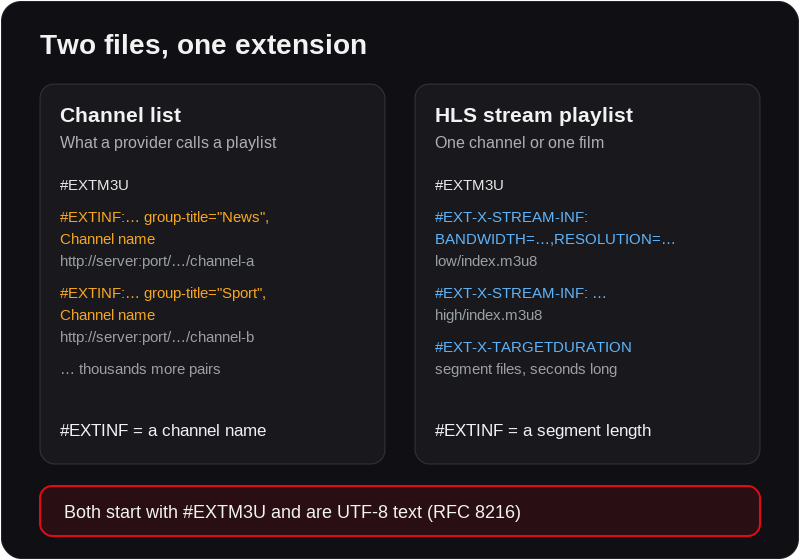
In IPTV, an .m3u8 file is one of two things. Usually it is a channel list: an M3U playlist saved in UTF-8, with an #EXTINF line naming each channel and the address of its stream. Sometimes it is a single HLS stream, the format RFC 8216 defines, whose #EXT-X- lines point to short video segments of one channel. Open it as text to tell them apart, load a channel list in your player's playlist field, and keep the link private: it carries your login.

Where the .m3u8 extension comes from
The 8 stands for UTF-8, the text encoding. An .m3u file is a plain list of media addresses, one per line, with lines starting with # as comments or tags, as the VideoLAN wiki describes it. An .m3u8 file is the same kind of list saved in UTF-8, so channel names in Arabic, Polish or Turkish survive intact.
The extension also has a second, formal job. HTTP Live Streaming (HLS), the format Apple created, uses .m3u8 for its playlists. RFC 8216, published in August 2017, says the HLS playlist format is derived from M3U, must be encoded in UTF-8, must start with #EXTM3U on the first line, and must be served from a path ending in .m3u8 or .m3u. Apple's HLS page says HLS sends video over ordinary web servers and content delivery networks, and adapts to network conditions.
So the same extension can sit on two very different files. If you want the background on the plain list first, start with our guide to what an M3U playlist is and what is inside one, and for how the whole service fits together, our complete guide to how IPTV works.
A channel list saved as .m3u8
This is the one an IPTV provider means when it sends you a “playlist”. It is a long list of channels. Each channel takes two lines: an #EXTINF line with the channel name after a comma (and often a logo, a group and a guide ID before it), then the address of that channel's stream. A full list can run to thousands of channels.
You rarely get the file itself. Providers usually send a link that builds the list on request, and the last part of the link is often a setting such as output=m3u8 or output=ts, which picks the format of the streams the list points to rather than the list itself. The same three details, server, username and password, can also be entered as an Xtream Codes login, which most players prefer because the guide and on-demand library load with it.
A single stream ending in .m3u8
The other kind describes one channel or one film, not a line-up. RFC 8216 calls it a Media Playlist when its lines point to short media segments, a few seconds of video each, and a Master Playlist when its lines point to several Media Playlists, usually the same stream at different qualities. The player picks a quality and moves between them as your connection changes.
Here, #EXTINF means something else: the RFC defines it as the length of the next segment, not a channel name. These files are written for players, not people, and they change every few seconds on a live channel. You meet one when a link you were given opens straight into a single picture with no channel list.
How to tell which one you have
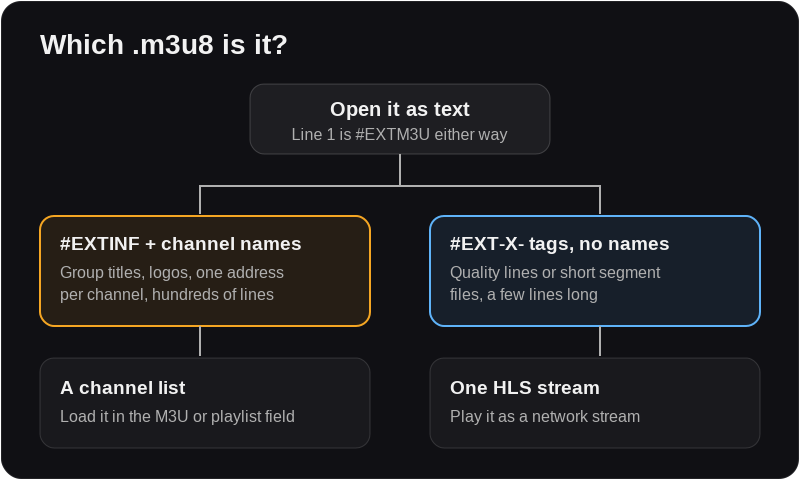
Open it as text. On a computer, save the file and open it in a text editor such as Notepad or TextEdit; if you only have a link, paste it into a browser on a laptop and the file usually downloads. Both kinds begin with #EXTM3U. What follows tells you which one it is:
- Channel list: #EXTINF lines with channel names and group titles, each followed by an address. Hundreds or thousands of them.
- Stream playlist: lines starting with #EXT-X-, such as #EXT-X-STREAM-INF (one line per quality) or #EXT-X-TARGETDURATION and #EXT-X-MEDIA-SEQUENCE, and short lines naming segments or other .m3u8 files. No channel names.
The link itself contains your username and password, so open it only on your own device and do not paste it into an online checker.
Which players open which
A channel list goes into the player's playlist or M3U field. A single stream goes into a “network stream” or “open URL” box, if the player has one. Checked on 28 November 2026 from each project's own pages:
| Player | Channel list | Single HLS stream |
|---|---|---|
| TiviMate | Yes (M3U link) | Plays the streams the list points to |
| IPTV Smarters | Yes (M3U URL) | Plays the streams the list points to |
| VLC | Yes (file or link) | Yes, as a network stream |
| Kodi PVR IPTV Simple Client | Yes (local path or URL) | Yes, through its adaptive inputstream |
TiviMate. Its UK Google Play listing names M3U, Xtream Codes and Stalker Portal as supported formats and says the app provides no content of its own. Our TiviMate review covers the paid features.
IPTV Smarters. Its login screen offers an Xtream Codes login or an M3U URL, as our Smarters setup walkthrough shows. The developer's site refused automated checks, so confirm the current options in the app.
VLC. VideoLAN added HLS playback in VLC 2.0, and the VLC 3.0 notes list HLS versions 4 to 7. It opens a channel list too, with no TV guide. See loading a playlist in VLC, or the Windows PC and Mac player guides.
Kodi. The IPTV Simple Client add-on's documentation says it reads an M3U list from a local path or a remote URL, and plays HLS through Kodi's adaptive inputstream. Our Kodi setup guide has the steps.
Why an .m3u8 link stops playing
The address has expired. Many stream addresses carry a token that is valid for a short time. A stream link copied from a web page or another app works for a while, then fails. Use the login or list your provider sent, which the player refreshes itself.
The server refuses it (403). Your request reached the server and it said no: the token is out of date, the account has expired or reached its connection limit, or the stream only plays for certain regions or from a certain website. Check the account first; our guide to channels that will not load walks through it.
The address no longer exists (404). The channel moved or the list is out of date. Reload the playlist in the player, or ask the provider for a fresh link.
Garbled names. If channel names show odd characters after you edited a list, it was saved in another encoding. Save it again as UTF-8, which RFC 8216 requires of .m3u8 files.
Your playlist link is your login
A provider's playlist link has your username and password in it. Anyone who has it can use your connections, and if they do, your own streams may stop when the limit is reached. Keep it in a password manager, do not post it in forums or screenshots, and ask for a new password if you think it has leaked. Lists passed around online are usually someone else's leaked login or content shared without the rights holder's permission, and they stop without warning; do not use them.
Flickhaven sends the server URL, username and password on WhatsApp within minutes of payment, with an M3U link on request. To check a player before paying, start with the free 24-hour trial with no card needed; it runs on one device at a time.
Sources
- RFC 8216 — HTTP Live Streaming
- Apple Developer — HTTP Live Streaming
- VideoLAN wiki — M3U
- VideoLAN — VLC 2.0.0 release notes
- VideoLAN — VLC 3.0.6 release notes
- Google Play (UK) — TiviMate IPTV Player
Checked on .
Want a login that just works?
Ask Flickhaven on WhatsApp for the free 24-hour trial: no card needed, one device at a time. Say which player you use and support will tell you which login format to enter. Support runs 24/7.
No credit card · No contract · Instant activation
See also: What Is an M3U Playlist? · Xtream Codes Explained · IPTV Not Loading Channels.