Flickhaven IPTV UK
Watch DStv Without a Decoder UK — No Dish, No Box (2026)
In the UK a DStv decoder gets no signal, because DStv broadcasts from a satellite slot serving Africa, so every working route is decoder-free. DStv Stream is DStv's own app, from R299 to R799 a month (about £14 to £36), and applies regional restrictions outside Africa. The other route is an IPTV service with its own line-up, including South African and pan-African categories, over broadband. Neither needs a dish, decoder or smartcard.
Quick Answer — Watching DStv Without a Decoder
- 1.A decoder and dish get no DStv signal in the UK, so neither helps here
- 2.Two decoder-free routes: DStv Stream (R299–R799/mo, regional limits) or IPTV
- 3.Flickhaven IPTV: South African, pan-African & UK categories — from £3.93/mo
Who wrote this
Flickhaven sells the IPTV service compared here, so we are not neutral between the two routes. DStv prices and satellite facts come from published reporting, checked on 2 November 2026.
Why You Don't Need a Decoder in the UK
If you have moved to the United Kingdom from South Africa, one of the first things people try to do is ship over a DStv decoder — an Explora or Explora Ultra — expecting to plug it in and carry on watching. The reality saves money and frustration: a decoder is no use in the UK. DStv is a satellite service broadcast from Intelsat's 68.5° East slot, which serves Africa. That coverage does not reach Britain, so even a perfectly working Explora, wired to a perfectly aligned dish, will find no signal in London, Manchester or Glasgow.
DStv content also travels over the internet: MultiChoice's own DStv Stream app carries SuperSport, Mzansi Magic and Africa Magic without a decoder or a dish, from R299 to R799 a month — but it applies regional restrictions outside Africa. The other route is an IPTV service with its own line-up. Everything streams over the broadband you already pay for, to a device you already own. This guide compares the two decoder-free routes and shows how to set up the IPTV one. For the wider context, see our complete guide to watching DStv in the UK.
The Two Decoder-Free Routes Compared
Without a decoder you have two realistic options: DStv Stream, MultiChoice's own app, or an IPTV subscription with its own line-up of South African, pan-African and UK channel categories. Both run entirely over the internet — no box, no dish — but they differ on what they carry, where they work and price. Here is the side-by-side.
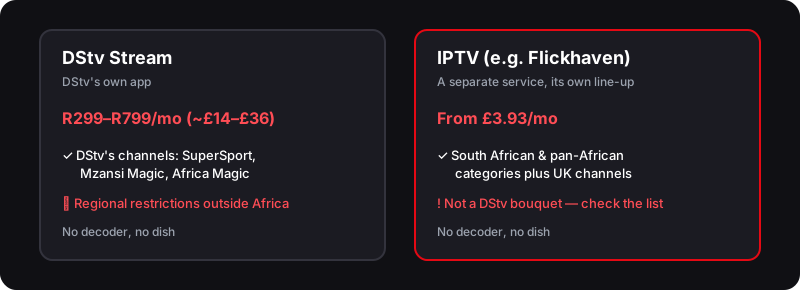
| Factor | DStv Stream | Flickhaven IPTV |
|---|---|---|
| Needs a decoder / box | No — app only | No — app only |
| Needs a satellite dish | No | No |
| Works in the UK | Regional restrictions outside Africa | Yes — over broadband |
| SuperSport & live sport | Sports package, R399/mo (~£18) | Sport categories — check the trial list |
| South African entertainment | Mzansi Magic, Africa Magic & more | SA & pan-African categories — check the trial list |
| UK & international channels | African line-up only | 55,000+ incl. live sports channels |
| Monthly cost | R299–R799/mo (~£14–£36) | From £3.93/mo |
| Free trial | Check DStv's current offer | 24 hours, one connection, no card |
Our position: both routes free you from the decoder. DStv Stream is the only official way to DStv's own channels; IPTV costs less and adds UK channels, but is not a DStv bouquet. We sell the IPTV route, so weigh that. For a deeper dive on the official app abroad, read our DStv Stream abroad guide, and if you are still deciding whether to keep hold of an Explora, see whether a DStv Explora decoder works in the UK.
How to Set Up IPTV to Replace the Decoder
Replacing a decoder with IPTV takes about ten minutes. You install a player, add your Flickhaven login — Xtream Codes (Server URL, Username, Password) or an M3U link, depending on the app — and open the channels. Here is the exact process.
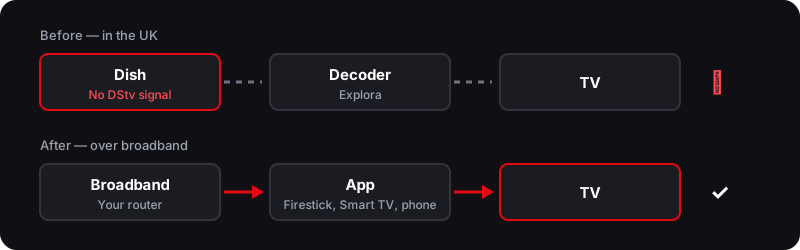
Device-specific walkthroughs are covered in our guides to DStv on Firestick and DStv on Samsung and LG Smart TVs. That is all it takes to replace the satellite box.
What You Gain by Ditching the Decoder
For a UK viewer, going decoder-free removes the hardware entirely. What you trade it for is a dependence on your broadband.
No Decoder, No Problem — What You Gain
- ✓No rain fade — there is no dish to knock out of alignment
- ✓No E16, E48-32 or E30 error codes — those only exist with a satellite decoder
- ✓Watch on any device — Firestick, Smart TV, phone, tablet, laptop or Apple TV
- ✓No hardware to buy, import, insure or repair — the app is the box
- ✓South African and pan-African categories among 55,000+ UK and world channels
- ✓From £3.93/month with a 24-hour free trial — no contract, no auto-renewal
The weather stops mattering; your broadband speed matters instead. For a full comparison against other options, see our roundup of the what UK households switch to instead, or go straight back to the main DStv UK guide to weigh every route.
If the Stream Does Not Play: Symptom, Cause, Fix
Without a decoder only three things can go wrong: the login, the app or the connection. Match the symptom and work through the check before messaging support.
The app rejects the login
Likely cause: A character mistyped in the Server URL, Username or Password — the three fields are case-sensitive.
Check: Re-enter all three exactly as sent on WhatsApp, including http:// at the start of the URL.
Fix: Delete the playlist and add it again rather than editing it in place.
Channels listed but a stream will not start
Likely cause: A weak Wi-Fi link, a VPN in the way, or a device clock set wrong.
Check: Try a second channel; if that also fails, test on a phone over mobile data.
Fix: Switch any VPN off, move the device closer to the router or use an Ethernet cable, and check the clock is set to automatic.
Plays, then freezes every few minutes
Likely cause: The connection cannot keep the buffer filled at peak evening demand.
Check: Run a speed test on the same device at the same time of day.
Fix: Move from Wi-Fi to Ethernet, lower the stream quality for that channel, or raise the player's buffer setting.
Every item on that list is a broadband or app setting, not a dish or a smartcard. For what your connection actually needs, see the internet speed IPTV needs in the UK, and for choosing a plan that covers every screen in the house, IPTV on multiple devices.
What to Test During the Free 24-Hour Trial
The trial answers the questions this page cannot answer for your house. Spend it on these, in order.
- 1.Install the player on the device you will actually watch on, not just a phone — a Smart TV app and a Firestick behave differently.
- 2.Open the African category and confirm the channels this page names are listed and play.
- 3.Watch during the evening, when your broadband is busiest, not only at midday.
- 4.Open the EPG and 7-day catch-up on a channel you follow, and message support with a real question — it runs 24/7.
Watch DStv Without a Decoder — Frequently Asked Questions
Can I watch DStv without a decoder in the UK?+
Partly. A decoder is no use here anyway, because the satellite signal does not reach the UK. DStv's own app, DStv Stream, needs no decoder but applies regional restrictions outside Africa. The other route is an IPTV service such as Flickhaven, from £3.93/month, which has its own line-up of South African, pan-African and UK channel categories — not a DStv bouquet.
Do I need a dish to watch DStv in the UK?+
No. A dish is only useful where the DStv satellite footprint reaches, which excludes the UK. Both DStv Stream and IPTV deliver the channels over your internet connection, so no dish is needed.
What is the cheapest way to watch DStv without a decoder?+
Of the two routes, IPTV costs less: Flickhaven has 55,000+ channels, including South African and pan-African categories, from £3.93/month, against DStv Stream from R299/month (~£14). It is not DStv itself, so check the current channel list during the 24-hour free trial before you pay.
Does DStv Stream work without a decoder?+
Yes, DStv Stream is decoder-free by design and runs as an app over the internet, from R299/month for Select to R799/month for Premium. The catch from the UK is that it applies regional restrictions outside Africa.
Will I still get DStv error codes without a decoder?+
No. Error codes like E16, E48-32 and E30 come from a decoder losing or descrambling satellite signal. With no decoder and no dish, those faults cannot happen — a stream either plays or needs a stronger connection.
Can I use my existing DStv account with IPTV?+
No, and you do not need to. An IPTV subscription is separate from any MultiChoice account, so nothing transfers across and nothing has to. The login you receive on WhatsApp is all the app needs.
Do I need a VPN to watch DStv channels without a decoder?+
On DStv Stream, a VPN used to get round geo-blocked sport can breach the app's terms. Flickhaven IPTV is a separate service with its own line-up, and a VPN is not part of its setup — a VPN can introduce buffering or a failed login. If you run a VPN for other reasons, switch it off while you test the trial.
How many devices can I watch on?+
That depends on the number of simultaneous connections in your plan, not on the hardware. The same login works on a Firestick, a Smart TV and a phone; the plan decides how many of them can stream at once. Our guide to IPTV on multiple devices explains how to choose the right connection count.
Sources
- TechCentral — DStv new packages: full detail on the 17 September overhaul (7 September 2026)
- DStv — Which devices are compatible for DStv Stream?
- Satellite Today — MultiChoice expands coverage in Africa on Intelsat's 68.5° East slot (11 June 2014)
Checked on .
No Decoder, No Dish, No Box — Try IPTV Instead
55,000+ channels, including South African and pan-African categories, streamed over your broadband to any device. No hardware, no contract. Check the current list during the free 24-hour trial.
No credit card · No commitment · One connection on the trial
See also: how DStv works from the UK, DStv Stream Abroad, DStv Explora Decoder UK and what to switch to instead of DStv.