Flickhaven IPTV UK
DStv on Smart TV UK — Your Samsung & LG Options
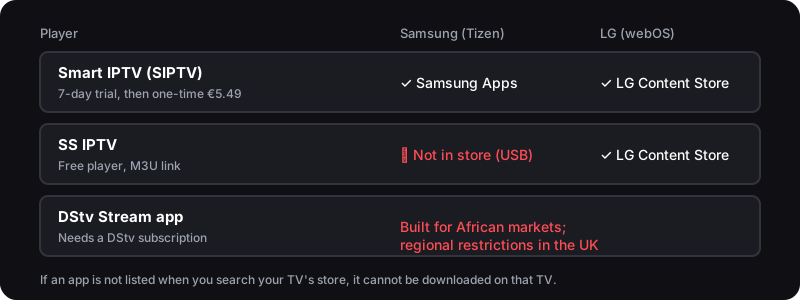
Samsung and LG Smart TVs cannot receive DStv satellite. DStv makes a Stream app for Tizen 4.0+ and webOS 4.0+ TVs, but it is built for African markets: TV app stores are regional and DStv Stream restricts use outside Africa. The workable UK route is an IPTV player from the TV's own store — Smart IPTV on Samsung or LG, or the free SS IPTV on LG only — loaded with an IPTV service's M3U link.
Quick Answer — Watching DStv on a Smart TV
- 1.Samsung Tizen and LG webOS cannot receive DStv satellite — there is no dish or decoder
- 2.Install Smart IPTV (Samsung or LG) or SS IPTV (LG) from the TV's own app store
- 3.Add your Flickhaven M3U link and check the South African categories on the free trial — from £3.93/mo
Who wrote this
Flickhaven sells the IPTV service this guide sets up, so we are not neutral about the alternative it recommends. DStv app and Smart TV player facts come from DStv and the app developers, checked on 2 November 2026.
DStv on a Smart TV in the UK — Samsung & LG
Most UK homes already own a Samsung or LG Smart TV, so it is natural to want South African TV right there on the big screen with no extra box plugged in. The catch is how. Samsung TVs run the Tizen operating system and LG TVs run webOS, and neither has any way to receive DStv's satellite signal. There is no tuner for African satellites, no decoder slot, and no dish.
DStv does make a DStv Stream app for both platforms — it lists Samsung TVs on Tizen 4.0 or later and LG TVs on webOS 4.0 or later — and since June 2026 it comes pre-installed on new Samsung TVs in 18 African countries. It is built for those markets, though. TV app stores are regional, so a UK TV may not list it at all, and DStv Stream applies regional restrictions outside Africa.
What these TVs do have is a proper built-in app store — Samsung Apps on Tizen and the LG Content Store on webOS — and both list dedicated IPTV players. Smart IPTV (SIPTV) is in both stores; SS IPTV is in LG's store but not Samsung's. Install the right one, add your Flickhaven M3U link, and the line-up — UK channels plus South African and pan-African categories — streams straight to the TV over your broadband, with no external device. Check the current channel list during the free 24-hour trial before you pay. For the full range of ways to watch, see our complete guide to DStv in the UK.
Samsung Smart TV — Smart IPTV Setup (Step by Step)
On Samsung's Tizen platform the player to use is Smart IPTV, which is in Samsung Apps. You link it to your playlist from a phone or computer using the TV's MAC address and your Flickhaven M3U link. The whole process takes about ten minutes.
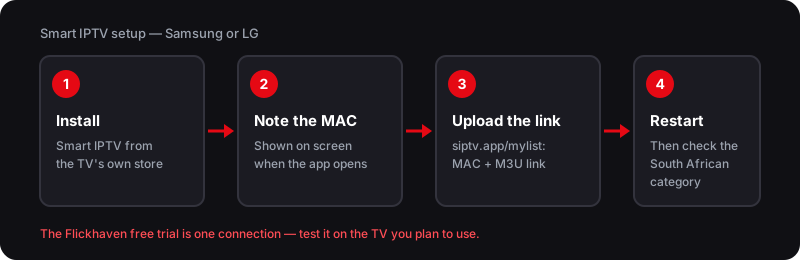
Once the playlist loads, your Samsung TV behaves like a dedicated set-top box — UK, South African and pan-African categories on the home screen, with none of the dish alignment or error codes a decoder brings.
LG Smart TV — SS IPTV & Smart IPTV Setup
LG owners have one more choice than Samsung owners. On webOS you install the free SS IPTV or Smart IPTV from the LG Content Store, then add your Flickhaven playlist. Here is the flow.
1. Open the LG Content Store
From the LG webOS home bar, open the LG Content Store — the official app marketplace built into LG Smart TVs.
2. Install SS IPTV or Smart IPTV
Search for SS IPTV (free) or Smart IPTV and install it. Both are listed in the LG store, so there is no sideloading on webOS.
3. Add your Flickhaven playlist
In SS IPTV, open Settings → Content → External playlists → Add, then enter a name and your M3U link. In Smart IPTV, upload the link at siptv.app/mylist.
4. Browse the channel categories
Let the list populate, then check the African and sport categories for the channels you want during your free trial.
Prefer a plug-in streaming stick over the built-in apps? Our guide to watching DStv on a Firestick covers the TiviMate and IPTV Smarters Pro route, which some viewers find gives a smoother programme guide than the native Smart TV apps.
The No-Dish, No-Decoder Advantage
The biggest win of streaming IPTV through your Smart TV is everything you don't need. There is no satellite dish to mount on a wall, no engineer to book, no decoder to buy or import from South Africa, and no monthly hardware to maintain. Your existing broadband and the TV you already own do all the work.
Smart TV IPTV vs a DStv Decoder
- ✓No satellite dish — nothing to install, align or repair on the roof
- ✓No decoder to import or pay for — the TV's own app is the box
- ✓No E16, E48-32 or E30 error codes — there is no satellite signal to lose
- ✓South African and pan-African categories alongside your UK apps in one place
- ✓From £3.93/month for the IPTV subscription
If you have been weighing up shipping over an Explora, our full breakdown of watching DStv without a decoder in the UK compares the two routes on cost and what each carries.
Picture Quality — HD & 4K on Your Smart TV
A common worry is that streaming looks worse than satellite. Picture quality depends on the source stream and your connection: channels broadcast in HD play in HD, and those offered in 4K UHD play in 4K on a compatible Samsung or LG panel. Allow about 10 Mbps per HD stream and 25 Mbps per 4K stream, measured on the TV itself.
Because your IPTV channels sit in the same app on your TV as everything else, you get one consistent interface, one remote, and the full benefit of your TV's upscaling and motion processing. Sports fans can read what each SuperSport channel shows, and the UK options for it, in our SuperSport channels explained.
Troubleshooting DStv on a Smart TV
If a channel will not load or a live match buffers, the fault is almost always the network or the app rather than the channels. Run through this quick list first.
If channels still won't play after that, work through our full DStv not working troubleshooting guide, which covers every common cause on Smart TVs and streaming devices.
DStv on Smart TV — Frequently Asked Questions
Can I watch DStv on a Samsung or LG Smart TV in the UK?+
Not by satellite — Tizen and webOS have no way to receive a DStv signal. The DStv Stream app is built for African markets and applies regional restrictions outside Africa. The workable alternative is an IPTV player such as Smart IPTV (Samsung and LG) or SS IPTV (LG) from the TV's own app store, which streams your IPTV provider's line-up over broadband with no dish or decoder. Check which South African channels a provider lists before you pay.
Is there a DStv app on Samsung or LG Smart TVs?+
Yes, in Africa. DStv lists Samsung TVs on Tizen 4.0 or later and LG TVs on webOS 4.0 or later as supported, and since June 2026 the app comes pre-installed on new Samsung TVs in 18 African countries. App stores are regional, though: if the app is not listed when you search your TV's store, it cannot be downloaded on that TV, and DStv Stream applies regional restrictions outside Africa.
Do I need to sideload apps on my Smart TV?+
Not if you pick the right player. Smart IPTV is in both the Samsung and LG stores, and SS IPTV is in the LG Content Store. SS IPTV is not in Samsung's store — its developer only offers a USB install there — so Samsung owners should use Smart IPTV instead.
Can I watch IPTV in HD or 4K on my Smart TV?+
Yes, where the channel is broadcast in HD or 4K and your connection keeps up. Allow about 10 Mbps per HD stream and 25 Mbps per 4K stream. A built-in TV app can be less capable than a Firestick player, so test the channels you care about during the trial.
Why won't IPTV channels load on my Smart TV?+
Loading issues are usually weak Wi-Fi, an outdated app, or a playlist link that has changed. Connect by ethernet or 5GHz Wi-Fi, update the app, and re-upload your M3U link to fix most problems.
Sources
- DStv — Which devices are compatible for DStv Stream? (Samsung Tizen 4.0+, LG webOS 4.0+)
- Advanced Television — DStv Stream app pre-installed on Samsung TVs in 18 African countries (22 June 2026)
- SS IPTV — Installing SS IPTV into your Smart TV (not in Samsung's store; LG store)
- SS IPTV — Playlist uploading (Settings → Content → External playlists)
- Smart IPTV (SIPTV) — official site: Samsung Tizen and LG webOS versions
Checked on .
Try IPTV on Your Samsung or LG TV — Free 24hr Trial
55,000+ channels, including South African and pan-African categories, straight from your Smart TV app store. No dish, no decoder — check the list on the free trial.
No credit card · No commitment · One connection on the trial
See also: our complete DStv UK guide, DStv on Firestick, DStv with no decoder at all and the SuperSport UK guide.