Flickhaven IPTV UK
DStv on Firestick UK — Your Options on Fire TV
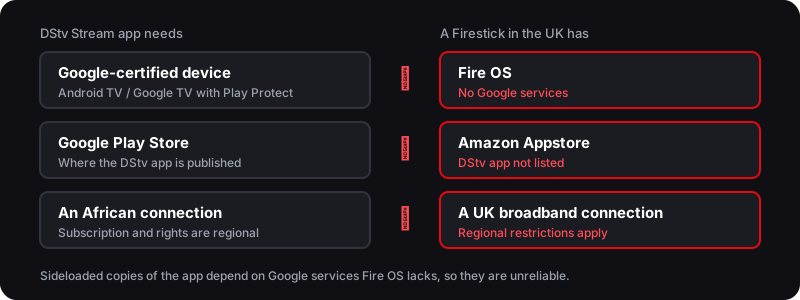
You cannot get the DStv app on an Amazon Firestick. DStv publishes it on Google Play for Google-certified Android TV devices, and the Firestick runs Fire OS, which has no Google services and uses the Amazon Appstore, where DStv is not listed. Sideloaded copies are unreliable, and DStv Stream also restricts use outside Africa. The workable route is an IPTV player such as TiviMate or IPTV Smarters Pro with an IPTV service and its own channel line-up.
Quick Answer — Watching DStv on a Firestick
- 1.A Firestick cannot receive DStv satellite, and the DStv app is not in the Amazon Appstore
- 2.The workable route is an IPTV player (TiviMate or IPTV Smarters Pro) on the Firestick
- 3.Add your Flickhaven Xtream Codes login and browse the South African categories — from £3.93/mo
Who wrote this
Flickhaven sells the IPTV service this guide sets up, so we are not neutral about the alternative it recommends. DStv app and Fire TV facts come from published reporting, checked on 2 November 2026.
DStv on Firestick in the UK — What Actually Works
The Amazon Fire TV Stick is the most popular streaming device in British living rooms, so it is no surprise that DStv fans reach for it first. Plug it into any TV's HDMI port, connect to Wi-Fi, and you have an app-driven media box — perfect for streaming. The catch is that DStv was built around satellite, and a Firestick has no dish and no decoder. So the natural question is: can you actually watch DStv on a Firestick in the UK, and how?
The honest answer is that you cannot receive the traditional satellite service on a Firestick at all — there is simply no signal path. The official DStv Stream app is not an option either. DStv publishes it on Google Play for Google-certified Android TV and Google TV devices, while a Firestick runs Amazon's Fire OS, which ships without Google services and installs apps from the Amazon Appstore — where the DStv app is not listed. Sideloaded copies lean on the missing Google services, and a 2026 update made the app flag uncertified devices as unsupported. On top of that, DStv Stream applies regional restrictions outside Africa. That leaves one workable route — an IPTV player on the Firestick with a subscription whose line-up includes South African and pan-African channel categories — check what is listed during the free trial before you pay. For the bigger picture of every viewing option, start with our complete guide to watching DStv in the UK.
Why the Firestick Suits Streaming in the UK
Once you accept that in the UK your South African viewing comes over the internet rather than a dish, the Firestick becomes an excellent home for it. It is cheap, small, and turns any television — old or new — into a smart streaming device. Because Fire OS is built on Android, it installs the common IPTV players, and it brings South African and pan-African channel categories to your TV without a single cable, engineer visit, or satellite alignment.
Why the Firestick Works So Well for DStv Channels
- ✓Runs TiviMate and IPTV Smarters Pro — the two players our setup guide covers
- ✓No dish, no decoder, no engineer — it streams over your existing broadband
- ✓Works on any TV with an HDMI port, so it revives older sets too
- ✓One remote controls everything — live African TV alongside Netflix and iPlayer
- ✓4K models play channels in full UHD where the stream supports it
- ✓Portable — take it to a friend's house or on holiday and log straight back in
The DStv app is the one exception: the diagram below shows why it does not make the jump to Fire TV.
New to streaming boxes entirely? Our main DStv UK guide explains why the satellite footprint stops at Africa and why every UK route runs over broadband instead. For a Smart TV without a Firestick, see DStv on Samsung and LG Smart TVs.
How to Set Up an IPTV Player on Your Firestick — Step by Step
The whole process takes about ten minutes. You install an IPTV player, add your Flickhaven login using Xtream Codes (Server URL, Username and Password), and open the African or Sport categories. Here is the exact sequence.
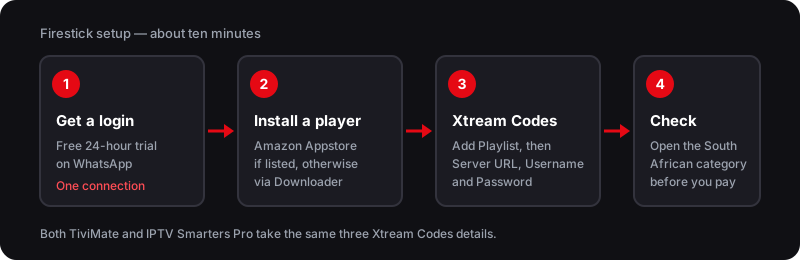
That is it — live channels streaming on your TV with no dish and no decoder. Check the South African and pan-African categories during the free 24-hour trial to confirm the channels you want are listed. If a channel will not load first time, it is almost always the connection rather than the login; the troubleshooting section below covers the quick fixes.
Best Firestick IPTV Players
Two IPTV players stand out on the Firestick. Both connect to Flickhaven the same way — with your Xtream Codes login — so the choice comes down to how you want to install and how much you care about a polished programme guide.
TiviMate
Best for FirestickThe premium Firestick experience
A full TV-style electronic programme guide, recording on the paid Premium tier, and favourites. Install via the Downloader app. Connects to Flickhaven using Xtream Codes.
IPTV Smarters Pro
Simplest LayoutAppstore if listed, else Downloader
Clean layout with live TV, catch-up and a channel guide. It is often missing from the UK Amazon Appstore, so search there first and sideload it through Downloader if it is not listed.
Whichever you pick, the login is identical: Add Playlist → Xtream Codes → Server URL, Username, Password. Sports fans should also read our guide to SuperSport in the UK for what SuperSport covers and the ways to follow rugby, PSL and cricket from Britain.
Fixing Buffering & Loading on the Firestick
If a channel buffers or refuses to open, the cause is almost always the Firestick or your network — not the channels themselves. Work through this checklist first.
Firestick Buffering — Quick Fixes
- ✓Use 5GHz Wi-Fi or an ethernet adapter — live streaming needs a stable connection
- ✓Clear the app cache in Settings → Applications → Manage Installed Applications
- ✓Close background apps and restart the Firestick to free up memory
- ✓Use a Fire TV Stick 4K or 4K Max for smoother live sport and HD playback
- ✓Keep the app updated and re-enter your Xtream Codes login if channels stop loading
If channels still refuse to play after that, the issue may be the stream or your subscription rather than the device — our DStv not working troubleshooting guide walks through every cause, and if you are seeing on-screen codes our DStv error codes fix guide decodes E16, E48-32, E30 and the rest.
DStv on Firestick — Frequently Asked Questions
Can I watch DStv on a Firestick in the UK?+
Not through DStv itself. A Firestick has no dish or decoder, and the DStv app is not in the Amazon Appstore. The usual alternative is an IPTV player such as TiviMate or IPTV Smarters Pro, loaded with a subscription like Flickhaven's (from £3.93/month) whose line-up includes South African and pan-African channel categories — check the current channel list on the free 24-hour trial.
Is there a DStv app for Firestick?+
No. DStv publishes its app on Google Play for Google-certified Android TV and Google TV devices, and Fire OS ships without Google services, so it is not in the Amazon Appstore. Sideloaded copies depend on those missing services and are unreliable, and since a 2026 update the app flags uncertified devices as unsupported. DStv Stream also applies regional restrictions outside Africa.
Which IPTV player should I use on a Firestick?+
TiviMate has a full TV-style guide and, on its paid Premium tier, recording. IPTV Smarters Pro has a simpler layout; it is often missing from the UK Amazon Appstore, so search there first and use Downloader if it is not listed. Both take the same Flickhaven Xtream Codes login.
Why does DStv buffer on my Firestick?+
Buffering usually comes from weak Wi-Fi, a full app cache, or too many background apps. Switch to 5GHz Wi-Fi or ethernet, clear the cache, and restart the Firestick to resolve it.
Do I need a VPN to watch DStv on Firestick?+
Not for the IPTV route — the player streams over your broadband and a VPN is not part of the setup. A VPN does not fix the DStv app problem on a Firestick either: the app is not available for Fire OS in the first place.
Sources
- Tech-ish — DStv Stream app disappears from some Android TVs, flagged as unsupported (2 June 2026)
- Dignited — How to sideload apps on Fire TV Stick (updated 13 May 2025): DStv is on Android TV and Google Play, not Fire TV
- Wikipedia — Fire OS: ships without Google Mobile Services, uses the Amazon Appstore
Checked on .
Try IPTV on Your Firestick — Free 24hr Trial
South African, pan-African and UK channel categories — 55,000+ channels on your Fire TV Stick. No dish and no decoder. Check the current list during the trial.
No credit card · No commitment · One connection on the trial
See also: DStv UK costs and channels, DStv on Smart TV, SuperSport coverage explained and DStv Not Working.