Flickhaven IPTV UK
DStv Not Working UK — Fix DStv Stream & Decoder Problems
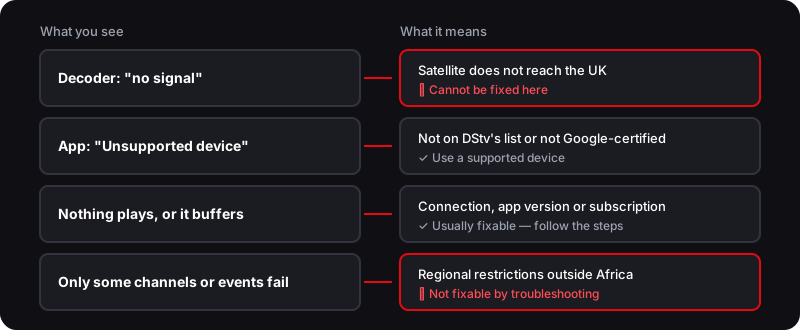
When DStv fails in the UK, the cause is usually one of four things. A decoder shows no signal because DStv's satellite does not reach Britain, which cannot be fixed. The app says "Unsupported device" on devices DStv does not list, including Fire TV. Buffering and login failures come from the connection, app or account and can be fixed. Content blocked by DStv Stream's regional restrictions outside Africa cannot.
Quick Answer — Why DStv Isn't Working in the UK
- 1.A decoder gets no signal in the UK — DStv satellite doesn't reach Britain (unfixable)
- 2.DStv Stream buffering and login issues are usually connection, device, app or account related
- 3.DStv Stream applies regional restrictions outside Africa — a licensing block, not a fault
Who wrote this
Flickhaven sells the IPTV service this guide offers as an alternative, so we are not neutral about it. DStv device facts come from DStv and published reporting, checked on 2 November 2026.
DStv Not Working in the UK? Start Here
When DStv is not working from the UK, the first job is figuring out which problem you actually have — because the fixes are completely different. A frozen DStv Stream app, a live match that will not load, an “Unsupported device” message, and a decoder stuck on “no signal” look like the same failure but have very different causes and solutions.
This guide walks through the common DStv problems UK viewers hit, gives you a clear troubleshooting sequence for the DStv Stream app, and helps you tell the difference between a genuine fault and a regional restriction you cannot troubleshoot away. It also covers the other route — an IPTV service with its own line-up. For the full context, see our complete guide to watching DStv in the UK.
Common DStv Problems in the UK
Most “DStv not working” complaints from the UK fall into one of five buckets. Identifying yours is half the fix.
The crucial distinction: buffering, device, login and account issues can usually be fixed, but the no-signal decoder error and the regional restrictions cannot — the first because there is no DStv satellite over Britain, the second because it is a licensing restriction. If you are seeing decoder errors specifically, our DStv error codes fix guide decodes each one.
Fix DStv Stream — Step-by-Step Troubleshooting
If DStv Stream is buffering, freezing, or refusing to log in, work through these steps in order. They clear most app-side problems.
If you have run every step and a specific live event still will not play while everything else works, you are not looking at a fault — you are most likely looking at a regional restriction, which is the next section.
When It's a Regional Restriction, Not a Fault
Here is the trap many UK viewers fall into: spending an hour reinstalling the DStv app and resetting the router when the app was never broken. If most channels play but a particular live match, tournament, or channel shows an error or blank screen, the most likely cause is a regional restriction — DStv Stream is licensed for Africa and applies restrictions outside it. DStv does not publish a list of what is blocked.
No amount of cache-clearing fixes a regional restriction, because nothing is actually broken. Some viewers reach for a VPN; we do not recommend it, because it adds cost and can breach DStv's terms. The practical answer is to accept the restriction and decide whether a different service suits you better. Our guide to what DStv Stream blocks outside South Africa goes deeper on using the app from the UK.
The Other Route — IPTV
If DStv Stream keeps hitting the same walls from the UK, the other route is IPTV. It streams over your home broadband to any device with its own channel line-up — not a copy of a DStv bouquet.
Flickhaven's line-up covers South African and pan-African channel categories alongside UK channels — 55,000+ in total — from £3.93/month, works on Firestick, Samsung and LG Smart TVs, iPhone, Android, and PC, and comes with a 24-hour free trial (one connection) and WhatsApp support, 24/7. Use the trial to check the current channel list before you pay.
What IPTV Changes
- ✓Streams over UK broadband to any device
- ✓No satellite no-signal errors — nothing to receive by dish, so nothing to fail
- ✓Works on Firestick, Samsung TV, LG TV, iPhone, Android TV, Apple TV, PC
- ✓WhatsApp support, 24/7
- ✓From £3.93/month with a 24-hour free trial (one connection) — no credit card needed
Try Flickhaven free for 24 hours
No credit card · One connection on the trial · No decoder
Prefer to lose the decoder entirely? Our guide to streaming DStv with no decoder or dish shows how to set it up in about ten minutes.
DStv Not Working — Frequently Asked Questions
Why is DStv not working in the UK?+
Usually one of four causes: a decoder gets no signal because DStv satellite does not reach Britain; the DStv app shows "Unsupported device" because the device is not on DStv's list; DStv Stream buffers or fails on a connection, app or subscription problem; or content is blocked by the regional restrictions DStv Stream applies outside Africa. Only the middle two can be fixed from here.
Why does DStv Stream keep buffering?+
Buffering is usually a connection or app problem. Run a speed test on the same device, restart your router, update the DStv app and clear its cache, and move to ethernet or 5GHz Wi-Fi if you can.
Why does the DStv app say my device is unsupported?+
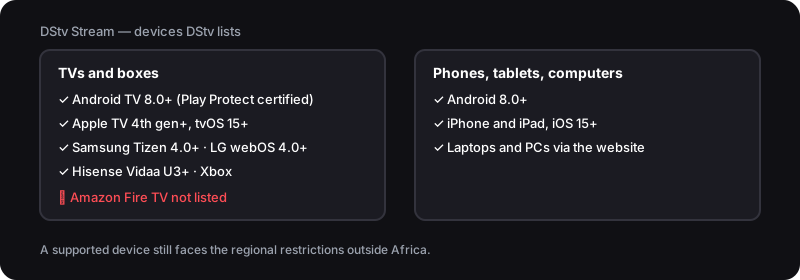
DStv lists the devices it supports: Play Protect certified Android TV 8.0 or later, Apple TV 4th generation or later, Samsung Tizen 4.0+, LG webOS 4.0+, Hisense Vidaa U3+, Xbox, and phones and tablets on Android 8.0+ or iOS 15+. Since a mid-2026 update the app flags uncertified Android TV devices as unsupported. Amazon Fire TV is not on the list.
Why can't I watch live sport on DStv in the UK?+
DStv Stream applies regional restrictions outside Africa, because broadcast rights for live sport are sold region by region. That is a licensing restriction, not a fault. Flickhaven IPTV is a separate service with its own sport and South African channel categories — check the current list during the free 24-hour trial rather than assuming any specific DStv channel is there.
Is my DStv problem a fault or a regional restriction?+
If most channels play but specific content shows an error or blank screen from the UK, a regional restriction is the most likely cause. If nothing plays at all, check your connection, app version, device and subscription first. A regional restriction cannot be troubleshot away.
What's the most reliable way to watch DStv channels in the UK?+
The only official route is DStv Stream on a supported device, and it applies regional restrictions outside Africa. If you want an alternative, Flickhaven streams 55,000+ channels — with South African and pan-African categories alongside UK channels — to any device from £3.93/month; it is not DStv, so check the current list on the 24-hour free trial. WhatsApp support runs 24/7.
Sources
- DStv — Which devices are compatible for DStv Stream?
- Tech-ish — DStv Stream app disappears from some Android TVs, flagged as unsupported (2 June 2026)
- Satellite Today — MultiChoice expands coverage in Africa on Intelsat's 68.5° East slot (11 June 2014)
Checked on .
Weighing the Other Route? Try IPTV Free
South African, pan-African and UK channel categories on any device. No decoder, no dish. Check the line-up on a free 24-hour trial.
No credit card · No commitment · One connection on the trial
See also: the full DStv UK guide, DStv Error Codes Fix, why DStv Stream is limited abroad and Watch DStv Without a Decoder.