Flickhaven IPTV UK
DStv Error Codes Fix — E16, E48, E30 & More
DStv error codes point at one of four places. E04 and E05 are the smartcard: power off, clean it and reinsert it chip down. E16 (service scrambled) and E30 (checking subscription) are the account: check it is paid, then use Fix error online and allow up to 15 minutes. E43 means the content is not available in your country. E48 and E48-32 are the signal: wait out rain, check the dish cables, switch off at the wall for 10 seconds. In the UK, E48 never clears.
Quick Answer — the DStv Error Codes Fix
- 1.Smartcard codes (E04, E05): power off, clean the card, reinsert it chip down
- 2.Subscription codes (E16, E30): check the account, then use Fix error online and allow 15 minutes
- 3.Signal codes (E48, E48-32): wait out rain, check the dish cables, switch off at the wall for 10 seconds
- 4.In the UK, E48 never clears: DStv's satellite does not reach Britain
Who wrote this
Flickhaven sells the IPTV service this guide mentions as an alternative, so we are not neutral about it. Every code meaning and fix here is taken from DStv's own error-code help pages, checked on 3 November 2026.
What a DStv Error Code Tells You
A DStv error code is the decoder telling you which part of the chain has failed. The code is short, but it narrows the fault down to one of four places: the smartcard in the slot, the subscription on your account, the region the content is licensed for, or the signal coming down the cable from the dish. Each place has its own fix, and the wrong fix wastes an evening.
This guide covers seven codes DStv describes on its help pages: E04, E05, E16, E30, E43, E48 and E48-32. For each one we give DStv's own meaning and fix, not a guess. DStv's full list runs to 35 codes, and it notes that some cannot be fixed through its self-service channels. If you are reading this from Britain, one section matters more than the rest: why a decoder here shows E48 and keeps showing it. For the wider picture, see our complete guide to watching DStv in the UK.
DStv Error Codes and What Each One Means
The codes below use DStv's titles. The pattern is the useful part: two are about the smartcard (E04, E05), two about the subscription (E16, E30), one about the region (E43) and two about the signal (E48, E48-32).
E04 — Please insert smartcard
Means: The smartcard may not have been put in the decoder correctly.
Fix: Check it is the correct, valid card. Switch off at the wall, remove the card, wipe it with a soft dry cloth and put it back with the chip facing down. If it persists, take the decoder and card to a DStv Service Centre or Agency to be tested.
E05 — Unknown smartcard
Means: The decoder does not recognise the card, possibly because it is invalid.
Fix: Confirm it is a valid card for this decoder and fully inserted. If it is, remove it, clean it with a dry soft cloth and reinsert it.
E16 — Service is currently scrambled
Means: Your services may be suspended, or the channel is not in your current package.
Fix: Check your balance and package in self service. If both are fine, use Fix error online and allow up to 15 minutes. A channel outside your package needs an upgrade.
E30 — Checking the subscription status
Means: Your subscription is being verified.
Fix: Wait about 5 minutes. If it stays, use Fix error online and allow up to 15 minutes.
E43 — Not available for your country
Means: The channel or content is not available in your country.
Fix: If you believe it should be available, chat to a DStv agent.
E48 — Searching for signal
Means: The decoder is not receiving an adequate signal from the dish: damaged cables, loose connections, a misaligned dish or bad weather.
Fix: Rule out weather, check the dish cables are connected to the decoder, then switch off at the wall for at least 10 seconds.
E48-32 — Weather
Means: Stormy weather and rain are interrupting the signal.
Fix: Wait for the signal to return. If the weather is fine, check the cables and power-cycle at the wall for at least 10 seconds.
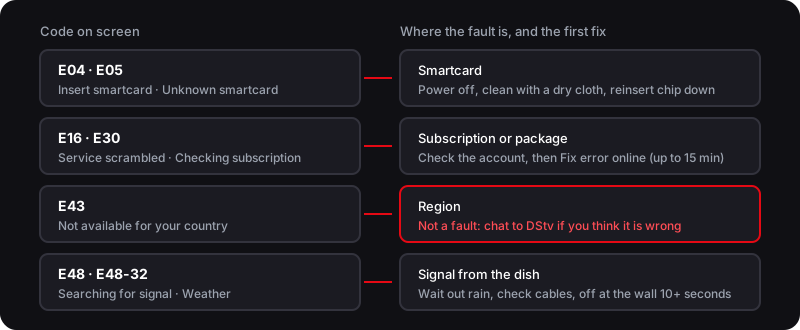
A quick way to triage: if the code appears on one channel while others play, start with the subscription and package (E16) or the region (E43). If it appears on every channel, start with the signal (E48, E48-32) or the card (E04, E05). For problems with the DStv app rather than the decoder, our guide to DStv Stream problems in the UK covers buffering, login and unsupported devices.
Fixing E48 and E48-32: the Signal Codes
E48 (Searching for signal) means the decoder is not receiving an adequate signal from the dish. DStv lists four causes: damaged cables, loose connections, a misaligned dish and bad weather. E48-32 is the weather case on its own: stormy weather and rain interrupt the satellite signal.
DStv's fix runs in the same order for both. First, look outside: if it is raining hard, wait for the signal to return, because nothing at your end will bring it back sooner. If the weather is clear, follow the cable from the dish to the back of the decoder and make sure each connector is properly connected. Then switch the decoder off at the wall plug, wait at least 10 seconds, and switch it back on. If E48 is still there after all three, contact DStv; a damaged cable or a dish that has moved is not something a restart can fix.
Fixing E16, E30 and the Smartcard Codes
E16 (Service is currently scrambled) is the code most people search for. DStv gives two causes: your services have been suspended, or the channel you are tuned to is not in your current package. Check your balance and package in DStv's self service first. If the account is up to date and the package is active, use the Fix error option online and allow up to 15 minutes for the code to clear. If the channel simply is not in your package, no reset will add it.
E30 (Checking the subscription status) is not a fault: the subscription is being verified. DStv says it usually clears by itself within about 5 minutes. Only if it lasts longer is it worth using Fix error online, again allowing up to 15 minutes.
The smartcard codes are physical. E04 (Please insert smartcard) usually means the card is not seated properly; E05 (Unknown smartcard) means the decoder does not recognise it, possibly because it is invalid. For both, confirm it is the right card for that decoder, switch off at the wall, take the card out, wipe it with a soft dry cloth and reinsert it with the chip facing down. If E04 survives that, DStv asks you to take the decoder and card to a DStv Service Centre or Agency to be tested.
Step-by-Step: the General DStv Error Fix
When you are not sure which group a code belongs to, this order clears what can be cleared at home without skipping a cheap check.
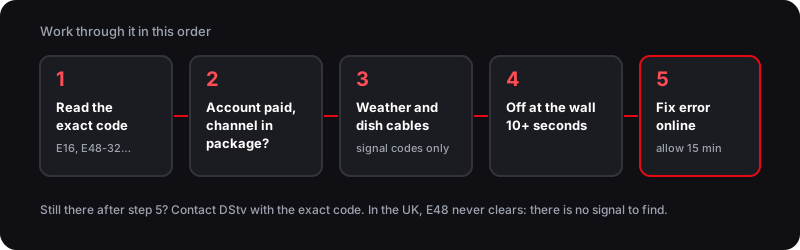
When a code keeps coming back:a power-cycle clears the decoder's temporary state, not the cause. If the same code returns after each reset, the account, the cable or the card is still at fault, and the next step is DStv support rather than another restart.
Why a Decoder in the UK Shows E48 for Good
Every fix above assumes a signal exists to be found. In Britain it does not. DStv broadcasts from Intelsat's 68.5° East slot, which serves Africa, and its footprint does not reach the UK. A decoder brought here from South Africa will search for a signal that never arrives, so it shows E48 however the cables, dish or power are handled. That is not a fault anyone can repair, and a new decoder would show the same code.
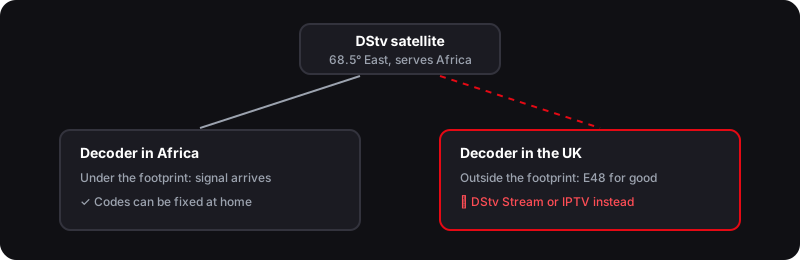
The official route from the UK is DStv Stream, the online service, which applies regional restrictions outside Africa, so some content will not play here. Our guide to whether a DStv Explora decoder works in Britain covers the hardware side in full.
The other route is an IPTV service, which streams over broadband to an app, so there is no dish, cable run or smartcard to produce these codes. Flickhaven is one: its line-up of 55,000+ channels includes South African and pan-African categories alongside UK channels, from £3.93/month on the 12-month plan. It is not DStv and does not carry DStv's bouquets, so check the current list during the free 24-hour trial (one connection) before you pay. WhatsApp support runs 24/7. If you are weighing the two, DStv versus IPTV for UK viewers sets them side by side.
Try Flickhaven free for 24 hours
No credit card · One connection on the trial · No dish, decoder or smartcard
DStv Error Codes — Frequently Asked Questions
How do I fix DStv error E16?+
DStv says E16 means the service is scrambled: your services may be suspended, or the channel is not in your current package. Check your account balance and package in DStv's self service. If the account is up to date, use the Fix error option online and allow up to 15 minutes. If the channel is not in your package, only an upgrade adds it.
What does DStv error E48-32 mean?+
DStv files E48-32 under weather: stormy weather and rain can interrupt the satellite signal. Wait for the signal to return. If the weather is fine, check the cables from the dish are connected to the decoder properly, then switch the decoder off at the wall for at least 10 seconds.
What is the difference between E48 and E48-32?+
E48 is "Searching for signal": the decoder is not getting an adequate signal from the dish, which DStv puts down to damaged cables, loose connections, a misaligned dish or bad weather. E48-32 is the weather case on its own. The first two checks are the same: rule out weather, then check the cables.
Is DStv error E30 a fault?+
No. DStv says E30 means your subscription is being verified. It should clear on its own within about 5 minutes. If it lasts longer, use Fix error online, allow up to 15 minutes, then contact DStv.
Why does my DStv decoder show E48 in the UK?+
Because DStv's satellite serves Africa and its signal does not reach Britain. The decoder searches for a signal that never arrives, so no reset, cable or dish alignment clears it. In the UK the routes are DStv Stream, which applies regional restrictions outside Africa, or a separate IPTV service.
Why does the same error come back after a reset?+
A power-cycle clears the decoder's temporary state; it does not remove the cause. If the account is still unpaid, the cable is still loose or the card is still dirty, the decoder finds the same fault on its next start and shows the same code. When an error returns, fix the cause or contact DStv with the exact code.
Sources
- DStv — Error codes (full list)
- DStv — E16: Service is currently scrambled
- DStv — E30: Checking the subscription status
- DStv — E48: Searching for signal
- DStv — E48-32: Weather
- DStv — E04: Please insert smartcard
- DStv — E05: Unknown smartcard
- DStv — E43: Not available for your country
- Satellite Today — MultiChoice expands coverage in Africa on Intelsat's 68.5° East slot (11 June 2014)
Checked on .
Decoder Stuck on E48 in the UK? Try IPTV Free
South African, pan-African and UK channel categories on any device. No dish, no decoder, no smartcard. Check the line-up on a free 24-hour trial.
No credit card · No commitment · One connection on the trial
See also: our complete DStv UK guide, DStv Not Working UK, DStv Explora Decoder UK and DStv alternatives compared.