What Is IPTV?
A Beginner's Guide to Your First Setup
IPTV means Internet Protocol Television — television delivered over your broadband connection instead of a satellite dish, cable or aerial. Netflix, BBC iPlayer and ITVX are all forms of IPTV. A subscription service works the same way: you receive a server address, username and password, enter them into a player app on any device, and live channels plus an on-demand library load. A 10 Mbps connection carries HD and 25 Mbps carries 4K.
IPTV delivers live TV channels over your internet connection instead of satellite or cable. This beginner's guide sticks to the practical side: what you need, which device and app to pick, and how your first setup goes.
💬 Get a Free IPTV Trial
IPTV Meaning: A Simple Definition
"IPTV stands for Internet Protocol Television — live TV and video content delivered over a broadband internet connection instead of satellite or cable."
Think of it this way: satellite TV providers send TV signals via satellite dishes. Virgin Media sends them through coaxial cables buried underground. IPTV sends the exact same channels — BBC One, live sports, ITV, Channel 4, international channels — through your broadband connection, the same pipe your Netflix and YouTube come through.
The TV you watch is identical. The only difference is how it gets to your screen — and IPTV is significantly cheaper, more flexible, and offers far more content. For a working example, see how Flickhaven delivers IPTV in the UK.
This page keeps to the basics. For the protocols, stream types and the full comparison with pay-TV, read our complete IPTV guide.
How Does IPTV Work?
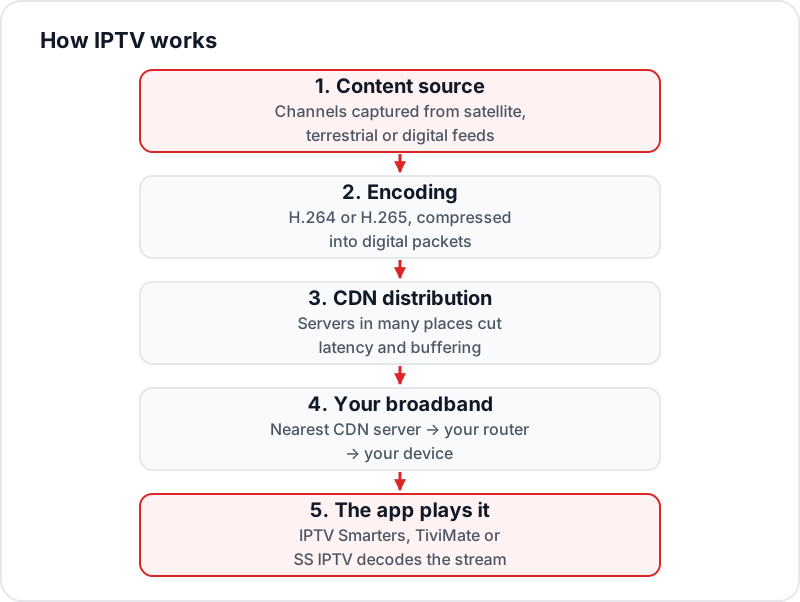
Content Source
Live TV channels and VOD are captured from original broadcast sources — satellite, terrestrial, or digital feeds — by the IPTV provider's servers.
Encoding & Compression
The raw video signal is encoded into digital packets (H.264 or H.265 codec) and compressed to reduce file size while maintaining quality.
CDN Distribution
Encoded streams are distributed across a Content Delivery Network (CDN) — multiple servers located globally — to reduce latency and prevent buffering during peak demand.
Your Internet Connection
The stream travels from the nearest CDN server to your home router over your broadband connection, then to your device.
IPTV App Decodes & Plays
Your IPTV app (e.g., IPTV Smarters, TiviMate, SS IPTV) receives, decodes, and plays the stream — presenting it as a live TV channel on your screen.
The Plumbing: M3U, Xtream Codes & EPG in Plain English
Three terms come up constantly when you set up IPTV. Here is what each one actually is — no jargon required.
M3U Playlist
The channel list as a file
An M3U playlist is a plain text file listing every channel — its name, logo, category, and the web address of its stream. Your IPTV app reads this file to build the channel list you scroll through. The format was originally invented for music playlists; IPTV borrowed it. Providers usually give you an M3U as a URL, which your app re-downloads so the list stays current.
Xtream Codes API
The login most modern apps use
Instead of a static file, your app signs in to the provider's server with three details: a server URL, a username, and a password. The server then hands back the channel list, the movie and series libraries, and the TV guide on request. It loads faster than a huge M3U file and updates automatically — which is why most modern IPTV apps ask for exactly those three details.
EPG (Electronic Programme Guide)
How the TV guide gets to your screen
Programme schedules travel separately from the video, usually as an XMLTV data feed. Your app downloads that feed and matches each programme to the right channel using channel IDs. When the IDs do not line up, the guide shows "No information" — which is why EPG quality varies so much between providers.
3 Types of IPTV Services
Live IPTV
Real-time live TV channels — sports, news, entertainment — streaming as they broadcast. This is the equivalent of your standard satellite or Freeview channels, but over the internet.
Examples: BBC One, live sports, CNN, Al Jazeera
VOD (Video on Demand)
A library of movies and TV series you can watch any time — not live. Similar to Netflix but as part of your IPTV package. Flickhaven includes 180,000+ titles.
Examples: Hollywood films, Netflix originals, full TV series
Time-Shifted TV
Watch recently broadcast content at your own pace — rewind live TV, watch catch-up TV from the last 7 days. Similar to the "catch-up" feature built into satellite TV subscriptions.
Examples: Missed Match of the Day, catch-up last night's drama
IPTV vs Satellite TV vs Cable vs Streaming Apps
How does IPTV compare to traditional TV — and to a stack of streaming apps like Netflix and iPlayer?
| Feature | IPTV | Cable (Virgin) | Satellite TV | Streaming Apps |
|---|---|---|---|---|
| Delivery Method | Internet (broadband) | Coaxial cable | Satellite dish | Internet (per-app) |
| Installation Required | None — use existing internet | Engineer visit + wiring | Dish installation | None — download each app |
| Channel Count | 10,000–20,000+ | 100–300 | 200–500 | Little live TV — VOD-first |
| VOD / On-Demand | ✓ 180,000+ titles with Flickhaven | Limited | Limited | ✓ Per-service libraries |
| 4K Content | ✓ On most channels | Some channels | Some channels | ✓ On top-tier plans |
| Monthly Cost (UK) | £10–£20/month | £40–£80/month | £40–£80/month | Per app — costs stack |
| Contract | None (monthly) | 12–24 months | 12–24 months | None (rolling monthly) |
| Device Flexibility | Any device, anywhere | Set-top box only | Dish location only | Any device |
| International Channels | ✓ 30+ language packs | Very limited | Limited | Depends on catalogue |
| Pause / Rewind Live TV | Depends on provider | Yes (some plans) | Yes (with a set-top box) | On-demand by design |
Streaming app prices change several times a year and stack quickly once you subscribe to more than one — the UK streaming price tracker keeps dated, source-checked prices for every mainstream UK service.
How to Use IPTV: What You Need to Start
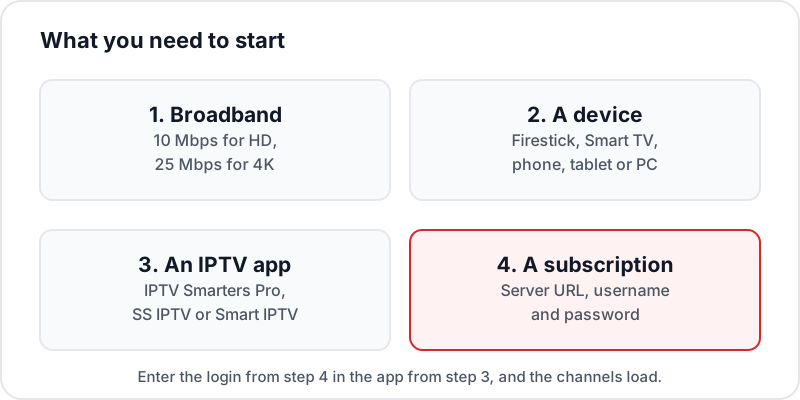
Broadband Internet
Any UK broadband connection of 10 Mbps+ works for HD streaming, and 25 Mbps for 4K. Fibre is ideal but not required.
A Device
Firestick, Android TV box, Smart TV (Samsung/LG), iPhone, iPad, PC or Mac — any will work.
An IPTV App
Free apps like IPTV Smarters Pro (Firestick/Android), SS IPTV (LG), or Smart IPTV (Samsung) play the streams.
An IPTV Subscription
Your provider gives you a server URL, username, and password (Xtream Codes format). Enter these in your app and you're live.
Which Device Will You Watch On?
IPTV runs on almost anything with a screen and an internet connection. These are the four most common routes in UK households — each links to a full step-by-step setup guide.
Amazon Firestick
The most popular IPTV device in the UK — install a player app in minutes.
Setup guide →
Samsung Smart TV
Install an IPTV app straight from the TV's app store — no extra hardware.
Setup guide →
Android TV / Google TV
Player apps from the Play Store, on boxes and built-in TV platforms alike.
Setup guide →
Apple TV
IPTV players from the tvOS App Store, set up with the same three login details.
Setup guide →
Using something else — LG TV, MAG box, Roku, iPhone, PC? The complete IPTV setup guide covers every platform.
⚖️ A note on legality
IPTV technology itself is legal in the UK — iPlayer, ITVX, and Channel 4 all deliver television over the internet. What matters is whether a provider holds the right licences for the channels it carries. For the full picture — the law, the risks, and what to check before subscribing — read Is IPTV legal in the UK?
Frequently Asked Questions
QWhat does IPTV stand for?▼
IPTV stands for Internet Protocol Television. It refers to television content delivered over an internet connection rather than traditional satellite or cable.
QIs IPTV the same as Netflix?▼
No. Netflix is a VOD (video-on-demand) service — you pick what to watch. IPTV primarily delivers live TV channels in real time. Many IPTV services also include VOD libraries, so they combine live TV and on-demand content together.
QIs IPTV legal in the UK?▼
IPTV technology is completely legal — iPlayer, ITVX, and Channel 4 streaming are all legal IPTV. The legality question relates to whether the provider holds proper licences for the channels they broadcast.
QWhat internet speed do I need?▼
At least 10 Mbps for HD streaming and 25 Mbps for 4K. Most UK broadband (average 80 Mbps) is more than sufficient. Wired Ethernet is always more reliable than Wi-Fi for IPTV.
QWhat devices work with IPTV?▼
Amazon Firestick, Android TV boxes, Samsung Smart TVs, LG Smart TVs, iPhones, Android phones, Windows PCs, Macs, MAG boxes, and more. Different devices use different apps to play the streams.
QHow much does IPTV cost?▼
Quality UK IPTV subscriptions typically cost £10–£20 per month — significantly cheaper than satellite TV (£50–£80/month) or combined satellite TV + Netflix + Amazon (£80–£120/month).
Have a question that is not covered here? The Flickhaven FAQ answers the ones new subscribers ask most.
First-Time IPTV Setup
What you need before you install
Best IPTV Providers UK
Compare the top services
What to Look For
Buyer's checklist 2026
Ready to Try IPTV?
Start with a free 24-hour Flickhaven trial — 55,000+ channels, full VOD library, and EPG. No payment needed.
💬 Get Free Trial via WhatsApp