Marinios IPTV Troubleshooting UK 2026
Marinios IPTV Not Working? 8 Fixes That Actually Work
When Marinios IPTV stops working, the failure is usually one of four things: expired or mistyped credentials, a player app that needs its cache cleared, an ISP or network problem, or a provider-side outage. Work through them in that order — re-enter the credentials first, since authorisation errors are the most common and the quickest to rule out. This page covers eight specific failures, the error each produces, and the fix.
Black screen, buffering, channels not loading, app crashing — work through this list in order. Many problems clear with the quick checks below.
Who wrote this
Flickhaven operates a competing IPTV service. The fixes below apply to any provider, Marinios included; where we mention Flickhaven, that is our stated position.
Looking for the full picture? For context on Marinios IPTV including pricing, channels, and alternatives, read our complete Marinios IPTV UK guide.
Quick Diagnostics — Do These First
Before working through the specific fixes below, run these three checks. They take a couple of minutes and clear many common faults.
Check your internet speed
Run a speed test on the streaming device itself if it has a browser or speed-test app; a phone on the same Wi-Fi is a rough second best. Allow about 10 Mbps for HD and 25 Mbps for 4K. If speed is low, the problem is your connection — not Marinios IPTV.
Restart your streaming device
Unplug your Firestick, Android box, or Smart TV from power for 30 seconds. This clears the device's working memory and restarts the app cleanly. It is easy to skip and often works.
Restart your router
Unplug your router from power for 30 seconds, then plug back in and wait 60 full seconds before reconnecting your streaming device. This gives the router a fresh connection to your broadband provider.
If the problem persists after these three steps, work through the specific fixes below in order.
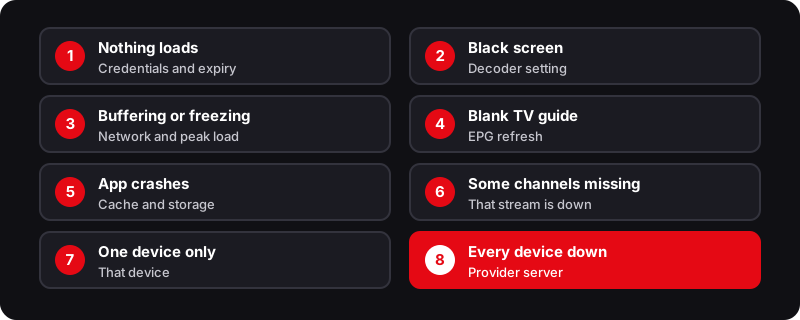
The 8 Fixes — Marinios IPTV Not Working
Channels not loading / App stuck on loading screen
Cause: Expired subscription or wrong credentials
- 1Check your subscription expiry date by contacting your reseller directly.
- 2Verify your Server URL, Username, and Password are exactly as provided — a single character error prevents connection.
- 3In IPTV Smarters Pro: tap your user profile → Delete → re-add with the same credentials to force a fresh connection.
- 4In TiviMate: Settings → Playlists → tap your playlist → Refresh Playlist.
Tip: If credentials are correct and expiry has not passed, the problem is likely your network — move on to Fix 3.
Black screen on channels
Cause: Player codec mismatch between stream format and selected player
- 1In IPTV Smarters Pro: open Settings → Player Selection (the name varies by version) and switch the Live TV player to the other option. Test after each switch.
- 2In TiviMate: Settings → Player → try the other decoder option (hardware or software), then replay the same channel.
- 3If you have set VLC as an external player, switch back to the app's built-in player and test again.
- 4If one specific channel shows a black screen but others work, that stream may be encoded differently. Try a different quality version of the channel (HD instead of FHD or 4K).
Tip: Hardware decoding uses the device's video chip; software decoding uses its processor. Neither is always better, so try both before assuming the channel is down.
Marinios IPTV buffering or freezing
Cause: Wi-Fi signal weakness, congested network, or provider server overload at peak time
- 1Run a speed test on the streaming device. Allow about 10 Mbps per HD stream and 25 Mbps per 4K stream. If you are below this, the issue is your network.
- 2Switch from Wi-Fi to Ethernet — when the cause is at home, this is often the biggest single improvement.
- 3If Ethernet is not possible, move your router closer to your streaming device or switch to a 5 GHz Wi-Fi band (less congested than 2.4 GHz).
- 4In your IPTV app, switch to a lower quality stream — choose "FHD" or "HD" instead of "4K" or "UHD" for the same channel.
- 5If buffering only occurs at peak times (weekday evenings and weekend match times), the cause is likely server overload on the provider side rather than your network.
Tip: Our Marinios IPTV buffering guide covers DNS changes, decoder settings and the restart order in more detail.
EPG not working — TV guide blank or showing wrong times
Cause: EPG data not synced or source URL has changed
- 1In IPTV Smarters Pro: use the EPG refresh option (labelled Install EPG or Refresh EPG, depending on version). Allow up to 10 minutes for the guide to re-populate.
- 2In TiviMate: Settings → EPG → Update EPG. If the guide is still empty, ask your reseller whether the EPG URL has changed.
- 3If EPG is completely empty, confirm your IPTV app has network permission and is not being blocked by a firewall or VPN.
- 4After a force update, close and reopen the IPTV app fully — some apps cache the old empty EPG until restarted.
Tip: Guide data is usually patchier for less common international channels than for UK channels. If the main UK channels are wrong too, it points to a genuine sync failure.
IPTV app crashing on Firestick
Cause: Low Firestick storage, corrupted app cache, or outdated app version
- 1Go to Firestick Settings → Applications → Manage Installed Applications → find your IPTV app → tap Clear Cache.
- 2If still crashing after clearing cache, tap Clear Data (this resets the app to its initial state — you will need to re-enter credentials).
- 3If crashing persists, uninstall the app completely and reinstall from the APK. For TiviMate, download the latest APK via the Downloader app.
- 4Check Firestick storage: Settings → My Fire TV → About → Storage. If storage is below 500MB, the Firestick is too full to run apps reliably. Uninstall unused apps.
Tip: If your Firestick is always short of space, a model with more storage helps: the Fire TV Stick 4K Max has 16 GB, double the standard 4K model.
Some channels working but others not
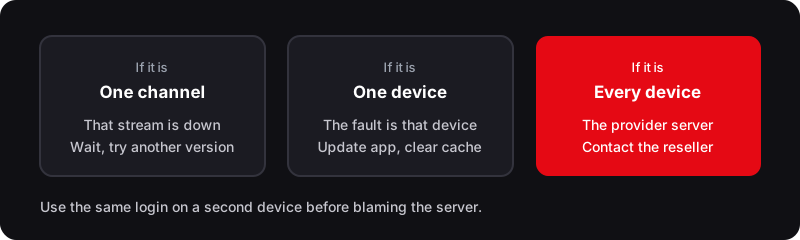
Cause: Specific channel streams are down on the provider's server — a provider-side issue
- 1Wait 20–30 minutes and try the same channel again. Individual streams can drop temporarily without the whole service being affected.
- 2Check your reseller's Telegram or WhatsApp group — providers typically announce when specific channels are under maintenance.
- 3Try an alternative version of the same channel if your playlist includes one (e.g., a premium sports channel in "HD" vs "FHD").
- 4If the same channel has been missing for more than 24 hours with no communication from your reseller, escalate directly to them.
Tip: Individual channel outages are common and usually temporary. Repeated outages on the busiest live sport channels, with no word from the reseller, are a sign of a struggling service.
Marinios IPTV not working on one device but fine on another
Cause: Device-specific issue: outdated app, wrong player or full storage
- 1Update the IPTV app on the affected device to the latest version — older versions can lose compatibility with server-side changes.
- 2On Firestick, if a sideloaded app will not update or reinstall, check Settings → My Fire TV → Developer Options → Install unknown apps. If Developer Options is hidden, open My Fire TV → About and select the device name seven times.
- 3Clear the app cache on the affected device specifically.
- 4If the problem device is a Smart TV (Samsung or LG), check that your IPTV app has been updated via the TV's app store — Smart TV apps are often slow to receive updates.
Tip: Using the same credentials that work on device A confirms the problem is local to device B — focus troubleshooting there rather than suspecting the server.
Server offline — entire service down across all devices
Cause: Provider server maintenance, technical failure, or enforcement action against the provider
- 1Confirm by trying on two or more devices simultaneously with correct credentials. If all show a connection error, the server is down.
- 2Check the error message: "Connection refused" or "Server not found" indicates a server-side issue rather than a credentials problem.
- 3Contact your reseller immediately via their stated support channel. Ask for a server status update and an estimated time for restoration.
- 4If the service has been down for more than 24 hours with no response from your reseller, your provider may have been shut down — this happens to IPTV services periodically.
Tip: A legitimate provider communicates proactively during outages. If your reseller goes silent during a multi-hour outage, consider this a signal about the quality of ongoing support.
When It Is Time to Switch Providers
If Marinios IPTV drops out repeatedly during big live matches despite a fast connection, or your reseller is unresponsive for hours at a time, these are reliability problems, not fixable bugs. Troubleshooting gets you back online once; it does not solve an underlying server capacity problem.
Flickhaven is a competing service, so judge it the same way. Run the free 24-hour trial on the same channel at the same peak time and compare what you see on your own connection.
Signs it's the provider, not your setup
- ›Service works fine on a weekday morning but buffers every time a big match kicks off
- ›Multiple different channels buffer simultaneously — not just one stream
- ›Friends using the same Marinios reseller report identical problems at the same time
- ›Ethernet is connected and the speed test shows well above 25 Mbps, but buffering continues on sports channels
- ›Reseller acknowledges server overload in their Telegram group
- ›Service has been down for more than 2 hours with no reseller communication
Related Troubleshooting Guides
Complete Marinios IPTV UK Guide
Full overview including channels, pricing, and alternatives
Marinios IPTV Buffering Fix
7 specific fixes for buffering and freezing issues
IPTV Not Loading Channels
Channels not loading fix guide for all IPTV services
IPTV Free Trial UK
Try Flickhaven free for 24 hours — compare performance
Frequently Asked Questions
Why is Marinios IPTV not working today?+
The most common reasons Marinios IPTV stops working are: expired subscription credentials, incorrect server URL, weak Wi-Fi causing buffering, a player codec mismatch causing black screens, or the provider's server being down. Start with the three quick diagnostics at the top of this page — restart your device, restart your router, and run a speed test. Then work through the 8 specific fixes for your exact symptom.
How do I fix a black screen on Marinios IPTV?+
If other channels play, a black screen is usually a decoder mismatch on that stream. In IPTV Smarters Pro, open Settings → Player Selection (the name varies by version) and switch the Live TV player to the other option. In TiviMate, go to Settings → Player and try the other decoder option. Replay the same channel after each change. If every channel is black, check your subscription and the server first.
Why has Marinios IPTV stopped working after working fine?+
If Marinios IPTV suddenly stopped working after previously being fine, the most likely causes are: your subscription has expired, your reseller changed the server URL, the server is down for maintenance, or your internet connection has changed. Check your subscription expiry with your reseller first, then run a speed test to rule out network issues.
How do I contact Marinios IPTV support?+
Marinios IPTV support is provided by your individual reseller — there is no central Marinios support team. Contact the reseller you purchased from via their stated channel (usually WhatsApp or Telegram). If your reseller is consistently unresponsive, this is a limitation of the reseller model that will not improve over time.
Is Marinios IPTV down right now?+
There is no official Marinios IPTV server status page. To check if the service is down: try on two or more devices with correct credentials, check your reseller's Telegram or WhatsApp group for maintenance announcements, or contact your reseller directly. Connection errors on all devices with correct credentials typically indicate a server-side outage.
Try Flickhaven — Free 24-Hour Trial
If Marinios IPTV keeps dropping at critical moments, test one Flickhaven connection free for 24 hours. 55,000+ channels, WhatsApp support 24/7, plans from £15.00/mo.
Try Flickhaven Free — No Card Required