Expat IPTV: What UK Expats Should Check Before Buying
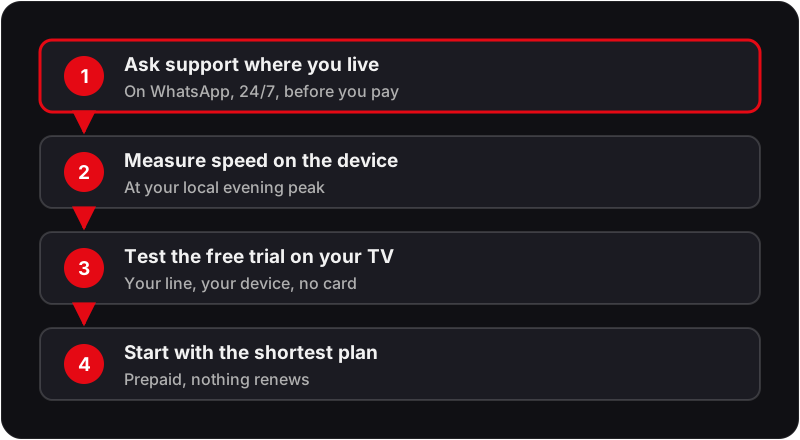
Expat IPTV for UK households starts with one fact: broadcast rights are sold territory by territory, and Flickhaven is a UK IPTV subscription that makes no promise about use outside the UK. Before you buy, message support on WhatsApp (24/7, in any time zone) and describe where you live. Then test the free 24-hour trial, no card needed, on the exact connection and device you will use: 10 Mbps per HD stream, 25 Mbps for 4K.
This expat IPTV guide is for British households living abroad who are weighing up a subscription. It covers the questions to ask first, then the practical checks: connection speed, devices, time zones, paying in pounds and what to test in the free trial.
What Should a UK Expat Know Before Buying IPTV?
Broadcast rights are territorial, and Flickhaven is a prepaid UK IPTV subscription that makes no promise about use outside the UK. So the first step is not choosing a plan; it is asking our support team on WhatsApp what applies where you live, and then testing the free 24-hour trial on the exact connection and device you will use.
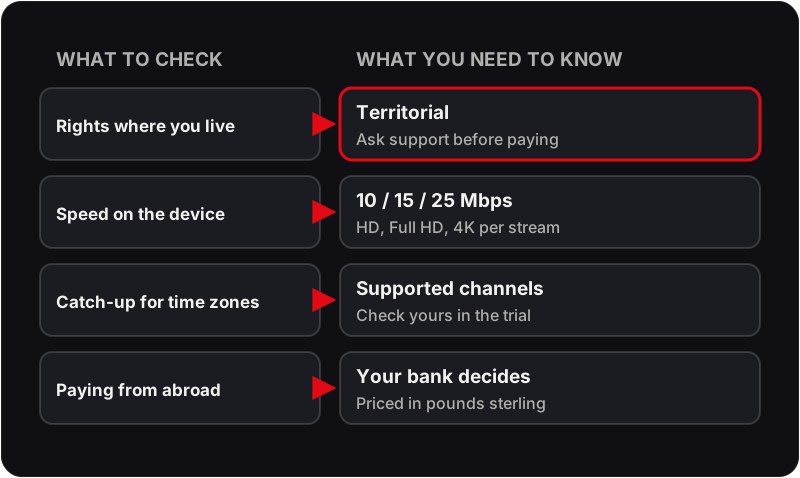
Rights to a channel, a series or a live match are sold country by country. A service is lawful where it holds the rights for the channels it carries in the territory it serves, which is the test our guide on whether IPTV is legal in the UK sets out in full. Moving abroad changes the territory, and that can change what is lawfully available to you, whatever box or app sits under the TV.
Support runs 24/7, so the time difference does not matter when you message. It still matters for live TV: allow for clocks that change on different dates in different countries.
UK Expat IPTV and British TV Abroad
Most people searching for UK expat IPTV want British TV where they now live. The honest answer is that British TV on IPTV abroad is a rights question first and a technical one second: the same channel can be licensed to one broadcaster in the UK and another, or none, in your new country.
So tell our support team on WhatsApp where you live and which British channels matter to you, and only then use the free trial to test them on your own line and TV.
Why Do Official UK Apps Stop Working When You Move Abroad?
UK catch-up apps such as BBC iPlayer and ITVX hold rights for viewers in the UK, so they check where you are connecting from and restrict playback elsewhere.
That restriction is the rights system working as designed, not a technical fault to route around. The same programme may be licensed to a different broadcaster in your new country, or not licensed there at all. Any service, IPTV included, is bound by the same principle: what it can lawfully show depends on the rights it holds in the place you are watching.
For the wider picture, including why a VPN does not change who holds the rights, read our separate overview of the routes for watching UK channels abroad. This page stays narrower: the decision to buy an IPTV subscription while living outside the UK.
How Fast Does Your Connection Abroad Need to Be?
Plan for 10 Mbps per HD stream, 15 Mbps per Full HD stream and 25 Mbps per 4K stream, measured on the streaming device itself during your local evening peak.
| Picture quality | Speed per stream | What it means in practice |
|---|---|---|
| HD | 10 Mbps | The minimum for a steady picture on one screen. |
| Full HD | 15 Mbps | A sensible target for a main living-room TV. |
| 4K | 25 Mbps | Needs a 4K-capable device and a wired or 5GHz Wi-Fi link. |
The figures are per stream, so two screens in HD need roughly twice the HD figure. Rural fixed-wireless, satellite broadband and shared connections in apartment blocks can fall well below their headline speed in the evening, which is exactly when most people watch. Run a speed test on the TV or stick, not on your phone next to the router.
Our guide to internet speed for IPTV explains how to measure properly and what to change if the line is marginal, from moving the router to using a cable.
Which Device Should an Expat Household Use?
Use a device you already own if it runs a supported player app; otherwise a Fire TV Stick, an Android TV box or a Samsung or LG smart TV app all work the same way.
Amazon Fire TV Stick
Plugs into any TV with an HDMI port; easy to pack and set up again after a move.
Step-by-step: setting up IPTV on a Fire Stick.
Android TV box or Google TV
Runs the same player apps; many boxes have an Ethernet port for a wired connection.
Step-by-step: setting up IPTV on Android TV.
Samsung or LG smart TV
Install a player app from the TV's own store; no extra hardware on the TV stand.
Step-by-step: setting up IPTV on a Samsung smart TV.
Two practical points for a home abroad. First, TVs bought locally may use a different app store region, so check that the player app is listed before you rely on the built-in TV route. Second, if the router is in another room, an Ethernet cable or adapter usually does more for a stable picture than a faster plan.
For LG sets, Apple TV, MAG boxes and the rest, see our full list of supported IPTV devices.
How Do Time Zones and Catch-Up Affect Viewing Abroad?
Live UK channels run on the UK broadcast schedule, so the further you are from UK time the more you will rely on 7-day catch-up, which is available on supported channels.
A programme that airs in the UK evening may land in your early morning or mid-afternoon. Catch-up lets you watch it later in the week instead, but it covers supported channels only, so list the channels and programmes your household actually watches and check each one during the trial rather than assuming.
Time zones do not affect support: WhatsApp support runs 24/7, so evening problems in your time zone are covered too. Our guide to IPTV catch-up TV explains how replay works inside the player apps.
How Do You Pay From Outside the UK?
Plans are priced in pounds sterling and paid by Visa, Mastercard, Google Pay or Apple Pay; PayPal is not offered.
If you still hold a UK bank account, paying in pounds is straightforward. If you pay with a card or account issued in another country, your bank decides whether the payment goes through and whether it adds a foreign-currency fee, so check with your bank and confirm with our support team before you pay. Our page on IPTV payment methods shows how each option works step by step.
What Do the Plans Cost?
Every plan is prepaid with no auto-renewal: £15.00 for 1 month, £25.00 for 3 months, £35.00 for 6 months, £55.00 for 12 months + 2 free.
| Plan | Term | Price | Effective monthly cost |
|---|---|---|---|
| Basic | 1 Month | £15.00 | £15.00/mo |
| Starter | 3 Months | £25.00 | £8.33/mo |
| Standard | 6 Months | £35.00 | £5.83/mo |
| Popular | 12 Months + 2 FREE | £55.00 | £3.93/mo |
Because nothing renews automatically, a move, a long trip home or a change of mind does not leave a subscription running in the background. If you are unsure, start with the shortest term once the trial has answered your questions; the longer terms only make sense when you know the service suits your connection. See Flickhaven plans and prices for multi-device options.
What Should You Test During the Free 24-Hour Trial?
Test the guide, catch-up, evening stability, your real device and support response, on the connection you will use every day; the trial needs no card.
- The programme guide (EPG): Does the guide load fully, and do the listings match what is actually playing?
- Catch-up on the channels you watch: Pick two or three programmes from the last few days and play them back. 7-day catch-up covers supported channels only.
- Peak-time stability on your line: Watch during your own local evening, when your neighbours are online too, and again during the UK evening.
- Your actual device and room: Test on the TV and device you will use every day, over the Wi-Fi or cable it will really use.
- Support in your time zone: Send a question on WhatsApp at the time of day you would normally need help and note how fast the reply comes.
Twenty-four hours goes quickly, so start it when you can watch that evening. Our guide on how to test an IPTV service turns these checks into a timed plan, and the free 24-hour IPTV trial page explains how to request one.
Frequently Asked Questions
QDoes IPTV work in Spain?▼
Broadcast rights are sold territory by territory, so whether a channel can lawfully be shown in Spain depends on who holds the rights there, not on the app or the internet connection. Flickhaven is a UK IPTV subscription and makes no promise about use in Spain or anywhere else outside the UK. If you live there, message our support team on WhatsApp before you subscribe and test the free 24-hour trial on the connection and device you will actually use.
QWill my UK Fire Stick work in my Spanish villa?▼
The device itself, yes: an Amazon Fire TV Stick plugs into any TV with an HDMI port and connects to any broadband Wi-Fi network, wherever you are. That is a fact about the hardware only. Which services you can lawfully watch on it in another country is a separate question that depends on the rights each service holds there.
QWhich IPTV box should I use for UK TV in France?▼
Any of the usual devices works as hardware in France: a Fire TV Stick, an Android TV box or a player app on a smart TV. The box is the easy part. What you can lawfully watch on it in France depends on the rights each service holds there, so ask our support team on WhatsApp before you pay, then test the free trial on that box and connection.
QDo I need a VPN with IPTV abroad?▼
Flickhaven does not ask you to use one. A VPN changes where your connection appears to come from; it does not change who holds the rights to a stream, and it can slow a stream down. Our legality guide explains why a VPN is a privacy and routing tool rather than a legal fix.
QCan I watch live UK football from abroad?▼
Live football rights are among the most tightly divided by territory, and we make no promise about any match outside the UK. Ask support on WhatsApp what applies where you live before you pay for anything.
QDoes catch-up help with the time difference?▼
It can. 7-day catch-up is available on supported channels, so a programme shown in the UK evening can be watched later in the week at a time that suits you. Not every channel supports it, so check the ones you care about during the trial.
QCan I pay from a bank account outside the UK?▼
Plans are priced in pounds sterling and paid by Visa, Mastercard, Google Pay or Apple Pay. PayPal is not offered. Whether a card or account issued abroad goes through, and whether your bank adds a currency fee, depends on your bank, so check with support and with your bank before you pay.
QWhat happens when my plan ends?▼
Every plan is prepaid with no auto-renewal. When the term ends the service stops and nothing further is charged unless you choose to buy another plan.
Living Abroad? Ask Before You Subscribe
Tell us where you live and what you want to watch. Support answers on WhatsApp 24/7, and the free 24-hour trial needs no credit card.
Ask Support on WhatsApp