How to Watch UK Channels Abroad:
Your Options and Their Limits
You can watch UK channels abroad only where the rights allow. BBC iPlayer, ITVX and Channel 4's streaming service are built for viewers in the UK, and pay-TV apps set their own travel rules, so check your provider's terms. A VPN can breach a service's terms and is unreliable. IPTV abroad works technically, but Flickhaven is a UK IPTV subscription and makes no promise about use abroad: ask support on WhatsApp first, then test the free 24-hour trial on your own connection.
This guide sets out the honest picture for UK channels abroad: what the broadcasters allow, why a VPN is a poor answer, and what to check before paying any service.
Rights are territorial
What you can watch depends on where you are
No promise abroad
Flickhaven is a UK subscription
Test before you pay
Free 24-hour trial, no card
Table of Contents
Why Are UK Channels Restricted Abroad?
UK channels are restricted abroad because broadcasters buy the rights to programmes, films and sport territory by territory, and the rights they hold for the UK do not cover other countries. The block is a licensing condition, not a technical fault.
When a UK broadcaster licenses a series or a sports competition, the deal usually covers the UK only. The same programme may be sold separately to a broadcaster in Spain, Australia or the United States, and that broadcaster has paid for the right to be the one showing it there. To keep to those deals, UK services check where a viewer is before they play anything.
The usual check is your IP address. Every internet connection has one, and it maps to a country. If the address points outside the UK, a UK-only service declines to play, often with a message saying it is only available in the UK. Your account, your TV Licence and what you pay at home do not change that, because the rights are tied to the territory, not to the person.
The same rule applies to every service
Rights being territorial is not only a broadcaster problem. Our guide to whether IPTV is legal in the UK explains the test: a service is lawful when it holds the rights for the channels it carries in the territory it serves. That test matters as much abroad as it does at home.
What Do the Official Routes Allow Abroad?
The official UK routes are built for viewers in the UK. BBC iPlayer, ITVX and Channel 4's streaming service are designed to be watched from inside the country, and UK pay-TV apps each set their own rules for travel, so the first step is always to read your own provider's terms.
We do not list travel allowances, day limits or country lists for any provider here, because those rules belong to each provider and can change. Their own help pages are the only reliable source.
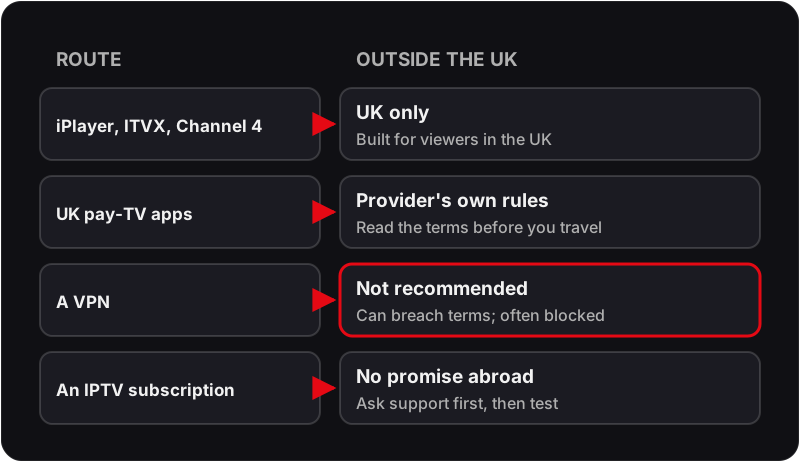
| Route | Built for | Outside the UK | What to do |
|---|---|---|---|
| BBC iPlayer | Viewers in the UK | Checks where your connection comes from and normally will not play outside the UK | Catch up on missed programmes once you are home |
| ITVX | Viewers in the UK | Restricted to the UK in the same way | Check ITVX’s own help pages before you travel |
| Channel 4 streaming service | Viewers in the UK | Restricted to the UK in the same way | Check Channel 4’s own help pages before you travel |
| UK pay-TV apps | Subscribers in the UK | Each provider sets its own travel rules | Read your provider’s terms or ask its support team |
Two practical habits help. First, programmes you miss while away can usually be caught up on once you are home, so a short trip rarely means losing a series. Second, the country you are in will have its own broadcasters and streaming services, and some of them buy British programmes; checking what is shown locally is the route that sits squarely within the rights.
Should You Use a VPN to Watch UK TV Abroad?
We do not recommend it. A VPN makes your connection appear to come from somewhere else, but using one to look as though you are in the UK can breach a streaming service's terms, and it is unreliable in practice.
- ✗ Services can treat it as a breach of their terms, which puts your account at risk.
- ✗ Many streaming services detect and block known VPN addresses, so a setup that plays today may fail tomorrow.
- ✗ The extra hop through a VPN server adds delay and can cut the speed a live stream needs.
- ✗ It changes where you appear to be, not who holds the rights to the programme.
The last point is the important one. A VPN is a privacy and routing tool. It does not make an unavailable programme available to you, and it does not make any service more lawful than it already is.
Does IPTV Work Abroad?
Technically, IPTV abroad works the same as at home: the player app runs on any internet connection and the device travels with you. What it may show is the part that changes, because the channels depend on the rights in the country you are in, not on the app.
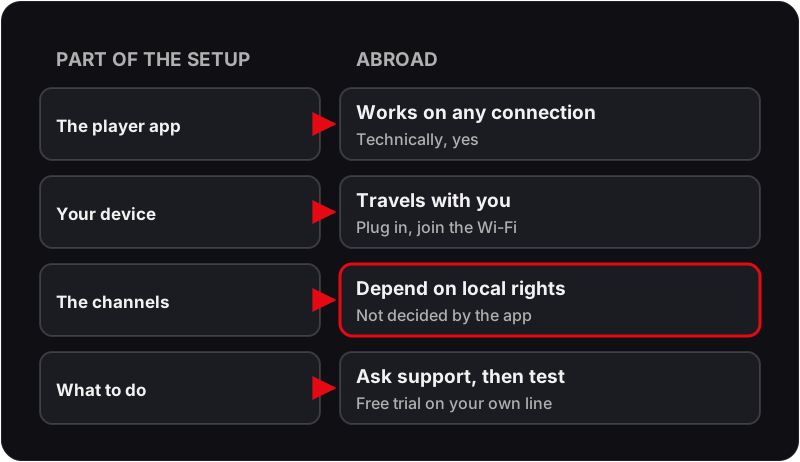
So the answer to whether IPTV works abroad is a question back: where are you, and which channels matter? Ask our support team on WhatsApp before you subscribe, and use the free trial to test on the connection you will actually use.
Where Does Flickhaven Fit If You Are Abroad?
Flickhaven is a UK IPTV subscription, and it makes no promise about use outside the UK. If you intend to watch from another country, ask our support team on WhatsApp before you subscribe, then test with the free 24-hour trial on the exact connection you will use.
For viewers in the UK, the subscription carries 55,000+ channels, an on-demand library of 180,000+ films and series, and 7-day catch-up on supported channels, played through an app on a Firestick, Android TV box, smart TV, phone or computer. Support runs on WhatsApp 24/7. Plans are prepaid, with no contract and no auto-renewal, as the guide to what a prepaid Flickhaven plan covers explains. The guide to IPTV channels by category and the guide to catch-up TV on IPTV explain what each covers.
| Plan | Price | Works out at |
|---|---|---|
| 1 Month | £15.00 | £15.00/mo |
| 3 Months | £25.00 | £8.33/mo |
| 6 Months | £35.00 | £5.83/mo |
| 12 Months + 2 FREE | £55.00 | £3.93/mo |
Payment is by Visa, Mastercard, Google Pay or Apple Pay. The Flickhaven pricing page has the multi-device options. If you have moved abroad for the long term, our IPTV guide for UK expats covers the same questions from that angle, and the overview of IPTV in the UK explains how the service works at home.
How Should You Test Before You Pay?
Ask first, then test on the real setup. A trial on a different network or device tells you little about the one you will actually use.
- Message support on WhatsApp and say where you are and which device you plan to use. Support answers 24/7.
- Start the free 24-hour IPTV trial, which needs no card.
- Run it on the same connection and the same device you will rely on, not on a phone hotspot if you will watch on home broadband.
- Watch the channels you care about at the times you normally watch, including an evening, when networks are busiest.
- Only pay if the trial gave you what you need. If it did not, you have spent nothing.
What Internet Speed Do You Need?
Plan for about 10 Mbps per HD stream and 25 Mbps per 4K stream, measured on the device that will play, in the evening. Those figures apply to any IPTV service wherever the connection is, and they say nothing about whether a given service is available where you are.
| Quality | Speed per stream |
|---|---|
| SD (480p) | 5 Mbps |
| HD (720p) | 10 Mbps |
| Full HD (1080p) | 15 Mbps |
| 4K UHD | 25 Mbps |
Shared connections in hotels and holiday lets vary a great deal, so run a speed test on the device itself rather than trusting the advertised speed. Our guide to internet speed for IPTV covers household maths, Wi-Fi fixes and why a fast speed test can still stutter.
Device Setup Basics for Travel
Any device that runs a player app will work as hardware wherever you take it; what it can play is decided by each service's rights and terms. Set the device up at home, where problems are easier to fix.
Fire TV Stick
Most portableSmall enough to pack, and it plugs into any TV with an HDMI port. Set it up and sign in to your apps at home, where you have time to fix anything that goes wrong.
Android TV or Google TV
Install from Google PlayIf the TV where you are staying runs Android TV or Google TV, player apps can be installed from Google Play. Samsung and LG TVs use their own app stores, so the app you use at home may not be listed.
Android phone or tablet
Nothing extra to carryA phone or tablet you already travel with needs only the player app and your login details. Mobile data use adds up quickly with video, so prefer Wi-Fi where you can.
Laptop (Windows or Mac)
Good for work tripsA desktop player app turns a laptop into a screen for a hotel room or rented flat, and lets you plug into a TV with an HDMI cable.
For step-by-step instructions, see the Firestick IPTV setup guide or browse setup guides for every supported device.
Frequently Asked Questions
QDoes IPTV work abroad?▼
Technically, the player app works on any internet connection and your device travels with you. Whether the channels may be shown where you are is a different question, decided by the rights in that country, not by the app. Flickhaven is a UK IPTV subscription and makes no promise about use outside the UK, so ask support on WhatsApp before you subscribe and test the free trial on your own line.
QDoes IPTV work in Spain, France or Dubai?▼
There is no general yes. TV rights are sold country by country, so what a service may show depends on the territory it serves. Flickhaven is a UK IPTV subscription and makes no promise about use outside the UK. If you plan to watch from another country, ask support on WhatsApp before you subscribe, then use the free 24-hour trial on the exact connection you will rely on.
QCan I watch BBC iPlayer abroad?▼
BBC iPlayer is built for viewers in the UK, and it checks where your connection comes from. Outside the UK it will normally refuse to play. Many programmes you miss while away can still be watched on iPlayer once you are back home.
QShould I use a VPN to watch UK TV abroad?▼
We do not recommend it. Using a VPN to appear to be in the UK can breach a streaming service’s terms, many services detect and block VPN addresses, and the extra hop can slow a live stream. A VPN does not change who holds the rights to a programme.
QWill my UK pay-TV app work on holiday?▼
It depends on the provider. Each pay-TV service sets its own rules for using its app outside the UK, and those rules can differ by channel and by country. Check your provider’s terms or ask its support team before you travel.
QCan I take my Firestick abroad?▼
The device itself travels fine: plug it into any TV with an HDMI port and join the local Wi-Fi. What it can play is a separate question, decided by the rights and terms of each service on it, not by the hardware.
QHow do I check Flickhaven before paying if I live outside the UK?▼
Message support on WhatsApp first (24/7) and say where you are. Then take the free 24-hour trial, which needs no card, on the same connection and device you plan to use, and watch the channels you care about at the times you would normally watch them.
Related Guides
Ask First, Then Test
Flickhaven is a UK subscription and makes no promise about use outside the UK. Tell us where you are on WhatsApp (24/7), then try it free for 24 hours on the connection you will use. No card needed.