Flickhaven IPTV UK
F1 IPTV UK: How to Watch Formula 1 in 2026 Without Satellite
F1 IPTV is the way to watch live Formula 1 in the UK without a satellite contract. Live UK rights sit with a pay-TV subscription until 2029, and for 2026 Channel 4 shows free highlights of every race plus the British Grand Prix live. Flickhaven includes live F1 coverage in every plan, with 7-day catch-up for early-morning races, so test a qualifying session during the free 24-hour trial.
F1 IPTV: live races without a satellite contract.
UK live F1 rights sit with a pay-TV subscription until 2029. Channel 4 shows free highlights and the British GP live in 2026. An IPTV subscription like Flickhaven includes live F1 coverage from £15.00/month — check race-weekend streams during the free 24-hour trial.
F1 Broadcast Rights in the UK (2026 Season)
UK live F1 rights sit with a pay-TV subscription until 2029. That means live practice, qualifying and race coverage is part of a pay-TV sports package rather than free-to-air television.
Channel 4 has a sub-licence, running to the end of the 2026 season, to show live coverage of the British Grand Prix at Silverstone and edited highlights of every other qualifying session, sprint and race. What happens to free-to-air coverage from 2027 had not been announced when we checked. For casual F1 fans, the highlights are enough. Fans who want the other races live need a pay-TV sports package or an alternative such as a UK IPTV service like ours.
Every Way to Watch F1 in the UK
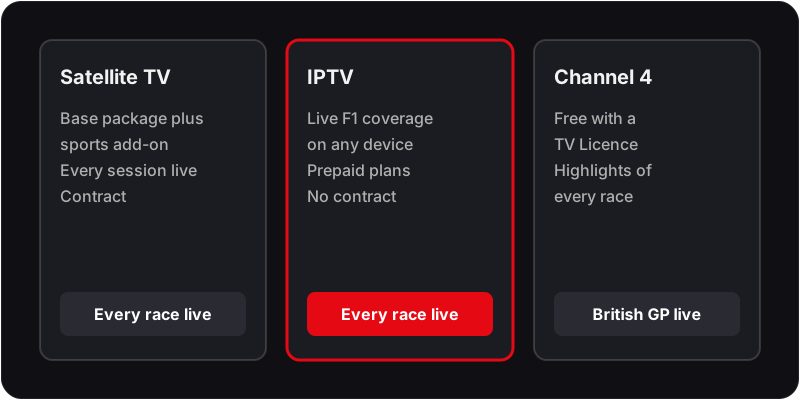
Pay-TV sports package (via satellite TV)
Complete coverage, most expensiveLive races, qualifying and practice under the UK rights deal
£69.00/month (base package plus sports add-on)
Flickhaven IPTV
Live races, lower monthly costLive F1 coverage included — check race-weekend streams in the free 24-hour trial
From £15.00/month
Channel 4 (Free)
Free but no live coverage (except British GP)British GP live + highlights of every other race (2026 season)
Free (TV Licence required)
2026 F1 Season — Key Races for UK Fans
The April races in Bahrain and Saudi Arabia were called off in March 2026 because of the conflict in the Middle East, so the calendar runs with fewer rounds than first published. These are the races UK fans plan around.
Australian Grand Prix
Melbourne — Season Opener
Japanese Grand Prix
Suzuka — Early-morning UK start
Monaco Grand Prix
Monte Carlo — Iconic Street Circuit
British Grand Prix
Silverstone — Free on Channel 4
Italian Grand Prix
Monza — Temple of Speed
Las Vegas Grand Prix
Strip Circuit — Night Race
Abu Dhabi Grand Prix
Yas Marina — Season Finale
Plus the rest of the calendar
Live on pay-TV; highlights on Channel 4
How to Watch F1 via IPTV on Any Device
An IPTV subscription is a lower-cost way to watch live F1 in the UK. Here's how to get started with a Flickhaven IPTV subscription:
Finding the IPTV F1 Channel in Your Player
IPTV apps group channels by country and genre, so the quickest route is the search box: type F1 or Formula and the F1 coverage appears alongside the general sports channels that carry the build-up shows. In the UK sports group you will find F1 coverage in HD; several international sports groups also carry sessions in other languages, which is useful if the UK feed is busy at lights-out.
Add the F1 coverage to your favourites once you have found it — a long-press in TiviMate, the star icon in IPTV Smarters. Favourites sit at the top of the list, so on race morning you are two clicks from the session rather than scrolling through 55,000+ channels.
A Race Weekend on the EPG
A standard Grand Prix weekend runs three practice sessions, qualifying and the race across three days. Sprint weekends replace part of that with a sprint shoot-out and a short sprint race on the Saturday. The guide lists each session by name, so check it on the Thursday evening rather than guessing from the race start time.
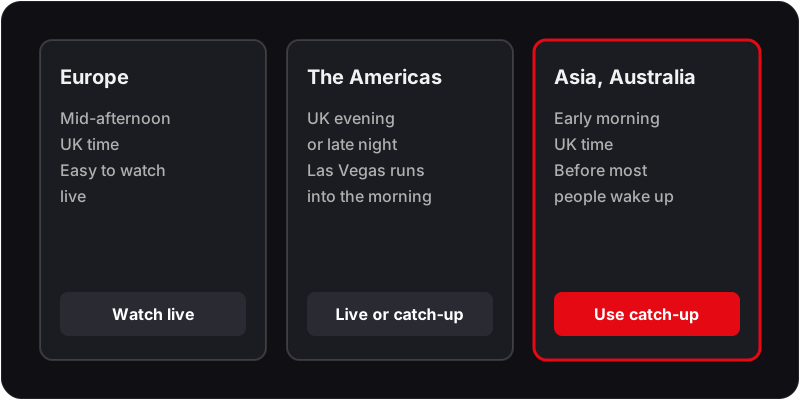
European races usually start mid-afternoon UK time, races in the Americas run into the UK evening or night, and races in Asia and Australia start in the early morning. If the guide shows times that look an hour out, your device is on a fixed time offset rather than the UK zone — fix that in the device settings, not the app.
Race-Day Troubleshooting
Stream stutters in the first lap
Likely cause: Demand spikes at lights-out on the main UK feed.
Check: Switch to the SD version, or to the same session on an international sports feed. If that is smooth, the feed is busy rather than your line.
Fix: Start the stream a few minutes before the formation lap and keep the alternate feed in your favourites so the switch is one click.
Picture is fine but commentary is in another language
Likely cause: You have opened an international feed of the session.
Check: Look at the group name next to the channel — it will be a country group rather than the UK sports group.
Fix: Go back to the UK sports group and pick the F1 coverage there. Add it to favourites so it is the first result next time.
Guide shows sessions an hour out or on the wrong day
Likely cause: The device's clock is set to a fixed offset instead of a UK time zone.
Check: Open the device settings, not the app, and look at the time zone.
Fix: Set the time zone to Europe/London and restart the IPTV app. Programme times then follow the clock change automatically.
Channel loads then freezes on a black screen
Likely cause: The app buffer is too small for the connection, or the Wi-Fi band is congested at race time.
Check: Run a speed test on the TV device itself during a session, not on your phone.
Fix: Use a wired connection or the 5 GHz band and raise the buffer in the app's playback settings.
If the freezing is not limited to race time, our IPTV buffering fix for UK broadband covers router, band and peak-hour checks step by step.
Which Option Suits You?
Choose Channel 4 if same-evening highlights are enough and the British Grand Prix is the only race you need live. Choose a satellite TV package with the sports add-on if you want official live coverage and do not mind a contract. Choose an IPTV subscription if you want live F1 coverage on any device — checked during the free 24-hour trial — plus the rest of the sports line-up, for less than a month of the satellite sports add-on. Our breakdown of what a season of sport costs UK viewers in 2026 puts the yearly figures side by side.
What to test during the free 24-hour trial
- ✓Time the trial over a race weekend if you can — a Saturday qualifying session tells you more than a quiet Tuesday evening.
- ✓Open the F1 coverage in HD on the device you will actually use, not just on your phone.
- ✓Check the EPG shows the session names and the correct UK start times.
- ✓Switch to an international sports feed and back to see how quickly channels change.
Plans are prepaid with no contract and no auto-renewal. The 12-month plan at £55.00 runs 14 months, which covers a full season and the winter break; the 1-month plan at £15.00 is the way to try a single Grand Prix weekend without committing further.
F1 IPTV FAQs
Is Formula 1 free to watch in the UK?
Only partly. For the 2026 season, Channel 4 shows free highlights of every race plus live coverage of the British Grand Prix weekend. UK live rights to the other races sit with a pay-TV subscription until 2029; an IPTV subscription is the alternative route.
What channel is Formula 1 on in the UK in 2026?
UK live F1 rights sit with a pay-TV subscription until 2029, so live coverage of most races is on pay-TV. Channel 4's highlights deal runs to the end of the 2026 season, covering every race plus the British Grand Prix live; arrangements for 2027 had not been announced when we checked.
How can I watch F1 without a satellite TV subscription in the UK?
Your options are Flickhaven IPTV (which includes live F1 coverage) or Channel 4, which shows free highlights of every race and the British Grand Prix live.
Does IPTV include live F1 races?
Live F1 coverage is part of the premium live sports channels included in every Flickhaven plan, alongside 55,000+ channels in total. Search for the IPTV F1 channel in your player and check the race-weekend streams on your own device during the free 24-hour trial.
Which F1 races are free in the UK?
In 2026, Channel 4 broadcast the British Grand Prix at Silverstone live and free, including practice and qualifying. All other races are shown as highlights on Channel 4 after the race; live coverage of those races is on pay-TV.
Can I watch F1 on my Smart TV without a satellite subscription?
Yes. Install an IPTV app on your Smart TV, add your Flickhaven credentials, and find the live F1 races in the channel list. No satellite TV subscription or dish required.
Can I watch practice and qualifying, not just the race?
Yes. Practice and qualifying are part of the live F1 coverage, and the EPG lists practice, qualifying and the race by name. On sprint weekends the Saturday sessions appear under their own names, so check the guide rather than assuming the usual timetable.
What if I miss a race?
On channels that offer catch-up, the EPG and 7-day catch-up let you open the guide, move back to the session and press play. Channel 4's highlights remain the free option on the evening of the race if you only want the edited version.
Can I watch F1 abroad or on holiday with IPTV?
Yes. IPTV is delivered over the internet, so the same login works on a phone, tablet or laptop outside the UK, including on hotel Wi-Fi. Pick the UK feed for English commentary and drop to the SD version if the connection is weak.
Do I need a 4K TV to watch F1 on IPTV?
No. F1 coverage plays in HD on any TV that runs an IPTV app, and a stable connection matters more than resolution during a race. 4K is included on all plans where the session is produced in 4K, but it needs about 25 Mbps on the device; if your line is slower, the HD feed will look better in practice.
Live F1 Coverage Included — from £15.00/month
Flickhaven IPTV includes live F1 coverage plus 55,000+ other channels. Free 24-hour trial available.
Sources
- Formula 1 on Channel 4 — race highlights and British Grand Prix coverage (channel4.com)
- Channel 4's Formula 1 coverage contracted until 2026 (Channel 4 press office)
- 2026 Bahrain and Saudi Arabian Grands Prix will not take place in April (formula1.com)
Checked on .
Related reading: our full IPTV explainer for British viewers, which IPTV providers are worth paying for and our no-card free trial.